IconsCove
IconsCove is a web-based tool for generating app icons, favicons, and UI icons from text prompts.
What IconsCove is
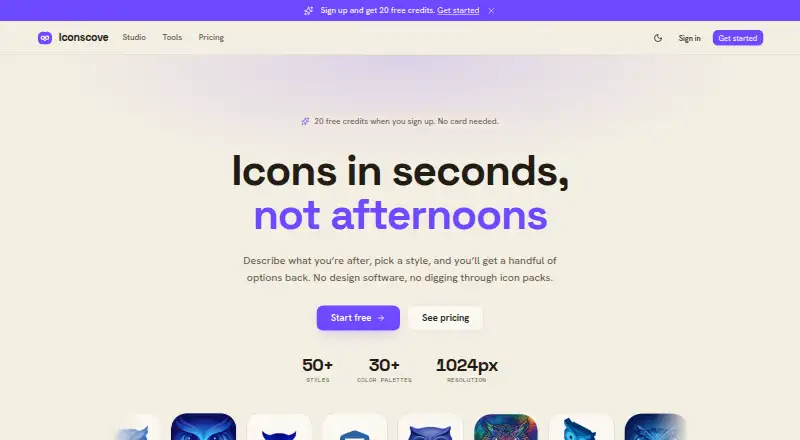
IconsCove is a web-based tool for generating app icons, favicons, and UI icons from text prompts. Users choose from more than 50 styles, such as 3D, neon, watercolor, and pixel art, and can set one to three brand colors to guide the results. Standard and Premium tiers let users provide an uploaded image or an existing icon as a style reference. Downloads are PNG files up to 1024×1024; SVG export is planned but not currently listed as available. Icons can be grouped into nested collections, searched, moved in bulk, and downloaded as a ZIP. Signup includes 20 credits without requiring a card. Fast, Standard, and Premium generations use two, three, and five credits, respectively. Credits do not expire, and failed or short generations return credits. The site says purchases include full commercial rights. IconsCove is operated in Lithuania.
Good
- More than 50 listed icon styles.
- Set one, two, or three brand colors.
- Credits do not expire.
- Purchased credits include full commercial rights.
- Collections support search, bulk moves, and ZIP downloads.
Watch out
- Exports are PNG only; SVG is not currently available.
- Style references require Standard or Premium tiers.
- Purchased credits are generally not refundable.
Who it suits
IconsCove suits people who need prompt-generated icons in chosen styles and brand colors, with collection tools for organizing output. It may also suit commercial projects, since purchases include full commercial rights.
Verdict
IconsCove combines prompt-based icon generation with palette controls and collection management. Check the credit costs and PNG-only export before choosing it.
Plans and prices
From IconsCove's own pricing page, checked 3 Oct 2026.
| Plan | Price | What it gives you |
|---|---|---|
| Free signup credits | Free | 20 credits on signup · no card required |
| 50 credits | $5, paid once | 50 credits · up to 4 icons per prompt · credits never expire · full commercial rights · one-time |
| 100 credits | $9, paid once | 100 credits · up to 4 icons per prompt · credits never expire · full commercial rights · one-time |
| 250 credits | $20, paid once | 250 credits · up to 4 icons per prompt · credits never expire · full commercial rights · one-time |
The facts
Each one read from IconsCove's own pages, with the date it was checked.
What it does
- Collections
- Icons can be organized into nested collections with search, bulk move, and ZIP download options.checked 3 Oct 2026
- Color palettes
- Users can set one, two, or three brand colors so generated icons follow the chosen palette.checked 3 Oct 2026
- Commercial use
- The pricing page says purchases include full commercial rights, and the homepage says generated icons can be used in products for sale without crediting IconsCove.checked 3 Oct 2026
- Credit expiration
- Credits do not expire, whether they are earned, purchased, or received through a subscription.checked 3 Oct 2026
- Credit use
- Fast icons cost 2 credits, Standard icons cost 3 credits, and Premium icons cost 5 credits; failed or short generations return credits to the balance.checked 3 Oct 2026
- Output
- Generated icons download as PNG files up to 1024×1024; the site says SVG is planned for later.checked 3 Oct 2026
- Payments and card handling
- Checkout uses Stripe, and the pricing page says card details do not touch IconsCove’s servers.checked 3 Oct 2026
- Reference images
- Users can upload an image or reuse one of their icons as a style reference; reference images are available on Standard and Premium tiers.checked 3 Oct 2026
- Refunds
- Purchased credits generally are not refundable, but the pricing page says verifiable service failures are refunded.checked 3 Oct 2026
- Styles
- The site lists 50+ icon styles, including 3D, neon, watercolor, and pixel art.checked 3 Oct 2026
- Support
- The legal notice lists [email protected] for general support.checked 3 Oct 2026
- What it does
- IconsCove generates app icons, favicons, and UI icons from text prompts, with a selected style and colors.checked 3 Oct 2026
The company
- Headquarters
- Lithuaniachecked 28 Sep 2026
- Maker
- The legal notice says the service is operated by Mantas Gerulskis in Lithuania.checked 3 Oct 2026
The full review of IconsCove
IconsCove is a browser-based generator for app icons, favicons, and interface icons. It is a good fit for designers, developers, and small product teams that need a coordinated set of graphics quickly. The central trade-off is clear: strong style and color direction with simple credit purchases, but no editable vector output.
Overview
Generation starts with a text prompt and a choice from more than 50 styles, including 3D, neon, watercolor, and pixel art. You can assign one, two, or three brand colors, which gives a prompt a practical visual constraint instead of leaving color entirely to the model. That makes IconsCove more useful for a product family than for isolated novelty images.
Reference images add another layer of control on Standard and Premium tiers: upload an image or reuse one of your existing icons to guide the look. This is valuable when a written description cannot capture a house style. The limitation is production-oriented rather than creative: downloads are PNG files only, at up to 1024×1024, while SVG support is planned but not currently offered.
Key features
Generation and credit use
IconsCove covers the common icon jobs—app icons, favicons, and UI icons—and supports batch generation. Paid packages allow up to four icons per prompt, which can speed up exploration of related variations. Fast generations cost 2 credits, Standard costs 3, and Premium costs 5, so higher-tier output consumes a balance more quickly. Failed or unusually short generations return the credits, reducing the risk of paying for an unusable result.
Collections and downloads
Nested collections, search, bulk moving, and ZIP downloads give the service a credible workflow for larger icon sets. Those tools matter once a project has many variants; they are less important if you only need one or two files. PNG export is suitable for web and app placement, but teams that need recoloring, infinite scaling, or handoff to vector-based design tools will need another step or another product.
Rights and account handling
Purchases include full commercial rights, and generated icons may be used in products sold to customers without crediting IconsCove. Credits never expire, whether earned, purchased, or supplied through a subscription. Checkout runs through Stripe, with card details kept off IconsCove’s servers. Purchased credits are generally non-refundable, although verifiable service failures are refunded. General support is handled at [email protected].
Pricing
The free signup option costs nothing and provides 20 credits without requiring a card. It is enough to assess the styles and credit mechanics, but it is a one-time starting allowance rather than a recurring monthly quota.
| Plan | Price | What it includes |
|---|---|---|
| 50 credits | $5.00 USD once | 50 credits, up to four icons per prompt, credits never expire, full commercial rights |
| 100 credits | $9.00 USD once | 100 credits, up to four icons per prompt, credits never expire, full commercial rights |
| 250 credits | $20.00 USD once | 250 credits, up to four icons per prompt, credits never expire, full commercial rights |
The 50-credit pack suits occasional projects and keeps the initial spend low. The 100-credit option lowers the effective cost for a larger batch, while 250 credits is the practical choice for a broad icon library or repeated iteration. Because usage is metered at 2, 3, or 5 credits per generation, Premium work exhausts any pack faster than Fast work. One-time billing and non-expiring credits favor sporadic users over anyone seeking a predictable monthly subscription. Reference images are tied to Standard and Premium tiers, so the cheapest access does not provide every control.
Platforms
IconsCove runs on the web. It is therefore accessible from a desktop or mobile browser, but it is not presented as a native Android, iOS, Windows, macOS, or Linux application.
Who it's for
Choose IconsCove if you need many related app, favicon, or UI icons, want to steer them with brand colors, and can ship PNG assets. It is especially sensible for indie developers, small product teams, and marketers who prefer one-time spending and commercial rights without a recurring bill. Look elsewhere if editable vectors, larger export dimensions, or a standing monthly allowance are essential.
Pros and cons
Pros
- Broad style selection: More than 50 named styles support distinct visual directions, from neon to pixel art.
- Useful consistency controls: One to three brand colors and higher-tier reference images help keep a set coherent.
- Flexible credit ownership: One-time packs never expire, and failed or short generations return credits.
- Commercial clearance: Purchases include full commercial rights without an IconsCove credit requirement.
- Project organization: Nested collections, search, bulk moves, and ZIP downloads suit multi-icon projects.
Cons
- No SVG export: PNG-only delivery limits editing, scaling, and vector handoff.
- Premium usage costs more credits: At five credits per generation, the highest mode can consume packs quickly.
- Reference images are tier-limited: The strongest style-matching control requires Standard or Premium access.
- Free access is finite: The 20-credit signup allowance is useful for evaluation but does not provide an ongoing free quota.
- Credits are usually non-refundable: A purchase should be sized carefully unless the issue qualifies as a verifiable service failure.
Alternatives
AI Icon Generators is the broader category to browse when you want to compare other prompt-driven icon tools. For a favicon-focused shortlist, see Favicon Generators.
Appilot is the better choice if you need Android, iOS, and web coverage, recurring credits, and project limits under a freemium model; its Free plan supplies 15 credits per month for one project, while Pro is $19.99 per month for 100 credits and three projects.
BudgetPixel AI suits users who also need broader image and video generation through web or API access, rather than an icon-specialized workflow.
Icovela is worth considering when photo-to-3D-icon creation is the specific requirement and a freemium model is preferable.
CleanVector is the stronger alternative when SVG delivery and browser-based color editing matter; its free tier includes a permanent SVG download and unlimited PNG exports.
IconsMint is a better fit if you want a large browsable icon library alongside AI creation, with both SVG and PNG downloads.
MiniMind AI is aimed at enterprise arrangements with custom credits, private tools, and account support.
IconAI.art offers freemium icon generation with one-icon runs and non-expiring credit packs, making it an alternative for smaller, simpler batches.
IconScout AI Icon Generator is the better direction if you want cross-platform access, a yearly individual plan, and a broader asset-download service.
Verdict
IconsCove is a focused recommendation for anyone building a coherent icon set from prompts and willing to deliver PNG files. Its style range, palette controls, references on higher tiers, organized collections, and non-expiring commercial credits make it easy to justify for project-based work. Choose another tool when SVG editing, native apps, or a recurring free or monthly allowance is more important than one-time credit flexibility.
Alternatives to IconsCove
- 1
Static.app
Free planWebAPImacOSWindows7.0From $5 a month - 2

Favicon Maker
Free planAndroidiOSWebWindows6.7Free plan - 3

MakeIcon
Free planAndroidiOSWebLinux6.7Free plan - 4

Favicon.one
Free planWeb6.6Free plan - 5
Resizo Favicon Generator
Free planAndroidiOSWebLinux6.6Free plan - 6
Favicon & App Icon Generator
Free planAndroidiOSWeb6.5Free plan