Resizo Favicon Generator
Resizo Favicon Generator turns a logo into favicon and app icon files in your browser.
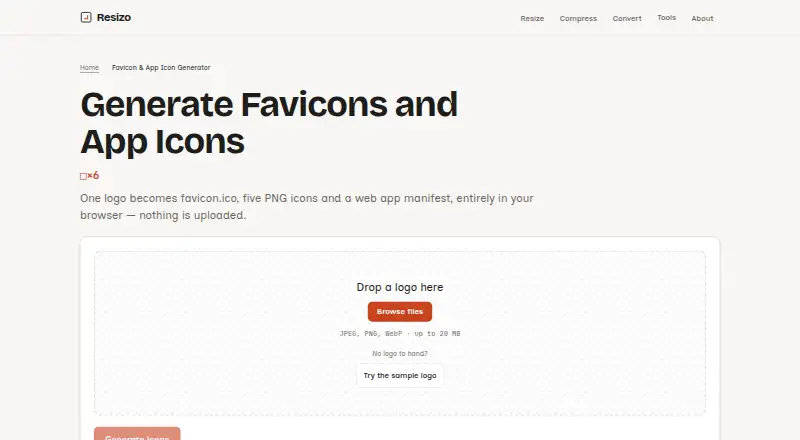
What Resizo Favicon Generator is
Resizo Favicon Generator turns a logo into favicon and app icon files in your browser. Its download package contains favicon.ico, five PNG icons, a web app manifest, an HTML snippet, and a ZIP file. The ICO bundles 16, 32, and 48 pixel icons; the PNG sizes are 16, 32, 180, 192, and 512 pixels. You can crop the image to a square or fit the complete logo inside one, then choose a background colour or transparency. Transparency is retained unless you select a background colour, which is applied to each icon. The generator accepts JPEG, PNG, and WebP images up to 20 MB, but not HEIC, SVG, or AVIF. Image processing happens in the browser tab rather than uploading the source to a server. Generated files exclude EXIF, GPS, XMP, ICC profile, and DPI data. Resizo says the tool needs no account, adds no watermark, and runs on iOS, Android, Windows, macOS, and Linux without installation. The free plan costs nothing and has no daily quota.
Good
- Creates an ICO, five PNGs, manifest, HTML snippet, and ZIP.
- Offers cropping, fit, background colour, or transparency options.
- Processes the logo in the browser tab.
- Free plan has no daily quota or watermark.
Watch out
- Accepts JPEG, PNG, and WebP only.
- Source images are limited to 20 MB.
- Does not create SVG favicons or maskable icons.
- No batch processing is available.
Who it suits
It suits people who need standard favicon and app icon files from a single logo without uploading the image. It is available in a browser across the listed desktop and mobile platforms.
Verdict
Resizo covers common favicon and app icon outputs, including a manifest and HTML snippet, with browser-based image processing. Check the input format and its lack of SVG and maskable icon output before using it.
Plans and prices
From Resizo Favicon Generator's own pricing page, checked 30 Sep 2026.
| Plan | Price | What it gives you |
|---|---|---|
| Free | Free | No account · no watermark · no daily quota · source image up to 20 MB |
The facts
Each one read from Resizo Favicon Generator's own pages, with the date it was checked.
What it does
- Account and watermark
- Resizo says its core tools require no account and add no watermark.checked 30 Sep 2026
- Composition options
- Users can crop to a square or fit the whole logo inside one, then choose a background colour or transparency.checked 30 Sep 2026
- Generated files
- The package contains favicon.ico, five PNG icons, a web app manifest, an HTML snippet, and a ZIP download.checked 30 Sep 2026
- Icon sizes
- favicon.ico bundles 16, 32, and 48 pixel icons; the PNGs are 16, 32, 180, 192, and 512 pixels.checked 30 Sep 2026
- Image handling
- The logo is processed in the browser tab and is not uploaded to a server.checked 30 Sep 2026
- Metadata
- The generated files remove EXIF, GPS, XMP, ICC profile, and DPI data from the source.checked 30 Sep 2026
- Notable limit
- The generator does not create SVG favicons or maskable icons.checked 30 Sep 2026
- Purpose
- Generates favicon and app icon files from one logo in the browser.checked 30 Sep 2026
- Security and privacy
- Resizo says the image work happens on the user's device and that the deployment has no file store, database, or account records.checked 30 Sep 2026
- Source formats
- The generator accepts JPEG, PNG, and WebP images up to 20 MB; it does not accept HEIC, SVG, or AVIF sources.checked 30 Sep 2026
- Transparency
- Transparency is preserved unless the user chooses a background colour, which is applied to every generated icon.checked 30 Sep 2026
The company
- Maker
- Resizo is built and maintained by Sucheet Boppana.checked 30 Sep 2026
Where it runs
- Supported devices
- Resizo says its web page runs on iOS, Android, Windows, macOS, and Linux without installation.checked 30 Sep 2026
The full review of Resizo Favicon Generator
Resizo Favicon Generator turns a logo into a ready-made set of website and app icons, and suits people who want a free, no-account tool for a single image. It is a practical fit for standard icon requirements, but its fixed output set will not serve every modern icon workflow.
Overview
One image yields a favicon.ico, five PNG icons, a web app manifest, an HTML snippet, and a ZIP download. That all-in-one package saves the work of exporting each size and assembling the files, though it is limited to those formats and does not include SVG favicons or maskable icons.
Image processing happens in the browser tab rather than through a server upload. Resizo says its deployment has no file store, database, or account records, a useful distinction for users who prefer to keep a logo on their device. Generated files also have EXIF, GPS, XMP, ICC profile, and DPI data removed.
Key features
Image controls and input limits
The generator accepts JPEG, PNG, and WebP images up to 20 MB. You can crop the logo to a square or fit the whole image inside one, then choose a background colour or transparency. Transparency is preserved unless a colour is selected; a chosen colour is applied to every icon. These controls cover common framing needs, but the accepted formats exclude HEIC, SVG, and AVIF, so those sources must be converted first.
Defined icon set
The ICO file bundles 16, 32, and 48 pixel icons. The PNGs are 16, 32, 180, 192, and 512 pixels, alongside the manifest, HTML snippet, and ZIP. This is a useful standard package for a website and app icon setup, but the absence of SVG and maskable output matters for projects that specifically need either format. There is no batch processing, so each logo must be handled individually.
Pricing
Resizo is free: the Free plan costs nothing and includes no account requirement, no watermark, no daily quota, and support for source images up to 20 MB. There is no free trial because the tool is already free. The generous lack of a daily cap suits occasional as well as repeat single-image use, while the 20 MB input ceiling and lack of batch processing define its practical limits.
Platforms
Resizo runs in a web page on Android, iOS, Windows, macOS, and Linux without installation. That makes it accessible across the listed desktop and mobile platforms, though it remains a browser-based tool rather than a native app.
Who it's for
Choose Resizo if you need a standard favicon and app-icon package from one JPEG, PNG, or WebP logo and value browser-side processing, a no-account workflow, and no watermark. It is less suitable if your source is HEIC, SVG, or AVIF, if you need to process multiple images at once, or if your project requires SVG favicons or maskable icons.
Pros and cons
- Pros: Produces ICO, five PNG sizes, a manifest, an HTML snippet, and a ZIP together, reducing manual export and packaging work.
- Pros: Processes the image in the browser and removes embedded metadata from generated files, useful for users mindful of image privacy.
- Pros: Free use has no account, watermark, or daily quota, with a 20 MB source limit.
- Cons: Accepts only JPEG, PNG, and WebP, excluding HEIC, SVG, and AVIF sources.
- Cons: Does not create SVG favicons or maskable icons, and cannot batch-process images.
Alternatives
Favicon Generators is the broader directory for comparing tools in this category. MakeIcon is another free option for readers who want PNG or a multi-platform ZIP, with no signup or watermark. Favicon Maker is a free alternative for readers comparing another basic favicon tool. Static.app suits someone seeking more than icon generation: its free plan includes one website, 50MB storage, a free subdomain, SSL, QR codes, and a Mac desktop app, with a 7-day trial and no credit card required. Texterfly is a free, no-signup alternative for readers who want a broader set of 136+ tools without usage limits. favicon.gg is another free, no-account choice for personal and commercial projects; its server-side tools are rate-limited per IP. IconsCove is an alternative for readers considering a paid web service with free signup credits. OhMyIcon offers a free web option with no signup or usage limits. Favicon.now is a free, no-account web and API option that also provides converters, validators, a checker, datasets, and guides.
Verdict
Resizo is a solid choice for anyone who needs a standard icon bundle from one supported image without creating an account or uploading the source. Its convenience and uncapped free use are the main reasons to choose it; look elsewhere if you need batch work, broader input formats, SVG favicons, or maskable icons.
Getting started
- Open the generator at https://www.resizo.net/favicon-generator.
- Choose a JPEG, PNG, or WebP logo up to 20 MB.
- Crop the logo to a square or fit the full image inside one.
- Choose a background colour or keep transparency.
- Download the generated package.
Limits worth knowing
The generator does not create SVG favicons or maskable icons, and it does not support batch processing. Source images must be JPEG, PNG, or WebP and no larger than 20 MB.
Questions
How much does it cost?
The free plan is free. It has no daily quota.
Do I need an account, and is there a watermark?
Resizo says its core tools require no account and add no watermark.
Which platforms does it support?
Resizo says the web page runs on iOS, Android, Windows, macOS, and Linux without installation.
Which source image formats can I use?
It accepts JPEG, PNG, and WebP images up to 20 MB. It does not accept HEIC, SVG, or AVIF.
What files does it generate?
The package contains favicon.ico, five PNG icons, a web app manifest, an HTML snippet, and a ZIP download.
Does it process the image on a server?
The logo is processed in the browser tab and is not uploaded to a server. Resizo says its deployment has no file store, database, or account records.
Alternatives to Resizo Favicon Generator
- 1
Static.app
Free planWebAPImacOSWindows7.0From $5 a month - 2
IconsCove
Free planWeb6.8Free plan - 3

Favicon Maker
Free planAndroidiOSWebWindows6.7Free plan - 4

MakeIcon
Free planAndroidiOSWebLinux6.7Free plan - 5

Favicon.one
Free planWeb6.6Free plan - 6
Favicon & App Icon Generator
Free planAndroidiOSWeb6.5Free plan