
MakeIcon
MakeIcon creates app icons for iOS, Android, and web using customizable open-source icon collections.
What MakeIcon is
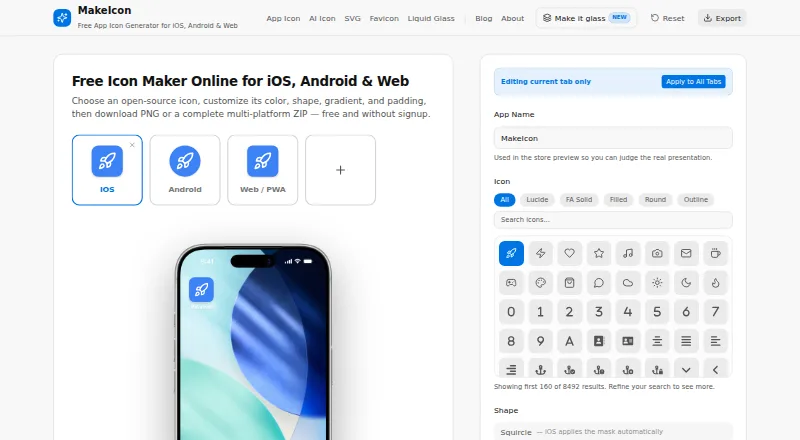
MakeIcon creates app icons for iOS, Android, and web using customizable open-source icon collections. The site lists more than 8,000 icons, including Lucide, Font Awesome, and Material Design. Users can change color, background, shape, gradient, padding, and size, with previews on device mockups. The main generator exports PNGs or a ZIP bundle with platform sizes for iOS, Android, and web. Separate AI tools generate icons and SVGs from text prompts, with SVG or PNG downloads. Liquid Glass Studio supports layered artwork, real-time WebGL2 effects, PNG exports up to 4096px, and ZIP packages with default, dark, and clear variants. MakeIcon runs in a browser without installation on Windows, Mac, Linux, and mobile devices. Its listed plan is free, with no signup or watermark. The About page says icon designs are processed in the browser and are not uploaded, stored, or tracked, but AI prompts are sent to Cloudflare Workers AI. The AI icon generator is subject to fair-use rate limits, and customized icons may be collected anonymously into the public library. Icon collections have listed licenses, with attribution and brand-logo rules applying where relevant.
Good
- More than 8,000 icons listed
- Exports PNGs and platform-size ZIP bundles
- Free plan has no signup or watermark
- Browser use across desktop and mobile
Watch out
- AI generation is subject to fair-use rate limits
- AI prompts are sent to Cloudflare Workers AI
- Customized icons may enter the public library
Who it suits
MakeIcon suits app developers, PWA creators, people making prototypes, indie developers, and designers who need customizable platform icons. Its browser-based workflow also suits users who do not want to install software for this task.
Verdict
MakeIcon offers a free browser-based way to customize icons and prepare platform exports, with separate AI and Liquid Glass tools. Consider the AI prompt handling and possible public-library collection if using those generators.
Plans and prices
From MakeIcon's own pricing page, checked 29 Sep 2026.
| Plan | Price | What it gives you |
|---|---|---|
| Free | Free | No signup · no watermark · PNG or multi-platform ZIP |
The facts
Each one read from MakeIcon's own pages, with the date it was checked.
What it does
- AI library collection
- The AI icon generator says customized icons may be collected anonymously into the public library.checked 29 Sep 2026
- AI tools
- MakeIcon also offers AI icon and SVG generators that create graphics from text prompts and provide SVG or PNG downloads.checked 29 Sep 2026
- AI usage limit
- The AI icon generator says normal use is free without signup, subject to fair-use rate limits.checked 29 Sep 2026
- Customization
- Users can adjust icon color, background, shape, gradient, padding, and size, with real-time previews on device mockups.checked 29 Sep 2026
- Exports
- The main generator exports PNGs or a ZIP bundle containing platform sizes for iOS, Android, and web.checked 29 Sep 2026
- Icon library
- The site says it offers more than 8,000 icons, including collections from Lucide, Font Awesome, and Material Design.checked 29 Sep 2026
- Integrations
- The About page says the icon library integrates with Iconify and provides icons from collections including Material Design, Font Awesome, and Lucide.checked 29 Sep 2026
- Intended users
- The maker describes MakeIcon as suited to mobile app developers, PWA creators, people making prototypes, indie developers, and designers.checked 29 Sep 2026
- Licensing
- The About page lists CC BY 4.0, SIL OFL 1.1, and MIT licenses for icon collections and says they are free for personal and commercial projects, subject to applicable attribution and brand-logo rules.checked 29 Sep 2026
- Liquid Glass Studio
- The Liquid Glass Studio supports layered artwork, real-time WebGL2 effects, PNG export up to 4096px, and ZIP exports with default, dark, and clear variants.checked 29 Sep 2026
- Privacy
- The About page says icon designs are processed in the browser and are not uploaded, stored, or tracked; AI icon prompts are sent to Cloudflare Workers AI.checked 29 Sep 2026
- Purpose
- MakeIcon creates app icons for iOS, Android, and web from open-source icons that users can customize.checked 29 Sep 2026
- Support
- The About page gives an email contact and says the team typically responds within two business days.checked 29 Sep 2026
Where it runs
- Browser support
- The maker says MakeIcon works in a browser without installation on Windows, Mac, Linux, and mobile devices.checked 29 Sep 2026
The full review of MakeIcon
MakeIcon is a free browser-based icon maker for app developers, designers, and anyone preparing artwork for iOS, Android, or the web. Its customizable library and platform-sized exports are the strongest fit for conventional app icons; AI generation and a separate Liquid Glass Studio broaden the toolkit, with different privacy considerations for prompt-based work.
Overview
The main maker pairs a library of more than 8,000 open-source icons—including Lucide, Font Awesome, and Material Design collections—with controls for color, background, shape, gradient, padding, and size. Device mockup previews help users judge how an icon will read at different sizes before exporting. This is a practical route from existing artwork to a coordinated app icon set, though it is less suited to someone who needs a wholly bespoke illustration without starting from the available library.
MakeIcon runs in a browser without installation on Windows, Mac, Linux, and mobile devices. The maker says standard icon designs are processed in the browser and are not uploaded, stored, or tracked. AI work is different: prompts go to Cloudflare Workers AI, and customized AI icons may be collected anonymously into the public library. That distinction matters if a prompt or generated design must remain private.
Key features
- Custom icon maker: Color, background, shape, gradient, padding, and size controls offer meaningful flexibility without requiring a separate graphics application. Live device mockups make the adjustments easier to evaluate in context.
- Exports for multiple platforms: The generator can produce PNGs or a ZIP bundle with platform sizes for iOS, Android, and web. MakeIcon also supports PNG, SVG, and ICO export, app icon sets, and web manifest support, making it useful for projects that need several common icon formats at once.
- AI icon and SVG generation: Text prompts can produce graphics downloadable as SVG or PNG. Normal use is free without signup, but fair-use rate limits apply; prompt handling and possible public-library collection make this less appropriate for confidential concepts.
- Liquid Glass Studio: This separate tool supports layered artwork, real-time WebGL2 effects, PNG export up to 4096px, and ZIP exports with default, dark, and clear variants. Those options suit users creating this visual treatment, rather than replacing the standard icon maker for every project.
- Open-source collections: The About page names CC BY 4.0, SIL OFL 1.1, and MIT licenses and says the collections are free for personal and commercial projects, subject to applicable attribution and brand-logo rules. Users should check those conditions for the specific artwork they choose.
Pricing
MakeIcon has one stated plan: Free — free. It requires no signup and has no watermark; PNG export and a multi-platform ZIP are included. The plan also covers the listed PNG, SVG, and ICO exports, app icon sets, and web manifest support. There is no free trial because the product is free. No paid tier or seat-based plan is described, so this is a straightforward choice for individual projects that can work within the AI generator's fair-use rate limits.
The main trade-off is not a paid-plan restriction but the split between private browser-based design work and AI generation, which sends prompts to Cloudflare Workers AI and may contribute customized icons to the public library. Users who need private prompt-based generation should look elsewhere.
Platforms
MakeIcon is browser-based and works without installation on Windows, Mac, Linux, and mobile devices. Its export targets include iOS, Android, and web, so it can serve projects across those platforms from a browser workflow.
Who it's for
Mobile app developers, PWA creators, indie developers, designers, and people making prototypes are the clearest audience: they can customize established icon artwork and generate a bundle of platform sizes without paying or installing software. It is also useful when an SVG, ICO, or web manifest is part of the deliverable. It is a weaker fit for teams that require private AI prompts, or for anyone whose work depends on avoiding the licensing and attribution conditions of the icon collections.
Pros and cons
- Pro: The free plan has no signup or watermark and includes PNG or multi-platform ZIP export, reducing friction for personal projects and prototypes.
- Pro: More than 8,000 icons and detailed appearance controls provide a broad starting point for creating consistent app artwork.
- Pro: Browser-based processing for standard designs avoids uploading, storing, or tracking those designs, according to the maker.
- Pro: AI generation and a high-resolution Liquid Glass Studio add distinct creative workflows alongside the conventional icon maker.
- Con: AI prompts are sent to Cloudflare Workers AI, and customized icons may enter the public library, so the AI tools are a poor choice for confidential concepts.
- Con: AI use is subject to fair-use rate limits, which makes it less dependable for sustained high-volume generation.
- Con: Icon collections carry applicable attribution and brand-logo rules, so free commercial use still calls for attention to licensing.
Alternatives
For more favicon-focused options, browse Favicon Generators. Resizo Favicon Generator is another free option with no account, watermark, or daily quota, and supports the same listed platform range as MakeIcon. Choose it when those stated limits matter more than MakeIcon's large icon library and separate creative tools.
Favicon Maker is a free alternative for Android, iOS, web, and Windows. Static.app is a broader freemium option with a free plan, free subdomain, SSL, QR codes, 50MB storage, one website, a Mac desktop app, and a 7-day trial; consider it when those website-publishing features are relevant. favicon.gg offers free personal and commercial use without an account, though its server-side tools are rate-limited per IP.
Favicon.now bundles generators, converters, validators, a checker, downloads, datasets, and guides without requiring an account. Favicon.one is a web-only free option with uploads limited to 10MB and reasonable-use limits possible under server overload. RealFaviconGenerator is another free web service, with no warranty and a restriction against using its non-interactive API to build a competing favicon-generator website. Texterfly offers 136+ tools without signup or limits for users who want a broader set of utilities.
Verdict
MakeIcon is a strong free pick for developers and designers who want to customize an existing icon and export a platform-ready set from a browser. Its no-signup, no-watermark plan and range of export formats make it especially useful for prototypes and straightforward app artwork. Look elsewhere if AI prompts must remain private, if fair-use limits are unsuitable, or if the collection licensing conditions do not fit the project.
Getting started
- Visit MakeIcon in a browser on a supported computer or mobile device.
- Choose icons from the library or use an AI tool to create graphics from a text prompt.
- Adjust the icon’s appearance and preview it on a device mockup.
- Export PNG files or a ZIP bundle for iOS, Android, and web.
- Use Liquid Glass Studio for layered artwork and its PNG or ZIP export options.
Limits worth knowing
The AI icon generator is subject to fair-use rate limits. Customized icons may be collected anonymously into the public library.
Questions
How much does MakeIcon cost?
Its Free plan costs nothing, with no signup requirement or watermark.
Which platforms can I use MakeIcon on?
It works in a browser on Windows, Mac, Linux, and mobile devices, and creates icons for iOS, Android, and web.
What can I export?
The main generator exports PNGs or a ZIP bundle with platform sizes for iOS, Android, and web. The AI tools offer SVG or PNG downloads.
Does MakeIcon include AI tools?
Yes. Its AI icon and SVG generators create graphics from text prompts. Prompts are sent to Cloudflare Workers AI.
Are icon designs uploaded or tracked?
The About page says icon designs are processed in the browser and are not uploaded, stored, or tracked. Customized AI icons may be collected anonymously into the public library.
Are the icon collections free for commercial projects?
The About page lists CC BY 4.0, SIL OFL 1.1, and MIT licenses and says the collections are free for personal and commercial projects, subject to applicable attribution and brand-logo rules.
Alternatives to MakeIcon
- 1
Static.app
Free planWebAPImacOSWindows7.0From $5 a month - 2
IconsCove
Free planWeb6.8Free plan - 3

Favicon Maker
Free planAndroidiOSWebWindows6.7Free plan - 4

Favicon.one
Free planWeb6.6Free plan - 5
Resizo Favicon Generator
Free planAndroidiOSWebLinux6.6Free plan - 6
Favicon & App Icon Generator
Free planAndroidiOSWeb6.5Free plan