CleanVector
CleanVector is a web and API tool for creating illustrations, icons, logos and mascots, as well as converting uploaded raster images into editable SVG paths …
What CleanVector is
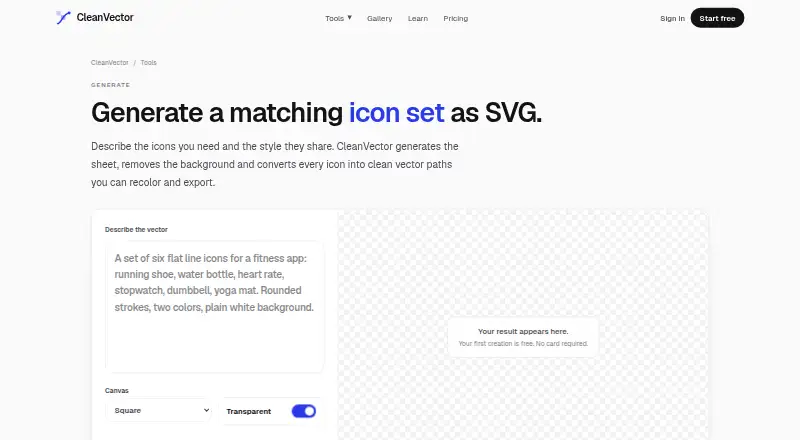
CleanVector is a web and API tool for creating illustrations, icons, logos and mascots, as well as converting uploaded raster images into editable SVG paths with transparent backgrounds. Its icon set generator turns one prompt into a sheet, removes the background and converts icons into vector paths. A single pass is designed to keep a set’s proportions, stroke and palette consistent. Sets can be exported as one SVG with each icon grouped separately, or as PNG; both formats are available after editing. The maker recommends six to ten icons per sheet and suggests using multiple sheets for larger libraries. Each icon sheet costs 4 credits, while exporting again at a different size is free. New accounts receive 10 free credits without a card, and the free plan supplies 10 credits monthly. The Free plan includes one permanent SVG download and unlimited PNG exports; Starter costs $5/month, Plus $19/month and Pro $49/month. Created work may be used commercially on every plan. API and MCP execution require Plus or Pro, and the MCP server supports AI agents, with setup instructions for Claude Code and Cursor.
Good
- Generates icon sheets from one prompt.
- Exports editable SVG and PNG.
- Different-size re-exports do not cost credits.
- Commercial use is allowed on every plan.
Watch out
- Each icon sheet costs 4 credits.
- Free plan includes one permanent SVG download.
- API and MCP execution require Plus or Pro.
Who it suits
CleanVector suits designers or developers who need editable vector icon sets, raster-to-vector conversion, or API and MCP access on higher plans.
Verdict
CleanVector combines prompt-based icon sheets with editable vector exports and raster conversion. Check the credit cost and plan requirements against the volume and integrations you need.
Plans and prices
From CleanVector's own pricing page, checked 15 Oct 2026.
| Plan | Price | What it gives you |
|---|---|---|
| Free | Free | 10 credits/month · one permanent SVG download · unlimited PNG exports · color editor · free browser tools · $0/month |
| Starter | $5 a month | 150 credits/month · about 37 AI generations · 150 image conversions · SVG and transparent PNG export · color editor with custom backgrounds · $5/month |
| Plus | $19 a month | 600 credits/month · about 150 AI generations · Starter features · API and MCP access · priority processing · $19/month |
| Pro | $49 a month | 1,700 credits/month · about 425 AI generations · Plus features · best price per credit · early feature access · $49/month |
The facts
Each one read from CleanVector's own pages, with the date it was checked.
What it does
- AIChief accessibility score
- AIChief reports 74% accessibility and 74% compatibility.checked 15 Oct 2026
- AIChief feature score
- AIChief reports 76% for features and 76% for user friendliness.checked 15 Oct 2026
- AIChief performance grade
- AIChief assigns CleanVector a B+ performance score.checked 15 Oct 2026
- API and MCP
- Plus and Pro plans include API and MCP access; the remote MCP endpoint is https://cleanvector.ai/api/mcp and uses bearer API keys.checked 15 Oct 2026
- API limits
- MCP image vectorization accepts PNG, JPG, or WebP up to 5 MB, and API and MCP execution require Plus or Pro.checked 30 Sep 2026
- Commercial rights
- The maker says users own what they create and may use outputs commercially on every plan.checked 15 Oct 2026
- Commercial use
- The maker says customers may use everything they create commercially on every plan.checked 30 Sep 2026
- Content processing
- Prompts and uploaded images are sent to fal.ai and model providers available through it for processing; CleanVector says it does not use content to train models or sell data.checked 30 Sep 2026
- Credits
- Illustration generation costs four credits, logo kits eight credits and mascot reference sheets ten credits; unused monthly credits expire.checked 15 Oct 2026
- Data processing
- Prompts and uploads are sent to fal.ai and its model providers for processing; CleanVector says it does not train models on that content or sell the data.checked 15 Oct 2026
- Deletion
- Users can request account and library deletion, which the privacy policy says is completed within 30 days including object-storage copies.checked 15 Oct 2026
- Documentation and support
- The site provides workflow guides, methodology, API/MCP setup instructions and email support that typically replies within one business day.checked 15 Oct 2026
- Editing and export
- Results can be recolored in the browser editor and exported as SVG or transparent PNG, with PNG rendering up to 4096 pixels.checked 15 Oct 2026
- Exports
- Icon sets export as one SVG with each icon in its own group of paths, or as PNG; SVG and PNG can be exported after editing.checked 30 Sep 2026
- Icon output
- An icon sheet downloads as one SVG containing each icon in its own group of paths, or as a transparent PNG.checked 15 Oct 2026
- Icon-set generation
- One prompt produces a coordinated icon sheet with shared style, palette and stroke weight, then converts each icon into editable SVG geometry.checked 15 Oct 2026
- Icon-set size
- The maker says six to ten icons per sheet generally works best; larger libraries should use multiple sheets.checked 15 Oct 2026
- Icon set workflow
- The icon set generator creates a sheet from one prompt, removes its background, and converts the icons into editable vector paths.checked 30 Sep 2026
- Image conversion
- PNG, JPG and WebP uploads can be converted to SVG; ordinary conversion costs one credit and cleanup-first conversion costs four.checked 15 Oct 2026
The company
- Company and launch
- CleanVector is operated by Vibe Pocket, LLC, listed as a United States company, and the maker says the product launched in 2026.checked 30 Sep 2026
- Founded
- 2026checked 23 Sep 2026
- Headquarters
- United Stateschecked 23 Sep 2026
Money
- Credit cost
- An icon sheet costs 4 credits, and re-exporting at another size is free.checked 30 Sep 2026
- Free allowance
- New accounts receive 10 free credits with no card required, and the pricing page says the free plan provides 10 credits each month.checked 30 Sep 2026
The full review of CleanVector
CleanVector is an AI tool for generating icon sheets and converting images into editable vector artwork. It best suits designers and developers who need a small, visually coordinated set of icons or SVG assets. Its strongest case is the combination of prompt-based sets and editable exports; recurring volume, API access, and the free plan’s SVG cap shape the decision.
Overview
CleanVector generates illustrations, icons, logos, and mascots, and can convert uploaded raster images into editable SVG paths with transparent backgrounds. Its icon-set workflow turns one prompt into a sheet, removes the background, and converts the icons to vector paths. A single pass is designed to keep proportions, stroke, and palette consistent, which makes it more suited to cohesive sets than to assembling unrelated icons.
The maker recommends six to ten icons per sheet, with several sheets for larger libraries. Each sheet costs four credits, and exporting at another size costs no additional credits. A set can be exported as one SVG with each icon in its own group of paths, or as PNG; both formats are also available after editing.
Key features
- Prompt-based icon sheets: Generating a set in one pass can help maintain a shared visual style. The recommended sheet size makes it practical for small collections; larger libraries mean repeating the process and spending more credits.
- Editable SVG and raster conversion: CleanVector converts uploaded images into editable paths and offers SVG and transparent PNG exports at paid tiers. This suits workflows that need both scalable artwork and raster assets, though the free plan limits SVG downloads to one.
- Free re-exporting at other sizes: Once a sheet is generated, exporting it at another size does not consume more credits, a useful distinction for work that needs multiple dimensions.
- API and MCP access: Plus and Pro include API and MCP server access for AI agents, with setup instructions for Claude Code and Cursor. API and MCP execution require one of those plans; MCP image vectorization accepts PNG, JPG, or WebP files up to 5 MB.
- Commercial use: Customers may use creations commercially on every plan, so commercial rights do not require an upgrade.
Pricing
CleanVector is freemium. New accounts receive 10 free credits without a card, and the free plan provides 10 credits each month. An icon sheet costs four credits, so this allowance covers two sheets with credits left over, but the plan includes only one permanent SVG download. Unlimited PNG exports, a color editor, and free browser tools make it useful for trying the workflow or producing raster assets; the SVG cap makes it a poor fit for ongoing vector work.
- Free — free, billed $0/month: 10 credits a month, one permanent SVG download, unlimited PNG exports, color editor, and free browser tools. Best for occasional use or evaluating the output.
- Starter — $5 a month, billed $5/month: 150 credits a month, about 37 AI generations, 150 image conversions, SVG and transparent PNG export at any size, and a color editor with custom backgrounds. This is the practical entry point for regular individual use, with full-size exports but no stated API or MCP access.
- Plus — $19 a month, billed $19/month: 600 credits a month, about 150 AI generations, API and MCP access, and priority processing. It fits higher-volume work or agent-based workflows that need those integrations.
- Pro — $49 a month, billed $49/month: 1,700 credits a month, about 425 AI generations, API and MCP access, the best price per credit, and early access to new features. It is aimed at sustained high-volume generation rather than occasional asset creation.
All plans include commercial use. The stated generation counts are approximate; the four-credit cost per icon sheet is a more direct guide for planning set output. No seat limits are stated.
Platforms
CleanVector is available on the web and through an API. API access and MCP execution require Plus or Pro, so the web workflow is the relevant option on Free and Starter.
Who it's for
Choose CleanVector if you need coordinated icons from a prompt, editable SVG paths, or both vector and PNG exports from the same workflow. Starter suits regular web-based creation at a modest monthly volume. Plus or Pro makes more sense when API or MCP access is essential, with Pro suited to users who can use its substantially larger monthly credit allowance. It is less compelling for someone who needs only a handful of SVGs and expects the free plan to cover repeated vector downloads.
Pros and cons
- Pro: One generation pass is designed to align an icon set’s proportions, stroke, and palette, reducing the mismatch risk of assembling unrelated results.
- Pro: SVG and PNG export, editable paths, and free re-exporting at other sizes support both editing and varied output dimensions.
- Pro: Commercial use is permitted on every plan, including Free.
- Con: The free plan allows only one permanent SVG download, sharply limiting it for repeated vector work.
- Con: API and MCP access start at Plus, so users who need integrations must pay more than the Starter price.
- Con: Four credits per sheet and a recommended maximum of ten icons per sheet mean larger libraries require multiple paid-credit generations.
Alternatives
For a broader category comparison, see AI Icon Generators and AI Vector Generators.
- Appilot is a freemium option across Android, iOS, and web, with a free plan of 15 credits a month for one project and a Pro plan at $19.99 a month for 100 credits and three projects; choose it when those platforms and project limits better match your workflow.
- Icovela offers a free allowance of 200 one-time credits for five Photo to 3D Icon uses, plus a 2.99 USD one-time Launch Offer available for 10 hours after signup; choose it when that 3D-icon use case or a one-time purchase suits you better.
- Imagcon is available on Android, iOS, web, and API, with a 5.00 USD one-time Starter plan; consider it if those platform options or a one-time payment are priorities.
- IconsMint has a web free plan with five AI icons on signup, access to browse over 100,000 icons, 30 downloads a day, and SVG and PNG formats; choose it if browsing a large icon catalog and daily downloads suit your needs.
- BudgetPixel AI offers a web and API free plan with 300 credits per month and text-to-image, image-to-image editing, enhancement, and text-to-video and image-to-video; choose it for that broader image and video toolset.
- SVG Maker AI offers a trial with one generation credit, a manual SVG editor, standard SVG export, and a community prompt library; consider it if a manual editor is more central to your work.
- IconFlowLabs is a web option with token packs priced in CHF, including a 2.99 CHF one-time Mini pack for eight standard-quality icons or two high-quality logos; choose it if those pack sizes and one-time pricing fit better.
- IconsCove offers web access and 20 free signup credits without a card; consider it if that free signup allowance is the better fit.
Verdict
CleanVector is a strong fit for designers and developers who want small, consistent icon sets and editable vector exports, with Starter offering a clear route beyond the free SVG cap. Its main trade-offs are the four-credit sheet cost and the Plus-or-Pro requirement for API and MCP use. Look elsewhere if you need integrations without upgrading or if your preferred workflow is better served by another platform or specialized toolset.
Getting started
- Open the CleanVector website
- Create an account to receive 10 free credits without a card
- Enter a prompt or upload a raster image
- Generate an icon sheet or vectorized artwork
- Edit colors or backgrounds when included in your plan
- Export the result as SVG or PNG
Limits worth knowing
The Free plan provides 10 credits monthly, one permanent SVG download, and unlimited PNG exports. A sheet costs 4 credits; Starter provides 150 credits monthly, while API and MCP execution are limited to Plus and Pro.
Questions
Is there a free plan?
Yes. Free costs nothing and includes 10 credits monthly, one permanent SVG download, unlimited PNG exports, a color editor, and browser tools.
What do paid plans cost?
Starter is $5 a month, Plus is $19 a month, and Pro is $49 a month.
Which export formats are available?
Icon sets can be exported as SVG or PNG after editing. SVG places each icon in its own group of paths.
Can created work be used commercially?
The maker says customers may use everything they create commercially on every plan.
Does it offer API or agent access?
The service has an API and an MCP server. API and MCP execution require Plus or Pro, and MCP setup instructions are listed for Claude Code and Cursor.