
SVG Maker AI
SVG Maker AI is a web and API service for creating and editing vector graphics.
What SVG Maker AI is
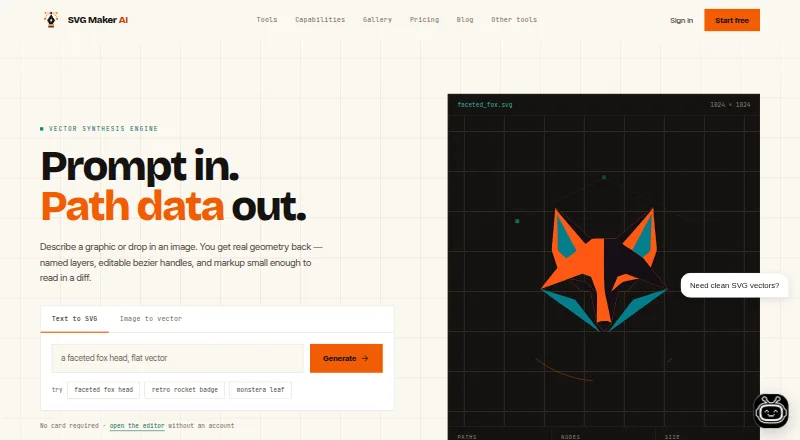
SVG Maker AI is a web and API service for creating and editing vector graphics. Enter a text prompt to generate editable SVG geometry with named layers and Bézier handles, or provide a PNG, JPG, or WebP image to trace into scalable paths. Its canvas lets you adjust anchor points and colors, rename layers, and remove shapes. You can export SVG files or copy results as a React component; the editor also supports linear and radial gradients and CSS keyframe animation. The service lists Figma and Illustrator import, plus a REST API for batch generation, color retheming, and format conversion. It says generated SVGs can be used commercially without royalties. The homepage says the editor can be opened without an account or payment card. Plans include a free trial listed as free with one generation credit, paid monthly plans, and one-time credit packs. Creator Pro is $15 a month; Business is $45 a month.
Good
- Creates editable SVGs from text prompts.
- Traces PNG, JPG, and WebP images.
- Exports SVG or copies a React component.
- Supports Figma and Illustrator import.
- Allows commercial use without royalties.
Watch out
- Creator Pro is $15 a month.
- The listed free trial includes one generation credit.
- Privacy policy lists prompt history and usage analytics as collected data.
Who it suits
It suits designers and developers who want to create or trace SVGs, then edit layers or export vectors and React components. Teams needing shared folders, collaborative sessions, batch generation, or REST API access can consider Business.
Verdict
SVG Maker AI combines prompt-based vector creation, image tracing, and canvas editing with several export and integration options. Check the generation limits and plan details against your workflow before choosing a paid plan.
Plans and prices
From SVG Maker AI's own pricing page, checked 29 Sep 2026.
| Plan | Price | What it gives you |
|---|---|---|
| Free Trial | Free | 1 generation credit · Manual SVG editor workspace · Standard .svg export · Community prompt library · $0 forever |
| 30 credits | $10, paid once | 30 credits · One-time · no subscription · credits never expire |
| Creator Pro | $15 a month | 70 generations a month · AI-assisted anchor point edits · Priority generation queue · Figma and Illustrator import · $15/ month |
| 100 credits | $25, paid once | 100 credits · Save 25% · One-time · no subscription · credits never expire |
| Business | $45 a month | 250 generations a month · Shared team folders · Collaborative editor sessions · Batch generation from a prompt list · REST API access · Dedicated support contact · $45/ month |
| 250 credits | $50, paid once | 250 credits · Save 40% · One-time · no subscription · credits never expire |
The facts
Each one read from SVG Maker AI's own pages, with the date it was checked.
What it does
- Canvas editing
- Users can drag anchor points, change colors, rename layers, and delete shapes on the canvas.checked 29 Sep 2026
- Commercial rights
- The site says users retain control of generated SVGs and may use them commercially without royalties.checked 29 Sep 2026
- Data collected
- The privacy policy lists account profile details, prompt history and usage analytics, IP addresses, browser specifications, and performance telemetry as collected data.checked 29 Sep 2026
- Data deletion
- Users can delete saved projects from the dashboard and request permanent deletion of account history and OAuth records by emailing [email protected].checked 29 Sep 2026
- Export
- Users can download SVG files or copy the output as a React component.checked 29 Sep 2026
- Image tracing
- It accepts PNG, JPG, or WebP images and produces layered, scalable vector paths.checked 29 Sep 2026
- Integrations
- The site says SVGs can be imported into Figma and Illustrator, and its REST API supports batch generation, color retheming, and format conversion.checked 29 Sep 2026
- Security
- The privacy policy says data transmission uses SSL/TLS and user information is stored in secured databases with access control rules.checked 29 Sep 2026
- Support and refunds
- The pricing FAQ says a human answers support inquiries and offers a seven-day full refund on Creator Pro and Business.checked 29 Sep 2026
- Text-to-vector
- The service turns text prompts into editable SVG geometry with named layers and bezier handles.checked 29 Sep 2026
- Third-party services
- The privacy policy says the service integrates Google Analytics for platform performance monitoring and Stripe for billing.checked 29 Sep 2026
- Use without signup
- The homepage says users can open the editor without an account or payment card.checked 29 Sep 2026
- Vector features
- The FAQ says the service generates linear and radial gradients and supports CSS keyframe animation in the editor.checked 29 Sep 2026
Alternatives to SVG Maker AI
- 1

Design.com
Free planAndroidiOSWeb8.2From $12 a month - 2

Wix Logo Maker
Free planAndroidiOSWebAPI8.2Free plan - 3

Clearly Logo Maker
Free planWebAPImacOSWindows7.8From $29 a month - 4

LOGO.com
Free planWebAPI7.6Free plan - 5
Logofai
AndroidiOSWebmacOS7.6From $9.99 a month - 6

Zoviz
AndroidiOSWebAPI7.6From $199 a year