Icecream PDF Editor
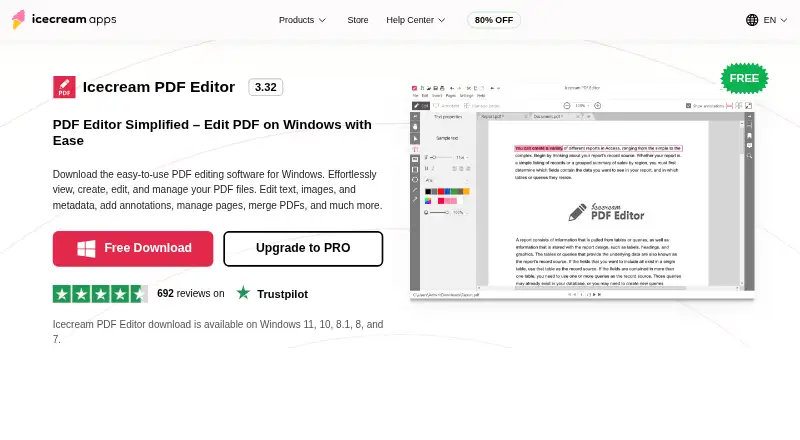
The facts below are what the maker publishes about Icecream PDF Editor, checked and dated. Our editors have not written about it yet.
Plans and prices
From Icecream PDF Editor's own pricing page, checked 20 Sep 2026.
| Plan | Price | What it gives you |
|---|---|---|
| PRO lifetime license | $129, paid once | View and edit PDFs · Edit text and objects · Manage pages · Annotate PDFs · Merge PDF documents · Protect PDFs · Lifetime license |
| Free | Free | Most main features; some limitations |
| PDF Editor PRO | $77, paid once | View and edit PDF · edit text and objects · manage pages · annotate · merge PDFs · protect PDFs · Lifetime license; page also describes a one-year auto-renewing license, but does not show its price |
The facts
Each one read from Icecream PDF Editor's own pages, with the date it was checked.
What it does
- Annotations
- Annotation tools include notes, stamps, arrows, lines, shapes, text highlighting, and freehand drawing.checked 9 Oct 2026
- Annotation tools
- Yeschecked 20 Sep 2026
- Editing
- It edits text, images, and shapes, including their content, style, position, size, and rotation.checked 9 Oct 2026
- Intended users
- The maker describes its products as tools for work, study, and creativity and says PDF Editor can be used as a daily reader and editor.checked 9 Oct 2026
- Modes
- The editor has four modes: Edit PDF, Annotate, Manage pages, and Fill in forms.checked 9 Oct 2026
- OCR
- Yeschecked 20 Sep 2026
- OCR and forms
- The FAQ says the editor supports OCR for scanned documents and filling interactive PDF forms.checked 9 Oct 2026
- Other PDF tools
- The product can merge PDFs, edit metadata, add password protection, search text, crop pages, and extract text and images.checked 9 Oct 2026
- Page management
- Users can rearrange, rotate, delete, add, and extract PDF pages, and split documents in Manage pages mode.checked 9 Oct 2026
- PDF conversion
- Yeschecked 20 Sep 2026
- Privacy
- The privacy policy says anonymized usage data may be transmitted automatically and describes administrative and technical safeguards for personal information.checked 9 Oct 2026
- Product
- Icecream PDF Editor is Windows software for viewing, creating, editing, and managing PDF files.checked 9 Oct 2026
- Refund and updates
- The PRO page offers a full refund request within 30 days for unresolved technical issues and says a one-year license receives updates during its term.checked 9 Oct 2026
- Support
- The Help Center accepts support requests and says direct support is provided in English only.checked 9 Oct 2026
- System requirements
- The listed supported systems are Windows 11, 10, 8.1, 8, and 7; minimum requirements include a 2.33 GHz compatible processor, 2 GB RAM, and 1280×720 display.checked 9 Oct 2026
- Text editing
- Yeschecked 20 Sep 2026
The company
- Founded
- 2014checked 28 Sep 2026
Money
- Free plan
- Yeschecked 20 Sep 2026
- Free version limits
- The free version provides most main functionalities, with some limitations; the upgrade page lists PRO features including PDF editing, annotations, page management, merging, and protection.checked 9 Oct 2026
Where it runs
- Supported platforms
- windowschecked 20 Sep 2026
Alternatives to Icecream PDF Editor
- 1

Smallpdf
Free planAndroidiOSWebWindows8.9From $10 a month - 2

LightPDF
Free planAndroidiOSWebAPI8.8From $15.99 a year - 3
PDF2Go
Free planAndroidiOSWebAPI8.7$6.42 usage-based - 4
Foxit PDF Editor
AndroidiOSWebmacOS8.6 - 5
WPS PDF Editor
Free planAndroidiOSWebExtension8.5From $3 a year - 6

PDF Candy
Free planAndroidiOSWebLinux8.5From $4 a year