HP PC Hardware Diagnostics
HP PC Hardware Diagnostics is a set of tools for testing computer components and identifying hardware failures.
What HP PC Hardware Diagnostics is
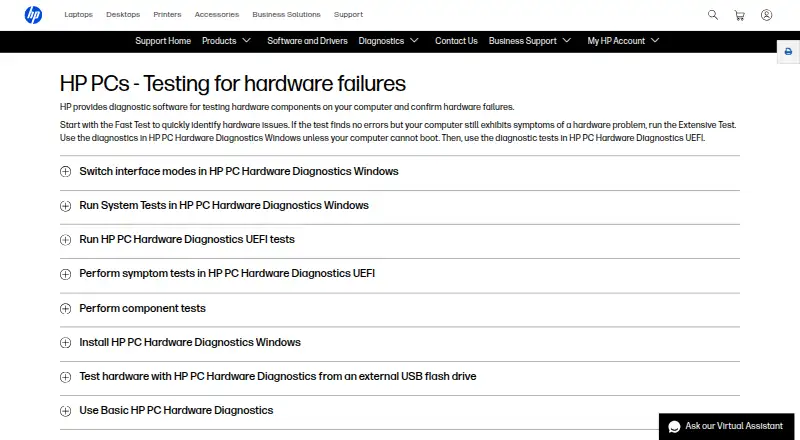
HP PC Hardware Diagnostics is a set of tools for testing computer components and identifying hardware failures. The Windows application runs within Windows 10 or 11, while UEFI diagnostics runs outside the operating system to help identify and isolate problems. Listed tests cover processor, memory, storage, power, audio, Bluetooth, fan, keyboard, mouse or touchpad, network, and video; available tests vary with installed components. The Windows tool also offers driver checks and updates for select components, and HP says it comes pre-installed on new HP computers or can be downloaded from its diagnostics page or the Microsoft Store. If Windows cannot start, UEFI diagnostics can be launched from the F2 startup menu or run from a USB flash drive. Diagnostics can generate a 24-digit failure ID to use with the product number when starting a repair process. HP says UEFI tests are intended for genuine HP hardware and does not guarantee they will work on other manufacturers’ products. The software is free. The Windows memory Quick Test is not currently available.
Good
- Tests a broad range of hardware components
- UEFI diagnostics can run outside Windows
- Failure IDs can be used to begin a repair process
- Free to use
Watch out
- UEFI tests are not guaranteed on non-HP hardware
- Windows memory Quick Test is unavailable
- Available tests vary by installed components
Who it suits
It suits HP computer owners checking hardware problems and users who need to diagnose a PC that cannot start Windows. The 4-in-1 USB Key is described for HP service partners and IT professionals.
Verdict
HP PC Hardware Diagnostics offers Windows-based and bootable options for identifying hardware issues, including when Windows will not start. Check hardware compatibility and test availability before relying on a particular diagnostic.
The facts
Each one read from HP PC Hardware Diagnostics's own pages, with the date it was checked.
What it does
- 4-in-1 USB Key
- The 4-in-1 USB Key combines Windows and UEFI diagnostics, dock and display diagnostics, and BIOS recovery files for supported systems; HP describes it for authorized service partners and IT professionals.checked 3 Oct 2026
- Boot troubleshooting
- When Windows cannot start, HP directs users to run UEFI diagnostics from the F2 startup menu or from a USB flash drive.checked 3 Oct 2026
- Compatibility limit
- Available tests can differ depending on the components installed on the computer.checked 4 Oct 2026
- Component checks
- Documented component tests include processor, memory, storage, power, audio, keyboard, network, and video checks.checked 3 Oct 2026
- Download options
- HP says the Windows tool can be downloaded from its diagnostics page or the Microsoft Store.checked 4 Oct 2026
- Failure reporting
- When a component fails, diagnostics can provide a 24-digit failure ID for contacting HP Customer Support.checked 4 Oct 2026
- Fast test
- The Windows Fast Test checks disk read, video memory, wireless, CPU stress, and battery, and takes about 3 to 5 minutes or more depending on system configuration.checked 4 Oct 2026
- Hardware compatibility
- HP states that UEFI diagnostics tests can only be performed correctly on genuine HP hardware and does not guarantee operation on other companies’ products.checked 3 Oct 2026
- Intended users
- The 4-in-1 USB Key is described for HP authorized service partners and IT professionals supporting mixed environments of older and newer HP/Compaq PCs.checked 4 Oct 2026
- Other diagnostic tools
- HP also offers a Windows tool for diagnosing connected HP dock and display hardware.checked 3 Oct 2026
- Preinstallation
- HP PC Hardware Diagnostics Windows comes pre-installed on new HP computers.checked 4 Oct 2026
- Purpose
- HP provides diagnostic software to test computer hardware components and confirm hardware failures.checked 4 Oct 2026
- Remote diagnostics
- Remote PC Hardware Diagnostics UEFI can be configured to download and run UEFI diagnostics and optionally upload a diagnostic log through F10 setup on select business products.checked 3 Oct 2026
- Support
- HP’s diagnostics support page directs users who receive a 24-digit failure code to enter it with their product number to start a repair process.checked 3 Oct 2026
- Test coverage
- The documented component tests include processor, memory, storage, power, audio, Bluetooth, fan, keyboard, mouse or touchpad, network, and video tests.checked 4 Oct 2026
- UEFI diagnostics
- HP PC Hardware Diagnostics UEFI runs outside the operating system to help identify, isolate, and diagnose hardware issues.checked 3 Oct 2026
- UEFI version
- HP PC Hardware Diagnostics UEFI runs outside the operating system to help identify, isolate, and diagnose hardware issues.checked 4 Oct 2026
- USB use
- HP says UEFI diagnostics can be installed on a USB flash drive and run when diagnostics on the computer's hard drive are unavailable.checked 4 Oct 2026
Where it runs
- Supported Windows versions
- The current Windows tool supports Windows 10 and Windows 11.checked 4 Oct 2026
- Windows diagnostics
- HP PC Hardware Diagnostics Windows tests hardware components within Windows and is supported on Windows 10 and 11.checked 3 Oct 2026
- Windows features
- The Windows tool offers driver checks and updates for select components and can test hardware components.checked 4 Oct 2026
- Windows test limit
- The documented memory Quick Test is not currently available in the Windows version.checked 4 Oct 2026
- Windows version
- HP PC Hardware Diagnostics Windows runs within Windows to diagnose hardware failures.checked 4 Oct 2026
Alternatives to HP PC Hardware Diagnostics
- 1
MemTest86
Free planLinuxmacOSSelf-hostedWindows7.5From $76 a year - 2
Hard Disk Sentinel
Free planLinuxWindows6.9$22 one-time - 3
smartmontools
Free planLinuxmacOSWindows6.8Free plan - 4

GSmartControl
Free planLinuxmacOSWindows6.7Free plan - 5

Speccy
Free planWindows6.6$19.95 one-time - 6
Intel VTune Profiler
Free planLinuxSelf-hostedWindows6.5Free plan