HighPoint Degree Planner
HighPoint Degree Planner helps students organize graduation requirements into academic terms and map a route to graduation.
What HighPoint Degree Planner is
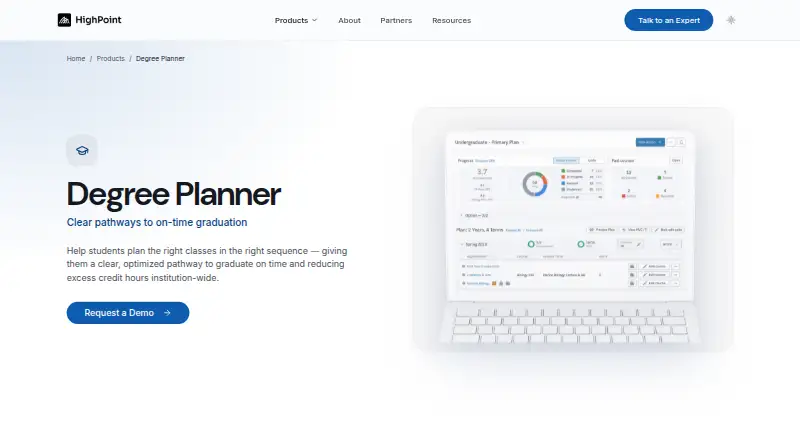
HighPoint Degree Planner helps students organize graduation requirements into academic terms and map a route to graduation. It shows courses a student should take and lets them place courses into terms. What-if scenarios let students consider changes such as credit load, major, or study abroad and evaluate how those choices affect the plan. At the University of Pittsburgh, plans can be generated and updated using academic progress, degree requirements, prerequisites, and typical course offering semesters; a dashboard maps completed courses, remaining requirements, and recommended sequences. HighPoint says planning stays in sync with audits and scheduling. Its products are designed for institutions using PeopleSoft Campus Solutions and reside within PeopleSoft, an approach HighPoint says leaves institutions in control of their data and requires no integrations. Advisors can use plans to identify students who may need help staying on track. The planner is intended to help students prepare for advising, not replace one-on-one advisor support. It is web-based, with mobile access listed, and pricing is on request.
Good
- Students can model changes to credit load or major.
- Plans can update based on academic progress and requirements.
- Planning stays in sync with audits and scheduling.
- Mobile access is listed.
- HighPoint says institutions retain control of their data.
Watch out
- Pricing is available on request.
- Designed for institutions using PeopleSoft Campus Solutions.
- Intended to prepare students for advising, not replace it.
Who it suits
Degree Planner suits students arranging courses around graduation requirements and exploring alternative academic plans. Advisors, registrars, and academic affairs staff are also intended users.
Verdict
Degree Planner helps students map requirements to terms and consider how changes may affect progress. It is designed for PeopleSoft institutions and complements, rather than replaces, advising.
The facts
Each one read from HighPoint Degree Planner's own pages, with the date it was checked.
What it does
- Advisor use
- Advisors can use the planner to identify students who may need help staying on track to complete their plans on time.checked 3 Oct 2026
- Connected workflows
- HighPoint says planning stays in sync with audits and scheduling.checked 4 Oct 2026
- Data control
- HighPoint says its in-PeopleSoft approach leaves institutions in control of their data.checked 4 Oct 2026
- Implementation
- HighPoint says code installation takes minutes and implementation is configuration driven.checked 4 Oct 2026
- Integrations
- HighPoint says its products reside inside PeopleSoft and describes this setup as requiring no integrations.checked 4 Oct 2026
- Intended users
- HighPoint identifies advisors, registrars, and academic affairs staff as an audience for its Degree Planner overview.checked 4 Oct 2026
- Limits and intended use
- The University of Pittsburgh says Degree Planner is intended to help students prepare for advising and does not replace one-on-one help from an academic advisor.checked 3 Oct 2026
- PeopleSoft focus
- HighPoint says its products are built to reside inside PeopleSoft and are designed for PeopleSoft Campus Solutions institutions.checked 4 Oct 2026
- Pricing availability
- The product page prompts visitors to schedule a personalized demo and does not state a price in the page content available.checked 4 Oct 2026
- Purpose
- HighPoint describes Degree Planner as a multi-term planning experience that gives students a path to graduation and advisors a shared planning canvas inside PeopleSoft.checked 4 Oct 2026
- Requirements
- The product uses students’ PeopleSoft requirements to support degree planning.checked 4 Oct 2026
- Security and access
- The University of Pittsburgh describes HighPoint Campus Experience as a secure, web-based, mobile-friendly interface for class, academic, and financial information.checked 3 Oct 2026
- Student audience
- The University of Pittsburgh describes the planner as helping students evaluate course options and plan a path to graduation.checked 3 Oct 2026
- Support and sales
- HighPoint offers a personalized demo and lists [email protected] as its contact email.checked 4 Oct 2026
Money
- Automatic planning
- At the University of Pittsburgh, Degree Planner automatically generates and updates plans based on academic progress, degree requirements, prerequisites, and typical course offering semesters.checked 3 Oct 2026
- Course planning
- It shows courses a student should take to graduate and lets them move courses to appropriate terms.checked 3 Oct 2026
- Planning display
- The University of Pittsburgh says the planner presents courses taken, courses still needed, and recommended sequences in a visual map on a dashboard.checked 3 Oct 2026
- What-if planning
- The product supports what-if scenarios.checked 4 Oct 2026
Where it runs
- Platform relationship
- The University of Pittsburgh describes Degree Planner as a scheduling tool within PeopleSoft/HighPoint Campus Experience.checked 3 Oct 2026
- What-if scenarios
- Students can model changes such as credit load, majors, or study abroad to evaluate effects on their graduation path.checked 3 Oct 2026
Alternatives to HighPoint Degree Planner
- 1
FlightPath
Free planOpen sourceAndroidiOSWebAPI7.9Free plan - 2

EAB Navigate360
AndroidiOSWebAPI6.8 - 3

Slate
AndroidiOSWebAPI6.8From $30,000 a year - 4

Civitas Advising
AndroidiOSWebAPI6.7 - 5
Ellucian Degree Works
AndroidiOSWebAPI6.6 - 6
TracCloud
WebAPI5.9