
herbstluftwm
herbstluftwm is a free manual tiling window manager for the X window system.
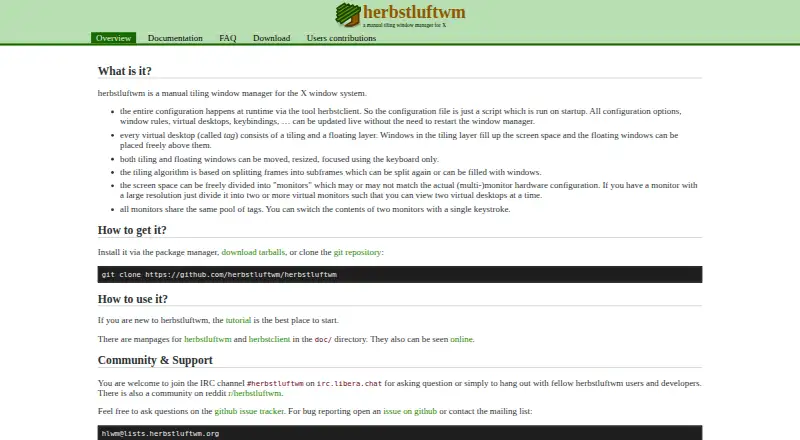
What herbstluftwm is
herbstluftwm is a free manual tiling window manager for the X window system. Each virtual desktop, called a tag, has a tiling layer and a floating layer, so windows can be arranged in frames or placed freely. Its tiling layout splits frames into subframes that can be divided again or filled with windows. Keyboard controls can move, resize and focus both tiled and floating windows. Configuration runs through herbstclient and can be changed while the window manager is running without restarting it. Screen space can also be divided into virtual monitors that do not have to match physical displays; monitors share a common pool of tags. The project is licensed under the Simplified BSD License. The download page lists Linux distribution packages and Mac OS X through MacPorts, and says the program is confirmed to run on Cygwin. Community help is available through IRC, Reddit, GitHub issues and a mailing list. The listed plan costs nothing.
Good
- Configuration changes take effect without a restart.
- Tiling and floating layers are available per tag.
- Keyboard controls move, resize and focus windows.
- Virtual monitors can differ from physical displays.
Watch out
- It is for the X window system.
- Cygwin is listed as confirmed, not as a direct native platform.
Who it suits
herbstluftwm suits users of the X window system who want manual tiling and keyboard control over window placement, focus and size.
Verdict
herbstluftwm offers manual tiling, floating placement and runtime configuration for X window system users. Its Linux and Mac OS X installation options, plus confirmed Cygwin support, define the listed platform scope.
Plans and prices
From herbstluftwm's own pricing page, checked 11 Oct 2026.
| Plan | Price | What it gives you |
|---|---|---|
| herbstluftwm | Free | manual tiling window manager for X · install via package manager or download source tarball |
The facts
Each one read from herbstluftwm's own pages, with the date it was checked.
Where it runs
- Additional platforms
- The download page says it is confirmed to run on Cygwin and many other Linux distributions.checked 11 Oct 2026
- Install platforms
- The download page lists packages for Linux distributions and Mac OS X via MacPorts, and says the program is confirmed to run on Cygwin.checked 11 Oct 2026
What it does
- Distribution
- The download page lists packages for multiple Linux distributions as well as Mac OS X via MacPorts and FreeBSD.checked 11 Oct 2026
- Integrations
- The FAQ describes using external EWMH panels such as xfce4-panel and using dmenu for a run dialog.checked 11 Oct 2026
- Intended users
- The project describes itself as a manual tiling window manager for users of the X window system.checked 11 Oct 2026
- Keyboard control
- Tiling and floating windows can be moved, resized, and focused using only the keyboard.checked 11 Oct 2026
- Latest release
- The download page lists version 0.9.6, dated 2026-04-03, as the most current released tarball.checked 11 Oct 2026
- Layouts
- Its tiling layout works by splitting frames into subframes that can be split again or filled with windows.checked 11 Oct 2026
- License
- The project repository states that herbstluftwm is licensed under the Simplified BSD License.checked 11 Oct 2026
- Live configuration
- Configuration runs through herbstclient and can be updated at runtime without restarting the window manager.checked 11 Oct 2026
- Privacy
- The website says it does not collect personal information from visitors; its wiki uses a session cookie.checked 11 Oct 2026
- Product
- herbstluftwm is a manual tiling window manager for the X window system.checked 11 Oct 2026
- Recent release
- The site lists version 0.9.6, released on 2026-04-03, with a CSS-inspired theme engine and a herbstclient mode for sending multiple commands through one instance.checked 11 Oct 2026
- Source distribution
- The download page offers released source tarballs and links to the current development version on GitHub.checked 11 Oct 2026
- Support
- The project offers community help through IRC, Reddit, GitHub issues, and a mailing list.checked 11 Oct 2026
- Tiling and floating
- Each virtual desktop, called a tag, has a tiling layer and a floating layer for freely placed windows.checked 11 Oct 2026
- Virtual monitors
- Screen space can be divided into virtual monitors that need not correspond to physical monitors, and monitors share a common pool of tags.checked 11 Oct 2026
- Website privacy
- The privacy policy says the website does not collect personal information from visitors and that its Wiki uses a session cookie.checked 11 Oct 2026
- What it does
- herbstluftwm is a manual tiling window manager for the X window system.checked 11 Oct 2026
- Window layers
- Each virtual desktop, called a tag, has a tiling layer and a floating layer.checked 11 Oct 2026
The full review of herbstluftwm
Overview
herbstluftwm is a manual tiling window manager for X, built around layouts the user controls rather than automatic placement. It is best suited to people who want keyboard-led control over windows and are comfortable configuring their desktop. Choose it for flexible tiling and live adjustment; look elsewhere if you want a ready-made, automatic window arrangement.
Key features
Configuration runs through herbstclient and can be changed while the window manager is running, without a restart. That makes experimentation less disruptive, but the approach rewards users willing to shape their own setup. Version 0.9.6 adds a CSS-inspired theme engine and a herbstclient mode that sends multiple commands through one instance.
Each virtual desktop, or tag, combines a tiling layer with a floating layer. The tiling layout splits frames into subframes that can be split again or filled with windows; floating windows can be positioned freely. Both kinds can be moved, resized and focused entirely from the keyboard, so users can keep a keyboard-centered workflow without forcing every window into a tile. Layout presets, application rules and virtual desktop controls extend those choices.
Virtual monitors divide screen space without requiring a one-to-one match with physical monitors, and share a common pool of tags. This gives users another way to organize workspaces, though it assumes they want to manage the arrangement themselves. The project describes using external EWMH panels such as xfce4-panel and dmenu as a run dialog, rather than treating those tools as built-in features.
Pricing
herbstluftwm is free and open source under the Simplified BSD License. Its plan costs nothing and provides the manual tiling window manager for X; users can install it through a package manager or download a source tarball. There is no free trial because the software is already free. This fits individual users who want a no-cost window manager and are comfortable with its manual approach; there is no paid tier to trade features or support for a subscription.
Platforms
The main installation options cover Linux distributions and Mac OS X via MacPorts. The project also confirms that it runs on Cygwin, and the download page offers FreeBSD packages. Released source tarballs and the current development version are available through the project’s download channels. Version 0.9.6 is the latest release, dated 2026-04-03.
Who it's for
Choose herbstluftwm if you use the X window system and want to decide how windows tile, float and move between workspaces. Keyboard control, runtime configuration and virtual monitors make it a strong fit for users who value deliberate control over automation. Its manual model is a poor match for anyone who would rather have window placement handled with minimal intervention.
Pros and cons
- Pro: Runtime configuration through herbstclient avoids restarting the window manager to adjust settings.
- Pro: Tiling and floating layers coexist on each tag, with keyboard control for moving, resizing and focusing windows.
- Pro: Virtual monitors and a shared tag pool allow workspace organization that is not tied to physical monitor boundaries.
- Con: Manual tiling puts arrangement decisions on the user, making it less suitable for people seeking automatic placement.
- Con: It is a window manager for X, so it is not the right choice for users whose needs fall outside that environment.
Alternatives
Window Management Software is a broader category to explore if you want to compare options across the field.
Choose spectrwm instead if you want another free X11 window manager, with Linux, macOS and Windows platform support.
Choose Amethyst instead if you use macOS and want configurable tiling layouts and keyboard shortcuts, with application floating or tiling rules.
Choose IceWM instead if you want a free X11 window manager that supports Linux and self-hosted use.
Dexpot is a freemium option for Windows users.
Launchpad is a free option for Linux, web, API and self-hosted use.
DisplayFusion is a freemium option for Windows users.
4t Tray Minimizer is a freemium option for Windows.
AquaSnap is a freemium option for Windows users.
Verdict
Choose herbstluftwm if you want a free X window manager that lets you direct tiling, floating placement and workspace organization, including live configuration. Its chief limitation is also its defining choice: you must manage the arrangement yourself. Look elsewhere if you want automatic window placement or do not use X.
Getting started
- Open the herbstluftwm website
- Choose a package for your Linux distribution or MacPorts on Mac OS X
- Install through the package manager or download a released source tarball
- Configure the window manager through herbstclient
- Use keyboard controls to arrange tiled and floating windows
Questions
How much does herbstluftwm cost?
The listed herbstluftwm plan costs nothing. It is open source.
Which platforms are supported?
It is listed for Linux and macOS. The download page also says it is confirmed to run on Cygwin.
Can configuration change while it runs?
Yes. Configuration through herbstclient can be updated at runtime without restarting the window manager.
Does it support floating windows?
Yes. Every tag has a tiling layer and a floating layer for freely placed windows.
What license does it use?
The project repository states that herbstluftwm uses the Simplified BSD License.
What integrations are described?
The FAQ describes external EWMH panels such as xfce4-panel and dmenu for a run dialog.
Alternatives to herbstluftwm
- 1

DisplayFusion
Free planAndroidiOSAPIWindows7.9$34 one-time - 2
Avidemux
Free planOpen sourceWebLinuxmacOSWindows7.3Free plan - 3

Dexpot
Free planAPIWindows7.2€24.90 one-time - 4
spectrwm
Free planOpen sourceLinuxmacOSWindows7.1Free plan - 5

Launchpad
Free planWebAPILinuxSelf-hosted7.0Free plan - 6

Reloop
Free planSelf-hosted7.0From $10 a month