Harth
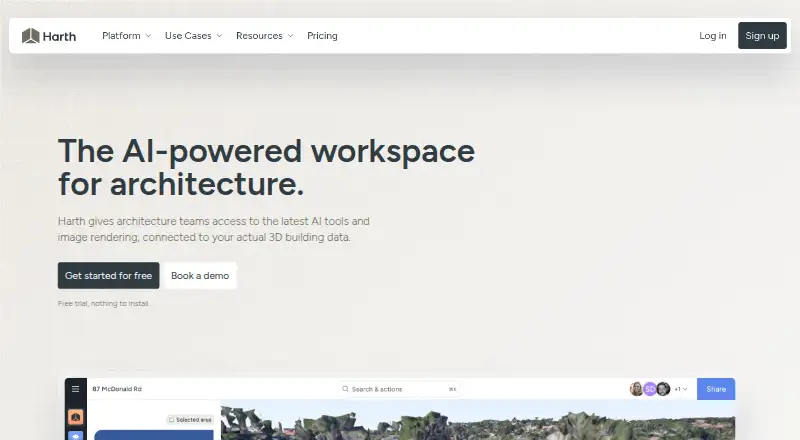
Harth is a browser-based workspace for architecture practices to design, research, collaborate on, and present projects, with AI agents working on building d…
What Harth is
Harth is a browser-based workspace for architecture practices to design, research, collaborate on, and present projects, with AI agents working on building data. It imports models from Revit, Archicad, SketchUp, and IFC while preserving elements and coordinates. Its roughly 40 discipline-specific agent skills cover areas including structure, envelope, interiors, and analysis. For site context, Harth supports 3D satellite terrain, surrounding-building imports, boundary tracing, geolocation, and sun studies. Users can render a model view, apply area masking and lighting presets, and upscale images for print. Collaboration features include simultaneous model work, live cursors, presence, comments pinned over 3D, and per-project voice. Harth can also turn 360-camera footage into an explorable, measurable 3D scan, with processing taking one to two days. Exports include PDF, images, 3D, 360-degree views, and recorded walkthroughs. All plans include the full workspace and differ in AI usage; each has a monthly credit allowance, and users can add credit packs. The Free plan includes 700 credits per month. Plus costs $59 a month and includes 5,000 credits per month; Pro costs $149 a month and includes 15,000.
Good
- Imports Revit, Archicad, SketchUp, and IFC models
- Roughly 40 discipline-specific agent skills
- Supports simultaneous model collaboration and pinned comments
- Includes PDF, image, 3D, and walkthrough exports
Watch out
- AI usage is limited by monthly credit allowances
- Prompts and outputs may be stored for platform improvement
- Reality-capture processing takes one to two days
Who it suits
Harth is aimed at architecture practices, particularly practices of roughly 15 to 30 people in New Zealand, Australia, and the United States. It suits teams that want model-based collaboration, AI agent skills, site context, and presentation tools in a browser workspace.
Verdict
Harth combines architecture project work, model collaboration, site context, and visualization tools in a browser workspace. Compare the plans' AI credit allowances and consider its stated prompt and output data handling.
Plans and prices
From Harth's own pricing page, checked 3 Oct 2026.
| Plan | Price | What it gives you |
|---|---|---|
| Free | Free | 700 credits / month · 20+ renders · Community support · $0 per month |
| Plus | $59 a month | 5,000 credits / month · 150+ renders · Priority rendering · Email support · $59 per month |
| Small credit pack | $99, paid once | 7,500 credits · 250+ renders · Never expires · $99 |
| Pro | $149 a month | 15,000 credits / month · 500+ renders · Priority rendering · Priority support · $149 per month |
| Medium credit pack | $199, paid once | 16,000 credits · 500+ renders · Never expires · $199 |
| Large credit pack | $399, paid once | 36,000 credits · 1000+ renders · Never expires · $399 |
The facts
Each one read from Harth's own pages, with the date it was checked.
What it does
- AI agents
- Harth describes roughly 40 discipline-specific agent skills for areas including structure, envelope, interiors, and analysis.checked 3 Oct 2026
- AI data handling
- The privacy policy says prompts and generated outputs may be stored for platform improvement and quality assurance, and anonymized or aggregated prompt data may be used to develop and train Harth's AI systems.checked 3 Oct 2026
- CAD imports
- Harth imports models from Revit, Archicad, SketchUp, and IFC while preserving elements and coordinates.checked 3 Oct 2026
- Collaboration
- Harth supports simultaneous model work with live cursors, presence, threaded comments pinned over 3D, and per-project voice.checked 3 Oct 2026
- Exports
- Harth lists PDF, image, and 3D exports, plus 360-degree views and recorded walkthroughs.checked 3 Oct 2026
- Intended users
- Harth says it is built for architecture practices of roughly 15 to 30 people in New Zealand, Australia, and the United States.checked 3 Oct 2026
- Privacy
- Harth NZ Limited says its privacy policy takes account of the New Zealand Privacy Act 2020 and Australian Privacy Act 1988, and describes rights for EU and UK individuals under GDPR.checked 3 Oct 2026
- Product
- Harth is a browser-based workspace for architecture practices to design, research, collaborate, and present projects, with AI agents working on building data.checked 3 Oct 2026
- Reality capture
- Harth says 360-camera footage can be turned into an explorable, measurable 3D scan, processed in one to two days.checked 3 Oct 2026
- Site context
- Harth supports 3D satellite terrain, surrounding-building import, site-boundary tracing, geolocation, and sun studies.checked 3 Oct 2026
- Support
- The Free plan includes community support, Plus includes email support, and Pro includes priority support.checked 3 Oct 2026
- Visualization
- Harth can render from a view framed in the model, apply area masking and lighting presets, and upscale images for print.checked 3 Oct 2026
Money
- Plan limits
- The maker says all plans include the full workspace and differ only in AI usage; each plan has a monthly credit allowance and credits can be topped up with packs.checked 3 Oct 2026
The full review of Harth
Overview
Harth brings architecture project work, model context, visualization and team collaboration into a browser workspace, with AI agents that work on building data. It is best suited to architecture practices that want these activities connected around shared projects, rather than a standalone rendering app.
The breadth is its strongest argument: every plan includes the full workspace, while the central trade-off is how much AI usage its monthly credits cover.
Key features
Harth imports Revit, Archicad, SketchUp and IFC models while preserving elements and coordinates. That gives practices a way to bring existing project models into a shared environment without recreating them. Its roughly 40 discipline-specific agent skills span areas such as structure, envelope, interiors and analysis; this is a wide remit, but credit consumption will determine how much a team can use the AI tools.
Site tools combine 3D satellite terrain, surrounding-building imports, boundary tracing, geolocation and sun studies. They make Harth more relevant to site and early-design work than a renderer alone, though teams seeking only image generation may not need the wider workspace.
For visualization, users can frame a view in the model, mask areas, apply lighting presets and upscale images for print. Collaboration includes simultaneous model work, live cursors, presence, threaded comments pinned over 3D and per-project voice, making the workspace suited to shared review rather than isolated production.
Harth also says 360-camera footage can become an explorable, measurable 3D scan, processed in one to two days. Exports include PDF, image and 3D files, 360-degree views and recorded walkthroughs, supporting both conventional deliverables and immersive presentations.
One important consideration is AI data handling: Harth NZ Limited says prompts and generated outputs may be stored for platform improvement and quality assurance, and anonymized or aggregated prompt data may be used to develop and train its AI systems. Its privacy policy addresses New Zealand and Australian privacy laws and describes rights for EU and UK individuals under GDPR.
Pricing
The Free plan costs nothing, billed $0 per month, and includes 700 credits / month, 20+ renders and community support. It is a sensible way for an individual or small team to assess the workspace, but the modest credit allowance limits sustained AI use.
Plus costs $59 a month, billed $59 per month, for 5,000 credits / month, 150+ renders, priority rendering and email support. It is the entry paid tier for regular use. Pro costs $149 a month, billed $149 per month, and raises the allowance to 15,000 credits / month and 500+ renders, with priority rendering and priority support; it better fits heavier AI workflows or practices that value faster escalation.
All plans include the same workspace, so the higher subscription tiers buy more AI capacity and support, not a different feature set. Credit packs offer a one-time alternative: Small is $99, paid once for 7,500 credits and 250+ renders; Medium is $199, paid once for 16,000 credits and 500+ renders; Large is $399, paid once for 36,000 credits and 1000+ renders. Packs never expire and suit occasional bursts better than upgrading monthly, though they do not replace a recurring allowance. Monthly credits can also be topped up with packs. A free trial is available.
Platforms
Harth runs on the web, so teams can use the browser-based workspace rather than a desktop-only application.
Who it's for
Harth says it is built for architecture practices of roughly 15 to 30 people in New Zealand, Australia and the United States. Its combination of model imports, site tools, shared review and multiple export formats makes the strongest case for practices coordinating design and presentation work across a team. It is less compelling for someone who needs only a narrowly focused rendering tool.
Pros and cons
- Pro: Existing Revit, Archicad, SketchUp and IFC models retain elements and coordinates on import, reducing the case for rebuilding project data.
- Pro: One shared workspace covers site context, model-based visualization, collaboration and exports, while every plan retains the full workspace.
- Pro: Credit packs never expire, giving teams a way to handle occasional high-demand periods without changing their monthly tier.
- Con: AI usage is governed by monthly credits, so the workspace's broad tools do not mean unlimited AI work.
- Con: Prompts and generated outputs may be stored and anonymized or aggregated prompt data may be used to develop and train AI systems; teams with strict data requirements should review that policy carefully.
Alternatives
For a dedicated AI architectural rendering category, browse AI Architectural Rendering Software. Choose Luw.ai Studio if iOS or macOS access matters alongside web; its free tier includes 2 credits every day but limits output to 512×512 with a watermark. Gendo is another web-based freemium option, with a free plan that allows unlimited generations but restricts users to one collaborator and watermarked output.
Treform is worth considering if macOS or Windows support is important in addition to web access. mnml.ai offers an API as well as a web platform, making it a better fit when API access is wanted. Renderica has a free allowance of 3 renders per month at 1024px, which may suit light rendering needs.
Archome AI is a paid option with a free trial and an API, extension, macOS, web and Windows platforms. Rendero is a web-based freemium alternative whose free allowance is a one-time 50 credits rather than a monthly refill. Massing Labs is another paid, web-based option.
Verdict
Harth is the stronger fit for a mid-sized architecture practice that wants model imports, site context, team review and presentation tools in one browser workspace. Its full-workspace plans keep the choice focused on AI credit needs, while never-expiring packs suit occasional spikes. Look elsewhere if you need only rendering, or if the stated prompt and output data handling does not fit your project requirements.
Alternatives to Harth
- 1
Luw.ai Studio
Free planAndroidiOSWebAPI8.1From $19 a month - 2
Gendo
Free planWeb7.4From £79 a month - 3

Archome AI
WebAPIExtensionmacOS7.2From $29 a month - 4

Treform
Free planWebmacOSWindows7.1From $25 a month - 5
ArchSynth
Web7.0From $9.99 a month - 6
RenderMage
Free planWebExtensionmacOSWindows7.0From $10 a month