
Massing Labs
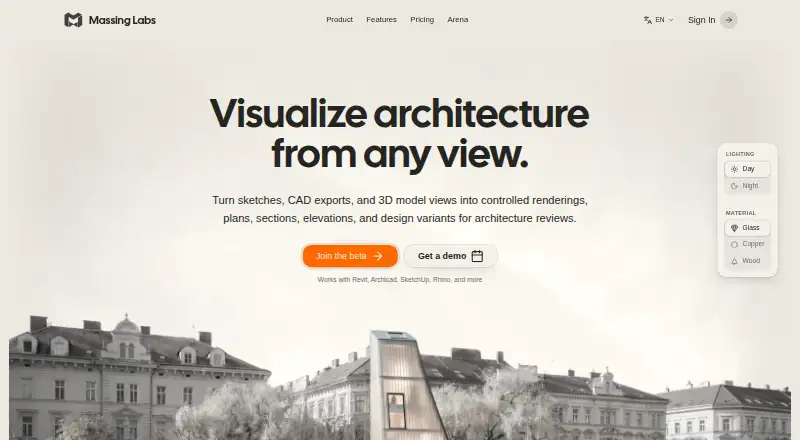
Massing Labs is a web tool that turns architectural sketches, CAD exports, and 3D model views into renderings and design documents.
What Massing Labs is
Massing Labs is a web tool that turns architectural sketches, CAD exports, and 3D model views into renderings and design documents. Listed outputs include context plans, model photos, floor plans, sections, elevations, variants, props, axonometry, and work on a realtime canvas. Supported uploads include JPG, PNG, WebP, HEIC/HEIF, and AVIF images, PDFs, plus OBJ, GLTF, GLB, STL, and FBX models. The site also lists exports from Revit, Archicad, SketchUp, Rhino, and Vectorworks, along with hand-drawn plans. Teams can manage projects, rename folders, and start renderings, with changes syncing automatically. Uploaded files and generated results remain the customer’s intellectual property and may be used commercially. Monthly credits reset each billing cycle without rollover; purchased top-up credits do not expire. Plans include Student at €10 per month, Starter at €24 per month, and Studio at €66 per month. Enterprise pricing is custom. Maximum output resolution is 8000 px.
Good
- Broad image, PDF, and 3D inputs
- Architecture-focused document outputs
- Team project synchronization
- Commercial use rights
- Outputs up to 8000 px
Watch out
- Monthly credits do not roll over
- Enterprise price is custom
- AI processing may send inputs externally
- Web-only platform
Who it suits
It is designed for architecture teams working alongside CAD, BIM, and layout tools. Student, Starter, Studio, and Enterprise plans cover individual and team workflows with different credit and storage provisions.
Verdict
Massing Labs combines architectural visualization outputs with support for common design files and team collaboration. Credit rollover rules, plan limits, and external AI processing are important considerations when choosing a workflow.
Plans and prices
From Massing Labs's own pricing page, checked 8 Oct 2026.
| Plan | Price | What it gives you |
|---|---|---|
| Student | €10 a month | 500 render credits · student status verification required · entitlement lasts at most 12 months · €10 / month |
| Starter | €24 a month | 750 render credits/month · ~375 renders/~100 premium · 25 GB image and board storage · commercial usage included · € 24/month; 290 € billed annually |
| Studio | €66 a month | 2,100 render credits/month · ~1,000 renders/~300 premium · 100 GB image and board storage · password-protected client sharing · € 66/month; 790 € billed annually |
| Enterprise | Priced on request | Tailored credit volume · workspace and Studio Style setup · team onboarding and live training · annual invoice · priority rollout support · Custom |
The facts
Each one read from Massing Labs's own pages, with the date it was checked.
What it does
- AI processing
- The privacy policy says image inputs and text prompts may be sent to Google Gemini, Microsoft Azure OpenAI, or FAL.ai for processing, depending on the feature.checked 8 Oct 2026
- Collaboration
- The site says team members can manage projects, rename folders, and start renderings, with changes syncing automatically across the team.checked 8 Oct 2026
- Commercial use
- The site says uploaded files and generated results remain the customer's intellectual property and may be used for commercial purposes.checked 8 Oct 2026
- Credit rollover
- Monthly plan credits reset each billing cycle and do not roll over, while purchased top-up credits never expire.checked 8 Oct 2026
- Data retention
- The privacy policy says account closure includes a 30-day recovery window and that some accounting, security, legal-hold, and consent records are retained for documented periods.checked 8 Oct 2026
- Data storage
- The privacy policy says uploaded files and generated results are stored encrypted on Cloudflare R2 and that team and user accounts are isolated from one another.checked 8 Oct 2026
- Design tools
- Its listed tools include renderings, context plans, model photos, floor plans, sections, elevations, variants, props, axonometry, and a realtime canvas.checked 8 Oct 2026
- Inputs and formats
- The site lists JPG, PNG, WebP, HEIC/HEIF, and AVIF images, PDF documents, and OBJ, GLTF, GLB, STL, and FBX 3D models as supported uploads, and says exports from Revit, Archicad, SketchUp, Rhino, and Vectorworks also work.checked 8 Oct 2026
- Integrations
- The site says it works with Revit, Archicad, SketchUp, Rhino, Vectorworks, and hand-drawn plans; it does not describe a separate software integration.checked 8 Oct 2026
- Intended users
- The maker describes Massing Labs as a professional tool for architecture teams that fits alongside CAD, BIM, and layout tools.checked 8 Oct 2026
- Purpose
- Massing Labs turns sketches, CAD exports, and 3D model views into architectural renderings, plans, sections, elevations, and design variants.checked 8 Oct 2026
- Support
- Enterprise includes tailored onboarding, team training, ongoing support, and priority rollout support.checked 8 Oct 2026
The company
- Headquarters
- Graz, Austriachecked 28 Sep 2026
Alternatives to Massing Labs
- 1
Luw.ai Studio
Free planAndroidiOSWebAPI8.1From $19 a month - 2
Gendo
Free planWeb7.4From £79 a month - 3
Archome AI
WebAPIExtensionmacOS7.2From $29 a month - 4
Treform
Free planWebmacOSWindows7.1From $25 a month - 5
ArchSynth
Web7.0From $9.99 a month - 6
RenderMage
Free planWebExtensionmacOSWindows7.0From $10 a month