Gendo
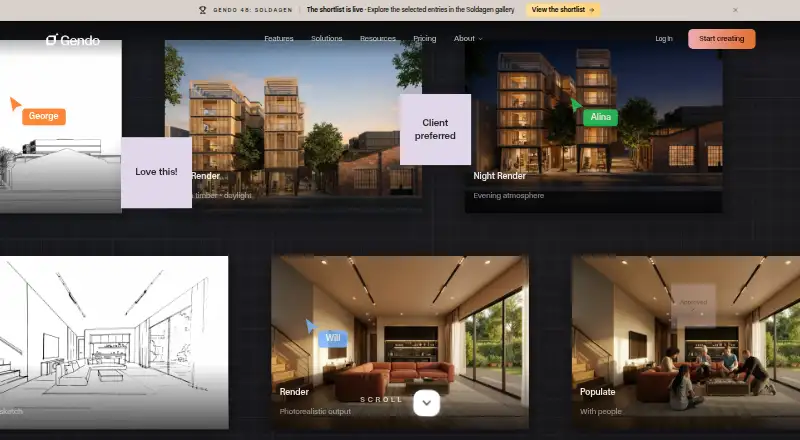
Gendo is a web-based collaborative AI canvas for architectural visualization.
What Gendo is
Gendo is a web-based collaborative AI canvas for architectural visualization. Architects and designers can create photorealistic renders, revise images, and work with teammates in a shared workspace. Its tools support text descriptions, sketches, CAD screenshots, exported scenes, renders, photographs, and reference images. Image options include material edits, scene population, style transfer, enhancement, and upscaling to 4× resolution. A natural-language assistant can access workspace tools; teammates can generate images simultaneously, leave comments and notes, share images, and iterate together. Users currently export scenes or views into the Canvas, while direct plugins for Revit, SketchUp, and Blender are on the roadmap. The Free plan is free and includes one active canvas, up to 50 assets, unlimited generations, one collaborator, watermarks, and history limited to 10 Image Sets. Gendo says data is stored in EU data centres and encrypted at rest with AES-256 and in transit with TLS. Free-plan prompts and outputs are not treated as confidential information; Studio and Enterprise receive contractual protection against AI training and marketing use.
Good
- Supports sketch-based rendering and material edits
- Includes a natural-language workspace assistant
- Teams can comment and share images
- Free plan includes unlimited generations
- Data is stored in EU data centres
Watch out
- Free plan is limited to one active canvas
- Free plan outputs are watermarked
- Free-plan prompts and outputs are not confidential
- Direct Revit, SketchUp, and Blender plugins are not available
Who it suits
Gendo suits architects and design teams who want to generate and revise visualizations in a shared workspace. The free plan may suit individual exploration, while teams handling confidential prompts should consider the stated plan distinctions.
Verdict
Gendo combines architectural image tools with shared canvas workflows and a free plan. Note its current export-based workflow and the different confidentiality terms for Free versus Studio and Enterprise.
Plans and prices
From Gendo's own pricing page, checked 4 Oct 2026.
| Plan | Price | What it gives you |
|---|---|---|
| Students Educational Plan | Free | Multiple canvases · No watermarks · Full AI tooling · 15 free video seconds · No commercial use |
| Educational Plan | Free | Multiple canvases · full AI tooling · no watermark · 15 free video seconds · no commercial use · .edu/.ac auto-enrolment · Free for students and educators |
| Free | Free | 1 active project canvas · 50 assets per canvas · unlimited generations · watermark · 1 collaborator · 10 Image Sets history · £0/mo |
| Video pack — 100 seconds | £40, paid once | 100 video seconds · Requires an active subscription · One-time; £0.40/sec; excl. tax |
| Video pack 100 seconds | £40, paid once | 100 video seconds · active paid subscription required · £40 one-time (£0.40/sec), excluding tax |
| Video pack — 250 seconds | £75, paid once | 250 video seconds · Requires an active subscription · One-time; £0.30/sec; excl. tax |
| Video pack 250 seconds | £75, paid once | 250 video seconds · active paid subscription required · £75 one-time (£0.30/sec), excluding tax |
| Studio | £79 a month | Unlimited projects/assets/generations · 5 seats (4 included) · 15 free video seconds · commercial licence · no watermark · 2x/4x upscale · MFA · £79/mo; £66/mo billed annually (£790/year), excluding tax |
| Video pack 500 seconds | £125, paid once | 500 video seconds · active paid subscription required · £125 one-time (£0.25/sec), excluding tax |
| Video pack — 500 seconds | £125, paid once | 500 video seconds · Requires an active subscription · One-time; £0.25/sec; excl. tax |
| Studio Scale | £299 a month | Unlimited video · organisation analytics · VIP onboarding and priority support · Custom Catalogue · £299/mo, excluding tax; 5 seats included |
| Enterprise | Priced on request | Minimum 20 seats · SSO and provisioning · usage analytics · DPA/custom agreements · custom models · Custom Catalogue · Custom pricing |
The facts
Each one read from Gendo's own pages, with the date it was checked.
What it does
- AI assistant
- The canvas includes a natural-language AI assistant with access to workspace tools.checked 4 Oct 2026
- API and SDK status
- Advanced API access is listed as a future Studio Scale phase-three item, and no public API or SDK documentation is provided on the reviewed pages.checked 21 Oct 2026
- Chat editing
- Natural-language edits can change lighting, seasons, landscaping and cladding while the stated geometry remains fixed.checked 21 Oct 2026
- Collaboration
- The in-browser canvas supports simultaneous generations, comments, notes, shared images, and team iteration.checked 4 Oct 2026
- Commercial rights
- Studio and Enterprise plans include commercial-use licensing and full ownership of generated content according to the product page.checked 21 Oct 2026
- Data residency
- Gendo states that data is stored in EU data centres, with configurable retention and isolation policies.checked 4 Oct 2026
- Data use
- Studio and Enterprise prompts and outputs are contractually protected from AI training and marketing use; Free-plan prompts and outputs are not treated as confidential information.checked 4 Oct 2026
- Design to image
- The platform renders sketches, CAD screenshots and design images into presentation-ready architectural scenes.checked 21 Oct 2026
- Direct integrations status
- The company says direct plugins for Revit, SketchUp and Blender are on its roadmap; the current workflow is exporting views into Canvas.checked 21 Oct 2026
- Documentation
- The help resources include feature guides, workspace and organisation tutorials, subscription instructions and FAQs.checked 21 Oct 2026
- Enterprise governance
- Enterprise controls include SAML single sign-on, audit logs, custom data processing agreements, and configurable data isolation and retention.checked 4 Oct 2026
- Fair use
- Gendo says unlimited generations remain subject to Fair Usage guidelines and abnormal usage may be temporarily restricted.checked 4 Oct 2026
- Funding
- The About page states total funding of £5.2 million from Concept Ventures, Ascension Venture Capital, PT1 Venture Capital, LEA Partners and the NVIDIA Inception Program.checked 21 Oct 2026
- Image tools
- Its architectural tools include rendering from sketches, material edits, scene population, style transfer, enhancement, and upscaling renders to 4× resolution.checked 4 Oct 2026
- Input workflow
- Gendo accepts exports or screenshots from SketchUp, Revit, Rhino, ArchiCAD, Vectorworks, Enscape, Blender and 3ds Max, plus sketches and photographs, without plugins or file conversion.checked 21 Oct 2026
- Integration
- Gendo says users currently export scenes or views into the Canvas; direct plugins for Revit, SketchUp, or Blender are on its roadmap.checked 4 Oct 2026
- Intended users
- Gendo describes its audience as design-led studios and teams of 2–50 who need faster visual decisions without specialist visualization pipelines.checked 4 Oct 2026
- Licence terms
- The terms grant a non-exclusive, non-transferable worldwide licence to use the platform and documentation during the subscription for permitted architectural use.checked 21 Oct 2026
- Limit: no native modelling
- The company’s FAQ says Gendo is an image tool rather than a BIM tool and does not yet generate editable 3D models from plans.checked 21 Oct 2026
- Limit: precision
- A comparison with Pelicad found Gendo reaches limits when exact site placement, geometry stability and precise element-level material changes are required.checked 21 Oct 2026
The company
- Company
- Gendo says it was founded in 2022 and is a UK-based startup.checked 4 Oct 2026
- Company legal name
- The terms identify the provider as Gendo Technology Ltd, incorporated in England and Wales under company number 14526185.checked 21 Oct 2026
- Founded
- Gendo’s own About page states it was founded in 2022.checked 21 Oct 2026
- Headquarters
- London, United Kingdomchecked 28 Sep 2026
The full review of Gendo
Gendo is a web-based AI workspace for architectural imagery, aimed especially at design-led studios that want to iterate together without a specialist visualization pipeline. Its combination of image tools and shared canvas makes it a strong fit for concept development, but it is not a connected CAD/BIM workflow.
Overview
Teams can bring text prompts, hand sketches, CAD screenshots, exported model views, renders, photographs, and reference images into a shared canvas, then generate and refine architectural visuals together. That range of starting points suits early visual exploration and team reviews. The practical limitation is that scenes or views must be exported into Gendo: CAD/BIM import is not supported, and direct Revit, SketchUp, and Blender plugins are only on the roadmap.
The canvas supports simultaneous generations, comments, notes, and shared images, while its natural-language assistant can access workspace tools. Together, these features make Gendo more compelling as a place to align on visual directions than as a replacement for the modeling software teams already use.
Gendo says it stores data in EU data centres and offers configurable retention and isolation policies. Stored data is encrypted with AES-256 and data in transit with TLS. Studio and Enterprise prompts and outputs are contractually protected from AI training and marketing use; Free-plan prompts and outputs are not confidential. Teams working with sensitive designs should account for that difference before choosing a plan.
Key features
- Architectural image tools: Render sketches, edit materials, populate scenes, transfer styles, enhance images, and upscale renders to 4× resolution. The breadth supports multiple kinds of visual iteration in one workspace, though users still need to export model views into it.
- Shared canvas and assistant: Concurrent generations, comments, notes, shared images, and team iteration keep review activity together. The assistant can use canvas tools through natural-language requests, giving users another way to work with the canvas.
- Material Bank: The Free plan includes material specification with Material Bank, adding a practical reference tool even before a team subscribes.
- Fair use: Unlimited generations are subject to Fair Usage guidelines, and abnormal usage may be temporarily restricted. “Unlimited” therefore does not mean unrestricted capacity.
Pricing
Gendo has a free entry tier, a student plan, paid studio subscriptions, and video packs. Prices below are in GBP and exclude tax where stated.
- Free — free: Includes one active canvas, up to 50 assets, unlimited generations, one collaborator, and history limited to 10 Image Sets. Outputs are watermarked. It is a useful solo evaluation option, but the single-collaborator cap and non-confidential prompts and outputs make it a poor fit for shared commercial work.
- Students Educational Plan — free: Offers multiple canvases, no watermarks, full AI tooling, and 15 free video seconds, but prohibits commercial use. It is the more capable free choice for eligible educational work, not client projects.
- Studio — £66 a year: Billed at £66/mo billed annually (£790/year; excl. tax). It includes unlimited projects, assets, and image generations; five seats, including four free seats; 15 one-off video seconds; no watermark; a commercial license; and 2× and 4× upscaling. It removes Free’s collaboration and watermark constraints and adds commercial rights, making it the clearest fit for a small professional team. Its prompts and outputs also receive contractual protection from AI training and marketing use.
- Studio Scale — £299 a month: Billed monthly, excluding tax, with five seats, unlimited video generation, organisation-level analytics, VIP onboarding, and priority support. It is aimed at teams that need video generation and organizational oversight; it is marked Beta.
- Enterprise — custom pricing: Requires a minimum of 20 seats and offers evaluation periods, SSO and user provisioning, a dedicated account and SLA, custom models, plus governance controls including audit logs, custom data processing agreements, and configurable isolation and retention. It suits larger organizations with administration and contractual requirements, but is a substantial step up from the small-team plans.
Video packs are one-time purchases but require an active subscription: 100 seconds costs £40, paid once (£0.40/sec), 250 seconds costs £75, paid once (£0.30/sec), and 500 seconds costs £125, paid once. These are add-ons rather than a substitute for an active plan. Studio includes 15 one-off video seconds; Studio Scale includes unlimited video generation.
Platforms
Gendo runs on the web, so teams can work in a browser-based canvas. It accepts exports from SketchUp, Revit, Rhino, ArchiCAD, Vectorworks, Blender, and 3ds Max, but those inputs do not constitute direct CAD/BIM import or live integration.
Who it's for
Gendo is best suited to architects and designers in small, design-led teams who need to develop visual options and discuss them in a shared workspace. Studio is the more appropriate tier for commercial team work because it includes commercial rights, more seats, unwatermarked output, and confidentiality protections. Solo users can start on Free, while students can use the educational plan for non-commercial projects. Teams dependent on direct model connections, or organizations needing at least 20 managed seats, should weigh its export workflow and plan structure carefully.
Pros and cons
- Pro — Broad architectural image workflow: Sketch rendering, material edits, scene population, style transfer, enhancement, and upscaling cover several visual tasks in one canvas.
- Pro — Team review is built in: Simultaneous generations, comments, notes, and shared images support collaborative iteration rather than isolated image creation.
- Pro — A useful free starting point: Free includes unlimited generations and Material Bank, though one canvas, one collaborator, 50 assets, watermarks, and limited history constrain its use.
- Con — Export-based workflow: There is no CAD/BIM import or current direct plugin connection, so model views must be exported before work in Gendo.
- Con — Free is not confidential: Free prompts and outputs are not treated as confidential, unlike Studio and Enterprise work covered by contractual protections.
- Con — Video has plan dependencies: Purchased video packs require an active subscription, and unlimited generations across plans remain subject to fair-use restrictions.
Alternatives
For a broader shortlist, browse AI Sketch-to-Image Generators or AI Architectural Rendering Software.
- Vizcom is another freemium option, with free Starter access and apps for macOS, web, and Windows; consider it if desktop platform choice matters.
- Fermat offers a free one-credit Starter plan and a monthly Pro plan at 30.00 USD; consider it if a credit-based paid option better suits your usage.
- FLORA Fashion Studio is a freemium alternative with fashion-oriented positioning; consider it for fashion work rather than architectural visualization.
- LookX AI is a web-based freemium option with a free 100-image Basic plan; consider it if a defined free image allowance is preferable to Gendo’s canvas and collaboration focus.
- Raspberry AI Prints & Patterns offers a free 50-credit plan and a paid Individual tier; consider it for prints-and-patterns work.
- Spacely AI is a freemium web and extension option whose free plan includes 40 trial credits; consider it if that credit-based starting point suits your needs.
- Tool67 Sketch to Image has a free plan with 15 subscription credits each month; consider it for a sketch-to-image alternative.
- Fashion Diffusion is a fashion-focused alternative with mobile, desktop, web, and API platforms; consider it for fashion workflows or broader platform coverage.
Verdict
Choose Gendo if your small architecture or design team wants a shared space to turn sketches, exports, and references into iterated visuals, and is comfortable moving images into the canvas by export. Studio is the strongest fit for commercial collaboration, with five seats, unwatermarked output, and contractual confidentiality protections. Look elsewhere if direct CAD/BIM integration is essential, or if Free’s confidentiality terms are unsuitable for the work.
Getting started
- Open the Gendo website in a browser
- Create or access a workspace and canvas
- Bring in text, sketches, CAD screenshots, exports, renders, photographs, or reference images
- Use the canvas assistant and architectural image tools
- Invite collaborators and share images, comments, or notes
- Select a plan if you need additional seats, projects, video, or commercial rights
Limits worth knowing
The Free plan includes one active canvas, up to 50 assets, one collaborator, watermarked results, and history limited to 10 Image Sets. Its prompts and outputs are not treated as confidential, and unlimited generations remain subject to Fair Usage guidelines.
Questions
Is Gendo free?
Yes. The Free plan costs nothing and includes one active canvas, up to 50 assets, unlimited generations, one collaborator, watermarked results, and Material Bank.
Which platforms does Gendo support?
Gendo is available on the web.
Does Gendo support direct CAD or BIM imports?
CAD/BIM import is listed as no. Users currently export scenes or views into the Canvas, while direct Revit, SketchUp, and Blender plugins are on the roadmap.
What does Studio cost?
Studio costs £66 a year, billed £66 per month annually (£790/year; excluding tax). It includes unlimited projects, assets, and image generations, five seats, no watermark, a commercial license, and 2× and 4× upscaling.
Are Gendo prompts and outputs confidential?
Studio and Enterprise prompts and outputs are contractually protected from AI training and marketing use. Free-plan prompts and outputs are not treated as confidential information.
Alternatives to Gendo
- 1
Luw.ai Studio
Free planAndroidiOSWebAPI8.1From $19 a month - 2
Archome AI
WebAPIExtensionmacOS7.2From $29 a month - 3
Treform
Free planWebmacOSWindows7.1From $25 a month - 4
ArchSynth
Web7.0From $9.99 a month - 5
RenderMage
Free planWebExtensionmacOSWindows7.0From $10 a month - 6

Rendero
Free planWeb6.7From $19 a month