Fermat
Fermat is a generative AI toolbox for fashion and luxury design work, supporting the process from moodboards to realistic renders, materials, and virtual mod…
What Fermat is
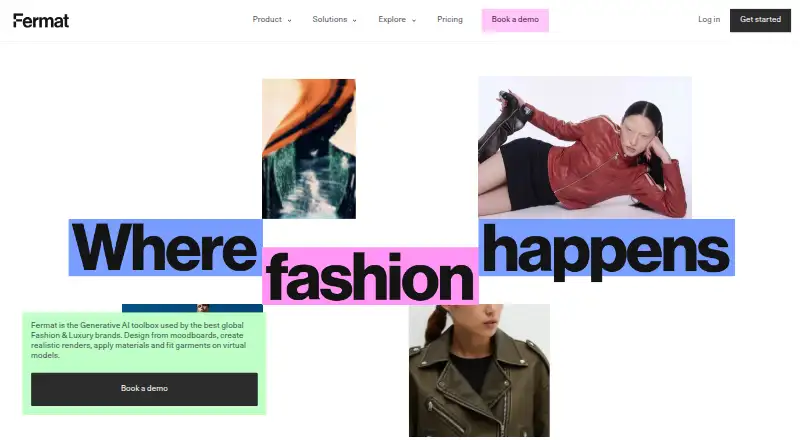
Fermat is a generative AI toolbox for fashion and luxury design work, supporting the process from moodboards to realistic renders, materials, and virtual model fitting. Its toolbox lists more than 40 tools organized by workflow. Designers can turn apparel sketches into photorealistic images, preview designs in fabric before making a sample, and adjust details such as sleeves, hems, necklines, fit, and length without redrawing. Custom Styles uses uploaded visual references to guide image generation, and a no-code editor can package public or private AI models in internal company frontends.
Fermat says customer generations, prompts, references, and uploads are not used to train its own or third-party foundation models, and customers retain intellectual property ownership of generations. Its security information lists SOC 2 certification, including SOC Type I and SOC 2 Type II. The free Starter plan includes 1 credit; an image generation costs 1 credit and a video generation costs 4. Pro costs $30 a month and includes 150 credits per month. Studio costs $250 a month and includes 500 credits per month and team access. Enterprise pricing is by contact and lists API access, batch processing, custom workflows, and SSO.
Good
- More than 40 tools organized by workflow.
- Turns apparel sketches into photorealistic images.
- Custom Styles can use uploaded visual references.
- Customers retain intellectual property ownership of generations.
- Pro includes 150 credits per month.
Watch out
- The free plan includes only 1 credit.
- Video generations cost 4 credits each.
- Enterprise pricing is by contact.
Who it suits
Fermat may suit fashion and luxury designers who want to develop visual concepts from sketches and references. Pro is described for individuals and freelancers, while Studio is aimed at small teams and agencies.
Verdict
Fermat focuses on fashion design workflows, with sketch rendering, design edits, and reference-guided styles. Check the credit limits and plan details against the volume and collaboration features needed.
Plans and prices
From Fermat's own pricing page, checked 2 Oct 2026.
| Plan | Price | What it gives you |
|---|---|---|
| Fermat Starter | Free | 1 credit |
| Fermat Pro (monthly) | $30 a month | 150 credits per month · credits renewed on the 1st · latest AI models and updates · assets library · train image models · full content ownership · commercial license · high resolution export · private generations · per month |
| Fermat Studio (monthly) | $250 a month | 500 credits per month · team access · unlimited users · support (8/5) · includes Fermat Pro features · per month |
| Fermat Pro (annual) | $330 a year | 150 credits per month · buy more credits as you go · latest AI models and updates · assets library · train image models · full content ownership · commercial license · high resolution export · private generations · $330 per year; page also shows $360 |
| Fermat Studio (annual) | $2,700 a year | 500 credits per month · buy more credits as you go · team access · unlimited users · support (8/5) · includes Fermat Pro features · $2700 per year; page also shows $3000 |
| Fermat Enterprise (annual) | Priced on request | Custom monthly credits · white label · customer success manager · custom SLA · SSO · batch processing and API · custom workflows · custom subdomain deployment · Contact us |
| Fermat Enterprise (monthly) | Priced on request | Custom monthly credits · white label · customer success manager · custom SLA · SSO · batch processing and API · custom workflows · custom subdomain deployment · Contact us |
The facts
Each one read from Fermat's own pages, with the date it was checked.
What it does
- API and automation
- The Enterprise plan lists batch processing and API, custom workflows, and custom tools among its features.checked 2 Oct 2026
- Audience
- The pricing page describes Pro as best for individuals and freelancers, and Studio as best for small teams and agencies.checked 2 Oct 2026
- Custom styles
- Custom Styles lets users upload visual references and train AI to generate images matching a chosen style.checked 2 Oct 2026
- Data training
- Fermat says customer generations, prompts, references, and uploads are not used to train its models or third-party foundation models.checked 2 Oct 2026
- Design iteration
- The site says users can modify sleeves, hems, necklines, fit, and length without redrawing.checked 2 Oct 2026
- Enterprise controls
- The company describes SSO, on-premises options, admin control for teams and roles, model opt-outs, and GDPR compliance.checked 2 Oct 2026
- Generation limits
- The pricing FAQ says each image generation costs 1 credit and each video generation costs 4 credits; the free plan includes 1 credit.checked 2 Oct 2026
- No-code editor
- The Tool Editor wraps public or private AI models in internal company frontends using a no-code editor.checked 2 Oct 2026
- Purpose
- Fermat describes itself as a generative AI toolbox for fashion and luxury brands, supporting design from moodboards through realistic renders, materials, and virtual model fitting.checked 2 Oct 2026
- Security certification
- The security page says Fermat is SOC 2 certified and lists SOC Type I and SOC2 Type II.checked 2 Oct 2026
- Sketch rendering
- Fermat says users can turn apparel sketches into photorealistic images and see designs in fabric before making a sample.checked 2 Oct 2026
- Support
- The Studio plan includes support (8/5), and Enterprise includes a customer success manager and custom SLA.checked 2 Oct 2026
- Toolbox
- The AI Toolbox page says it provides 40+ generative AI tools organized by workflow.checked 2 Oct 2026
- Workspace privacy
- Fermat says each brand has an isolated workspace and generated content is private and accessible only to the customer.checked 2 Oct 2026
The company
- Content ownership
- The security page says customers retain full intellectual property ownership of all generations.checked 2 Oct 2026
The full review of Fermat
Fermat is a fashion-focused generative AI workspace for visualizing and refining apparel concepts. It is best suited to designers and fashion teams that need sketch-to-render workflows and controlled brand imagery. Its focused tools and privacy controls make it compelling for that work, but the free tier’s single credit is only a brief sample.
Overview
Fermat groups more than 40 generative AI tools by workflow, aiming to support fashion and luxury design from visual direction through realistic renders, materials, and virtual model fitting. The specialization is its clearest advantage over a general-purpose image tool: apparel sketches and garment edits are central use cases, rather than incidental prompts. That focus is valuable when developing concepts, but ongoing experimentation depends on a paid credit allowance.
Key features
- Sketch rendering: Convert apparel sketches into photorealistic images and preview designs in fabric before making a sample. That makes Fermat useful at the concept stage, when a visual can inform decisions before physical production.
- Design iteration: Modify sleeves, hems, necklines, fit, and length without redrawing. This targets repetitive design changes directly, although each image generation uses a credit.
- Custom styles: Upload visual references and train image models to generate in a chosen style. This is a practical advantage for teams seeking a more consistent visual direction.
- No-code editor: The Tool Editor lets companies wrap public or private AI models in internal frontends without code. It is aimed at organizations shaping tools around their workflows, not just individual designers generating images.
- Privacy and controls: Fermat says customer prompts, uploads, references, and generations are not used to train its or third-party foundation models. It also describes isolated brand workspaces, private generated content, customer ownership of generations, SOC 2 certification, GDPR compliance, SSO, model opt-outs, and on-premises options. These provisions make the product more relevant to brands with confidentiality requirements.
Pricing
Fermat has a free plan and a free trial, but the free Starter plan includes just 1 credit. Each image generation costs 1 credit and each video generation costs 4, so Starter is a minimal way to sample the workflow, not a workable ongoing allowance.
- Pro monthly: $30 a month, billed monthly, for 150 credits per month, latest AI models and updates, an assets library, image-model training, full content ownership, commercial licensing, high-resolution export, and private generations. Fermat describes Pro as best for individuals and freelancers. It is the entry paid option for regular solo use, but video generations draw down the allowance four times as quickly as images.
- Pro annual: $330 a year, billed yearly; the page also shows $360. It includes the same Pro features and 150 credits per month, with the option to buy more credits as needed. This suits an individual who expects to use Fermat throughout the year; the displayed $360 alongside the annual charge makes the stated annual saving unclear.
- Studio monthly: $250 a month, billed monthly, for 500 credits per month, team access, unlimited users, 8/5 support, and Pro features. Fermat positions it for small teams and agencies. Its shared team access and support distinguish it from Pro, though the monthly price is a substantial step up.
- Studio annual: $2,700 a year, billed yearly; the page also shows $3000. It includes 500 credits per month, buy-as-needed additional credits, unlimited users, team access, 8/5 support, and Pro features. It fits teams committing for a year, but the second displayed figure makes the apparent saving unclear.
- Enterprise: Custom pricing, monthly or annual, with custom monthly credits, white label, a customer success manager, custom SLA, SSO, batch processing and API, custom workflows, and custom subdomain deployment. This is the relevant tier for organizations needing those controls and integration options; it is not a fixed-price alternative to the self-serve plans.
Credits renew on the 1st for the monthly Pro plan. API access is available, while Enterprise specifies batch processing and API among its features.
Platforms
Fermat is available on web and through an API. That combination serves browser-based design work and integration needs, but does not provide a native desktop or mobile platform in the stated lineup.
Who it's for
Fermat is a strong fit for fashion designers, freelancers, small agencies, and brands that want to visualize apparel, iterate garment details, or maintain private, reference-guided image workflows. Pro is the clearest fit for solo users; Studio makes more sense when a team needs shared access and support. Organizations requiring enterprise controls or custom processing can consider Enterprise. It is less suitable for occasional users who need more than a one-credit preview without taking on a paid plan, or for buyers seeking a broad image tool rather than a fashion-specific workflow.
Pros and cons
- Pro: Apparel sketch rendering and targeted garment edits address concrete fashion-design tasks before sampling.
- Pro: Reference-trained styles, private workspaces, and stated ownership protections support brand-conscious visual work.
- Pro: Studio offers unlimited users and 8/5 support, while Enterprise adds API processing and organizational controls.
- Con: The free plan’s 1 credit covers only one image generation or a fraction of a video generation, so it cannot support sustained exploration.
- Con: Pro and Studio have bounded monthly credits; video costs four credits per generation, which can constrain teams producing video-heavy work.
- Con: The annual plans show both a billed amount and a different comparison figure, making the displayed savings less straightforward to interpret.
Alternatives
For other sketch-to-image options, browse AI Sketch-to-Image Generators.
- Vizcom is worth considering for a free option with 800 credits and basic AI creation tools, plus macOS and Windows support alongside web.
- Gendo may suit users who prioritize its free plan’s unlimited generations, though it limits that tier to one active canvas, one collaborator, and watermarked output.
- FLORA Fashion Studio is another fashion-focused choice; its free tier includes one seat, three active projects, and up to 17 free generations.
- LookX AI offers a free 100-image Basic plan and a 20.00 USD monthly subscription, making it a lower-cost option to consider for image generation.
- Raspberry AI Prints & Patterns is an alternative for prints and patterns, with 50 one-time free credits and an Individual plan at $49 a month.
- Spacely AI is a freemium alternative with a free plan that includes 40 trial credits, private mode, and a commercial license.
- Fashion Diffusion may appeal to users seeking broader platform coverage, including mobile, and a Starter plan at $12 a month with 100 monthly credits.
- Neolocus AI has a free plan with 30 credits and a one-time Starter plan at 18.00 USD for 200 credits.
Verdict
Choose Fermat if fashion-specific sketch rendering, garment iteration, and private brand workflows matter more than an expansive free allowance. Its Pro plan is the natural starting point for individuals, while Studio and Enterprise address teams with higher usage or control needs. Look elsewhere if a single free credit is too restrictive or if your work does not benefit from Fermat’s fashion focus.
Getting started
- Visit https://www.fermat.app/.
- Use the web service or API access.
- Start with Fermat Starter, which includes 1 credit.
- Choose Pro at $30 a month for 150 credits per month, or Studio at $250 a month for 500 credits per month and team access.
- Contact Fermat for Enterprise plan pricing and setup details.
Limits worth knowing
Starter includes 1 credit; each image generation costs 1 credit and each video generation costs 4 credits. Pro includes 150 credits per month, and Studio includes 500 credits per month. Enterprise monthly credit amounts are custom.
Questions
Is there a free plan?
Yes. Fermat Starter costs nothing and includes 1 credit.
How much do the paid plans cost?
Pro costs $30 a month, and Studio costs $250 a month. Annual Pro is $330 a year and annual Studio is $2,700 a year; the annual plan listings also show $360 and $3000, respectively.
How are credits used?
Each image generation costs 1 credit and each video generation costs 4 credits. Starter includes 1 credit; Pro includes 150 per month and Studio includes 500 per month.
Which platforms are supported?
Fermat lists web and API access.
Does Fermat provide API access?
Yes. API access is listed, and Enterprise includes batch processing and API among its features.
What does Fermat say about customer content?
Fermat says customer generations, prompts, references, and uploads are not used to train its models or third-party foundation models. It also says customers retain full intellectual property ownership of generations.
Alternatives to Fermat
- 1

Fashion Diffusion
AndroidiOSWebAPI7.7From $119.99 a year - 2

Vizcom
Free planWebmacOSWindows7.7From $49 a month - 3
Neolocus AI
Free planAndroidWeb7.5From $39 a month - 4
Gendo
Free planWeb7.4From £79 a month - 5

Raspberry AI Prints & Patterns
Free planWebAPI7.4From $49 a month - 6
FLORA Fashion Studio
Free planWebAPI7.3From $18 a month