
GuardTrac
GuardTrac is a security guard management platform for tracking guards, scheduling shifts, billing, and reporting.
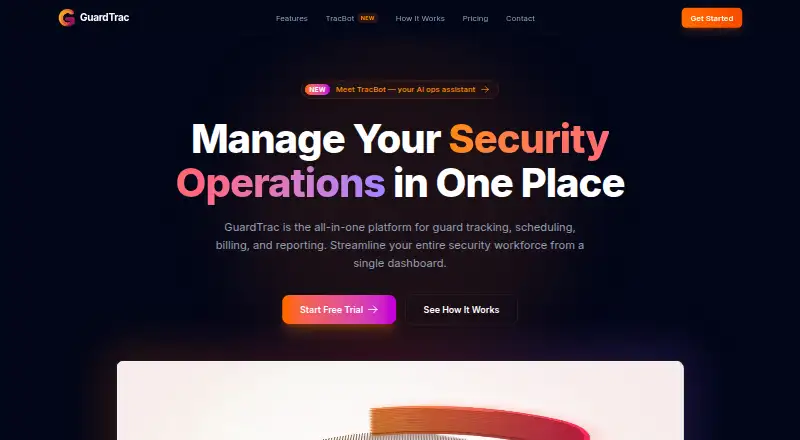
What GuardTrac is
GuardTrac is a security guard management platform for tracking guards, scheduling shifts, billing, and reporting. GPS tracking and geofencing show guard locations and patrol routes in real time. Scheduling tools automate shift assignments and help address conflicts, while QR code checkpoints let teams verify patrol completion. The iOS and Android app supports clocking in and out, checkpoint scans, incident reports, and communication with dispatch. TracBot answers plain-English questions using a customer’s guards, sites, shifts, and reports. GuardTrac says its web maps use Mapbox. The Free plan costs nothing and includes live guard tracking, shift management, basic reporting, and a client dashboard, but is limited to 5 users and 1 client location. The site advertises a 30-day free trial with no credit card required. Its privacy policy says precise location can be collected in the foreground and background while a guard is clocked into an active shift, and that collection pauses when the shift ends. GuardTrac says it does not sell or share personal information as defined by CCPA/CPRA.
Good
- GPS and geofencing track locations and patrol routes in real time.
- QR checkpoints help verify patrol completion.
- Mobile app supports timekeeping, incident reports, and dispatch communication.
- 30-day trial requires no credit card to start.
Watch out
- Free plan is limited to 5 users.
- Free plan covers 1 client location.
- Precise location collection continues in the background during active clocked-in shifts.
Who it suits
GuardTrac suits security teams that need to manage guard schedules, track patrols, and collect incident reports. Its mobile app supports guards working on iOS or Android, while managers can use its web interface.
Verdict
GuardTrac combines shift management, live location tracking, patrol checkpoints, and mobile reporting. The free plan is limited to one location and five users, while Pro costs from $5 (priced on request).
Plans and prices
From GuardTrac's own pricing page, checked 29 Sep 2026.
| Plan | Price | What it gives you |
|---|---|---|
| Free | Free | Up to 5 users · 1 client location · Basic reporting · Live guard tracking · Client dashboard · Shift management |
| Pro | Priced on request | Unlimited client locations · TracBot AI assistant · In-app messaging · HR & Payroll module · Custom report templates · Priority support · Early access to new features |
| Enterprise | Priced on request | Everything in Pro · Unlimited guards · Unlimited client locations · Dedicated account representative · Priority feature requests |
The facts
Each one read from GuardTrac's own pages, with the date it was checked.
What it does
- Checkpoint tours
- Teams can set up QR code checkpoints and verify patrol completion.checked 29 Sep 2026
- GPS tracking
- It monitors guard locations and patrol routes in real time using GPS tracking and geofencing.checked 29 Sep 2026
- Integration
- GuardTrac says its web interface uses Mapbox for maps and geospatial visualization.checked 29 Sep 2026
- Location data
- The policy says precise location may be collected in the foreground and background while a guard is clocked into an active shift, and collection pauses when the shift ends.checked 29 Sep 2026
- Privacy
- GuardTrac says it does not sell or share personal information as defined by CCPA/CPRA.checked 29 Sep 2026
- Product
- GuardTrac is a security guard management platform for tracking guards, scheduling shifts, billing, and reporting.checked 29 Sep 2026
- Scheduling
- Its scheduling tools automate shift assignments and help resolve scheduling conflicts.checked 29 Sep 2026
- Security
- Its privacy policy lists encryption in transit and at rest, security assessments, access controls, staff training, and secure hosting among its data-protection measures.checked 29 Sep 2026
- TracBot AI
- TracBot answers plain-English questions using a customer's guards, sites, shifts, and reports.checked 29 Sep 2026
Money
- Free plan limit
- The Free plan is limited to 5 users and 1 client location.checked 29 Sep 2026
- Trial
- The site advertises a 30-day free trial and says no credit card is required to start.checked 29 Sep 2026
Where it runs
- Mobile app
- The mobile app supports clock in and out, checkpoint scans, incident reports, and communication with dispatch, and is listed as available on iOS and Android.checked 29 Sep 2026
The full review of GuardTrac
Overview
GuardTrac brings guard scheduling, patrol oversight, and reporting into one platform for security teams managing client sites. It suits operators who need both live location visibility and proof of patrol completion; the key trade-offs are a small free-tier cap and location collection during active shifts.
GPS tracking and geofencing show guard locations and routes in real time, while QR checkpoints help verify patrols. Scheduling tools automate assignments and address conflicts, and the mobile app handles clock-ins, incident reports, checkpoint scans, and communication with dispatch. This breadth is useful for coordinating daily operations, though teams seeking only checkpoint logging may not need its wider management scope.
TracBot AI answers plain-English questions using customer guard, site, shift, and report data. GuardTrac says it does not sell or share personal information as defined by CCPA/CPRA; its stated safeguards include encryption in transit and at rest, access controls, security assessments, staff training, and secure hosting. Precise location may be collected in the foreground and background while a guard is clocked into an active shift, and collection pauses when the shift ends.
Key features
Tracking and patrol verification
Live GPS and geofencing give supervisors visibility into locations and patrol routes, while QR checkpoint scans provide a way to confirm that patrols were completed. This combination is stronger for accountability than a location view alone, but it depends on guards using the mobile workflow.
Scheduling and field work
Automated shift assignments and conflict resolution can reduce coordination work for managers. Guards can clock in and out, file incident reports, scan checkpoints, and contact dispatch from the mobile app, supporting a connected field workflow rather than a separate patrol-only tool.
Reporting and AI
GuardTrac includes reporting and billing capabilities, client reporting, and a client dashboard on the Free plan. TracBot can answer questions based on guards, sites, shifts, and reports; it is included with Pro rather than Free. The web interface uses Mapbox for maps and geospatial visualization.
Pricing
GuardTrac has a free plan and advertises a 30-day free trial with no credit card required to start. The Free plan costs nothing and supports up to 5 users and 1 client location, with basic reporting, live guard tracking, a client dashboard, and shift management. It is a reasonable starting point for a small single-location team, but the five-user and one-location caps quickly rule it out for growing operations.
Pro costs from $5 (priced on request). It adds unlimited client locations, TracBot AI, in-app messaging, the HR & Payroll module, custom report templates, priority support, and early access to new features. The additional locations and management tools make it the more practical fit for teams operating across sites; the listed price is per contact, so teams should confirm how their contacts are counted before budgeting.
Enterprise has custom pricing and includes everything in Pro, unlimited guards and client locations, a dedicated account representative, and priority feature requests. It is aimed at larger operations that need those scale and account-support provisions. The free plan gives up Pro additions such as AI, messaging, HR and payroll, custom report templates, and priority support.
Platforms
GuardTrac is available on web, Android, and iOS. The mobile app is the guard-facing route for clocking, checkpoint scans, incident reporting, and dispatch communication, while the web interface provides maps and geospatial visualization.
Who it's for
GuardTrac is a good fit for security firms that coordinate shifts and patrols across client sites and want location visibility, checkpoint verification, and reporting in one system. Small teams can start with Free if one location and five users are enough. Teams with more sites or a need for TracBot, messaging, or HR and payroll will need Pro, while larger organizations may find Enterprise's unlimited guard and location scope more suitable.
It is less compelling for a team that only needs checkpoint verification, or for an organization unwilling to collect precise location during active shifts. The policy's shift-based collection boundary is clear, but location monitoring remains a material consideration for guards and employers.
Pros and cons
- Pros: GPS tracking, geofencing, QR checkpoint verification, scheduling, timekeeping, incident reporting, and client reporting cover several operational needs in one platform.
- Pros: The Free plan includes live tracking, shift management, basic reporting, and a client dashboard, giving a small team a usable starting point.
- Pros: The stated privacy safeguards include encryption, access controls, assessments, staff training, and secure hosting, and precise location collection pauses when shifts end.
- Cons: Free is capped at five users and one client location, limiting its usefulness once a team grows or adds sites.
- Cons: TracBot AI, in-app messaging, HR and payroll, custom report templates, and priority support require Pro.
- Cons: Active-shift location collection includes precise location in the foreground and background, which may not suit privacy-sensitive teams.
Alternatives
For a broader comparison, browse Security Guard Software. Choose guardtour.app instead if a focused checkpoint tool is enough: its free plan supports five checkpoints, unlimited controllers, one site, 30-day history, QR and NFC verification, and iOS and Android apps. GuardsPro is another option, with a paid model, a free trial, and plans including visitor-management and vehicle-patrol offerings.
GuardConnect offers a free plan for 1 to 10 officers and may suit teams looking for a free guard-management option. Security Guard App has a free-forever plan for a single user, with check-in/out, post sites, reporting, multimedia attachments, teams, and profiles, making it a fit when that single-user scope matches the need. Guardix is a paid alternative with a free trial and a Starter plan at $8.99 a month, billed at $8.99 per user, per month, with annual billing savings and support for up to 50 guards.
Guard Patrol Pro is another option for teams considering web, iOS, and Android software. QR-Patrol is a paid alternative with a free trial and a Base plan from $3.20 a month per guard, with annual billing available and guard-count tiers. SNTNL is a web-based paid alternative.
Verdict
GuardTrac is a strong choice for security teams that want shift coordination, real-time guard tracking, checkpoint verification, and reporting under one roof. Its free plan offers a credible entry point for a single site with no more than five users, while Pro expands the service for multi-location operations. Look elsewhere if checkpoint logging alone is the goal, or if active-shift location monitoring is not acceptable for your team.
Getting started
- Open the GuardTrac website
- Start the Free plan or the 30-day trial
- Use the web interface or install the iOS or Android mobile app
- Add users and client locations
- Create shifts and configure QR code checkpoints
- Have guards clock in, scan checkpoints, and submit reports
Limits worth knowing
The Free plan is limited to 5 users and 1 client location, with basic reporting, live guard tracking, a client dashboard, and shift management.
Questions
Is there a free GuardTrac plan?
Yes. The Free plan is listed as free and supports up to 5 users and 1 client location.
Is a trial available?
Yes. GuardTrac advertises a 30-day free trial and says no credit card is required to start.
Which platforms are supported?
GuardTrac is available on Android, iOS, and the web.
What does the mobile app do?
The app supports clocking in and out, checkpoint scans, incident reports, and communication with dispatch.
Does GuardTrac collect precise location?
Its policy says precise location may be collected in the foreground and background while a guard is clocked into an active shift, with collection pausing when the shift ends.
Alternatives to GuardTrac
- 1
Guard Patrol Pro
Free planAndroidiOSWebAPI7.9From $15 a month - 2
guardtour.app
Free planAndroidiOSWebAPI7.8From $29 a month - 3
Patrolr.AI
AndroidiOSWeb7.4From $29 a month - 4

GuardConnect
Free planAndroidiOSWeb7.3Free plan - 5
Security Guard App
Free planAndroidiOSWebmacOS7.2From $5 a month - 6
ActivitySuite
AndroidiOSWebSelf-hosted6.9From $99 a month