
GOV.UK Design System
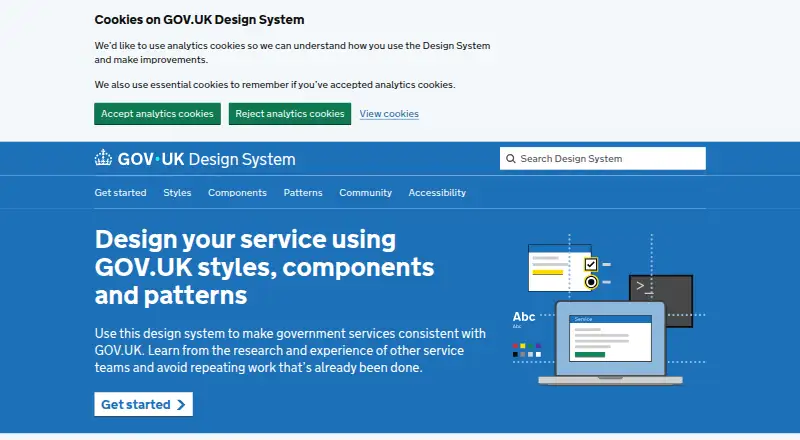
The GOV.UK Design System helps government teams create services with consistent styles, reusable components, and patterns for user-focused tasks.
What GOV.UK Design System is
The GOV.UK Design System helps government teams create services with consistent styles, reusable components, and patterns for user-focused tasks. Its guidance covers page structure, typography, colour, and images. Components come with instructions and coded examples, while patterns set out design approaches for particular tasks and page types. Teams can add GOV.UK Frontend to a project using npm or by including compiled files. Production components can be used as HTML or, in Node.js applications with GOV.UK Frontend installed through npm, as Nunjucks macros. Prototyping requires GOV.UK Prototype Kit version 7 or later. The code is publicly available under the MIT License at no cost. The system aims for WCAG level AA, but adopting it alone does not make a service accessible; the team checks component accessibility using tools, automated deployment tests, and manual testing. Published guidance includes information about user-research testing. The system is aimed particularly at central UK government services, and its team cautions that support may be less reliable in other contexts.
Good
- Public code is available under the MIT License.
- Components include guidance and coded examples.
- Published guidance explains user-research testing.
- Accessibility checks include automated and manual methods.
Watch out
- Using the system alone does not ensure accessibility.
- Compiled files do not allow selective component assets.
- Support may be limited outside central UK government services.
- Prototyping requires Prototype Kit version 7 or later.
Who it suits
It is intended for people building government services, especially teams working on central UK government digital services. Teams outside that context may not receive reliable guidance from its support channels.
Verdict
The Design System provides free, reusable guidance and code for government-service interfaces. Teams still need to assess accessibility themselves, and compiled-file users have less control over included assets.
Plans and prices
From GOV.UK Design System's own pricing page, checked 4 Oct 2026.
| Plan | Price | What it gives you |
|---|---|---|
| GOV.UK Design System | Free | Publicly available code · MIT license |
The facts
Each one read from GOV.UK Design System's own pages, with the date it was checked.
What it does
- Accessibility
- The team describes accessibility work as continuous and iterative, and says using the system alone does not make a service accessible.checked 4 Oct 2026
- Accessibility testing
- The team tests component accessibility with a mix of tools, automated deployment tests and manual testing.checked 3 Oct 2026
- Audience
- The team says the Design System is intended for people working on government services, with a focus on central UK government digital services.checked 3 Oct 2026
- Community
- People can contribute through discussions, events, co-design collaborations, research and component or pattern development.checked 3 Oct 2026
- Components
- It provides reusable interface components with usage guidance and coded examples.checked 4 Oct 2026
- Installation
- For production projects, GOV.UK Frontend can be installed with npm or used by including compiled stylesheets, JavaScript and asset files.checked 4 Oct 2026
- Integration
- Components can be used as HTML or as Nunjucks macros when GOV.UK Frontend is installed with npm and the application uses Node.js.checked 4 Oct 2026
- License
- The system's code is public and freely available under the MIT license.checked 4 Oct 2026
- Limit
- Using compiled files includes all GOV.UK Frontend CSS and JavaScript but does not support selectively including component CSS or JavaScript or customizing the build.checked 3 Oct 2026
- Patterns
- Its patterns offer design solutions for specific user-focused tasks and page types, with written guidance and coded examples where possible.checked 4 Oct 2026
- Prototype Kit
- Prototyping with the system requires GOV.UK Prototype Kit version 7 or later.checked 4 Oct 2026
- Purpose
- The system helps teams make government services consistent with GOV.UK and learn from research and experience across service teams.checked 4 Oct 2026
- Research
- Published styles, components and patterns include details of how and when they were tested in user research.checked 4 Oct 2026
- Styles
- It provides guidance for applying GOV.UK layout, typography, colour and images.checked 4 Oct 2026
- Support
- The team focuses support on central UK government digital services and says it cannot reliably provide guidance for different contexts.checked 4 Oct 2026
- Support channels
- Central UK government service teams can contact the team through cross-government Slack, email, GitHub issues and community discussions.checked 4 Oct 2026
- Templates
- Production components can be used as HTML or as Nunjucks macros when GOV.UK Frontend is installed with npm and the application uses Node.js.checked 3 Oct 2026
The company
- Maker
- The GOV.UK Design System at the Government Digital Service maintains the system.checked 4 Oct 2026
The full review of GOV.UK Design System
GOV.UK Design System is a set of design guidance, reusable interface components and task-focused patterns for building government services. It is best suited to teams working on central UK government digital services. The code is free and commercially usable, but adoption still requires service-specific accessibility work and a suitable integration route.
Overview
The system brings visual guidance and coded examples together with patterns for particular user tasks and page types. Its published research notes explain how and when styles, components and patterns were tested with users, helping teams judge their relevance rather than treating a recommended approach as universal.
The code is publicly available under the MIT License, including for commercial use. The team aims for WCAG level AA and tests component accessibility with tools, automated deployment checks and manual testing. Those measures provide a useful starting point, not an accessibility guarantee for the finished service.
Key features
Styles, components and patterns
Guidance covers page structure, typography, colour and imagery; reusable components come with implementation examples, and patterns address specific tasks and page types. Together they give teams a coherent service-design foundation. They are less suited to projects that need a design language unrelated to GOV.UK or components tailored to a different product context.
Integration and implementation
Production teams can install GOV.UK Frontend with npm or include its compiled stylesheets, JavaScript and assets. With the npm installation, a Node.js application can use production components as HTML or Nunjucks macros. The compiled-file route is simpler to include, but brings all GOV.UK Frontend CSS and JavaScript: teams cannot select only particular component assets or customize the build.
Prototyping requires GOV.UK Prototype Kit version 7 or later. That requirement matters for teams maintaining older prototype setups.
Accessibility and support
The team tests component accessibility, but explicitly cautions that using the system alone does not make a service accessible. Teams need to assess their own service and implementation. Support is focused on central UK government digital services, with contact through cross-government Slack, email, GitHub issues and community discussions; teams in other contexts may not get reliable guidance. Contributions can also take the form of discussions, events, co-design, research, or component and pattern development.
Pricing
GOV.UK Design System: free. The public code is MIT-licensed, so there is no paid tier or trial to weigh against a restricted free edition. Its core trade-offs are technical rather than price-based: compiled-file users give up selective asset inclusion and build customization, while npm users need a Node.js application to use the production HTML and Nunjucks macro options.
Platforms
The system is self-hosted and web-based. Teams integrate GOV.UK Frontend into their own project rather than relying on a separate hosted service.
Who it's for
This is the clearest fit for people building government services, particularly central UK government digital teams that can use GOV.UK Frontend and work within its implementation model. Teams outside that focus can still use the public code, but should not assume the support remit will match their needs. It is a weaker choice when a project needs selective compiled assets, a customizable compiled build, or an accessibility solution that removes the need for service-level assessment.
Pros and cons
- Pros: Free MIT-licensed code can be used commercially, avoiding a licence fee for teams adopting the system.
- Pros: Styles, reusable components, patterns and research context give service teams a consistent starting point grounded in user-focused work.
- Pros: Accessibility testing combines automated and manual methods, providing more than guidance alone.
- Cons: Compiled-file adoption includes all Frontend CSS and JavaScript, so teams cannot trim component assets or customize the build through that route.
- Cons: The team does not guarantee that adopting the system makes a service accessible; the implementing team retains that responsibility.
- Cons: Support is centered on central UK government services, which may leave other organizations without dependable guidance.
Alternatives
For a broader set of UI kit options, browse UI Kit Libraries.
- Figma Wireframe Kit suits readers seeking a free kit for Figma products, with unlimited drafts and platforms spanning mobile, desktop, web and extension.
- Ant Design Icons is a better fit when the need is a free, MIT-licensed icon package, with npm options for Vanilla, React, React Native, Angular and Vue.
- Untitled UI is worth considering for web projects that want open-source React components with commercial use, or a separate free single-user Figma tier.
- Carbon Design System is another free, open-source web design system for anyone to use and contribute to.
- Shadcn Studio Figma UI Kit offers a free community tier with limited resources and community support, alongside a one-time paid Basic plan.
- Singapore Government Design System is an alternative government design system with web and API platforms.
- Adobe Spectrum is a free option for readers looking across mobile, desktop and web platforms.
- Material Design for Bootstrap offers a free MIT-licensed core for personal and commercial use, with a paid Team plan for additional components and resources.
Verdict
Choose GOV.UK Design System if you are building a government service and want a free, commercially usable foundation of styles, tested guidance, components and task patterns. Its main advantage is that coherent toolkit; look elsewhere if you need a different design context, dependable support outside central UK government, or finer control over compiled assets. In every case, plan to assess accessibility in the service you build.
Alternatives to GOV.UK Design System
- 1

Ant Design Icons
Free planAndroidiOSWeb7.1Free plan - 2
Avalonia
Free planAndroidiOSWebLinux7.0From €299 a year - 3

Ionic Framework
Free planAndroidiOSWeb6.8Free plan - 4

Carbon Design System
Free planWeb6.6Free plan - 5

Bootstrap Icons
Free planWeb6.1Free plan - 6

Framework7 Icons
Free planWeb6.0Free plan