Figma Wireframe Kit
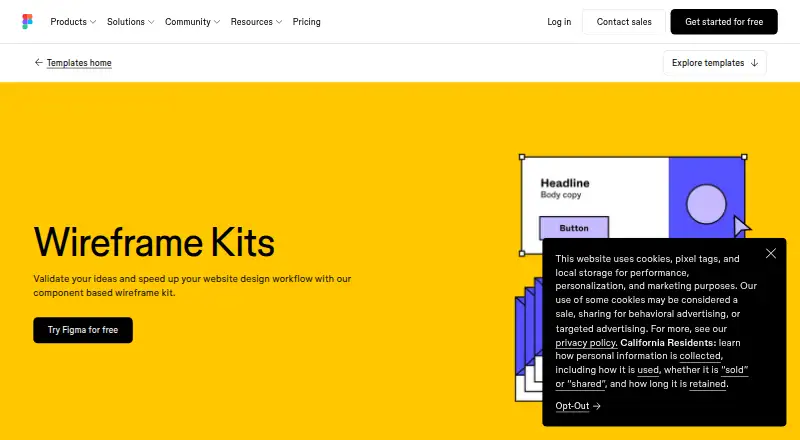
Figma Wireframe Kit is a browser-based set of components for validating ideas and speeding up website design.
What Figma Wireframe Kit is
Figma Wireframe Kit is a browser-based set of components for validating ideas and speeding up website design. Users can drag and drop ready-made elements, including navigation bars, features, headers, and buttons, to create website wireframes and mockups. The kit can also be used for mobile app wireframes. Users can turn designs into interactive, clickable prototypes without code, while comments stay with the design files for contextual feedback. Files can be shared by link and opened in a browser for collaboration. The templates run in the browser and do not require another software download. Figma lists integrations with Slack, Google Workspace, Microsoft Teams, Jira, Confluence, Zapier, and Notion. The Starter plan costs nothing and includes limited access to Figma products, unlimited drafts, UI kits, and templates. The listed platforms include Android, iOS, macOS, web, and Windows.
Good
- Drag-and-drop website components are included.
- Can create clickable prototypes without code.
- Comments stay with design files.
- Browser-based templates need no additional software download.
Watch out
- Starter plan has limited access to Figma products.
- The kit's primary asset format is Figma.
Who it suits
Figma Wireframe Kit suits people planning website or mobile app layouts, including people who are not designers. It may also help collaborators who want to review prototypes and leave comments alongside design files.
Verdict
Figma Wireframe Kit provides browser-based components for wireframes and clickable prototypes. It is a practical fit for early layout work and shared feedback, with a Starter plan that has limited product access.
Plans and prices
From Figma Wireframe Kit's own pricing page, checked 15 Oct 2026.
| Plan | Price | What it gives you |
|---|---|---|
| Starter | Free | Unlimited drafts · UI kits and templates · 150 AI credits/day, up to 500 AI credits/month |
| Professional Collab seat | $3 a month | 500 AI credits/month · Collaboration access · monthly |
| Enterprise Collab seat | $5 a month | 500 AI credits/month · Collaboration access · annually |
| Organization Collab seat | $5 a month | 500 AI credits/month · Collaboration access · annually |
| Professional Dev seat | $12 a month | 500 AI credits/month · Advanced Dev Mode inspection and MCP Server · monthly |
| Professional Full seat | $16 a month | Unlimited files and projects · Team-wide design libraries · 3,000 AI credits/month · monthly |
| Organization Dev seat | $25 a month | 500 AI credits/month · Developer access · annually |
| Enterprise Dev seat | $35 a month | 500 AI credits/month · Developer access · annually |
| Organization Full seat | $55 a month | 3,500 AI credits/month · Publish resources across teams · Shared libraries and fonts · Centralized admin tools · annually |
| Enterprise Full seat | $90 a month | 4,250 AI credits/month · Custom team workspaces · Design system theming and APIs · SCIM seat management · annually |
The facts
Each one read from Figma Wireframe Kit's own pages, with the date it was checked.
Where it runs
- Browser operation
- The wireframe kit runs in the browser with no installation required, and files can be shared by link.checked 15 Oct 2026
- Limit: mobile app bugs
- App Store reviewers report black screens, slow loading, large-file problems and limited editing on mobile.checked 15 Oct 2026
What it does
- Chrome extension
- Figma lists a Chrome extension among its additional downloads.checked 15 Oct 2026
- Clickable prototypes
- Users can add interactivity and turn wireframes into clickable prototypes without writing code.checked 15 Oct 2026
- Collaboration
- Files can be shared with anyone by link and opened in a browser for collaboration.checked 4 Oct 2026
- Desktop downloads
- Official downloads include desktop applications for macOS, Windows and Windows ARM.checked 15 Oct 2026
- Developer APIs
- Figma provides Plugin APIs, Widget APIs, a REST API, an Embed kit and a SCIM API for account provisioning.checked 15 Oct 2026
- Developer documentation
- The developer site provides API documentation, guides, references, plugin and widget samples, GitHub repositories, video tutorials, Discord and community forums.checked 15 Oct 2026
- Feedback
- Comments attached to prototypes stay with the design files so feedback retains its context.checked 15 Oct 2026
- Installation
- The wireframe templates run in the browser and do not require additional software downloads.checked 4 Oct 2026
- Integrations
- The official integration help center lists Zoom, Google Meet, Microsoft Teams, Slack, Google Chat, Jira, Asana, UserTesting, Maze, Mixpanel and other integrations.checked 15 Oct 2026
- Intended users
- Figma describes its wireframing software as approachable for people who are not designers.checked 4 Oct 2026
- Legal name
- Figma’s terms identify the contracting company as Figma, Inc.checked 15 Oct 2026
- Licence
- Figma’s terms grant limited, non-exclusive access rights and prohibit reverse engineering, copying, modification and redistribution, indicating a proprietary service rather than open-source software.checked 15 Oct 2026
- Limit: illustration and print
- Creative Bloq says Figma lacks CMYK support and is less capable than Illustrator for complex vector illustration.checked 15 Oct 2026
- Limit: integrations and prototyping
- TrustRadius reviewers report that integrations are limited and ask for stronger prototyping interactivity, including form fields.checked 15 Oct 2026
- Limit: occasional lag
- TechRadar lists laggy or unresponsive behavior as a reason to avoid Figma at times.checked 15 Oct 2026
- Limit: performance and navigation
- TrustRadius reviewers report lag with complex files and say file browsing and search can be unintuitive.checked 15 Oct 2026
- Limit: pricing
- TrustRadius reviewers say pricing can restrict collaboration for larger teams.checked 15 Oct 2026
- Mobile downloads
- Official downloads include Figma apps for iOS/iPad and Android, plus separate government mobile apps.checked 15 Oct 2026
- Mobile use
- Figma presents the kit for wireframing mobile apps as well as websites.checked 4 Oct 2026
- Mobile wireframing
- Figma supports wireframing mobile applications as well as websites.checked 15 Oct 2026
The company
- Company
- Figma says it was founded in 2012 and is headquartered in San Francisco.checked 4 Oct 2026
- Company profile
- LinkedIn lists Figma as a privately held San Francisco company founded in 2012 with 1,001–5,000 employees.checked 15 Oct 2026
The full review of Figma Wireframe Kit
Figma Wireframe Kit is a browser-based set of reusable interface components for sketching website and mobile app layouts. It is best for non-designers and teams aligning on an early concept. Its drag-and-drop elements and clickable prototypes make ideas easier to review, though the free Starter plan limits access to Figma products.
Overview
The kit helps turn a rough idea into a wireframe or mockup without building each common element from scratch. Navigation bars, headers, feature sections and buttons provide useful starting points, but this is a tool for shaping and validating layouts, not a finished website or app.
Files can be shared by link and opened in a browser, which lowers the friction of gathering feedback. Comments stay with the design files, keeping discussion tied to the relevant work. Clickable prototypes add a way to communicate flow without code; they do not determine how a product will be implemented.
Key features
- Ready-made components: Reusable interface pieces speed up early layout work, especially for people who would rather arrange familiar elements than draw them from scratch.
- Website and mobile wireframes: The kit covers both kinds of layouts, making it useful when a team is considering more than one screen context.
- Clickable prototypes: Connecting wireframes into interactive prototypes helps reviewers follow a proposed flow before detailed design or development.
- Shared files and contextual comments: Browser collaboration and comments attached to design files keep feedback close to the work.
- Integrations: Figma lists Slack, Google Workspace, Microsoft Teams, Jira, Confluence, Zapier and Notion, giving teams several established collaboration and work-management options.
Pricing
The pricing model is free. The Starter plan costs nothing and includes unlimited drafts, UI kits and templates, but only limited access to Figma products. That cap is the main trade-off: it suits someone exploring wireframes or working within the included access, but may be restrictive for users who need broader use of Figma products.
No paid plan is described, so there is no stated upgrade price or trial term to weigh. The plan is free, but its product-access limit matters more than the price for anyone considering it as a regular part of a wider design workflow.
Platforms
Figma lists Android, iOS, macOS, Windows, web and extension as platforms. The wireframe templates run in a browser and require no additional software download, making browser access the clearest starting point. The primary asset format is Figma.
Who it's for
This kit is a sensible fit for non-designers, product teams and collaborators who need to outline a website or mobile app and discuss the idea before committing to detailed design. It is less suitable for someone seeking a complete build tool or whose work requires access beyond Starter's limited Figma products.
Organizations with formal security requirements may value Figma's stated SOC 2 Type 2 and SOC 3 reports, along with ISO/IEC 27001:2022 and ISO/IEC 27018:2019 certifications. Product or account support is directed through Figma's Support Hub.
Pros and cons
- Pro: Prebuilt components make it quicker to assemble common layout structures than starting from an empty canvas.
- Pro: Clickable prototypes and file-linked comments support useful early feedback without code.
- Pro: Browser-based access and link sharing make review possible without asking collaborators to install additional software.
- Con: Starter's limited access to Figma products can constrain users who need a broader product workflow.
- Con: Wireframes and prototypes help validate a concept, but do not replace implementation of the finished product.
Alternatives
For a broader set of choices in this category, browse UI Kit Libraries.
- Untitled UI is worth considering when its free React components or single-user Figma option better fit the work.
- Carbon Design System is an open-source, free option for anyone to use and contribute to.
- GOV.UK Design System may suit projects that want publicly available code under an MIT license.
- Shadcn Studio Figma UI Kit offers a free community tier with limited resources and community support, plus a 99.00 USD one-time Basic plan for a single user and unlimited projects.
- Adobe Spectrum is another free option, with Android, iOS, macOS, web and Windows platforms.
- Material Design for Bootstrap has a free MIT-licensed Core plan for personal and commercial use, and a Team plan with unlimited projects and PRO components, design blocks, plugins and templates.
- UI Prep Design System offers a free demo with fewer components, variables and styles, while allowing unlimited editors and projects.
- Clarity Design System is a free, MIT-licensed open-source option with no paid tiers stated.
Verdict
Choose Figma Wireframe Kit to put website or mobile app ideas into a shareable, clickable form quickly, particularly if non-designers need to contribute. Its strongest case is the combination of ready-made components, browser collaboration and contextual feedback at no cost. Look elsewhere if Starter's limited access to Figma products would impede the rest of your workflow or if you need a tool that builds the finished product.
Getting started
- Open the Figma Wireframe Kit templates website in a browser.
- Choose the free Starter plan at no cost.
- Use the browser-based drag-and-drop tools to arrange components into a website or mobile app wireframe.
- Turn a wireframe into a clickable prototype without code.
- Share the file by link for browser collaboration.
Limits worth knowing
The free Starter plan provides limited access to Figma products. It includes unlimited drafts, UI kits, and templates.
Questions
Is Figma Wireframe Kit free?
Yes. The Starter plan is free at no cost.
What does the Starter plan include?
It includes limited access to Figma products, unlimited drafts, UI kits, and templates.
Which platforms are listed?
Android, extension, iOS, macOS, web, and Windows.
Do I need to download software to use the templates?
No. The templates run in the browser and do not require additional software downloads.
Can I use it to make prototypes and collect feedback?
Yes. Wireframes can become interactive, clickable prototypes without code, and comments are captured with the design files.
Which integrations does Figma list?
Slack, Google Workspace, Microsoft Teams, Jira, Confluence, Zapier, and Notion.
Alternatives to Figma Wireframe Kit
- 1
Ant Design Icons
Free planAndroidiOSWeb7.1Free plan - 2

Shopify
Web7.1From $29 a month - 3

GitHub Primer
Free planOpen sourceWebAPI7.0Free plan - 4

MUI
Free planWeb6.8From $299 a year - 5
Shadcn Studio Figma UI Kit
Free planWeb6.7$99 one-time - 6

Carbon Design System
Free planWeb6.6Free plan