
GoToMyPC
GoToMyPC lets users remotely connect to a home or office computer to access its files, applications, programs, and network.
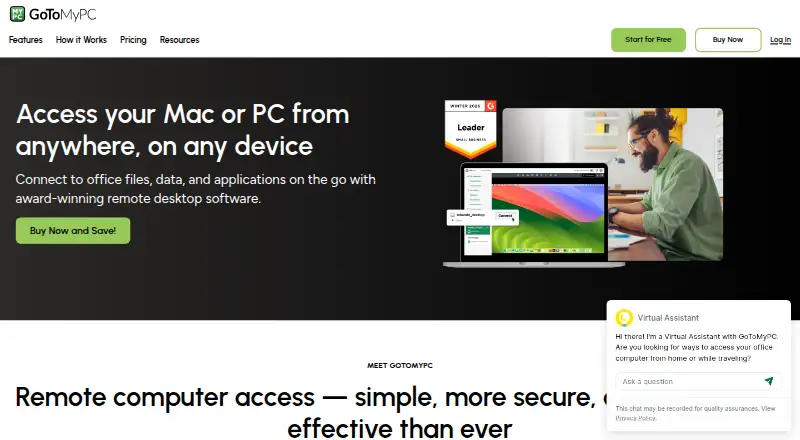
What GoToMyPC is
GoToMyPC lets users remotely connect to a home or office computer to access its files, applications, programs, and network. It supports Windows, macOS, Linux, iOS, Android, and web browsers, with mobile apps and zero-download browser connections listed for all three plans. Remote features include file transfer, multi-monitor support, remote sound and printing, guest invites, and session diagnostics. Security features listed by the maker include multifactor authentication, host access codes, antivirus, security scoring, and 256-bit AES encryption. Each plan is marked compliant with SOC 2, GDPR, PCI, and HIPAA. Personal costs $35 a month per computer and covers one user and 1–20 computers. Pro costs $22.83 a month per computer for unlimited users and 2–50 computers. Corporate costs $22.40 a month per computer for unlimited users and five or more computers. The site also shows alternate amounts of 44.00 USD, 41.50 USD, and 28.00 USD for those plans, respectively. A 7-day free trial is offered without a credit card or commitments; there is no free plan.
Good
- Supports desktop, mobile, and browser access
- File transfer and remote printing included
- 7-day trial requires no credit card
- 24/7 technical support advertised
Watch out
- No free plan
- Personal supports one user
- Plan prices are per computer
Who it suits
Personal is described for one user, while Pro is aimed at small teams needing administration across multiple computers. Corporate is intended for larger teams needing advanced security and administrative control.
Verdict
GoToMyPC offers remote access across a wide range of devices, with plan limits tied to users and computers. Compare the per-computer prices and plan capacities before choosing; the service also offers a 7-day trial.
Plans and prices
From GoToMyPC's own pricing page, checked 11 Oct 2026.
| Plan | Price | What it gives you |
|---|---|---|
| Personal | $35 a month | 1 user · 1–20 computers · unlimited remote access · multi-monitor · file transfer and sync · remote printing · complimentary antivirus · $35.00 per computer / month; page also shows $44.00 |
| Pro | $22.83 a month | Unlimited users · 2–50 computers · Personal features · shared device access · account and user administration · usage monitoring · central billing · reporting · $22.83 per computer / month; page also shows $41.50 |
| Corporate | $22.40 a month | Unlimited users · 5+ computers · Pro features · multiple admins · remote deployment · granular group and user settings · SSO · real-time chat · $22.40 per computer / month; page also shows $28.00 |
The facts
Each one read from GoToMyPC's own pages, with the date it was checked.
What it does
- Access mode
- bothchecked 20 Sep 2026
- Administration
- Pro adds shared device access and account administration, while Corporate adds multiple administrators, remote deployment, and single sign-on.checked 11 Oct 2026
- Compliance
- The plan comparison marks SOC 2, GDPR, PCI, and HIPAA compliance for each listed plan.checked 11 Oct 2026
- File transfer
- Yeschecked 20 Sep 2026
- Integrations and APIs
- The resource center lists Corporate Integration Services APIs, and the plan comparison lists APIs and RADIUS Server for Corporate.checked 11 Oct 2026
- Intended users
- Personal is described for one user, Pro for small teams needing admin access to multiple computers, and Corporate for larger teams needing advanced security and admin control.checked 11 Oct 2026
- Mobile use
- The site says users can connect from iOS and Android devices, as well as PC, Mac, Linux, and Chromebook devices.checked 11 Oct 2026
- Purpose
- GoToMyPC remotely connects users to their home or office computer’s files, applications, programs, and network.checked 11 Oct 2026
- Remote features
- Features include file transfer, multi-monitor support, remote sound, remote printing, guest invites, and session diagnostics.checked 11 Oct 2026
- Security
- The maker lists multifactor authentication, host access codes, antivirus, security scoring, and 256-bit AES encryption.checked 11 Oct 2026
- Support
- The maker advertises free 24/7 technical support and the pricing comparison lists 24/7 phone support for each plan.checked 11 Oct 2026
Where it runs
- Browser access
- The pricing comparison lists zero-download connection in a browser for all three plans.checked 11 Oct 2026
- Mobile apps
- Yeschecked 20 Sep 2026
- Supported platforms
- Windows,macOS,Linux,iOS,Android,web browserchecked 20 Sep 2026
The company
- Founded
- 2003checked 28 Sep 2026
- Headquarters
- Boston, Massachusetts, United Stateschecked 28 Sep 2026
Money
- Free plan
- Nochecked 20 Sep 2026
- Trial
- The site offers a 7-day free trial with no credit card and no commitments.checked 11 Oct 2026
Alternatives to GoToMyPC
- 1

DWService
Free planOpen sourceAndroidiOSWebAPI9.2From $40 a year - 2

ManageEngine Remote Access Plus
Free planAndroidiOSWebAPI9.0From $75 a year - 3

Zoho Assist
Free planAndroidiOSWebLinux8.9From $10 a month - 4

HopToDesk
Free planAndroidiOSLinuxmacOS8.8From $159 a year - 5

ThinLinc
Free planAndroidiOSWebLinux8.7From $103 a year - 6

TeamViewer Remote
Free planAndroidiOSWebLinux8.5Free plan