Google Cloud Firewall Policies
Google Cloud Firewall Policies let administrators apply firewall rules centrally across an organization or selected folders.
What Google Cloud Firewall Policies is
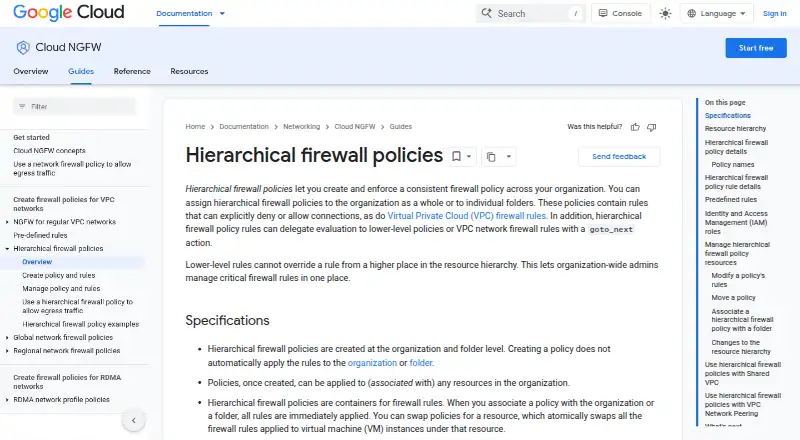
Google Cloud Firewall Policies let administrators apply firewall rules centrally across an organization or selected folders. Rules can allow or deny connections, or pass evaluation to lower-level policies or VPC firewall rules. A policy takes effect only when associated with an organization or folder; it cannot be assigned directly to a project. Rules can target VPC networks and VM service accounts, but not instance tags. With a security profile group, matching traffic can be sent through a firewall endpoint for Layer 7 inspection, including URL filtering and intrusion detection and prevention.
Administrators can manage policies through the Google Cloud console or gcloud CLI. Logs are available in Cloud Logging, and Identity and Access Management roles control policy and rule permissions. Cloud NGFW Essentials rules based on standard network attributes are free. Other listed plans include per-VM hierarchical policy charges and Cloud NGFW Standard and Enterprise charges. Logging covers TCP and UDP only, and established connections might not appear until idle for at least 10 minutes. Rules are updated individually, with no batch-update mechanism.
Good
- Central rules cover organizations or selected folders.
- Rules can allow, deny, or delegate evaluation.
- Layer 7 inspection can include URL filtering and intrusion detection.
- Logs can be viewed and exported through Cloud Logging.
- Cloud NGFW Essentials rules are free.
Watch out
- Policies cannot be assigned directly to projects.
- Rules cannot target instance tags.
- Logging records TCP and UDP connections only.
- Policy rules have no batch-update mechanism.
Who it suits
It suits organization-wide administrators who need to manage firewall rules centrally across folders and their resources. It is also relevant to teams that need policy logging or Layer 7 inspection.
Verdict
Google Cloud Firewall Policies provide centralized rule management, with options for delegated evaluation, logging, and Layer 7 inspection. Consider the attachment requirements, targeting limits, and per-VM charges when choosing how to apply them.
Plans and prices
From Google Cloud Firewall Policies's own pricing page, checked 7 Oct 2026.
| Plan | Price | What it gives you |
|---|---|---|
| Cloud NGFW Essentials | Free | Rules based on standard network attributes, including IP ranges, ports, and protocols · No charge for Essentials rules. |
| Hierarchical firewall policies (500 or fewer attributes) | Free | Price calculated per VM per month · 500 or fewer rule attributes · no charge if policy applies to no VMs · $0.001369863 / 1 hour per VM covered by the policy. |
| Hierarchical firewall policies (501 or more attributes) | Free | Price calculated per VM per month · 501 or more rule attributes · no charge if policy applies to no VMs · $0.002054795 / 1 hour per VM covered by the policy. |
| Cloud NGFW Standard | $0.02 a month | FQDN objects · threat intelligence · $0.0193 / 1 gibibyte evaluated; billed for eligible internet ingress and egress traffic. |
| Cloud NGFW Enterprise | $1.75 a month | Layer 7 IDPS and URL filtering · endpoint deployment charge · $1.75 / 1 hour per deployed endpoint, plus $0.0193 / 1 gibibyte inspected. |
The facts
Each one read from Google Cloud Firewall Policies's own pages, with the date it was checked.
What it does
- Compliance
- Google Cloud states that its services undergo independent verification and achieve security, privacy, and compliance certifications; the Google Cloud Services ISMS has ISO/IEC 27001 certification.checked 7 Oct 2026
- Intended users
- The product is designed for organization-wide administrators who need to manage critical firewall rules centrally across folders and their resources.checked 7 Oct 2026
- Layer 7 inspection
- Hierarchical rules can use a security profile group to send matching traffic through a firewall endpoint for Layer 7 inspection, including URL filtering and intrusion detection and prevention.checked 7 Oct 2026
- Logging
- Firewall policy logs can be viewed in Cloud Logging and exported to destinations supported by Cloud Logging export.checked 7 Oct 2026
- Logging limit
- Firewall policy rules logging records only TCP and UDP connections, and existing connections might not produce entries until idle for at least 10 minutes.checked 7 Oct 2026
- Management tools
- Google documents management through the Google Cloud console and gcloud CLI, and documents a Terraform resource for firewall policy rules with logging enabled.checked 7 Oct 2026
- Other limits
- Hierarchical firewall policies do not support VPC networks using an RDMA network profile, and an individual rule can include IPv4 or IPv6 ranges but not both.checked 7 Oct 2026
- Policy attachment
- A policy is enforced only after it is associated with an organization or folder, and hierarchical policies cannot be assigned directly to projects.checked 7 Oct 2026
- Purpose
- Hierarchical firewall policies let organizations enforce consistent firewall rules across an organization or individual folders.checked 7 Oct 2026
- Rule evaluation
- Rules can allow or deny connections or use the goto_next action to delegate evaluation to lower-level policies or VPC firewall rules.checked 7 Oct 2026
- Rule updates
- Hierarchical policy rules are updated individually, and the documentation says there is no mechanism to batch update rules in a policy.checked 7 Oct 2026
- Security controls
- Identity and Access Management roles govern who can create, associate, modify, delete, and view effective hierarchical firewall policies and rules.checked 7 Oct 2026
- Targeting
- Rules can target VPC networks and VM service accounts, but hierarchical firewall policies do not support targeting by instance tags.checked 7 Oct 2026
The full review of Google Cloud Firewall Policies
Google Cloud Firewall Policies applies hierarchical firewall rules across an organization or selected folders. It is aimed at administrators governing Google Cloud resources centrally, with delegated evaluation and optional Layer 7 inspection. Its main trade-off is structural: policies attach to organizations or folders, while covered VMs can incur hourly charges.
Overview
These policies let organizations establish consistent firewall rules across folders and their resources. Rules can allow or deny connections, or use goto_next to pass evaluation to lower-level policies or VPC firewall rules. That gives central administrators room to set guardrails while leaving some evaluation to lower levels.
A policy does nothing until associated with an organization or folder, and it cannot be assigned directly to a project. That hierarchy suits organization-wide governance, but is a poor fit for teams that need project-level attachment. The product is cloud-deployed, with API access and change control.
Key features
Rules can target VPC networks and VM service accounts, but not instance tags. Teams that rely on tags to select instances will need a different targeting method. Individual rules can use IPv4 or IPv6 ranges, not both, and policies do not support VPC networks using an RDMA network profile.
For Layer 7 inspection, hierarchical rules can send matching traffic through a firewall endpoint. The inspection options include URL filtering and intrusion detection and prevention, making this a stronger fit when network controls must extend beyond standard attributes such as IP ranges, ports and protocols.
Administrators can manage policies through the Google Cloud console and gcloud CLI. Google documents a Terraform resource for firewall policy rules with logging enabled. IAM roles govern who can create, associate, modify, delete and view effective policies and rules. Rules are updated individually, with no batch-update mechanism, which can make large policy changes more laborious.
Firewall policy logs appear in Cloud Logging and can be exported to destinations supported by its export service. Rule logging records only TCP and UDP connections; existing connections might not generate entries until they have been idle for at least 10 minutes. Google Cloud states that its services undergo independent security, privacy and compliance verification, and its Services ISMS has ISO/IEC 27001 certification.
Pricing
The free Cloud NGFW Essentials plan costs nothing, with no charge for Essentials rules based on standard network attributes such as IP ranges, ports and protocols. It covers those basic rules, not the separate per-VM policy charges or endpoint and inspection charges associated with other offerings.
Hierarchical firewall policies cost nothing in both attribute tiers, but the billed rates are $0.001369863 / 1 hour per VM covered for 500 or fewer rule attributes and $0.002054795 / 1 hour per VM covered for 501 or more. Pricing is calculated per VM per month, and there is no charge if the policy applies to no VMs. The lower tier fits policies with up to 500 attributes; larger policies fall into the higher hourly rate.
Cloud NGFW Standard costs $0.02 a month, billed $0.0193 / 1 gibibyte evaluated for eligible internet ingress and egress traffic. It adds FQDN objects and threat intelligence. Cloud NGFW Enterprise costs $1.75 a month, billed $1.75 / 1 hour per deployed endpoint plus $0.0193 / 1 gibibyte inspected; it includes Layer 7 IDPS and URL filtering. The endpoint charge makes Enterprise most relevant when those inspection controls justify deployment, rather than for teams needing only basic rules.
Platforms
Google Cloud Firewall Policies supports API and web access. The console and gcloud CLI provide management paths, while the documented Terraform resource supports policy-rule automation.
Who it's for
This is best for organization-wide administrators who need to manage critical firewall rules centrally across folders and their resources. Its delegated evaluation can accommodate layered governance, while IAM roles provide control over policy responsibilities. It is less suitable for teams that need project attachment, instance-tag targeting, or batch rule updates.
Pros and cons
- Pros: Central rules can span an organization or folders, with goto_next allowing evaluation to continue at lower levels.
- Pros: Optional endpoint-based Layer 7 inspection adds URL filtering and intrusion detection and prevention.
- Pros: IAM controls policy actions, and logs integrate with Cloud Logging and its supported export destinations.
- Cons: Policies cannot attach directly to projects, and rules cannot target instance tags.
- Cons: Covered VMs incur hourly policy charges, and Enterprise adds endpoint and inspected-traffic charges.
- Cons: Rule updates are individual; logging covers only TCP and UDP and can be delayed for existing connections.
Alternatives
Firewall Management Software is a useful category to compare if Google Cloud's organization-and-folder attachment model does not match your needs.
- Comodo Internet Security is a Windows option with a free plan and a Premium tier covering antivirus, firewall, security features and updates.
- SonicWall Network Security Manager is worth considering for API, self-hosted or web use; centralized management and alerting is included with SonicWall firewall support.
- Check Point DDoS Protector is another paid option for Linux, self-hosted or web environments.
- WatchGuard FireCloud offers a paid, multi-platform alternative with a free trial and a one-year Internet Access plan for 1–50 licenses at $97.75 a year.
- pfSense is a freemium, Linux, self-hosted and web option with a free-download Community Edition.
- AlgoSec is a paid option for API, Linux, self-hosted and web environments.
- Forcepoint ZTNA is a paid option for macOS, self-hosted, web and Windows environments.
- FireMon is a paid option with a free trial; its Cloud Defense Pro plan costs $200 a month per cloud account.
Verdict
Choose Google Cloud Firewall Policies if you administer organization-wide Google Cloud rules and want central control with delegated evaluation and optional Layer 7 inspection. The reason to look elsewhere is just as clear: project-level attachment and instance-tag targeting are unavailable, while covered VMs and deployed inspection endpoints can add recurring charges.
Getting started
- Open the Google Cloud Firewall Policies website
- Choose the Cloud NGFW or hierarchical policy plan
- Create a policy in the Google Cloud console or with gcloud
- Associate the policy with an organization or folder
- Define rules for VPC networks or VM service accounts
- Enable logging and review entries in Cloud Logging
Limits worth knowing
The free Cloud NGFW Essentials plan covers rules based on standard network attributes such as IP ranges, ports, and protocols. Hierarchical policies do not support RDMA network profiles; each rule can use IPv4 or IPv6 ranges, but not both, and existing connections may wait at least 10 minutes before logging entries.
Questions
Is there a free plan?
Yes. Cloud NGFW Essentials standard-attribute rules are listed at 0.00 USD with no charge for Essentials rules.
How are hierarchical policies priced?
Policies with 500 or fewer attributes are listed as free and billed at $0.001369863 per VM-hour. Policies with 501 or more attributes are listed as free and billed at $0.002054795 per VM-hour when VMs are covered.
What do Cloud NGFW Standard and Enterprise cost?
Cloud NGFW Standard is listed at $0.02 a month and bills $0.0193 per gibibyte evaluated. Cloud NGFW Enterprise is listed at $1.75 a month, plus $1.75 per deployed endpoint-hour and $0.0193 per gibibyte inspected.
Can I attach a policy to a project?
No. A hierarchical policy must be associated with an organization or folder and cannot be assigned directly to a project.
Which management tools are available?
Google documents the Cloud console, gcloud CLI, API access, and a Terraform resource for firewall policy rules with logging enabled.
Alternatives to Google Cloud Firewall Policies
- 1

Comodo Internet Security
AndroidiOSExtensionWindows8.0 - 2

ManageEngine Firewall Analyzer
AndroidiOSWebAPI7.3From $395 a year - 3

WatchGuard AuthPoint
AndroidiOSWebAPI7.2 - 4

FireMon
WebAPILinuxSelf-hosted6.5From $200 a month - 5
CacheGuard-OS
Free planWebLinuxSelf-hosted6.2Free plan - 6
Cisco Catalyst Center
WebAPILinuxmacOS6.2