GoMind
GoMind is a mind map workspace for organizing knowledge, developing ideas, and turning outlines into usable results.
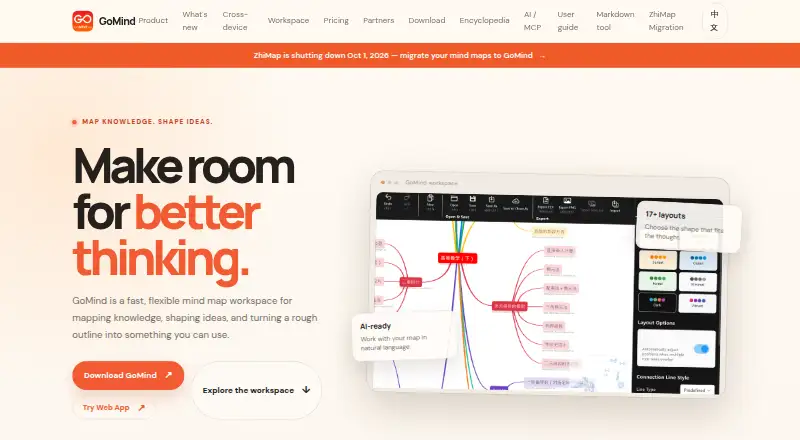
What GoMind is
GoMind is a mind map workspace for organizing knowledge, developing ideas, and turning outlines into usable results. It offers more than 17 layouts and imports XMind, Markdown, YAML, OPML, FreeMind, and plain text. Maps can span pages, link across pages, and include custom connections, branch memos, and focus history. Node notes support Markdown, HTML, LaTeX, code blocks, and Mermaid. Export options include PNG, JPG, SVG, PDF, Markdown, and OPML. AI workflows can create, edit, organize, read, and inspect maps, with listed connections including OpenAI-compatible services, MCP, and OpenClaw. GoMind describes itself as local-first and lists autosave recovery, document-level undo and redo, and complete import and export. It supports web, Windows, macOS, Linux, iOS, and Android, with offline mode available. A free plan covers core mapping, notes, layouts, and import and export. Paid personal plans and private deployment for organizations are also offered; Enterprise deployment is intended for internal networks or private infrastructure.
Good
- Offers more than 17 map layouts.
- Imports six named formats, including XMind and FreeMind.
- Node notes support code blocks and Mermaid.
- Includes offline mode and local-first data handling.
- Supports Windows, macOS, Linux, iOS, Android, and web.
Watch out
- Real-time collaboration is not available.
- Presentation mode is not available.
- Customer-operated Enterprise infrastructure has no uptime SLA.
Who it suits
GoMind may suit individuals organizing complex ideas across maps, notes, and outlines, including those who need offline access or varied import and export formats. Organizations that need maps on private infrastructure can consider its Enterprise deployment option.
Verdict
GoMind offers broad mapping, note, import, export, and AI capabilities across desktop, mobile, and web. Teams needing live collaboration or presentation mode should note those missing features.
Plans and prices
From GoMind's own pricing page, checked 15 Oct 2026.
| Plan | Price | What it gives you |
|---|---|---|
| Free | Free | Core mind mapping · rich notes and layouts · import and export workflows · $0 forever |
| Pro | $1.99 a month | Everything in Plus · more usage and advanced features · Pro-only visual assets · $1.99 per month |
| Pro yearly | $19.90 a year | Everything in Plus · Pro features and higher limits · annual subscription · $19.9 per year; $9.9 for the first year and eligible education users |
| Enterprise base service | $1,000 a year | Security updates · basic support · applies to each private deployment · $1,000 / year per deployment |
| Plus | $9.90, paid once | Everything in Free · watermark-free PDF and PNG export · more visual assets and capabilities · $9.9 one time |
| Enterprise deployment license | $6,000, paid once | One production deployment · up to 50 seats · internal deployment included · $6,000 / license |
The facts
Each one read from GoMind's own pages, with the date it was checked.
What it does
- AI
- AI workflows can create, edit, organize, read, and inspect maps, and the release notes list GoMind AI Relay, OpenAI-compatible services, MCP, and OpenClaw connections.checked 3 Oct 2026
- AI assistance
- The AI sidebar can create, edit, organize, read and inspect maps using natural-language instructions.checked 15 Oct 2026
- Audience
- The pricing page offers personal plans for individuals and private deployment for organizations that need maps kept within their organization.checked 3 Oct 2026
- Canvas editing
- Users can detach nodes, position branches freely, resolve collisions and preserve chosen positions.checked 15 Oct 2026
- Data handling
- The product page describes GoMind as local-first and lists autosave recovery, document-level undo and redo, and complete import and export.checked 3 Oct 2026
- Documentation
- The user manual covers getting started, editing, documents and pages, import/export, layouts, cloud and AI integrations, shortcuts and troubleshooting.checked 15 Oct 2026
- Download options
- Windows offers Store, installer, portable ZIP and MSIX packages; macOS offers App Store, DMG and ZIP; Linux offers DEB, RPM and AppImage; Android offers an Arm64 APK.checked 15 Oct 2026
- Enterprise support
- The annual Enterprise base service includes security updates and basic support; the page says customer-operated infrastructure has no uptime SLA.checked 3 Oct 2026
- Export
- GoMind can export maps as PNG, JPG, SVG, PDF, Markdown, or OPML.checked 3 Oct 2026
- Export formats
- Documented exports include PNG, JPG, SVG, PDF, Markdown and OPML.checked 15 Oct 2026
- Google Play developer
- Google Play identifies the developer as POSH GROUP LIMITED and gives a Kowloon, Hong Kong address.checked 15 Oct 2026
- Google Play features
- Google Play lists 17 layouts, XMind compatibility, Markdown/HTML notes, LaTeX, stickers, images, relationships, hyperlinks, cloud file management and 17 languages.checked 15 Oct 2026
- Google Play privacy declaration
- Google Play shows the developer declaration as no data shared with third parties and no data collected.checked 15 Oct 2026
- Google Play update
- The Google Play listing says the app was updated on September 2, 2026.checked 15 Oct 2026
- Import
- GoMind can import XMind, Markdown, YAML, OPML, FreeMind, and plain text.checked 3 Oct 2026
- Import formats
- Supported imports include XMind, Markdown, YAML, OPML, FreeMind and plain text, with web-page import also documented.checked 15 Oct 2026
- Layouts
- The product advertises more than 17 layout algorithms, including mind maps, timelines, fishbone diagrams and organization charts.checked 15 Oct 2026
- License
- The opened official pages describe pricing, downloads and features but do not state an open-source license.checked 15 Oct 2026
- Limit: import reliability
- The troubleshooting guide warns that large or malformed files may not map cleanly into a tree.checked 15 Oct 2026
- Limit: large-map sharing
- The troubleshooting guide says mobile sharing may be limited for very large maps and recommends exporting a file first.checked 15 Oct 2026
Where it runs
- Apple App Store compatibility
- The current Apple listing requires iOS 15 or later, iPadOS 15 or later and macOS 12 or later.checked 15 Oct 2026
- Apple App Store pricing
- The Apple listing shows GoMind Plus at $9.99, Pro Monthly at $1.99 and Pro Yearly at $9.99 as in-app purchases.checked 15 Oct 2026
- Apple App Store privacy
- Apple displays the developer declaration that GoMind collects no data, while noting the declaration is unverified by Apple.checked 15 Oct 2026
Money
- Free plan
- Yeschecked 20 Sep 2026
The full review of GoMind
GoMind is a mind-mapping workspace for people who want to develop connected ideas into structured notes and exportable files. It suits individuals working across devices and organizations that need private deployment. Its broad format support is a strong draw, but it is not the right choice for live collaboration or presenting maps.
Overview
GoMind goes beyond single-page diagrams: maps can span pages, link across them, use custom connections and branch memos, and retain focus history. That structure suits evolving projects with related strands of information better than quick, disposable sketches. The local-first approach, autosave recovery, document-level undo and redo, and complete import and export favor users who want to keep working documents under their control and move them between tools.
Key features
More than 17 layouts give users different ways to shape a map around its content. GoMind imports XMind, Markdown, YAML, OPML, FreeMind, and plain text, making it useful for bringing existing outlines into a map-based workflow. Export options span PNG, JPG, SVG, PDF, Markdown, OPML, DOCX, and XLSX, so finished work can travel as an image, document, or structured text. Plus adds watermark-free PDF and PNG export, a practical upgrade for polished sharing in those formats.
Node notes support Markdown, HTML, LaTeX, code blocks, and Mermaid diagrams. That makes GoMind more useful for technical or research-heavy maps where the supporting detail matters as much as the visual structure. AI workflows can create, edit, organize, read, and inspect maps; the listed connections include OpenAI-compatible services, MCP, and OpenClaw through GoMind AI Relay. These capabilities extend map work, though the absence of real-time collaboration means they do not make GoMind a shared live workspace.
Offline mode and support across web, Windows, macOS, Linux, iOS, and Android make it a flexible fit for people switching between desktop and mobile devices. The download page sets minimums at Windows 10, macOS 10.14, 64-bit Linux with GTK 3.0+, Android 6.0, and iOS 12.0. There is no presentation mode, so users who need to walk an audience through a map should choose another tool or plan a separate presentation workflow.
Pricing
The free plan costs nothing, billed forever. It includes core mind mapping, rich notes and layouts, and import and export workflows, making it the sensible starting point for individuals assessing the core workspace. Plus costs $9.90 a month, billed One-time unlock. It keeps everything in Free and adds watermark-free PDF and PNG export plus more visual assets and capabilities; it suits users who want those export and visual upgrades without a recurring subscription.
Pro costs $1.99 a month, billed per month, and adds more usage, advanced features, and Pro-only visual assets to Plus. Pro yearly costs $19.90 a year, billed per year; the first year is $9.9 for eligible education users. It includes Plus, Pro features, higher limits, and an annual subscription. The monthly Pro plan fits users who need added usage or features without committing annually; the yearly plan is aimed at those comfortable with an annual term and, if eligible, offers a lower first-year price. No seat cap or usage quota is stated for these personal plans.
Enterprise separates deployment from service. The Enterprise deployment license costs $6,000 a month for one standard production deployment, with up to 50 seats. The Enterprise base service costs $1,000 a year per deployment and includes security updates and basic support. This is for organizations that need maps kept on internal or private infrastructure; customer-operated infrastructure has no uptime SLA, an important operational limitation.
Platforms
GoMind supports web, Windows, macOS, Linux, iOS, and Android, with offline mode. That mix covers users who need access on both desktop and mobile, while the stated operating-system minimums may rule out older devices.
Who it's for
GoMind is a strong fit for individuals who organize complex material into maps, need rich notes, or regularly import and export across formats. Its free plan covers core mapping workflows, while Plus is the clearest step up for watermark-free PDF and PNG output. Organizations with private-infrastructure requirements can consider Enterprise, but should account for the deployment cost, separate annual service, 50-seat ceiling, and lack of an uptime SLA on customer-run infrastructure. Teams that need live co-editing and presenters who need a dedicated presentation mode should look elsewhere.
Pros and cons
- Pros: Broad imports and exports make it easier to bring existing outlines in and carry finished maps into other tools.
- Pros: Multi-page maps, cross-page links, custom connections, and rich node notes support detailed, connected work.
- Pros: Offline access, autosave recovery, and document-level undo and redo suit workflows that value local control and recovery.
- Cons: No real-time collaboration makes it a poor fit for teams that need to edit maps together live.
- Cons: No presentation mode leaves users without a dedicated way to present maps from within GoMind.
- Cons: Enterprise has a substantial deployment license and separate service fee, while customer-operated infrastructure has no uptime SLA.
Alternatives
For a broader comparison, browse Mind Mapping Software. Choose EdrawMind instead if its free plan's 100 MB storage and 100-topic limits suit your needs, or if you want a free trial. Thortspace is an option for users comfortable with a free license centered on public spheres and limited public-sphere use. Xmind offers a free plan for exploring classic and essential mapping features, with 10 online maps and a 3-day version period.
MindMapVault may suit users who prioritize encrypted cloud storage, shares, and published maps within its Cloud Free limits of 25 MB, 3 active shares, and 5 published maps. Mindomo is another freemium mind-mapping option with a free plan. Mapify is worth considering for users seeking a free plan with 30 one-time AI credits and allowances for PDF/document and YouTube-to-map conversions. Mind Elixir App offers a free plan capped at 24 maps and paid plans for unlimited maps. MindGenius is an alternative for web and Windows users, with a 14-day full-capability trial and a free plan limited to one project.
Verdict
Choose GoMind if you want a flexible, offline-capable mapping workspace with detailed notes and unusually broad import and export workflows. Its free plan makes the core approach accessible, and paid tiers add export polish or higher limits. Look elsewhere if live team editing or presentation mode is central to your work.
Getting started
- Open the GoMind website or download it for Windows, macOS, Linux, iOS, or Android
- Start with the Free plan or choose a paid personal plan
- Import an existing map or outline in a supported format
- Choose a layout and add map content, connections, or notes
- Use export to save a map in a supported format
Limits worth knowing
The Free plan covers core mind mapping, rich notes and layouts, and import and export workflows. Watermark-free PDF and PNG export is listed under Plus, which costs 9.90 USD as a one-time unlock.
Questions
Does GoMind have a free plan?
Yes. The Free plan costs 0.00 USD and is billed forever; it includes core mind mapping, rich notes and layouts, and import and export workflows.
What do paid personal plans cost?
Plus is 9.90 USD as a one-time unlock. Pro is $1.99 a month, and Pro yearly is $19.90 a year.
Which platforms does GoMind support?
GoMind supports web, Windows, macOS, Linux, iOS, and Android. Offline mode is available.
Can GoMind import and export maps?
It imports XMind, Markdown, YAML, OPML, FreeMind, and plain text. Export formats include PNG, JPG, SVG, PDF, Markdown, and OPML.
Can an organization deploy GoMind privately?
Yes. Enterprise deployment is intended for organizations that need deployment on an internal network or private infrastructure. The Enterprise deployment license is $6,000 a month for one standard production deployment, up to 50 seats.
Does GoMind support real-time collaboration or presentations?
No. Real-time collaboration and presentation mode are both listed as unavailable.
Alternatives to GoMind
- 1
Mind Elixir App
Free planOpen sourceAndroidiOSWebAPI8.5From $19 a year - 2

EdrawMind
Free planAndroidiOSWebLinux8.1Free plan - 3

Xmind
Free planAndroidiOSWebLinux8.0From $4.92 a month - 4

Mindomo
Free planAndroidiOSWebLinux7.9From €6 a month - 5

Coggle
Free planiOSWebAPIExtension7.8From $5 a month - 6
Mapify
Free planAndroidiOSWebExtension7.8From $5.99 a month