
Glitter
Glitter turns a recorded or uploaded process into a step-by-step guide or standard operating procedure.
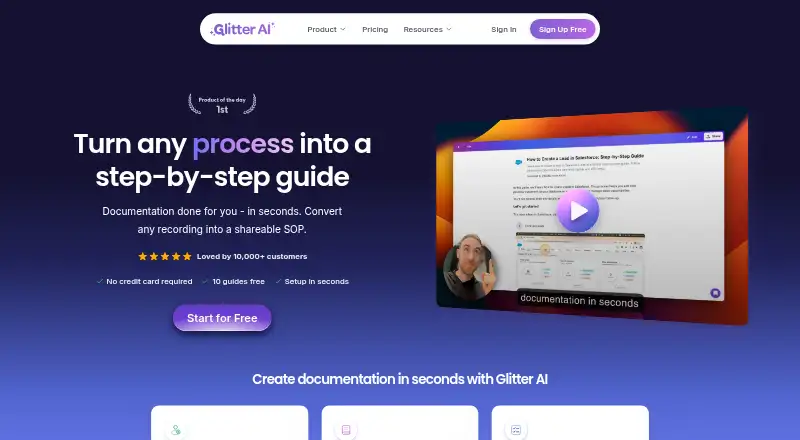
What Glitter is
Glitter turns a recorded or uploaded process into a step-by-step guide or standard operating procedure. Its AI transcribes narration, captures screenshots at key moments, and produces a guide ready to publish. Users can upload existing videos, including meeting recordings, screen recordings, live footage, and mobile screen recordings. The desktop app captures activity across Mac and Windows applications. Its browser extension captures web workflows in Chromium-based browsers such as Chrome, Edge, Arc, and Brave; Safari and Firefox are not supported.
Guides can be made in 99 languages, with automatic translation between languages. They can be shared by link, exported as PDF, HTML, or Markdown, or embedded in a website, knowledge base, or learning management system. Guides are private by default, and sensitive information can be blurred on-device before it reaches Glitter’s servers. Glitter states that it is SOC 2 Type II certified, encrypts data in transit and at rest, and does not use customer content to train AI models. The free plan allows three guides and three people total, with a five-minute limit per guide and a Glitter watermark.
Good
- Creates guides from recordings or uploaded videos.
- Supports guides in 99 languages and automatic translation.
- Offers PDF, HTML, and Markdown exports.
- Guides are private by default.
- Sensitive information can be blurred on-device.
Watch out
- Safari and Firefox are not supported by the extension.
- The free plan allows only three guides and three people.
- Free guides are limited to five minutes each.
- The free plan adds a Glitter watermark.
Who it suits
Glitter suits teams documenting onboarding, financial services procedures, IT and support processes, customer self-service, or compliance SOPs. It can also suit people who need to turn existing recordings into guides.
Verdict
Glitter turns process recordings into shareable documentation, with desktop capture, browser capture, and multiple export options. Review the free plan’s guide and user limits and the extension’s browser support before choosing it.
Plans and prices
From Glitter's own pricing page, checked 7 Oct 2026.
| Plan | Price | What it gives you |
|---|---|---|
| Free | Free | 3 guides total · 3 people total · 5 min per guide · 15 minutes total, never expire · Glitter watermark · No card. No time limit. |
| Growth | $249 a year | 3 creators included · unlimited guides and viewers · 1 hour per guide · 15 video hours / month · Billed yearly (save 37%) |
| Scale | $499 a year | 5 creators included · unlimited guides and viewers · 2 hours per guide · 30 video hours / month · Billed yearly (save 37%) |
| Enterprise | Priced on request | Unlimited guides and viewers · no guide length limit · creator and video-hour volume pricing · Yearly billing only. |
The facts
Each one read from Glitter's own pages, with the date it was checked.
What it does
- AI guide creation
- The AI transcribes narration, captures screenshots at key moments, and produces a publish-ready SOP from a recording.checked 7 Oct 2026
- Audience
- Glitter describes use cases including employee onboarding, financial services procedures, IT and support documentation, customer self-service, and compliance SOPs.checked 7 Oct 2026
- HIPAA
- Glitter says teams can sign a HIPAA Business Associate Agreement and use HIPAA-eligible AI processing with platform-enforced privacy.checked 7 Oct 2026
- Integrations
- The maker says guides can be embedded into hundreds of supported platforms or exported from Glitter.checked 7 Oct 2026
- Languages
- Glitter supports guides in 99 languages and offers automatic translation between languages.checked 7 Oct 2026
- Privacy controls
- Guides are private by default, and sensitive information can be blurred on-device before it reaches Glitter’s servers.checked 7 Oct 2026
- Purpose
- Glitter turns a recorded or uploaded process into a step-by-step guide or standard operating procedure.checked 7 Oct 2026
- Security
- Glitter states it is SOC 2 Type II certified, encrypts data in transit and at rest, and does not use customer content to train AI models.checked 7 Oct 2026
- Sharing and exports
- Guides can be shared by link, exported to PDF, HTML, or Markdown, or embedded in a website, knowledge base, or LMS.checked 7 Oct 2026
- Support
- The Help Center offers live chat and account or technical support by email at [email protected].checked 7 Oct 2026
- Video uploads
- Users can upload existing videos, including Zoom and Microsoft Teams recordings, screen recordings, live footage, and mobile screen recordings, for conversion into guides.checked 7 Oct 2026
Where it runs
- Browser extension
- The extension captures web workflows in Chrome, Edge, Arc, Brave, and other Chromium-based browsers; Safari and Firefox are not supported.checked 7 Oct 2026
- Desktop app
- The desktop app captures activity across Mac and Windows applications, including Excel, SAP, and custom apps.checked 7 Oct 2026
The company
- Founded
- 2024checked 28 Sep 2026
Alternatives to Glitter
- 1

Cap
Free planOpen sourceWebAPIExtensionLinux8.3From $29 a year - 2

Claap
Free planAndroidiOSWebAPI8.2From €32 a month - 3
ScreenApp AI Meeting Notes
Free planAndroidiOSWebAPI8.2From $19 a month - 4

Kommodo
Free planAndroidiOSWebAPI8.1From $9 a month - 5

Loom
Free planAndroidiOSWebmacOS8.1From $18 a month - 6
Visla AI Video Agent
Free planAndroidiOSWebAPI8.1Free plan