gLabels
gLabels is a desktop GUI program for designing and printing labels and business cards.
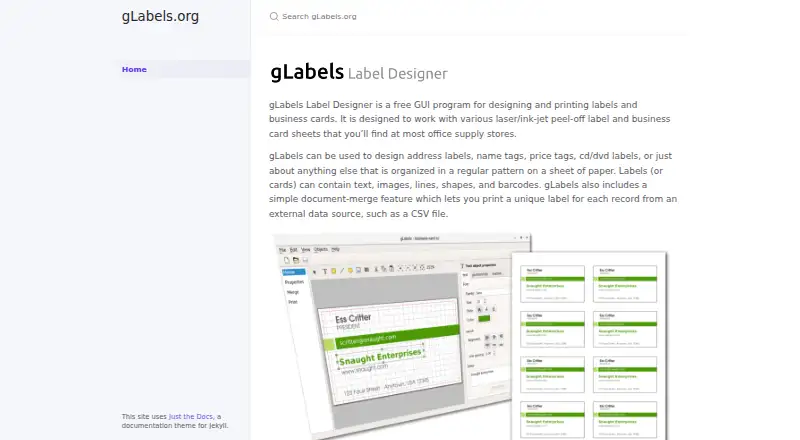
What gLabels is
gLabels is a desktop GUI program for designing and printing labels and business cards. It is made for peel-off sheets used with laser or ink-jet printers. Designs can combine text, images, lines, shapes, and barcodes. Its document-merge feature can use records from an external source such as a CSV file to create a different label for each record. The project lists address labels, name tags, price tags, and CD/DVD labels as example uses. gLabels is free and available for Linux, macOS, and Windows. The project describes gLabels-qt as development work for the next major release, gLabels 4, but says no official gLabels 4 releases are currently available. It also has no self-hosted binary snapshot releases and encourages users to build the code themselves. Proposed version 4 additions include a Qt6 rewrite, an activity-based interface, user-defined variables, continuous-roll label support, and new product templates. gLabels-qt is distributed under GNU GPL version 3 or, at the user's option, any later version, without warranty. The maker says the legacy 3.x version has not been supported since 2018.
Good
- Supports text, images, shapes, lines, and barcodes.
- Document merge can generate a unique label per record.
- Works with laser and ink-jet printers.
- Free software for Linux, macOS, and Windows.
Watch out
- There are currently no official gLabels 4 releases.
- No self-hosted binary snapshot releases are available.
- Legacy 3.x has not been supported since 2018.
- The project says gLabels-qt comes without warranty.
Who it suits
gLabels suits people who need to lay out and print labels or business cards, including variable labels from CSV records. Users considering gLabels-qt should be comfortable building the code themselves.
Verdict
gLabels covers label and business-card design, including barcode and record-merge workflows. Check release availability and the project's build expectations before selecting the gLabels-qt development version.
Plans and prices
From gLabels's own pricing page, checked 4 Oct 2026.
| Plan | Price | What it gives you |
|---|---|---|
| Free | Free | Free GUI label and business-card designer |
The facts
Each one read from gLabels's own pages, with the date it was checked.
What it does
- Build availability
- The project says it has no self-hosted binary snapshot releases available and encourages users to build the code themselves.checked 4 Oct 2026
- Current release
- The project says there are currently no official releases of gLabels 4.checked 4 Oct 2026
- Data merge
- Its document-merge feature can print a unique label for each record from an external data source such as a CSV file.checked 4 Oct 2026
- Design elements
- Labels can contain text, images, lines, shapes, and barcodes.checked 4 Oct 2026
- Label formats
- It is designed for laser or ink-jet peel-off label and business-card sheets.checked 4 Oct 2026
- Legacy support
- The maker says the legacy 3.x version has not been supported since 2018.checked 4 Oct 2026
- License
- gLabels-qt is free software under the GNU GPL version 3 or, at the user's option, any later version.checked 4 Oct 2026
- Purpose
- gLabels is a GUI program for designing and printing labels and business cards.checked 4 Oct 2026
- Typical uses
- The maker lists address labels, name tags, price tags, and CD/DVD labels as examples.checked 4 Oct 2026
- Version 4 features
- The listed additions include a Qt6 rewrite, a new activity-based UI, user-defined variables, continuous-roll label support, and new product templates.checked 4 Oct 2026
- Version status
- The maker describes gLabels-qt as the development version of the next major release, gLabels 4.checked 4 Oct 2026
- Warranty
- The project states that gLabels-qt is distributed without warranty, including implied warranties of merchantability or fitness for a particular purpose.checked 4 Oct 2026
Where it runs
- Platforms
- The project describes gLabels 4 as cross-platform and links build instructions for Linux, Windows, and Mac.checked 4 Oct 2026
The full review of gLabels
gLabels is a free desktop application for designing and printing labels and business cards on laser or ink-jet sheets. It suits offices, clubs, classrooms, and small operations that need custom layouts or record-based batches without subscription costs. Its core workflow is capable, but choosing between its legacy branch and the still-unreleased Qt successor is essential.
Overview
gLabels is built around peel-off label and business-card sheets rather than general page layout. A design can combine text, images, lines, shapes, and barcodes, covering address labels, name tags, price tags, and CD/DVD labels. Support for both laser and ink-jet printers makes it a sensible match for organisations that already use those printers and standard sheet stock.
Document merge is the feature that makes gLabels more than a one-off drawing tool. It can read an external source such as a CSV file and print a different label for each record. That is useful for address lists, inventories, or event badges, where duplicating a design manually would be slow and error-prone. The desktop-only deployment is less suitable when several people need browser access or online collaboration.
Key features
- Sheet-oriented design: Text, images, lines, and shapes cover the essential composition work for labels and business cards without requiring a separate graphics application.
- Barcode elements: Barcodes support identification and tracking jobs where a purely visual label is insufficient.
- Variable-data printing: Document merge turns each external record into its own printed label, making CSV-driven batches practical for addresses, products, or attendees.
- Printer support: Laser and ink-jet output aligns with common office and home printing hardware, rather than requiring a dedicated label printer.
- gLabels-qt direction: The development version for gLabels 4 is a Qt6 rewrite with an activity-based interface, user-defined variables, continuous-roll support, and additional product templates. Those additions are promising for users whose stock or workflows need them, but they belong to a development build rather than an official release.
Pricing
The Free plan costs nothing and includes the free GUI label and business-card designer. There are no paid tiers, seat charges, quotas, or subscription renewals to weigh, which suits occasional and small-scale in-house printing. The trade-off is not a reduced feature tier; it is the responsibility of selecting and maintaining an appropriate project version.
Platforms
gLabels runs on Linux, macOS, and Windows as desktop software. That broad operating-system coverage helps mixed-device households and small teams, while the lack of a web deployment means designs and printing remain tied to an installed workstation.
Who it's for
Choose gLabels for address labels, name tags, price tags, CD/DVD labels, or business cards printed on laser or ink-jet sheets. It is particularly well suited to users who need barcode layouts or CSV-based variable printing and prefer free software over a hosted service. It is a weaker fit for teams requiring browser collaboration, continuous-roll output today, or a supported legacy release: the 3.x version has not been supported since 2018, and gLabels 4 has no official release.
Pros and cons
Pros
- Free across three desktop platforms: Linux, macOS, and Windows users can use the same no-cost model.
- Useful batch workflow: CSV document merge produces unique labels from records instead of forcing repetitive manual edits.
- Broad label vocabulary: Text, imagery, shapes, lines, and barcodes cover both informational and machine-readable designs.
- Printer flexibility: It targets familiar laser and ink-jet hardware and sheet formats.
Cons
- Unsettled release path: gLabels-qt is a development version, has no official gLabels 4 release, and offers no self-hosted binary snapshots; users are encouraged to build it themselves.
- Legacy branch is obsolete: The 3.x line has been unsupported since 2018, limiting the appeal of relying on it for ongoing work.
- No browser workflow: Desktop deployment does not provide built-in online sharing or collaboration.
- Development-build warranty position: gLabels-qt is distributed without warranty, including implied warranties of merchantability or fitness for a particular purpose.
Alternatives
For a broader comparison, see Label Design Software. Pick PrintSpirit instead when a freemium product with a free cloud-based Web Edition, storage, sharing, and batch printing is preferable. ZebraDesigner is the better choice for Zebra Link-OS and Link-OS Basic printer workflows, with a free Essentials edition. Choose Brother P-touch Editor for free software intended for select Brother P-touch and QL models.
EASYLABEL suits Windows users who want a free Start plan with a Tharo printer or paid one-time editions supporting all available printers and Windows drivers. FreeLabels Desktop is an alternative for free-forever, offline use on Linux, macOS, or Windows, with no account or watermark. LabelForge offers another free, open-source desktop option under the MIT License. MasoLabel is a Windows freemium service with a capped free Starter plan. Union Label is a web and Windows option with a limited free plan and paid Excel/CSV workflows.
Verdict
gLabels is a strong fit for cost-conscious users who need flexible sheet layouts, barcode support, and CSV-driven variable printing on Linux, macOS, or Windows. Choose it for a straightforward desktop workflow with no subscription; look elsewhere if you need a supported current release, ready-made binaries for gLabels 4, browser collaboration, or a dedicated printer ecosystem.
Alternatives to gLabels
- 1
Brother P-touch Editor
Free planAndroidiOSAPImacOS7.4Free plan - 2

BarTender
AndroidiOSWebAPI7.2From $199 a year - 3

DYMO Connect
iOSWebAPImacOS6.6 - 4

Label LIVE
macOSWindows6.5From $19.99 a month - 5

Labeljoy
Windows6.4From $14.90 a month - 6
Avery Design & Print
Free planWeb6.3Free plan