
GitComet
GitComet is an open-source desktop Git client for Linux, macOS, and Windows.
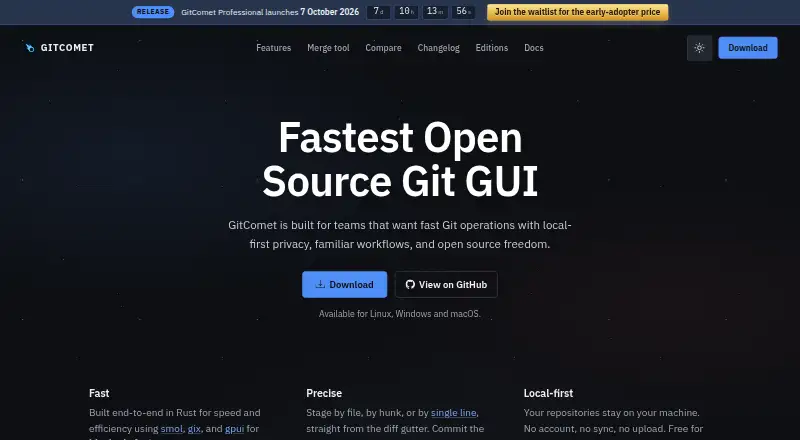
What GitComet is
GitComet is an open-source desktop Git client for Linux, macOS, and Windows. It keeps repositories on your machine and does not require an account, synchronization, or repository upload. Its diff view lets you stage or unstage files, hunks, or individual lines. For history work, it supports interactive rebase, cherry-pick, squash, revert, reset, and comparisons among commits, branches, tags, and the working tree. The merge tool automatically handles certain whitespace moves, one-sided edits, and duplicate changes, leaving remaining conflicts for you to resolve. It also supports branches, remotes, tags, worktrees, submodules, stashes, patches, blame, cloning, and configurable pull policies. The free Open Source plan covers personal and commercial use; Professional is listed at €20 for lifetime access and adds integrations including Claude Code, Codex, GitHub CLI, GitHub, and Azure DevOps. GitComet works offline but requires a local Git installation version 2.50 or newer.
Good
- Repositories stay on the user's machine.
- Stage or unstage individual lines in diffs.
- Includes interactive rebase and other history operations.
- Free plan covers personal and commercial use.
- Works offline and supports submodules.
Watch out
- Requires local Git version 2.50 or newer.
- Git LFS is not supported.
- Professional integrations require the paid edition.
Who it suits
GitComet suits individuals or teams who want a local-first desktop workflow for Git across Linux, macOS, or Windows. Teams seeking the listed Professional integrations can consider its paid edition.
Verdict
GitComet combines local repository handling with a broad set of Git history, diff, and merge workflows. Check the Git version requirement and lack of Git LFS support before choosing it.
Plans and prices
From GitComet's own pricing page, checked 1 Oct 2026.
| Plan | Price | What it gives you |
|---|---|---|
| Open Source | Free | Free for personal and commercial use · full local-first desktop workflow · Git remotes, pull/push, staging, commits · worktrees, branching, full history · multi-repository browsing · inline and side-by-side diffs · 2-way and 3-way merge tools · €0 forever |
| Professional | €20, paid once | Everything in Open Source · Claude Code, Codex, and GitHub CLI integrations · code test coverage workflows · GitHub and Azure DevOps integrations · priority improvements during early access · limited-time early-adopter offer · €20 lifetime access |
The facts
Each one read from GitComet's own pages, with the date it was checked.
What it does
- Audience
- GitComet is built for teams wanting fast Git operations, local-first privacy, familiar workflows, and open-source freedom.checked 1 Oct 2026
- Desktop requirement
- GitComet is a desktop application, with Linux Wayland support, automatic X11 fallback, and WSLg support.checked 1 Oct 2026
- Diff staging
- Users can stage and unstage files, hunks, or individual lines directly from the diff gutter.checked 1 Oct 2026
- Forge links
- GitComet can create permalinks for GitHub, GitLab, Bitbucket, Azure DevOps, Gitea, Codeberg, Forgejo, and AWS CodeCommit.checked 1 Oct 2026
- History workflows
- GitComet supports interactive rebase, cherry-pick, squash, revert, reset, and comparisons across commits, branches, tags, and the working tree.checked 1 Oct 2026
- Integrations
- The Professional edition lists Claude Code, Codex, GitHub CLI, GitHub, and Azure DevOps integrations.checked 1 Oct 2026
- Local-first privacy
- Repositories stay on the user's machine; GitComet requires no account, synchronization, or repository upload.checked 1 Oct 2026
- Merge resolution
- Its merge tool automatically settles whitespace moves, one-sided edits, and duplicate changes before the user resolves remaining conflicts.checked 1 Oct 2026
- Product
- GitComet is an open-source desktop Git client for Linux, macOS, and Windows.checked 1 Oct 2026
- Repository support
- GitComet includes branches, remotes, tags, worktrees, submodules, stashes, patches, blame, cloning, and configurable pull policies.checked 1 Oct 2026
- Security model
- GitComet keeps repository data local, is licensed under AGPL-3.0, and forbids unsafe Rust code in its workspace.checked 1 Oct 2026
- Support channels
- The project links users to Discord, GitHub Discussions, documentation, and GitHub issue reporting.checked 1 Oct 2026
- System requirement
- GitComet requires a local Git installation version 2.50 or newer.checked 1 Oct 2026
The company
- Headquarters
- Finlandchecked 28 Sep 2026
- Maker
- GitComet is developed by AutoExplore, a company dedicated to building tools that help software teams deliver high-quality software faster.checked 1 Oct 2026
Where it runs
- Platform builds
- Windows has signed MSI and portable x86-64 and ARM64 builds; macOS has a notarized disk image for Apple silicon and Intel; Linux supports multiple package formats on x86-64 and ARM64.checked 1 Oct 2026
The full review of GitComet
Overview
GitComet is a desktop Git client for Linux, macOS, and Windows, aimed at developers who want detailed staging and repository history tools without sending repositories to a service. Its free edition covers substantial local work; the Git 2.50 requirement and lack of Git LFS support narrow its fit.
Key features
Staging and unstaging files, hunks, or individual lines from the diff gutter gives developers precise control over commit contents, especially when unrelated edits share a file. Interactive rebase, cherry-pick, squash, revert, reset, and comparisons across commits, branches, tags, and the working tree make it useful for shaping and reviewing history, not just committing and pushing.
The merge tool automatically settles whitespace moves, one-sided edits, and duplicate changes before leaving remaining conflicts for the user. Branches, remotes, tags, worktrees, submodules, stashes, patches, blame, cloning, and configurable pull policies add breadth for people who want common repository work in one desktop app. That range does not extend to Git LFS, so repositories that depend on it call for another client.
Repositories stay on the user's machine, with no account, synchronization, or repository upload required; offline mode is supported. The AGPL-3.0 license and rule against unsafe Rust code in the workspace will matter to users weighing open-source licensing and the project's security model, but do not replace the need to check whether GitComet's workflows suit a particular team.
Pricing
Open Source is free forever, for personal and commercial use. It includes the local-first desktop workflow, remotes, pull and push, staging, commits, worktrees, branching, full history, multi-repository browsing, inline and side-by-side diffs, and 2-way and 3-way merge tools. It is a capable starting point for individuals and teams whose work does not require the Professional integrations.
Professional costs €20 once for lifetime access, with a limited-time early-adopter offer. It adds Claude Code, Codex, GitHub CLI, GitHub, and Azure DevOps integrations, code test coverage workflows, and priority improvements during early access. It suits users who need those connections; the free plan gives up these additions, while its listed core local Git workflows remain substantial. The purchase is a one-time payment, not a recurring subscription.
Platforms
GitComet runs on Linux, macOS, and Windows and requires a local Git installation at version 2.50 or newer. Linux supports Wayland, with automatic X11 fallback, and WSLg. Windows offers signed MSI and portable x86-64 and ARM64 builds; macOS has a notarized disk image for Apple silicon and Intel; Linux packages cover x86-64 and ARM64. It is a desktop application, so it is not a browser-based option. Support channels include Discord, GitHub Discussions, documentation, and GitHub issue reporting.
Who it's for
GitComet is a strong fit for developers and teams who want granular diff staging, substantial history and merge workflows, offline use, and repositories kept local. Its no-cost plan also makes it practical for personal and commercial use without a registration requirement. Look elsewhere if you rely on Git LFS, cannot install Git 2.50 or newer, or need a non-desktop client.
Pros and cons
- Pro: Line- and hunk-level staging lets users build focused commits from changes within the same file.
- Pro: History, merge, worktree, submodule, stash, and patch support covers a wide range of local repository tasks.
- Pro: The free plan permits personal and commercial use, and repositories need not leave the user's machine.
- Pro: Professional adds integrations and test coverage workflows for a one-time €20 payment.
- Con: Git LFS is unsupported, ruling it out for workflows that depend on large-file storage.
- Con: Git 2.50 or newer must already be installed, which can block use on systems with older Git versions.
- Con: GitHub, Azure DevOps, Claude Code, Codex, and GitHub CLI integrations are Professional features, not part of the free plan.
Alternatives
For a broader comparison, browse Git GUI Clients. SmartGit is another freemium client for Linux, macOS, and Windows; its Hobby plan has a free feature set except for enterprise integrations, but is limited to personal, non-commercial use and requires free registration.
GitKraken Desktop is worth considering for open-source work: its free Community plan is for OSS development and limits users to local repositories and public remotes. Git Cola is a free option across the same three desktop platforms. Gitember is free and open source, with all features included and no paid Pro tier or account requirement.
GitButler offers a free, open-source standalone client. Gitnuro is completely free for personal and commercial use without limitations. GitQlient is free software for managing one or several repositories, while Gittyup is an open-source Git client under the MIT license.
Verdict
Choose GitComet if you want a local-first desktop client with precise staging and a broad set of history and merge workflows, especially if its free plan covers your needs or its Professional integrations justify a one-time €20 purchase. Its main reasons to look elsewhere are decisive: it does not support Git LFS and requires Git 2.50 or newer.
Getting started
- Open the GitComet website
- Install Git version 2.50 or newer locally
- Download the build for Linux, macOS, or Windows
- Install GitComet using the available package or disk image
- Choose the free Open Source plan or Professional lifetime access
- Open or clone a repository and begin staging and committing
Questions
Is GitComet free?
Yes. The Open Source plan is free forever for personal and commercial use. Professional costs €20 once for lifetime access.
Which systems does it support?
GitComet supports Linux, macOS, and Windows, including x86-64 and ARM64 builds where listed.
Does it work offline?
Yes. GitComet supports offline use and keeps repository data on the local machine.
Does it require an account?
No account, synchronization, or repository upload is required.
Which integrations are included?
Professional lists Claude Code, Codex, GitHub CLI, GitHub, and Azure DevOps integrations.
Is GitComet open source?
Yes. It is licensed under AGPL-3.0.
Alternatives to GitComet
- 1

GitHub CodeQL
Free planWebExtensionLinuxmacOS7.5From $30 a month - 2

Gitnuro
Free planOpen sourceLinuxmacOSWindows7.4Free plan - 3

GitWand
Free planOpen sourceAPIExtensionLinuxmacOS7.2Free plan - 4

SmartGit
Free planLinuxmacOSWindows7.2From $5 a month - 5

GitButler
Free planLinuxmacOSWindows6.9Free plan - 6
Working Copy
Free planiOS6.8$35.99 one-time