GenFavicon
GenFavicon is a free web tool that turns images, text, or emoji into favicon files for websites and apps.
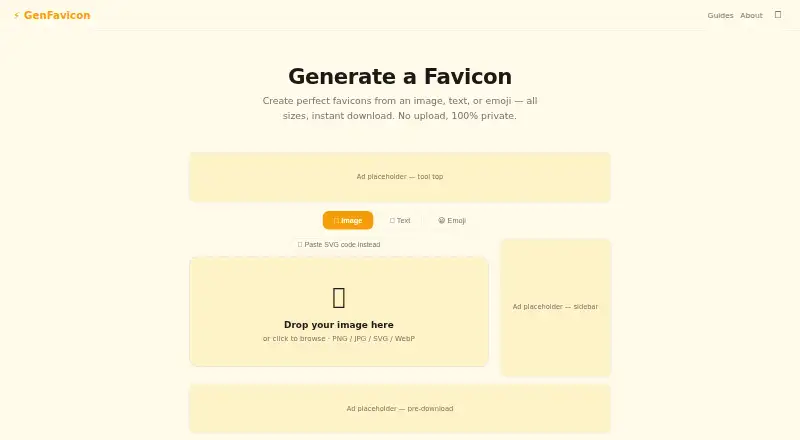
What GenFavicon is
GenFavicon is a free web tool that turns images, text, or emoji into favicon files for websites and apps. Image inputs can be PNG, JPG, SVG, or WebP, and users can also paste SVG code. The generator lists 16×16, 32×32, 48×48, 64×64, 128×128, and 256×256 sizes. Text designs use one to three characters with font and color controls, while emoji can form an icon directly. GenFavicon creates a pack containing ICO and PNG files, Apple touch icons, and Android manifest icons, with downloads for all PNGs and favicon.ico. An image can supply a brand color, and the homepage offers an iframe snippet for embedding the tool in a blog or documentation site. The maker says processing happens locally in the browser, with files never uploaded, stored, or tracked. It also says the tool continues working after the page loads if you disconnect.
Good
- Free with no signup
- ICO, PNG, Apple touch, and Android icons
- Accepts PNG, JPG, SVG, and WebP
- Local processing with no file uploads
- Offline use after the page loads
Watch out
- No batch processing
- Browser-based access only
- Text input is limited to one to three characters
Who it suits
GenFavicon suits website owners and developers who need favicon and app-icon files from common image formats, text, or emoji. It also fits users who prefer local browser processing and offline use after loading.
Verdict
GenFavicon covers standard favicon and related icon exports without charging or requiring an account. Its lack of batch processing matters if you need to handle many source designs at once.
Plans and prices
From GenFavicon's own pricing page, checked 8 Oct 2026.
| Plan | Price | What it gives you |
|---|---|---|
| Free | Free | No upload · no watermark · no signup |
The facts
Each one read from GenFavicon's own pages, with the date it was checked.
What it does
- Brand color
- The tool offers an option to extract a brand color from an image.checked 8 Oct 2026
- Downloads
- The homepage offers downloads for all PNGs and a favicon.ico file.checked 8 Oct 2026
- Embedding
- The homepage provides an iframe snippet for embedding GenFavicon on a blog or documentation site.checked 8 Oct 2026
- Image sizes
- The homepage lists 16×16, 32×32, 48×48, 64×64, 128×128, and 256×256 icon sizes.checked 8 Oct 2026
- Input formats
- The homepage accepts PNG, JPG, SVG, and WebP images.checked 8 Oct 2026
- Offline use
- The maker says the tool continues to work after the page loads if the user disconnects from the internet.checked 8 Oct 2026
- Output
- It creates a favicon pack with ICO, PNG sizes, Apple touch icons, and Android manifest icons.checked 8 Oct 2026
- Privacy
- The maker says files are processed locally in the browser and are never uploaded, stored, or tracked.checked 8 Oct 2026
- Purpose
- GenFavicon generates favicon icons from images, text, or emoji.checked 8 Oct 2026
- Support
- The About page lists an email address for questions or feedback.checked 8 Oct 2026
- SVG input
- Users can paste SVG code into the generator.checked 8 Oct 2026
- Text and emoji
- Users can create icons from 1–3 characters of text or from an emoji, with font and color controls for text.checked 8 Oct 2026
Alternatives to GenFavicon
- 1
Static.app
Free planWebAPImacOSWindows7.0From $5 a month - 2
IconsCove
Free planWeb6.8Free plan - 3

Favicon Maker
Free planAndroidiOSWebWindows6.7Free plan - 4

MakeIcon
Free planAndroidiOSWebLinux6.7Free plan - 5

Favicon.one
Free planWeb6.6Free plan - 6
Resizo Favicon Generator
Free planAndroidiOSWebLinux6.6Free plan