FS-UAE
FS-UAE is a free emulator for Amiga computers, designed with games in mind while also supporting higher-end Amiga systems.
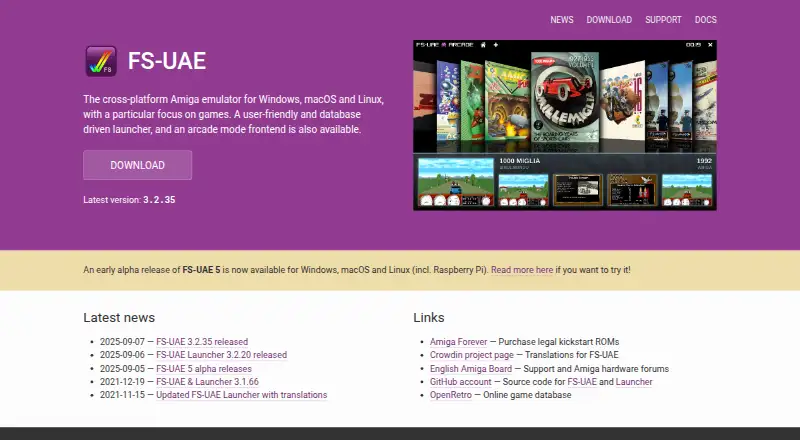
What FS-UAE is
FS-UAE is a free emulator for Amiga computers, designed with games in mind while also supporting higher-end Amiga systems. It runs on Windows, macOS, and Linux, and emulates systems including the Amiga 500, 600, 1200, 4000, CD32, and CDTV. It accepts several disk image formats, including ADF, IPF, DMS, ADZ, and ZIP, as well as ISO and BIN/CUE CD-ROM images; computer folders can also be mounted as Amiga hard drives. An optional graphical Launcher helps configure the emulator without writing configuration files, recognizes many archived WHDLoad games, and connects with the Open Amiga Game Database for game identification and images. Users can control its on-screen menu with a gamepad for tasks such as changing disks and loading save states. Online play works across platforms. FS-UAE uses OpenGL graphics and offers options such as aspect correction, zoom, shaders, and themes. It requires a moderately fast computer with accelerated OpenGL graphics. Kickstart ROMs are not included, and users should ideally have those for the systems they want to emulate.
Good
- Runs on Windows, macOS, and Linux.
- Supports multiple Amiga disk image formats.
- Online play works across platforms.
- Save states are supported.
- Optional Launcher provides graphical configuration.
Watch out
- Accelerated OpenGL graphics are required.
- Kickstart ROMs are not included.
- A moderately fast computer is required.
Who it suits
It suits Amiga game players who want an emulator for Windows, macOS, or Linux, including those interested in online play. Users should have a computer with accelerated OpenGL graphics and ideally the relevant Kickstart ROMs.
Verdict
FS-UAE combines broad Amiga system and image-format support with an optional graphical Launcher and cross-platform online play. Check the computer requirements and Kickstart ROM availability before choosing it.
Plans and prices
From FS-UAE's own pricing page, checked 29 Sep 2026.
| Plan | Price | What it gives you |
|---|---|---|
| FS-UAE | Free | Open-source Amiga emulator · donations optional |
The facts
Each one read from FS-UAE's own pages, with the date it was checked.
What it does
- Controls
- Its on-screen menu supports gamepad control for actions such as swapping floppy disks and loading save states.checked 29 Sep 2026
- Developer
- The site identifies Frode Solheim and contributors as the copyright holders and says FS-UAE is a hobby project supported by donations.checked 29 Sep 2026
- Disk images
- It supports ADF and IPF floppy images, ISO and BIN/CUE CD-ROM images, and computer folders mounted as Amiga hard drives.checked 29 Sep 2026
- Emulated systems
- It emulates Amiga 500, 500+, 600, 1000, 1200, 4000, CD32 and CDTV.checked 29 Sep 2026
- Game database
- The Launcher integrates with the Open Amiga Game Database to recognize ADF, IPF and WHDLoad games and retrieve covers and screenshots.checked 29 Sep 2026
- Graphics
- FS-UAE uses OpenGL and offers aspect correction, zoom, shaders and visual themes.checked 29 Sep 2026
- Kickstart ROMs
- The documentation says users should ideally have Kickstart ROMs for the Amigas they want to emulate.checked 29 Sep 2026
- Launcher
- The optional graphical FS-UAE Launcher configures the emulator without requiring users to write configuration files.checked 29 Sep 2026
- License
- FS-UAE is free software licensed under GPLv2, with some other project parts and dependencies under LGPL or other open-source licenses.checked 29 Sep 2026
- Online play
- FS-UAE supports cross-platform online play over the Internet, designed to avoid desynchronization issues.checked 29 Sep 2026
- Purpose
- FS-UAE is a cross-platform Amiga emulator with a focus on games, and it can also emulate high-end Amigas.checked 29 Sep 2026
- Requirements
- The emulator requires a moderately fast computer with accelerated OpenGL graphics; a gamepad or joystick is recommended but not required.checked 29 Sep 2026
- Support
- The project directs support questions to its English Amiga Board subforum and also provides a Discord community and email contact.checked 29 Sep 2026
- Website privacy
- The website says it uses no tracking cookies, does not try to track visitors, and temporarily stores IP addresses in access logs when necessary.checked 29 Sep 2026
- WHDLoad
- The Launcher can recognize many archived WHDLoad games in ZIP or LHA format and configure them to launch.checked 29 Sep 2026
The full review of FS-UAE
FS-UAE is a free, cross-platform Amiga emulator focused on games, with support for a range of classic and higher-end Amiga systems. It suits players who want configurable emulation, broad disk-image support and optional online play, provided they have a computer with accelerated OpenGL graphics and can supply Kickstart ROMs.
Overview
FS-UAE covers systems from the Amiga 500 through the Amiga 4000, as well as CD32 and CDTV. That range makes it useful for more than a single model’s game library, while support for mounted computer folders also gives users a route to use directory-based content as Amiga hard drives.
The emulator’s optional graphical Launcher is a meaningful advantage for people who would rather configure through an interface than write configuration files. It is optional, though: users who want a graphical setup can use it, while FS-UAE does not require it.
Key features
Games, images and configuration
FS-UAE supports ADF and IPF floppy images, ISO and BIN/CUE CD-ROM images, and mounted folders. Its on-screen menu supports gamepad control for tasks such as changing floppy disks and loading save states, so a keyboard is not the only way to handle common in-game emulator actions. A gamepad or joystick is recommended, not required.
The Launcher integrates with the Open Amiga Game Database to identify ADF, IPF and WHDLoad games and retrieve cover art and screenshots. It can also recognize many archived WHDLoad games in ZIP or LHA format and configure them to launch. This can reduce setup work for supported games, but does not remove the need to have the relevant game files.
Graphics and online play
OpenGL underpins FS-UAE’s graphics, with aspect correction, zoom, shaders and visual themes for adjusting presentation. The trade-off is a moderately fast host computer with accelerated OpenGL graphics; this is not the best fit for a machine that cannot meet that requirement.
Cross-platform online play is designed to avoid desynchronization issues, making FS-UAE a stronger option for Amiga play with others than an emulator limited to local use. It also supports save states, useful for resuming play without relying only on the original game’s save system.
Pricing
FS-UAE — free. The open-source emulator is free to use, with donations optional. There is no paid tier to compare, and the GPLv2 license applies to FS-UAE; some other project parts and dependencies use LGPL or other open-source licenses.
The free price does not include Kickstart ROMs. FS-UAE does not bundle them, and the documentation recommends having ROMs for the Amiga systems you want to emulate. Account or seat limits are not part of the stated plan.
Platforms
FS-UAE runs on Windows, macOS and Linux. Its host-platform spread and cross-platform online play make it practical for groups using different desktop operating systems, but it is not a mobile or web emulator.
Who it's for
Choose FS-UAE if you want a free desktop Amiga emulator that spans several Amiga models, recognizes common game formats and offers optional graphical configuration and online play. It is especially suited to users who already have Kickstart ROMs and a computer with accelerated OpenGL.
Look elsewhere if you need ROMs included, want to play on a phone or tablet, or cannot meet the graphics requirement. The Launcher helps with configuration, but users seeking an emulator that does not depend on external ROMs should consider another route.
Pros and cons
- Pros: Free, open-source software with no paid tier, and support for Amiga 500 through 4000 models plus CD32 and CDTV.
- Pros: Broad floppy and CD image support, folder mounting, save states and gamepad-controlled menu actions cover varied play and setup needs.
- Pros: The optional Launcher can identify supported games, retrieve artwork and configure many archived WHDLoad titles without manual configuration files.
- Pros: Cross-platform online play is designed to limit desynchronization, and graphics options include aspect correction, zoom and shaders.
- Cons: Kickstart ROMs are not included, so users must bring their own for the Amigas they intend to emulate.
- Cons: Accelerated OpenGL and a moderately fast computer are required, ruling out some older or less capable machines.
Alternatives
For other options, browse Amiga Emulators or the broader Emulator Software directory.
- Amiberry is another free, open-source choice if you want support for Android as well as desktop platforms.
- Copperline is free and supports Linux, macOS, Windows and the web; its maker uses real Amigas as a reference for checking emulator behavior.
- Amiga Forever is the paid alternative for someone willing to make a one-time purchase for its Value Edition, which includes a Windows installer, Workbench 1.3 and ROM versions 1.1, 1.2 and 1.3.
- Amigo — Amiga Emulator is a free option for iOS and macOS; it has no ads or accounts, but requires users to bring Kickstart ROMs and disks.
- vAmigaWeb is a free choice for someone seeking an emulator on Android, iOS or the web.
- Denise is another free option for Linux, macOS and Windows.
- Scripted Amiga Emulator (SAE) is a free alternative for users looking for an API or web-based option.
- UAE4ARM is a free option if Android is the platform you need.
Verdict
FS-UAE is a strong fit for desktop users who want free Amiga emulation across multiple systems, with useful Launcher assistance and online play. Its main reasons to choose something else are equally clear: it requires accelerated OpenGL and does not supply Kickstart ROMs.
Alternatives to FS-UAE
- 1

Damisoft Amiga Emulator
Free planWebLinuxmacOSWindows6.8Free plan - 2
Amiga Forever
AndroidiOSLinuxmacOS6.6$19.95 one-time - 3
Meta Amiga Emulator
Free planLinuxmacOSWindows6.6Free plan - 4
UAE4ALL2 Mod
Free planAndroidiOS6.6Free plan - 5
Amiberry
Free planAndroidLinuxmacOSWindows6.4Free plan - 6
Jammy
Free planLinuxWindows6.4Free plan