Scripted Amiga Emulator (SAE)
Scripted Amiga Emulator (SAE) is a free Amiga emulator built with HTML5 and JavaScript for modern web browsers.
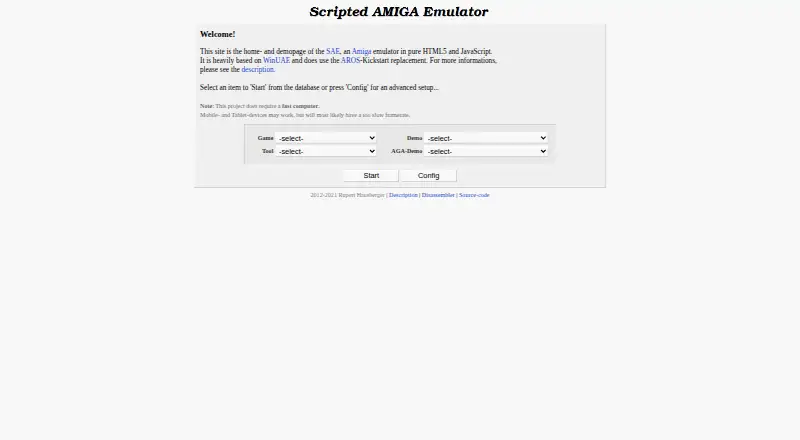
What Scripted Amiga Emulator (SAE) is
Scripted Amiga Emulator (SAE) is a free Amiga emulator built with HTML5 and JavaScript for modern web browsers. It is intended for playing Amiga demos, intros, music modules, and games, and can also be used to benchmark a browser. Listed machines range from the A1000 and A500/A2000 to the A1200, A3000, and A4000/030. SAE emulates OCS, ECS, and AGA chipsets, PAL and NTSC regions, and 68000 through 68030 processors. It accepts several floppy-image formats, including ADF, EXT, IMG, DMS, SCP, and EXE, as well as HDF and VHD hardfiles. Mouse, keyboard, keyboard joystick emulation, and browser gamepads are supported. The browser needs modern HTML5 capabilities, and stated memory use ranges from 200 MB to 1.5 GB depending on configuration and browser. Amiga Kickstart ROMs are not included; an AROS replacement is provided. SAE also offers an API with commented examples, but no written API documentation.
Good
- Free to use
- Supports multiple Amiga models and chipsets
- Accepts several floppy and hardfile formats
- Supports keyboard, mouse, and browser gamepads
- Includes an AROS Kickstart replacement
Watch out
- Amiga Kickstart ROMs are not included
- No written API documentation is provided
- AGA emulation may not run in real time
- Mobile and tablet performance may be slow
Who it suits
SAE may suit people who want to run Amiga software in a browser or embed emulator playback through its API. Users should have a modern browser and a fast computer, particularly for demanding AGA emulation.
Verdict
SAE offers broad Amiga model and media support in a browser, with an API for embedding. Its performance demands and missing written API documentation are important considerations.
The facts
Each one read from Scripted Amiga Emulator (SAE)'s own pages, with the date it was checked.
What it does
- API documentation
- The maker says there is no written API documentation, but provides commented examples.checked 4 Oct 2026
- Controls
- The emulator supports HTML5 mouse and keyboard input, keyboard joystick emulation, and gamepads through the browser gamepad extension.checked 4 Oct 2026
- CPU and chipset
- Listed features include 68000 through 68030 CPUs, OCS, ECS, and AGA chipsets, and PAL/NTSC regions.checked 4 Oct 2026
- Emulated models
- It lists support for A1000, A500/A2000, A500+, A600, A1200, A3000, and A4000/030 models.checked 3 Oct 2026
- Emulation features
- It supports OCS, ECS, and AGA chipsets, PAL and NTSC regions, and 68000 through 68030 CPUs.checked 3 Oct 2026
- Format limits
- SAE does not support compressed floppy images such as ADZ, FDI/IPF images, compressed hardfiles such as HDZ, or onboard SCSI for A3000/4000.checked 3 Oct 2026
- Integration
- The project describes an API intended to let other sites integrate playback of demos, intros, mods, or games.checked 4 Oct 2026
- Integrations
- The project describes an API and examples for embedding the emulator, but says its API has no written documentation.checked 3 Oct 2026
- Kickstart ROM
- Amiga Kickstart ROMs 1.0–3.1 are not included for copyright reasons; an AROS Kickstart replacement is included.checked 4 Oct 2026
- License
- The source code is listed under the GPL license.checked 3 Oct 2026
- License and author
- The maker identifies Rupert Hausberger as the author and lists the source code license as GPL.checked 4 Oct 2026
- Limits
- The emulator does not support compressed floppy images such as ADZ, FDI/IPF images, onboard SCSI for A3000/A4000, or compressed hardfiles such as HDZ.checked 4 Oct 2026
- Media support
- It supports ADF, EXT, IMG, DMS, SCP, and EXE floppy images, plus HDF and VHD hardfiles; support varies by format for read and write.checked 4 Oct 2026
- Performance limit
- The maker says SAE requires a fast computer and that most AGA emulation needs a super-computer to run in real time; mobile and tablet devices may have too low a framerate.checked 3 Oct 2026
- Privacy
- The maker says the site uses no third-party analytics or tracking and does not transfer files selected from the user's computer to the internet.checked 4 Oct 2026
- Purpose
- SAE is an Amiga emulator in pure HTML5 and JavaScript, intended to make Amiga Classic emulation available in browsers.checked 4 Oct 2026
- ROM requirement
- Amiga Kickstart ROMs are not included for copyright reasons; an AROS Kickstart replacement is included.checked 3 Oct 2026
- Safety
- The maker says SAE runs within browser memory and changes to disk images are held in memory rather than saved physically.checked 4 Oct 2026
- Supported models
- The emulator lists support for A1000, A500/A2000, A500+, A600, A1200, A3000, and A4000/030 models.checked 4 Oct 2026
- System requirements
- The maker recommends a fast computer and a modern HTML5 browser; stated memory requirements range from 200 MB to 1.5 GB depending on configuration and browser.checked 4 Oct 2026
- Use cases
- The project aims to let people play Amiga demos, intros, mods, and games in a browser, and possibly benchmark the browser.checked 3 Oct 2026
Where it runs
- Browser requirements
- SAE requires a modern HTML5 browser with capabilities including WebGL or Canvas2D, WebAudio, typed arrays, and FileReader; the page estimates memory use at 200 MB to 1.5 GB depending on configuration and browser.checked 3 Oct 2026
The company
- Maker
- The readme credits Rupert Hausberger as the person who wrote and ported SAE.checked 3 Oct 2026
Alternatives to Scripted Amiga Emulator (SAE)
- 1

Damisoft Amiga Emulator
Free planWebLinuxmacOSWindows6.8Free plan - 2
Amiga Forever
AndroidiOSLinuxmacOS6.6$19.95 one-time - 3
Meta Amiga Emulator
Free planLinuxmacOSWindows6.6Free plan - 4
UAE4ALL2 Mod
Free planAndroidiOS6.6Free plan - 5
Amiberry
Free planAndroidLinuxmacOSWindows6.4Free plan - 6
Jammy
Free planLinuxWindows6.4Free plan