
Damisoft Amiga Emulator
Damisoft Amiga Emulator lets users play Amiga games in a web browser, with Windows, Linux, and macOS also listed as host platforms.
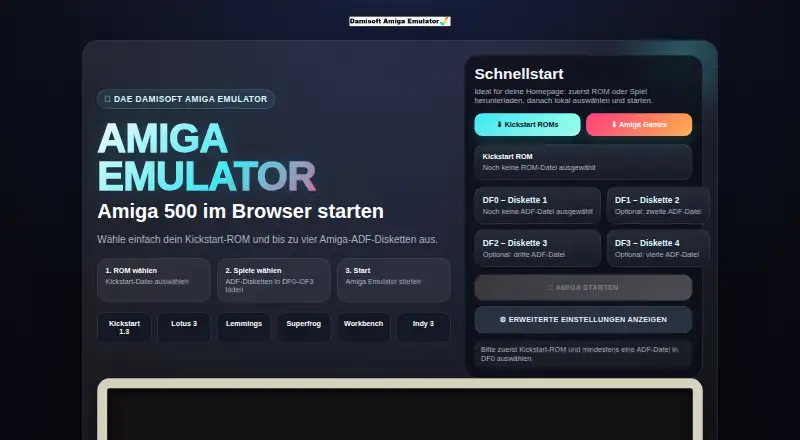
What Damisoft Amiga Emulator is
Damisoft Amiga Emulator lets users play Amiga games in a web browser, with Windows, Linux, and macOS also listed as host platforms. To start, users select a Kickstart ROM and load at least one ADF disk image; the quick start supports up to four ADF images in drives DF0–DF3. Kickstart is not included. The emulator lists Amiga 500, 2000, 3000, and 4000/030 models, as well as OCS, ECS, and AGA. Supported floppy file types are uncompressed ADF, DMS, IMG, EXE, and SCP; HDF and VHD are listed for hard drive images. Advanced settings cover the Amiga model, CPU, chipset, RAM, PAL or NTSC video, audio, ports, ROMs, floppy drives, and IDE media. Users can control games with a PC keyboard, but key combinations may need to be discovered separately for each game. The maker's games index lists 73 links, including game folders, ADF images, and ZIP archives, and its ROM page lists Kickstart versions 1.2, 1.3, 2.0, 3.0, 3.1, and 4.0. The maker says a fast computer is required and warns that mobile or tablet frame rates may be too slow. Turbo is the fastest speed mode, but it is not always compatible. The emulator is free, and its creator is identified as the Damisoft Groupe.
Good
- Runs in a browser and on Windows, Linux, and macOS.
- Supports several Amiga models and chipsets.
- Supports floppy and hard drive image formats.
- Advanced settings include CPU, RAM, and video options.
- Free to use.
Watch out
- Kickstart ROM is not included.
- A Kickstart ROM and at least one ADF image are required.
- Maker says a fast computer is required.
- Mobile and tablet frame rates may be too slow.
Who it suits
It suits people with a Kickstart ROM and Amiga disk images who want to run games in a browser or on Windows, Linux, or macOS. Users on mobile or tablet devices should consider the maker's performance warning.
Verdict
Damisoft Amiga Emulator offers browser and desktop access with a broad set of configuration options and disk-image formats. Users need to supply a Kickstart ROM and ADF image, and should heed the performance and Turbo-mode cautions.
Plans and prices
From Damisoft Amiga Emulator's own pricing page, checked 8 Oct 2026.
| Plan | Price | What it gives you |
|---|---|---|
| Damisoft Amiga Emulator | Free | Start in browser · requires a Kickstart ROM and at least one ADF disk image |
The facts
Each one read from Damisoft Amiga Emulator's own pages, with the date it was checked.
What it does
- Advanced settings
- Advanced settings include Amiga model, CPU, chipset, RAM, video, audio, ports, ROMs, floppy drives, and IDE media.checked 8 Oct 2026
- Controls
- The emulator can be controlled with a PC keyboard, but keyboard combinations vary by game.checked 8 Oct 2026
- Disk drives
- The quick-start interface supports loading up to four ADF disks in DF0 through DF3.checked 8 Oct 2026
- Disk formats
- The floppy interface lists uncompressed ADF, DMS, IMG, EXE, and SCP as supported file types.checked 8 Oct 2026
- Download library
- The maker's games index lists 73 links, including game folders, ADF images, and ZIP archives.checked 7 Oct 2026
- Emulation settings
- Advanced settings include Amiga models, CPU, chipset, RAM, PAL or NTSC video, and other configuration options.checked 7 Oct 2026
- Game downloads
- The maker’s Amiga Games Index lists 73 links and describes ADF files, ZIP archives, and Workbench folders for emulator users.checked 8 Oct 2026
- Hard drive formats
- The interface lists HDF and VHD as supported types for the PCMCIA hard drive slot.checked 8 Oct 2026
- Keyboard
- The page says users can play with a PC keyboard, but each game's key combinations may need to be discovered separately.checked 7 Oct 2026
- Organization
- The Damisoft Groupe describes itself as an independent non-profit organization founded in 1999.checked 8 Oct 2026
- Performance limit
- The maker says a fast computer is required and warns that mobile and tablet devices may have a frame rate that is too slow.checked 8 Oct 2026
- Purpose
- The emulator lets users play almost all Amiga games in a web browser.checked 8 Oct 2026
- ROM library
- The ROM download page lists Kickstart versions 1.2, 1.3, 2.0, 3.0, 3.1, and 4.0.checked 7 Oct 2026
- Security
- The emulator page does not state security certifications or compliance claims.checked 7 Oct 2026
- Speed limitation
- The page warns that Turbo is the fastest speed mode but is not always compatible.checked 7 Oct 2026
- Startup
- To start a game, users select a Kickstart ROM and load an ADF disk image into DF0.checked 8 Oct 2026
- Startup files
- To start, users select a Kickstart ROM and at least one ADF disk image.checked 7 Oct 2026
- System requirements
- The maker says a fast computer is required and mobile or tablet devices may have a frame rate that is too slow.checked 7 Oct 2026
The company
- Headquarters
- The maker’s About page states that the Damisoft Groupe headquarters is in Bad Säckingen, Germany.checked 8 Oct 2026
- Maker
- The page identifies the Damisoft Groupe as the emulator’s creator.checked 8 Oct 2026
The full review of Damisoft Amiga Emulator
Overview
Damisoft Amiga Emulator runs Amiga games in a browser, with versions for Windows, Linux and macOS. It suits players who can provide their own ROM and disk images and want to tune the emulated machine. Its configuration range is a clear advantage; the required setup and performance demands make it a poor fit for casual mobile play.
Key features
System configuration
Users can select Amiga 500, 2000, 3000 or 4000/030 systems, with OCS, ECS and AGA options. Advanced settings cover CPU, chipset, RAM, PAL or NTSC video, audio, ports, ROMs, floppy drives and IDE media. That breadth is useful for matching a game's expected setup, but it puts the emulator's flexibility ahead of a simple, ready-to-play experience.
Disk images and controls
Supported floppy formats include ADF, DMS, IMG, EXE and SCP; hard-drive images can be HDF or VHD. Quick start can mount up to four ADF images in drives DF0–DF3. To launch a game, users need a Kickstart ROM and at least one ADF image, loaded into DF0. PC keyboard input is supported, though combinations vary by game and may take some discovery.
Turbo is the fastest speed mode, but the maker cautions that it is not always compatible. Users who value compatibility should not assume it is the best default. A fast computer is required, and mobile phones or tablets may deliver a frame rate that is too slow for comfortable play.
Game and ROM downloads
The Damisoft Amiga Games Index links to 73 items, including game folders, ADF images and ZIP archives. A separate ROM page lists Kickstart versions 1.2, 1.3, 2.0, 3.0, 3.1 and 4.0. These resources may help users find files to work with, but the emulator does not include a Kickstart ROM, and starting a game still requires users to select one and load an ADF image.
Pricing
Damisoft Amiga Emulator is free: the plan is free and starts in the browser. There are no paid tiers, seat counts, quotas or trial period to weigh. The trade-off is that free access does not include a Kickstart ROM; users must bring that and at least one ADF disk image to play.
Platforms
The emulator supports web browsers, Windows, Linux and macOS. That range makes it an option for desktop users who want browser access or a desktop platform, but the performance warning narrows its appeal on mobile and tablet devices, where frame rates may be too low.
Who it's for
This is a good fit for Amiga players who already have a Kickstart ROM and disk images, want to adjust system settings, or need support for several floppy and hard-drive image formats. It is less suitable for newcomers expecting a game to start without sourcing files, people who prefer a fixed configuration, and anyone relying on a phone or tablet for play.
Pros and cons
- Pros: Free browser and desktop access across Windows, Linux and macOS; detailed model and system controls; support for multiple floppy and hard-drive image formats.
- Cons: Users must supply a Kickstart ROM and ADF image; keyboard combinations vary by game; Turbo may not be compatible; mobile and tablet performance may be too slow.
Alternatives
Amiga Emulators is the category directory for comparing options. Choose Amiberry if you want a free, open-source GPLv3 emulator on Android as well as Linux, macOS and Windows. Meta Amiga Emulator is also free and open source, but it is pre-alpha and has no emulator to run yet. Buddi is budgeting software, not an Amiga emulator. E-UAE is a free, open-source GPL option for Linux, macOS and Windows; FS-UAE is another free open-source Amiga emulator for those platforms, with optional donations. UAE4ALL2 Mod is for Android and iOS. Jammy is free MIT-licensed software for Linux and Windows. For Apple devices, Amigo — Amiga Emulator is free on iOS and macOS, with no ads or accounts, and requires users to bring their own Kickstart ROM and disks.
Verdict
Choose Damisoft Amiga Emulator if you want a free browser or desktop route to Amiga games and value granular system configuration and broad disk-image support. Its main limitation is the setup burden: you must source a Kickstart ROM and ADF image, and mobile performance may disappoint. If you want a ready-to-run experience or reliable mobile play, look elsewhere.
Getting started
- Open https://amiga.damisoft.ch/ in a web browser, or use a listed Windows, Linux, or macOS platform.
- Select a Kickstart ROM.
- Load at least one ADF disk image into DF0.
- Optionally load more ADF images into DF1–DF3.
- Adjust the Amiga model or other advanced settings if needed.
- Use a PC keyboard to control the game.
Limits worth knowing
The free plan requires a Kickstart ROM and at least one ADF disk image, and the ROM is not included. The maker says a fast computer is required; mobile and tablet frame rates may be too slow.
Questions
How much does Damisoft Amiga Emulator cost?
The listed plan is free at no cost.
Which platforms does it support?
The listed platforms are web browser, Windows, Linux, and macOS.
Does it include a Kickstart ROM?
No. Users select a Kickstart ROM to start a game.
Which disk image formats are supported?
The listed floppy formats are ADF, DMS, IMG, EXE, and SCP; hard drive image formats are HDF and VHD.
Who makes the emulator?
The emulator page identifies the Damisoft Groupe as its creator.
Alternatives to Damisoft Amiga Emulator
- 1
Amiga Forever
AndroidiOSLinuxmacOS6.6$19.95 one-time - 2
Meta Amiga Emulator
Free planLinuxmacOSWindows6.6Free plan - 3
UAE4ALL2 Mod
Free planAndroidiOS6.6Free plan - 4
Amiberry
Free planAndroidLinuxmacOSWindows6.4Free plan - 5
Jammy
Free planLinuxWindows6.4Free plan - 6

vAmigaWeb
AndroidiOSWeb6.4