
Fresh KDS
Fresh KDS is a kitchen display system that connects to a point of sale and shows orders with items, modifiers, notes, and timers.
What Fresh KDS is
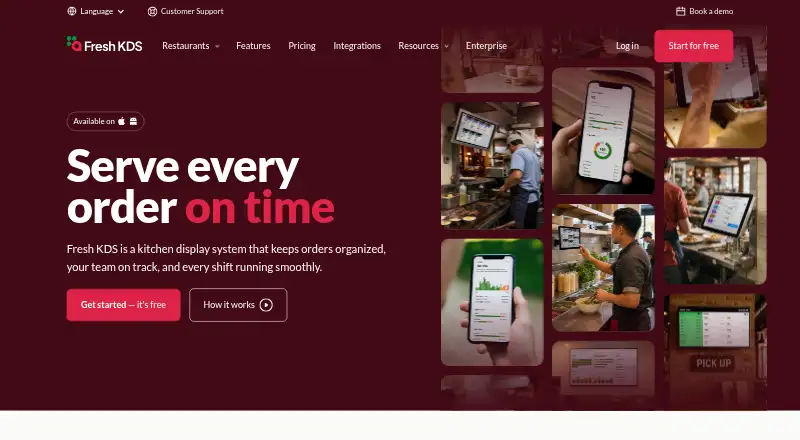
Fresh KDS is a kitchen display system that connects to a point of sale and shows orders with items, modifiers, notes, and timers. It can sort orders by prep and pickup times and move urgent or delayed tickets forward. Kitchen workflow features include ingredient all day counts, screen communication, prep lists, and routing items to specific screens based on modifiers. For customer handoff, it offers an order tracker and take-out view, along with automatic SMS updates about order status and pickup. On The Fly provides mobile-friendly kitchen performance insights, while in-app metrics show ticket times, delays, and order flow. Listed POS and ordering integrations include Square, Clover, TouchBistro, Lightspeed K-Series, Olo, Cuboh, and Oracle Restaurants. Fresh KDS supports Android 7 and later and iOS 13 and later, and also works with commercial kitchen-grade screens, USB bump bars, and specified Bluetooth printers. New accounts start with a seven-day Premium free trial without a credit card. Support is available 24/7.
Good
- Sorts orders using prep and pickup times
- Routes items to screens based on modifiers
- Includes order tracking and automatic SMS updates
- Offers a seven-day Premium trial without a credit card
- 24/7 support is available
Watch out
- Essentials costs $20 a month, billed monthly per screen
- Premium costs $27 a month, billed monthly per screen
- Enterprise pricing is quoted directly
Who it suits
Fresh KDS suits restaurant kitchens that want to route and prioritize orders on screens and track ticket flow. Its customer handoff tools may also help teams that want order tracking and automatic status and pickup messages.
Verdict
Fresh KDS combines order display, kitchen workflow tools, and customer handoff features, with pricing based on screens for Essentials and Premium. Check the listed device requirements and integrations against the kitchen's setup before choosing a plan.
Plans and prices
From Fresh KDS's own pricing page, checked 5 Oct 2026.
| Plan | Price | What it gives you |
|---|---|---|
| Essentials | $192 a year | iOS and Android compatibility · order holds and recall · order prioritization · custom timers and alerts · speed of service reports · sound notifications · $192.00 per screen per year (= $16.00 per screen/month, billed annually) |
| Premium | $264 a year | Everything in Essentials · label and ticket printing · ingredient all day counts · screen communication · modifier styles · in-app metrics · customer messaging · $264.00 per screen per year (= $22.00 per screen/month, billed annually) |
| Enterprise | Priced on request | Everything in Premium · custom kitchen workflows · enterprise device settings management · multi-location analytics and benchmarking · custom data integrations · quoted directly |
The facts
Each one read from Fresh KDS's own pages, with the date it was checked.
What it does
- Cancellation
- The pricing FAQ says customers can cancel, upgrade, or downgrade at any time without a long-term contract.checked 29 Sep 2026
- Customer handoff
- Features include an order tracker, a take-out view, and automatic SMS updates about order status and pickup.checked 29 Sep 2026
- Enterprise fit
- Enterprise is designed for restaurant groups and is typically for restaurants with 20 or more locations.checked 29 Sep 2026
- Hardware requirements
- Fresh KDS supports iOS 13 and later and Android 7 and later, and also works with commercial kitchen-grade screens, USB bump bars, and specified Bluetooth printers.checked 29 Sep 2026
- Integrations
- The integrations page lists POS and ordering connections including Square, Clover, TouchBistro, Lightspeed K-Series, Olo, Cuboh, and Oracle Restaurants.checked 29 Sep 2026
- Kitchen workflow
- Fresh KDS supports ingredient all day counts, screen communication, prep lists, and routing items to specific screens based on modifiers.checked 29 Sep 2026
- Order management
- The system can automatically sort orders based on prep and pickup times and move urgent or delayed orders to the front of the line.checked 29 Sep 2026
- Performance insights
- On The Fly provides mobile-friendly kitchen performance insights, and in-app metrics show ticket times, delays, and order flow.checked 29 Sep 2026
- Product
- Fresh KDS is a kitchen display system app that connects to a point of sale and displays orders with items, modifiers, notes, and a timer.checked 29 Sep 2026
- Support
- The support team is available 24/7 to help with setup, troubleshooting, and questions during service.checked 29 Sep 2026
The company
- Company
- The site copyright identifies the maker as Fresh Technology, Inc.checked 29 Sep 2026
Money
- Price basis
- Essentials and Premium are priced per screen, and the site says customers can add or remove screens as kitchen needs change.checked 29 Sep 2026
- Trial
- Every new account starts with a 7-day Premium free trial, with no credit card required.checked 29 Sep 2026
The full review of Fresh KDS
Overview
Fresh KDS connects a restaurant’s point of sale to kitchen displays, organizing tickets from order arrival through pickup. It suits kitchens that need more than a digital queue, particularly those coordinating prep across stations and keeping customers informed.
Its strongest case is the combination of timing-based ticket prioritization, kitchen coordination, and customer handoff tools. The trade-off is a recurring per-screen cost, with some capabilities reserved for Premium and custom workflows for Enterprise.
Key features
Order flow and timing
Orders appear with items, modifiers, notes, and a timer. Fresh KDS can sort them by preparation and pickup times, pushing urgent or delayed tickets to the front. Custom timers, alerts, and sound notifications make it easier for staff to track service pace; speed-of-service reports and in-app metrics add visibility into ticket times, delays, and order flow. This is useful for kitchens managing shifting priorities, though the value of the reports depends on whether managers will use them to adjust service.
Kitchen coordination
Ingredient all day counts, prep lists, and communication between screens support coordination beyond the ticket queue. Modifier-based routing sends items to specific screens, while an expo screen can support a pass station. These tools are especially relevant where several stations share responsibility for an order; kitchens with a simpler workflow may not need the higher-tier coordination features.
Customer handoff
An order tracker, take-out view, and automatic SMS status and pickup updates extend the system beyond the kitchen. Customer messaging is a Premium feature, so kitchens choosing Essentials should not assume the customer-facing tools are included in that lower tier.
Integrations and hardware
Fresh KDS connects with POS and ordering services including Square, Clover, TouchBistro, Lightspeed K-Series, Olo, Cuboh, and Oracle Restaurants. It supports iOS 13 and later and Android 7 and later, as well as commercial kitchen-grade screens, USB bump bars, and specified Bluetooth printers. The supported equipment is a practical strength for purpose-built kitchen stations, but buyers should confirm compatibility with their own devices and integrations before committing. On The Fly offers mobile-friendly kitchen performance insights.
Pricing
Essentials costs $20 a month per screen, billed monthly. It includes iOS and Android compatibility, order holds and recall, prioritization, custom timers and alerts, speed-of-service reports, and sound notifications. It is the sensible starting point for kitchens focused on ticket flow and timing; it does not include the Premium feature set such as label and ticket printing, ingredient counts, screen communication, modifier styles, in-app metrics, and customer messaging.
Premium costs $27 a month per screen, billed monthly. It includes everything in Essentials plus those printing, coordination, metrics, and messaging features. Kitchens that need communication across screens or customer updates have a clearer reason to pay the per-screen increase; smaller operations that only need a prioritized queue may not.
Enterprise has custom pricing, billed by direct quote. It includes everything in Premium, along with custom kitchen workflows, enterprise device settings management, multi-location analytics and benchmarking, and custom data integrations. It is designed for restaurant groups and is typically aimed at businesses with 20 or more locations.
Every new account starts with a 7-day Premium free trial, with no credit card required; there is no free plan. Essentials and Premium are priced per screen, and screens can be added or removed as kitchen needs change. Customers can cancel, upgrade, or downgrade at any time without a long-term contract. The listed paid-from price is 16 /mo (annual), while the Essentials and Premium prices above are billed monthly.
Platforms
Fresh KDS is available on Android, iOS, and web, with tablet display support. Offline mode is supported, and deployment is hybrid. Device compatibility matters in practice: older iOS devices below version 13 and Android devices below version 7 fall outside the stated requirements.
Who it's for
Fresh KDS is best suited to restaurants that want ticket timing, station coordination, and customer pickup communication in one kitchen display system. Its per-screen Essentials and Premium plans can fit kitchens that need to adjust screen counts as operations change. Enterprise is the stronger fit for larger groups needing multi-location analytics or custom integrations. A kitchen seeking a free system, or one that does not need these workflow tools, should compare alternatives before taking on a paid per-screen plan.
Pros and cons
- Pro: Timing-based prioritization can bring urgent or delayed orders forward, helping staff focus on the tickets most in need of attention.
- Pro: Modifier routing, prep lists, all day counts, and screen communication support coordination across kitchen stations.
- Pro: The take-out view, order tracker, and SMS updates connect kitchen progress with customer pickup.
- Pro: The 7-day Premium trial requires no credit card, and paid screen counts can change without a long-term contract.
- Con: There is no free plan, and Essentials and Premium costs scale with each screen.
- Con: Several coordination and customer-facing features require Premium, while custom workflows and multi-location tools require an Enterprise quote.
- Con: Device compatibility has minimum OS requirements, so older tablets may not qualify.
Alternatives
Kitchen Display System Software is the broader category guide for comparing options. Choose Epson TrueOrder KDS if a one-time purchase with no subscription or maintenance fee is preferable; its price is sold through Epson partners. NodeDR OrderRestro has a free plan and supports self-hosted and desktop platforms, making it worth considering when those deployment options matter.
Logic Controls KitchenGO KDS Software is another paid option for web, Windows, and Android. Baresto Manager is a free, open-source option that runs locally at the venue, with optional paid installation support. Mise Kitchen Display charges $29 a month per restaurant location for one location with unlimited stations, which may suit a restaurant that prefers location-based rather than per-screen pricing.
SterkChef is another paid kitchen display option. FloCafe KDS is free open-source software with no subscription fee, though hardware and operating costs are separate. Cibus KDS offers a quoted package that combines POS, ordering, kitchen display, payments and receipts, a staff mobile app, and an admin dashboard.
Verdict
Fresh KDS is a strong fit for restaurants that need a kitchen display system to do more than show tickets: its timing tools, station coordination, and customer handoff features cover a broad service workflow. Choose it if those capabilities justify a per-screen subscription and your devices and POS connections fit. Look elsewhere if a free or open-source system is the priority, or if per-screen pricing does not suit the kitchen’s setup.
Alternatives to Fresh KDS
- 1

HungerRush
Free planAndroidiOSWebAPI8.1From $149 a month - 2
Slant KDS
Free planAndroidWebAPImacOS7.8From $32 a month - 3

Baresto Manager
Free planOpen sourceAndroidiOSWebAPI7.7Free plan - 4
Toast
Free planAndroidiOSWebAPI7.6From $69 a month - 5
NodeDR OrderRestro
Free planOpen sourceWebAPILinuxmacOS7.5Free plan - 6

Ordering.Tools
Free planAndroidiOSWeb7.5From €30 a month