
Baresto Manager
Baresto Manager is a restaurant system for QR menus, waiter ordering, kitchen display, cashier workflows, and management reports.
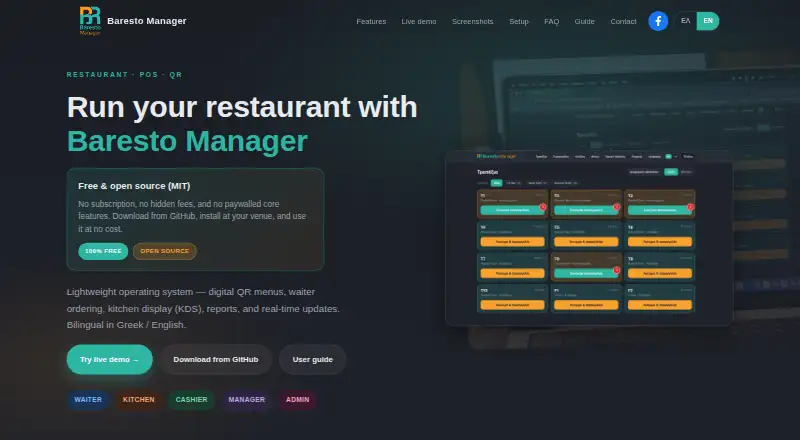
What Baresto Manager is
Baresto Manager is a restaurant system for QR menus, waiter ordering, kitchen display, cashier workflows, and management reports. Staff can manage tables and floor plans, place orders from mobile devices, send items to the kitchen, mark them delivered, and close tables with payment. The kitchen display groups tickets by table, supports dish-status updates and kitchen, bar, and grill filters, and shows real-time alerts. Guests can use a Greek- or English-language menu with allergen and availability details, call a waiter, and access a table-specific or shared QR code. Managers can view revenue, order, and top-item reports and export them as CSV. Password and four-digit PIN login are available, with admin, manager, waiter, kitchen, and cashier roles. Cashiers can close with cash or card and print receipts. The system runs locally on venue LAN or Wi-Fi, so daily service does not require always-on internet; downloads and updates do. It is free to run, with no license fee or SaaS subscription. Windows setup uses a GitHub ZIP and launcher, while macOS and Linux require Python 3.11 or later. Optional paid installation support is available.
Good
- Free to run with no license fee or SaaS subscription.
- Daily service works on venue LAN or Wi-Fi.
- QR menus include allergens and availability.
- Cashiers can accept cash or card and print receipts.
- Reports cover revenue, orders, and top items with CSV export.
Watch out
- Downloads and updates require internet.
- macOS and Linux setup requires Python 3.11 or later.
- The shared live demo may reset data periodically.
- Installation support is optional and paid.
Who it suits
Baresto Manager suits restaurants that want local table, ordering, kitchen, cashier, and reporting workflows, with guest-facing QR menus in Greek and English.
Verdict
Baresto Manager brings several restaurant service workflows into a local system without a SaaS subscription. Its setup requirements and internet need for downloads and updates are worth checking before installation.
Plans and prices
From Baresto Manager's own pricing page, checked 15 Oct 2026.
| Plan | Price | What it gives you |
|---|---|---|
| Baresto Manager | Free | QR menus · waiter ordering · KDS · cashier · reports · no SaaS subscription |
The facts
Each one read from Baresto Manager's own pages, with the date it was checked.
Where it runs
- Android app function
- The AppAgg listing describes Waiter Baresto365 as a free waiter app for selecting or scanning tables, adding orders, checking pending orders and entering comments or modifiers.checked 15 Oct 2026
- Apple app publisher
- Baresto Waiter is published by G.M Powersoft Computer Solutions Ltd., is free, is 160 MB and requires iOS/iPadOS 10 or later.checked 15 Oct 2026
- Apple privacy statement
- The Apple listing states that the developer reports no data collection.checked 15 Oct 2026
- macOS and Linux setup
- macOS and Linux require Python, a virtual environment, dependency installation, migrations and a runserver command.checked 15 Oct 2026
What it does
- API authentication
- The repository identifies JWT authentication through SimpleJWT.checked 15 Oct 2026
- API endpoint
- The repository documents a REST API at /api/v1/ and Django admin at /admin/.checked 15 Oct 2026
- Databases
- SQLite is used locally and PostgreSQL is supported for production deployments.checked 15 Oct 2026
- Demo limitation
- The live demo is shared, may be reset periodically and warns users not to enter real customer data.checked 15 Oct 2026
- Documentation
- The bilingual staff guide covers login, roles, waiter and cashier workflows, KDS, management, QR menus, URL paths and troubleshooting.checked 15 Oct 2026
- Documentation depth
- The repository includes API paths, environment configuration, management commands, Docker instructions, tests and Windows launchers, but no separate SDK reference is listed.checked 15 Oct 2026
- Google Play publisher page
- Google Play has a Powersoft developer page listing the Waiter Baresto365 Powersoft app.checked 15 Oct 2026
- Guest QR menu
- Guests can view bilingual menus with allergens and availability, use a call-waiter button, and access either shared or per-table QR codes.checked 15 Oct 2026
- Internet and network
- Daily service runs on the venue's LAN or Wi-Fi without always-on internet; internet is needed for downloads and updates.checked 30 Sep 2026
- Kitchen display
- The KDS shows tickets by table, dish status flow, station filters for kitchen, bar and grill, and real-time alerts.checked 15 Oct 2026
- Languages
- The interface and guest menus support Greek and English.checked 15 Oct 2026
- Limit: internet dependency
- Internet is required for downloads and updates even though normal service can run on the local network.checked 15 Oct 2026
- Limit: local WebSockets
- The guide says local development uses in-memory WebSockets and recommends refreshing or checking the server if KDS updates stall.checked 15 Oct 2026
- Limit: payment scope
- The documented payment workflow covers cash and credit card only.checked 15 Oct 2026
- Local deployment
- The application runs locally on port 8765 and daily service can operate over the venue LAN or Wi-Fi without continuous internet.checked 15 Oct 2026
- Menu administration
- Managers can edit bilingual dish names and descriptions, prices, allergens, dietary tags, modifiers and sold-out availability.checked 15 Oct 2026
- Open-source licence
- The code is released under the MIT License, allowing use, modification, distribution and sale with no warranty.checked 15 Oct 2026
- Payments
- The documented checkout flow offers cash or credit-card payment and receipt printing.checked 15 Oct 2026
Money
- Floor plans
- Managers can create floors, edit table capacity and labels, drag tables on a floor plan and assign waiters.checked 15 Oct 2026
The company
- Maker attribution
- The official site and repository credit Antonis Tzounis as the copyright holder and project author.checked 15 Oct 2026
The full review of Baresto Manager
Overview
Baresto Manager brings several restaurant floor and service workflows together in one locally run system: QR menus for guests, mobile ordering for waiters, a kitchen display, cashier checkout and manager reports. It is open source under the MIT license and has no license fee or SaaS subscription. Day-to-day service can run on the venue’s local network without an always-on internet connection.
The system runs locally on port 8765. Windows installation uses a GitHub ZIP and launcher; macOS and Linux installation requires Python 3.11 or later. Internet access is needed to download and update the software, even though it is not required throughout daily service.
The live demo is shared, and its site cautions against entering real customer data because information may be reset periodically. For teams setting up a venue, optional paid installation support is available through the contact form, including help with Windows setup, networking and initial configuration.
Key features
Table and waiter workflows
Waiters can work from table and floor-plan views, place mobile orders, send items to the kitchen and mark them delivered. When service is finished, they can close a table with payment. The product supports password access as well as four-digit PIN login, with separate admin, manager, waiter, kitchen and cashier roles.
Kitchen display and routing
The kitchen display organizes tickets by table and lets staff update dish status. Filters separate kitchen, bar and grill stations, while real-time alerts help staff follow incoming work. Baresto Manager supports station routing and order status tracking. The display platform is web-based.
Guest QR menu
Guests can open a public menu using a QR code. The menu supports Greek and English, lists allergens and item availability, and includes a call-waiter button. Venues can use codes assigned to individual tables or shared codes.
Checkout and reporting
The cashier workflow supports closing a bill with cash or card and printing a receipt. Managers can review revenue, orders and top items, then export reports as CSV.
Guidance for staff
A bilingual staff guide covers the main roles: waiters, kitchen staff, cashiers, managers and administrators. This provides role-specific guidance across the service and management workflows described for the system.
Pricing
Baresto Manager is free: the listed plan is free, billed Free to run. There is no license fee or SaaS subscription. The software is open source under the MIT license. Optional paid installation support is separate from the free plan.
Platforms
Baresto Manager is listed for Linux, macOS, web and Windows. It is deployed on premise and runs locally at the venue; the kitchen display is web-based. Linux and macOS setup requires Python 3.11 or later, while Windows setup uses a GitHub ZIP and launcher. Daily operation can use the venue’s LAN or Wi-Fi without always-on internet, but downloads and updates require internet access.
Who it's for
Baresto Manager may suit restaurants that want QR menus, waiter ordering, kitchen ticket handling and cashier checkout in a single local system, particularly where continued internet access during service is not practical. Its role-based logins and bilingual guide address teams with distinct front-of-house, kitchen and management responsibilities. Because setup differs by operating system and some installations require Python 3.11 or later, venues should account for those requirements when choosing who will install and maintain it.
Teams evaluating a kitchen display can also browse Kitchen Display System Software.
Pros and cons
Pros
- No license fee or SaaS subscription; open source under the MIT license.
- Daily service can run on the venue’s LAN or Wi-Fi without always-on internet.
- Combines table ordering, kitchen station views, QR menus, checkout and CSV reports.
- Offers role-based access, Greek and English guest menus, and a bilingual staff guide.
Cons
- Installation has specific requirements: Windows uses a GitHub ZIP and launcher, while macOS and Linux require Python 3.11 or later.
- Internet is still needed for downloads and updates.
- The shared demo is not suitable for real customer data, which may be reset periodically.
- Installation support is optional and paid.
Alternatives
Other options in the restaurant and kitchen display space include Odoo Restaurant, FloCafe KDS, Ordering.Tools, HungerRush, Lightspeed Restaurant, NodeDR OrderRestro, ZeusPOS KDS and ChefDesk.
Verdict
Baresto Manager’s clearest distinction is its locally run, free and open-source approach, paired with a broad set of restaurant workflows: guests can browse QR menus, staff can manage tables and route orders, kitchen teams can track tickets, and cashiers can close bills. Reports add basic management visibility through revenue, order and top-item summaries with CSV export.
The trade-off is that the venue must handle installation and local setup, with different procedures for Windows versus macOS and Linux. Internet is not needed throughout daily service, but remains necessary for downloads and updates, and the shared demo should not be used with real customer data. For venues comfortable with those conditions, Baresto Manager covers a substantial range of day-to-day restaurant operations without a recurring software subscription.
Getting started
- For Windows, obtain the software through the GitHub ZIP and launcher.
- For macOS or Linux, prepare Python 3.11 or later.
- Run the software locally on port 8765.
- Connect staff through the venue's LAN or Wi-Fi.
- Use password or four-digit PIN login and assign the available staff roles.
Questions
How much does Baresto Manager cost?
The plan is free. It has no license fee or SaaS subscription; optional paid installation support is available.
Which platforms does it support?
Baresto Manager supports Linux, macOS, web, and Windows. Windows setup uses a GitHub ZIP and launcher, while macOS and Linux require Python 3.11 or later.
Does it work without internet?
Daily service runs on the venue's LAN or Wi-Fi without always-on internet. Internet is needed for downloads and updates.
Is Baresto Manager open source?
Yes. It is open source under the MIT license.
Can I try the live demo with customer information?
The live demo is shared, and its data may be reset periodically. The site advises against entering real customer data.
What help is available for setup?
Optional paid installation support is available through the contact form, including help with Windows setup, networking, and initial configuration.
Alternatives to Baresto Manager
- 1

HungerRush
Free planAndroidiOSWebAPI8.1From $149 a month - 2
Slant KDS
Free planAndroidWebAPImacOS7.8From $32 a month - 3
Toast
Free planAndroidiOSWebAPI7.6From $69 a month - 4
NodeDR OrderRestro
Free planOpen sourceWebAPILinuxmacOS7.5Free plan - 5

Ordering.Tools
Free planAndroidiOSWeb7.5From €30 a month - 6

ChefDesk
AndroidiOSWebLinux7.3