FloCafe KDS
FloCafe KDS connects front-of-house restaurant orders to a kitchen screen with live tickets and preparation status.
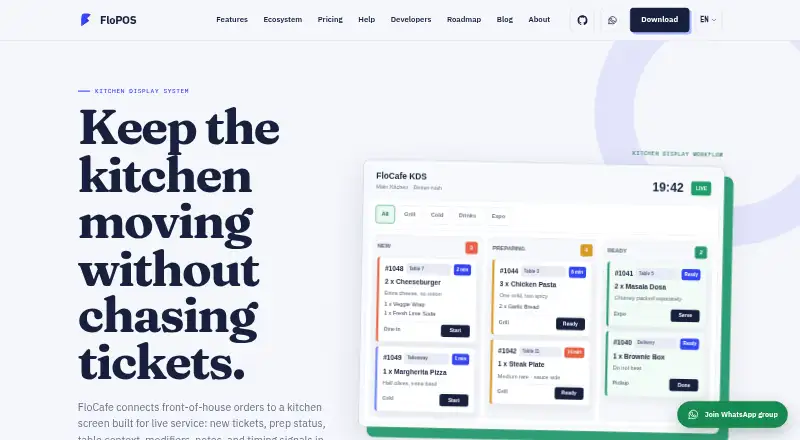
What FloCafe KDS is
FloCafe KDS connects front-of-house restaurant orders to a kitchen screen with live tickets and preparation status. Tickets can display table, order type, items, modifiers, notes and elapsed time. Kitchen staff can use a full kitchen board or filter tickets by station, including grill, cold, drinks or expo. The KDS is part of FloCafe, a restaurant POS that also covers dine-in, takeaway, delivery, tables, printing, menus and local data. It is designed to run on infrastructure controlled by the operator, such as a local device, desktop environment, local network or managed deployment. The maker says it does not operate a central cloud database for restaurant data. Anonymous launch and usage pings are on by default, can be switched off in Settings, and exclude business data. FloCafe is free open-source software under the MIT license, supplied without warranty. Operators are responsible for testing, backups, access control, compliance and hardware compatibility. Desktop downloads are listed for Linux, macOS and Windows.
Good
- Tickets show modifiers, notes and elapsed time.
- Orders can be filtered by preparation station.
- Runs on operator-controlled infrastructure.
- Free software under the MIT license.
Watch out
- Provided without warranty.
- Anonymous usage pings are enabled by default.
- Operators are responsible for backups and hardware compatibility.
- Kitchen printing is recommended as a backup.
Who it suits
FloCafe KDS may suit restaurant teams that want kitchen tickets organized by station and value open-source code and local control. Operators should be prepared to manage testing, backups, access and hardware compatibility.
Verdict
FloCafe KDS provides live kitchen ticket and station views as part of a broader restaurant POS. Its local-control approach comes with operational responsibilities, and the maker recommends keeping kitchen printing as a backup.
Plans and prices
From FloCafe KDS's own pricing page, checked 3 Oct 2026.
| Plan | Price | What it gives you |
|---|---|---|
| FloCafe | Free | Free open-source software · MIT license · hardware and operating costs are separate · No subscription fee |
The facts
Each one read from FloCafe KDS's own pages, with the date it was checked.
What it does
- Data control
- The maker says it does not operate a central cloud database for restaurant data, and that sales, customer, menu, inventory, and business report data stay under the operator’s control.checked 3 Oct 2026
- Deployment
- FloCafe is designed to run on operator-controlled infrastructure, including a local device, desktop environment, local network, or deployment the operator manages.checked 3 Oct 2026
- Desktop downloads
- The download page lists GitHub releases and store installs for macOS, Windows, and Linux.checked 3 Oct 2026
- Integrations
- The optional OrderFlow service brings orders from Zomato, Swiggy, and other aggregators into the POS workflow.checked 3 Oct 2026
- Intended users
- FloCafe is intended for businesses and their staff, and the maker says it is a fit for teams that value open-source code, local control, and the ability to adapt the system.checked 3 Oct 2026
- KDS purpose
- FloCafe connects front-of-house orders to a kitchen screen showing live tickets, prep status, table context, modifiers, notes, and timing signals.checked 3 Oct 2026
- License and warranty
- FloCafe is MIT-licensed open-source software provided as is without warranty, and operators are responsible for testing, backups, access control, legal compliance, hardware compatibility, and production use.checked 3 Oct 2026
- Optional telemetry
- Anonymous launch and usage pings are enabled by default in FloCafe, can be turned off in Settings, and exclude business data such as sales, orders, menus, customers, staff, and payment details.checked 3 Oct 2026
- Printer fallback
- The maker recommends testing the KDS together with kitchen order ticket printing, network recovery, and reprint behavior, and notes that many teams keep kitchen printing as a backup.checked 3 Oct 2026
- Product scope
- FloCafe is a restaurant POS that includes kitchen display alongside dine-in, takeaway, delivery, tables, printing, menus, and local data.checked 3 Oct 2026
- Station views
- Kitchen staff can use a full kitchen board or filter tickets by prep station, such as grill, cold, drinks, or expo.checked 3 Oct 2026
- Support
- The site lists email support at [email protected] and says FloCafe can raise a support ticket through an optional cloud connection.checked 3 Oct 2026
- Ticket details
- The KDS can show table, order type, items, modifiers, notes, and elapsed time on tickets.checked 3 Oct 2026
The company
- Founded
- 2016checked 28 Sep 2026
The full review of FloCafe KDS
Overview
FloCafe KDS is a kitchen display system built into the FloCafe restaurant POS. It suits teams that want kitchen tickets on operator-managed infrastructure and can take responsibility for running and maintaining the software. Its kitchen workflow is capable, but the open-source, local-control model puts operational work on the restaurant.
Key features
Tickets can show table, order type, items, modifiers, notes and elapsed time, giving kitchen staff useful context for preparing and prioritizing orders. Order-status tracking and timing signals help teams follow progress rather than relying on a static list of items.
Staff can use a full kitchen board or route work into station views for areas such as grill, cold, drinks or expo. That division can help kitchens with distinct prep roles; a small team working from one station may not benefit as much. FloCafe also includes an expo screen and offline mode.
The KDS is one part of a broader POS covering dine-in, takeaway, delivery, tables, printing and menus. Optional OrderFlow can bring Zomato, Swiggy and other aggregator orders into the POS workflow. This breadth makes FloCafe more relevant to restaurants choosing an operating system for the venue rather than a standalone kitchen screen.
FloCafe runs on infrastructure the operator controls, such as a local device or network, and the maker says it does not operate a central cloud database for restaurant data. Sales, customer, menu, inventory and business report data remain under the operator’s control. Anonymous launch and usage pings are enabled by default, but can be disabled in Settings; they exclude business data such as sales, orders, menus, customers, staff and payment details.
Local control is not hands-off reliability. The maker recommends testing the KDS alongside kitchen ticket printing, network recovery and reprints, and says many teams keep printing as a fallback. FloCafe is MIT-licensed and provided as is, without warranty; operators are responsible for testing, backups, access controls, legal compliance, hardware compatibility and production use. Email support is available at [email protected], and FloCafe can raise a support ticket through an optional cloud connection.
Pricing
FloCafe costs nothing, with no subscription fee. The free plan is open-source software under the MIT license, and there is no free trial because the software is free. Hardware and operating costs are separate, so the zero license price does not remove the work and expense of providing and maintaining suitable infrastructure.
Platforms
FloCafe supports Linux, macOS and Windows, as well as self-hosted deployment. Desktop downloads are offered through GitHub releases and store installs. This suits operators who want to choose and manage their own deployment, but is less attractive to teams seeking a centrally operated cloud service.
Who it's for
FloCafe is best for restaurant businesses and staff who value open-source code, local data control and the ability to adapt their system, and who have the capacity to manage its operation. It is a weaker fit for teams that need a vendor-backed warranty or do not want to own testing, backups and access control.
Pros and cons
- Useful ticket context: Table, order type, modifiers, notes and elapsed time help staff interpret and prioritize each order.
- Station and expo views: Routing and an expo screen suit kitchens that split preparation across roles.
- Operator-controlled data: Local deployment and no central FloCafe cloud database keep restaurant data under the operator’s control.
- No license fee: The MIT-licensed software costs nothing, though hardware and operating costs remain.
- Operational responsibility: There is no warranty, and operators must manage testing, backups, access, compliance and production readiness.
- Printing remains important: The maker recommends testing printing and recovery behavior, and many teams retain kitchen printing as a backup.
Alternatives
For another free, locally run MIT-licensed option, Baresto Manager is worth considering; it also offers optional paid installation support. Choose NodeDR OrderRestro if you want a free option that also lists API and web platforms.
Slant KDS may suit teams seeking a free tier with a stated monthly order cap and a paid annual plan. Brisk Table Kitchen View is another free option, with Android, iOS and web platforms.
HungerRush may fit a venue that qualifies for its free Starter plan, which covers one location and one POS terminal. Consider Odoo Restaurant if its One App Free plan, with unlimited users, matches your needs. Ordering.Tools offers a free tier capped at 20 orders per month, while eat·orbit Kitchen Display System offers a free Starter plan for one restaurant and one staff account.
Compare more options in Kitchen Display System Software.
Verdict
FloCafe KDS is a strong choice for restaurant teams that want detailed live kitchen tickets, station routing and local control as part of a broader POS, without a software subscription. Choose it if your operation can own deployment and safeguards; look elsewhere if you need a warranty or want the vendor to take on that operational burden.
Alternatives to FloCafe KDS
- 1

HungerRush
Free planAndroidiOSWebAPI8.1From $149 a month - 2
Slant KDS
Free planAndroidWebAPImacOS7.8From $32 a month - 3

Baresto Manager
Free planOpen sourceAndroidiOSWebAPI7.7Free plan - 4
Toast
Free planAndroidiOSWebAPI7.6From $69 a month - 5
NodeDR OrderRestro
Free planOpen sourceWebAPILinuxmacOS7.5Free plan - 6

Ordering.Tools
Free planAndroidiOSWeb7.5From €30 a month