Brisk Table Kitchen View
Brisk Table Kitchen View is a cloud kitchen display system for restaurants, cafes, and bars.
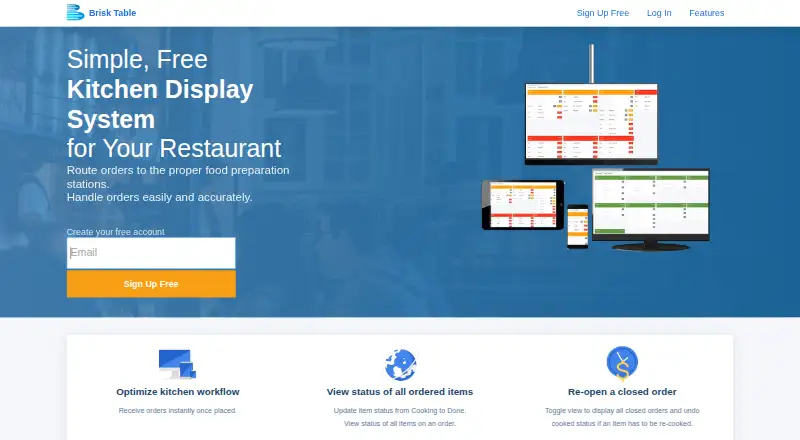
What Brisk Table Kitchen View is
Brisk Table Kitchen View is a cloud kitchen display system for restaurants, cafes, and bars. It routes orders from Brisk Table’s Point of Sale and online ordering systems to kitchen preparation stations, with updates sent to the kitchen terminal in real time. Staff can prioritize orders by order time and view or change item statuses such as New, Cooking, and Cooked. Closed orders can be displayed again, and an item’s Cooked status can be undone if it needs more preparation. Staff can also reset an item’s status when a plate is dropped or an order is prepared incorrectly. Kitchen View runs on standard available hardware rather than requiring a custom display. Brisk Table says it works on internet-connected computers, laptops, iPads, tablets, and smartphones; listed platforms are Android, iOS, and web. It supports station routing and order status tracking, but has no offline mode. A free plan is listed as free, and paid plans start at $9.99/mo.
Good
- Routes POS and online orders in real time.
- Staff can prioritize orders by order time.
- Item statuses can be viewed and changed.
- Runs on standard available hardware.
Watch out
- No offline mode.
- Order routing is tied to Brisk Table systems.
Who it suits
It suits restaurants, cafes, and bars that use Brisk Table’s POS or online ordering system and want kitchen staff to track and prioritize orders on a display.
Verdict
Kitchen View provides order routing and item-status tracking for kitchens using Brisk Table’s systems. Its lack of offline mode matters for teams that need the display to work without internet access.
Plans and prices
From Brisk Table Kitchen View's own pricing page, checked 8 Oct 2026.
| Plan | Price | What it gives you |
|---|---|---|
| Kitchen View | Free | 100% free to use |
The facts
Each one read from Brisk Table Kitchen View's own pages, with the date it was checked.
The company
- Company identity
- Brisk Table's site identifies Brisk Cloudware Inc. as the company behind its products.checked 8 Oct 2026
What it does
- Correct preparation
- Staff can reset an ordered item's status if a plate is dropped or an order is prepared incorrectly.checked 8 Oct 2026
- Hardware
- The display works on standard available hardware, without requiring a custom-made display.checked 8 Oct 2026
- Integration
- Kitchen View receives orders from Brisk Table's Point of Sale system and online ordering system.checked 8 Oct 2026
- Intended users
- The maker presents Kitchen View for restaurants, cafes, and bars.checked 8 Oct 2026
- Item status
- Staff can view item statuses including New, Cooking, and Cooked, and update item status from the kitchen display.checked 8 Oct 2026
- Order updates
- Orders from Brisk Table's POS and online ordering system are sent to the kitchen terminal in real time.checked 8 Oct 2026
- Payments integration
- Brisk Table's online ordering payments integrate with Stripe; the Kitchen View page does not describe a separate payment integration.checked 8 Oct 2026
- Prioritization
- Kitchen View lets staff prioritize orders by order time.checked 8 Oct 2026
- Purpose
- Brisk Table Kitchen View is a kitchen display system that routes restaurant orders to food preparation stations.checked 8 Oct 2026
- Reopen orders
- Staff can display closed orders and undo an item's cooked status if it needs to be prepared again.checked 8 Oct 2026
- Security and privacy
- Brisk Cloudware's privacy statement says it takes reasonable and appropriate steps to protect personal information and that its site has security measures against loss, misuse, and unauthorized alteration.checked 8 Oct 2026
- Support
- The Kitchen View page lists support by email at [email protected].checked 8 Oct 2026
Where it runs
- Supported devices
- The maker says Kitchen View works on any internet-connected device, including computers, laptops, iPads, tablets, and smartphones.checked 8 Oct 2026
The full review of Brisk Table Kitchen View
Overview
Brisk Table Kitchen View is a kitchen display system for restaurants, cafes, and bars that use Brisk Table’s POS or online ordering. It is best for teams that want to track preparation on ordinary connected devices rather than buy a dedicated display. Order corrections are a practical strength, but kitchens that need the screen to keep working offline should choose another system.
Key features
Routing and item status
Orders from Brisk Table’s POS and online ordering system reach the kitchen terminal in real time, and staff can prioritize them by order time. Station routing and item-level statuses—New, Cooking, and Cooked—give the team a shared view of progress and let staff update status directly from the display. This is useful for coordinating preparation, but the order flow is tied to Brisk Table’s own systems.
Staff can reopen closed orders, undo an item’s cooked status, or reset its status if a plate is dropped or prepared incorrectly. Those controls make it easier to send an item back for preparation without leaving an inaccurate completion state on screen.
Everyday hardware, cloud dependence
Kitchen View runs on internet-connected computers, laptops, iPads, tablets, and smartphones, without requiring a custom-made display. That flexibility can help a venue use hardware it already owns. However, deployment is cloud-based and there is no offline mode, so an internet outage can interrupt access to the kitchen display.
Pricing
The Kitchen View plan costs nothing and is described as 100% free to use. A paid option starts at $9.99/mo. The free plan makes it possible to use the system without a subscription, while the paid starting price may suit venues looking for a low-cost step up. No specific differences between the free and paid plans are established, so buyers should confirm what the paid tier adds before budgeting for it. The pricing note mentions a 30-day trial, while the plan information identifies no free trial; the trial terms are unclear.
Platforms
Kitchen View is listed for Android, iOS, and web. Its maker also says it works on internet-connected computers, laptops, iPads, tablets, and smartphones, providing a range of screen choices for a kitchen team. The cloud deployment and lack of offline mode remain important constraints across those devices.
Who it's for
Restaurants, cafes, and bars already using Brisk Table’s POS or online ordering are the clearest fit. It is especially useful for kitchens that need order-time prioritization, station routing, and item-level status changes, including corrections after an item has been marked cooked. Venues that rely on uninterrupted kitchen visibility during internet outages, or that need order intake beyond Brisk Table’s systems, should look elsewhere.
Pros and cons
Pros
- Real-time orders from Brisk Table POS and online ordering keep the kitchen display connected to those order sources.
- Staff can prioritize by order time and track or correct item status, including reopening closed orders and resetting items that need to be remade.
- Runs on standard connected devices, so a custom-made display is not required.
- A free plan and a paid option from $9.99/mo give venues a no-subscription starting point.
Cons
- No offline mode means kitchens need a working internet connection to access the display.
- Order intake is described for Brisk Table’s POS and online ordering, limiting its fit for venues using other systems.
- The differences between free and paid plans are unclear, as are the terms of the mentioned 30-day trial.
Alternatives
Browse the Kitchen Display System Software category to compare more options. For kitchens that prefer locally run, open-source software, Baresto Manager is free under the MIT license and runs locally at the venue, with optional paid installation support; it supports Linux, macOS, web, and Windows. NodeDR OrderRestro is another free option, with Linux, macOS, self-hosted, web, and Windows support.
Slant KDS may suit teams seeking a free tier capped at 100 orders per month, with limited invoices and email support, or a paid plan listed at $32 a year. FloCafe KDS is a free, MIT-licensed option for venues prepared to self-host on Linux, macOS, or Windows and cover hardware and operating costs separately. HungerRush offers a qualifying Starter plan from $0 / Month for one location and one POS terminal.
Odoo Restaurant may appeal to venues wanting a broader restaurant software suite: its One App Free plan includes one app and unlimited users, while the Standard plan includes all apps on Odoo Online. Ordering.Tools has a free plan capped at 20 orders per month, with no commission, and a Starter plan at €30 a month. eat·orbit Kitchen Display System offers a free Starter plan for one restaurant and one staff account, alongside POS billing, table and menu management, daily sales summaries, and thermal receipt printing.
Verdict
Choose Brisk Table Kitchen View if your restaurant already uses Brisk Table and wants order-time prioritization, station routing, and correctable item statuses on standard devices. The free plan lowers the barrier to trying it, but the lack of offline mode is a decisive drawback for kitchens that cannot rely on continuous internet access.
Getting started
- Open the Kitchen View website
- Choose the free plan or a paid plan
- Use an internet-connected Android, iOS, or web device
- Connect Brisk Table’s POS and online ordering systems
- Display incoming orders at kitchen preparation stations
Limits worth knowing
The free plan is free. Offline mode is not supported, and paid plans start at 9.99 /mo.
Questions
What platforms support Kitchen View?
The listed platforms are Android, iOS, and web. Brisk Table says it works on internet-connected computers, laptops, iPads, tablets, and smartphones.
Does Kitchen View have a free plan?
Yes. The Kitchen View plan is free, described as 100% free to use.
How much do paid plans cost?
Paid plans start at 9.99 /mo.
Does it work offline?
No. Offline mode is not supported.
Which order systems integrate with it?
Kitchen View receives orders from Brisk Table’s Point of Sale system and online ordering system.
How can users get support?
The Kitchen View page lists email support at [email protected].
Alternatives to Brisk Table Kitchen View
- 1

HungerRush
Free planAndroidiOSWebAPI8.1From $149 a month - 2
Slant KDS
Free planAndroidWebAPImacOS7.8From $32 a month - 3

Baresto Manager
Free planOpen sourceAndroidiOSWebAPI7.7Free plan - 4
Toast
Free planAndroidiOSWebAPI7.6From $69 a month - 5
NodeDR OrderRestro
Free planOpen sourceWebAPILinuxmacOS7.5Free plan - 6

Ordering.Tools
Free planAndroidiOSWeb7.5From €30 a month