
Lightspeed Restaurant
Lightspeed Restaurant is restaurant management software built around a point-of-sale and payments platform for restaurants, hotels and multi-location operato…
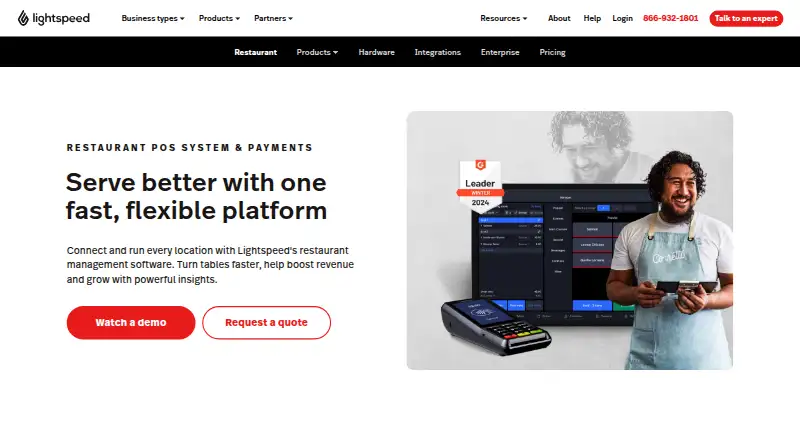
What Lightspeed Restaurant is
Lightspeed Restaurant is restaurant management software built around a point-of-sale and payments platform for restaurants, hotels and multi-location operators. Its POS supports customizable menus, screens and floor plans, as well as online, tableside and QR-code ordering. The cloud-based system can continue offline by saving entered data locally and uploading it when connectivity returns, though master-data maintenance and eCloud evaluations need an internet connection. The front end requires the Lightspeed Restaurant iPad app, while the back end can be managed on desktop and iPad. Lightspeed also says the POS can run in a browser on Mac, PC, Apple or Android devices. It connects with hotel PMS, employee-management and loyalty tools, and its Integration Hub includes hundreds of third-party options. Accounting sync can send sales data to QuickBooks, Xero, Sage and other accounting software. Lightspeed offers 24/7 phone and chat support, one-on-one onboarding and a dedicated account manager.
Good
- Supports customizable menus, screens and floor plans.
- Online, tableside and QR-code ordering are available.
- Offline mode stores entered data for later cloud upload.
- Integration Hub lists hundreds of third-party options.
- Includes 24/7 phone and chat support.
Watch out
- No free plan or free trial is listed.
- Front end requires the Lightspeed Restaurant iPad app.
- Some functions require an internet connection.
Who it suits
It is aimed at hospitality businesses, including restaurants, hotels and operators managing multiple locations. It may suit teams that need POS, ordering, table management and business integrations.
Verdict
Lightspeed Restaurant brings ordering, POS and integrations into a cloud-based system with offline operation for entered data. Check the iPad front-end requirement, connectivity-dependent functions and paid plans against your operation.
Plans and prices
From Lightspeed Restaurant's own pricing page, checked 30 Sep 2026.
| Plan | Price | What it gives you |
|---|---|---|
| Starter | $69 a month | Customizable POS · Menu manager · Floor plans · Advanced Insights · Offline mode · 24/7 support · KDS $30/screen per month |
| Essential | $189 a month | Customizable POS · Advanced Insights · Online ordering · Multi-location management · Advanced inventory management · KDS $30/screen per month |
| Premium | $399 a month | Customizable POS · Advanced Insights · Multi-location management · Advanced inventory management · Multiple revenue center support for hotels · KDS $30/screen per month |
| Enterprise | Priced on request | Personalized software and hardware package · Unlimited launch and consultation services · Dedicated support team and customer success manager |
The facts
Each one read from Lightspeed Restaurant's own pages, with the date it was checked.
What it does
- Accounting
- Lightspeed Accounting syncs sales data with QuickBooks, Xero, Sage and other accounting software and can automate daily or weekly synchronization.checked 30 Sep 2026
- Cloud access
- The POS is cloud-based, and its front end requires the Lightspeed Restaurant iPad app while the back end can be managed on desktop and iPad.checked 30 Sep 2026
- Core workflows
- The POS supports customizable menus, screens and floor plans, plus online, tableside and QR-code ordering.checked 30 Sep 2026
- Integration catalog
- Lightspeed's Restaurant Integration Hub has hundreds of third-party integrations, with categories including inventory and marketing.checked 30 Sep 2026
- Integrations
- The product connects with hotel PMS software, employee-management tools, loyalty programs and partners such as 7shifts and OpenTable.checked 30 Sep 2026
- Offline operation
- The restaurant software continues working offline, stores entered data locally and uploads it to the cloud when connectivity returns; master-data maintenance and eCloud evaluations require internet access.checked 30 Sep 2026
- Paid from
- 69checked 21 Sep 2026
- Payment compliance
- Lightspeed says its payment terminals are fully PCI compliant.checked 30 Sep 2026
- Product purpose
- Lightspeed Restaurant is restaurant management software and a point-of-sale and payments platform for running locations, turning tables faster, boosting revenue and using business insights.checked 30 Sep 2026
- Security
- Lightspeed states that cloud POS communications use end-to-end encryption and that data access is heavily restricted and protected via cloud partners.checked 30 Sep 2026
- Support
- Lightspeed offers 24/7 phone and chat support, one-on-one onboarding and a dedicated account manager.checked 30 Sep 2026
- Target customers
- Lightspeed Restaurant is positioned for hospitality businesses including restaurants, hotels and multi-location operators.checked 30 Sep 2026
Where it runs
- Browser support
- Lightspeed says the POS can run in a web browser on any device, including Mac, PC, Apple or Android.checked 30 Sep 2026
The company
- Founded
- 2005checked 23 Sep 2026
- Headquarters
- Montreal, Quebec, Canadachecked 23 Sep 2026
Money
- Free plan
- Nochecked 21 Sep 2026
- Trial availability
- The Lightspeed trial page offers a 14-day free trial for Lightspeed Retail, while Restaurant is presented with a demo option.checked 30 Sep 2026
The full review of Lightspeed Restaurant
Overview
Lightspeed Restaurant is a cloud-based restaurant POS and management platform for hospitality businesses, including restaurants, hotels and multi-location operators. It is strongest for teams that want ordering, menu and floor-plan tools, payments and business insights in one system; its iPad front end and plan costs narrow the fit.
Customizable menus, screens and floor plans support online, tableside and QR-code ordering. Desktop and iPad access to the back end and a broad integration catalog add flexibility, while some core maintenance and evaluation functions still depend on internet access.
Key features
The POS combines menu management and table layouts with online ordering, reservations, inventory management, sales reporting and staff scheduling. That breadth can reduce the need to coordinate separate restaurant tools, and multi-location support suits operators managing more than one site.
Offline mode stores entered data locally and uploads it when connectivity returns, which helps keep service moving during an outage. It is not a fully offline system: master-data maintenance and eCloud evaluations require an internet connection.
Lightspeed connects with hotel property-management systems, employee-management tools, loyalty programs and partners including 7shifts and OpenTable. Its Integration Hub spans hundreds of third-party integrations, including inventory and marketing. Lightspeed Accounting can sync sales with QuickBooks, Xero, Sage and other accounting software daily or weekly, with automation available.
The company says cloud POS communications use end-to-end encryption, restrict data access through its cloud partners, and that its payment terminals are PCI compliant. Support includes 24/7 phone and chat, one-on-one onboarding and a dedicated account manager.
Pricing
Lightspeed Restaurant is paid software, with no free plan or free trial. Starter is $69 a month and includes a customizable POS, menu manager, floor plans, Advanced Insights, offline mode and 24/7 support. It is the lowest-cost option for a single-site operation that needs those core tools; KDS costs an additional $30 per screen per month.
Essential costs $189 a month and adds online ordering, multi-location management and advanced inventory management to a customizable POS and Advanced Insights. It suits operators who need those capabilities, but the higher price buys no listed menu manager or offline mode. KDS remains $30 per screen per month.
Premium costs $399 a month. It includes a customizable POS, Advanced Insights, multi-location management, advanced inventory management and multiple revenue-center support for hotels. That hotel-specific capability makes it the clearest fit for hospitality groups with several revenue centers; for other operators, the listed plan features may not justify the step up from Essential. KDS is again $30 per screen per month.
Enterprise has custom pricing and includes a personalized software and hardware package, unlimited launch and consultation services, a dedicated support team and a customer success manager. It is aimed at businesses that want a tailored package and launch support rather than a fixed-price tier.
Platforms
The product is listed for Android, iOS, macOS, web and Windows, and Lightspeed says the POS can run in a browser on any device. The distinction that matters operationally is that the POS front end requires the Lightspeed Restaurant iPad app; the back end can be managed on desktop and iPad. Businesses that do not want iPads at the point of service should look elsewhere.
Who it's for
Lightspeed Restaurant best suits restaurants, hotels and multi-location operators that can use its ordering, reporting and integration options as a connected system. Hotels with multiple revenue centers have a specific reason to consider Premium. A small restaurant seeking the lowest possible cost may find Starter's add-on KDS charge and the higher tiers less attractive, while operations needing uninterrupted access to master-data updates should account for the internet requirement.
Pros and cons
- Broad restaurant workflow coverage: Menu, floor-plan, table, ordering, inventory and reporting functions can sit within one POS platform.
- Offline continuity for entered data: Local storage and later cloud upload help during connectivity interruptions, though maintenance and eCloud evaluations still need internet.
- Extensive integration options: Hundreds of integrations and accounting syncs can connect restaurant operations with other business tools.
- iPad front-end requirement: Despite broad browser and platform support, the POS front end requires an iPad app.
- Paid-only entry: There is no free plan or free trial, and KDS adds $30 per screen per month on every listed tier.
Alternatives
SpotOn Restaurant is worth comparing if you want POS software and hardware, ordering, payments, table layouts, menu management and reporting in one package. Its All-In Plan is shown at no cost, but processing minimums apply and the term is at least two years.
HungerRush may suit a restaurant seeking a freemium option: its Starter plan is $0 per month for one location and one POS terminal, subject to qualification criteria.
RestioX is another option to compare for a freemium restaurant platform; its trial package has caps on dishes, categories, monthly delivery orders, staff, branches and storage.
Sapaad may fit operators considering a paid platform with a free trial; its Essentials plan is $99 a month, billed once every 24 months, tax exclusive, for one outlet and up to 10,000 customers.
Toast is an alternative to compare for a single-location setup with one terminal included in its Starter Kit.
GloriaFood is a strong candidate when online ordering is the priority and a no-fee starting point matters: its free service plan offers unlimited orders and locations, no order commission and no monthly fee.
Epos Now may appeal to buyers looking for a bundled POS package; its Complete POS solution is $399 a month and includes software, a terminal, thermal receipt printer and card machine.
Squirrel Systems is another paid restaurant POS option to compare.
For category-wide comparisons, browse Restaurant Management Software, Restaurant Online Ordering Software, Restaurant POS Software, Restaurant Payment Processing Software, Restaurant Table Management Software and Restaurant Gift Card Software.
Verdict
Choose Lightspeed Restaurant if you run a restaurant or hospitality group that will use its ordering, reporting and integration breadth, and can accommodate an iPad at the POS. Its connected workflows and offline handling of entered data are compelling; the paid-only pricing, recurring KDS charge and internet-dependent functions make it a weaker fit for cost-sensitive operators or businesses seeking fully offline administration.
Getting started
- Open the Lightspeed Restaurant product page
- Request a demo for the Restaurant product
- Select a Starter, Essential, Premium or Enterprise package
- Use the Lightspeed Restaurant iPad app for the POS front end
- Manage the back end on desktop or iPad
- Connect supported integrations and accounting software
Limits worth knowing
Starter, Essential and Premium plans charge $30 per KDS screen each month.
Questions
Is there a free plan or trial?
No free plan or free trial is listed for Lightspeed Restaurant. Lightspeed presents a demo option.
What devices can run it?
The platforms listed are Android, iOS, macOS, web and Windows. The front end requires the Lightspeed Restaurant iPad app, and the POS can also run in a browser on Mac, PC, Apple or Android devices.
Does it work without internet?
Yes. Entered data is stored locally while offline and uploaded when connectivity returns. Master-data maintenance and eCloud evaluations require internet access.
What integrations are available?
Connections include hotel PMS software, employee-management tools, loyalty programs, 7shifts and OpenTable. The Integration Hub has hundreds of third-party integrations, and accounting sync supports QuickBooks, Xero, Sage and other software.
Alternatives to Lightspeed Restaurant
- 1

Lunchbox
Free planAndroidiOSWebAPI8.9From $300 a month - 2
GloriaFood
Free planAndroidiOSWebAPI8.9From $9 a month - 3

HungerRush
Free planAndroidiOSWebAPI8.8From $149 a month - 4
CloudWaitress
Free planAndroidiOSWebAPI8.7From $39 a month - 5

Ressto
Free planAndroidiOSWeb8.5From $39 a month - 6
Toast
Free planAndroidiOSWebAPI8.4From $69 a month