
FreeConference.com
FreeConference.com provides audio and video conferencing, screen sharing, and online meeting rooms for businesses and individuals.
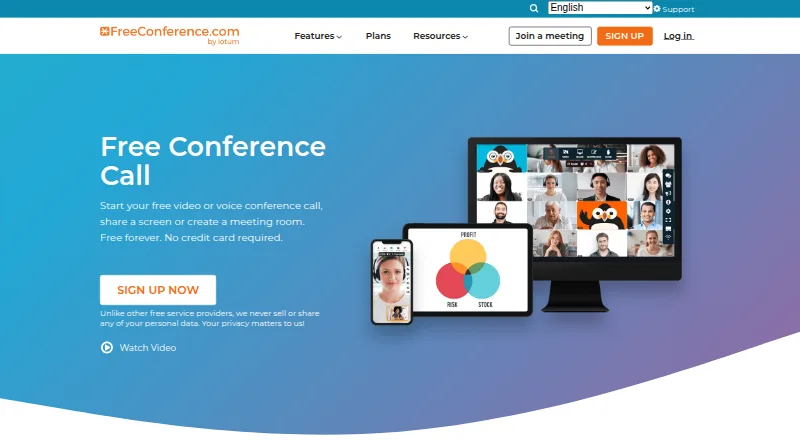
What FreeConference.com is
FreeConference.com provides audio and video conferencing, screen sharing, and online meeting rooms for businesses and individuals. Meeting features include chat, document sharing, moderator controls, whiteboards, breakout rooms, and smart meeting summaries. Users can schedule calls, send invitations and reminders, set recurring calls, and schedule across time zones. Listed calendar options include Microsoft Outlook invitations and Google Calendar syncing. Hosts and participants can join through a browser without installing software, and participants do not need an account. The free plan allows up to 100 call participants and up to five web participants, with unlimited calls on local numbers and email support. Starter costs $9.99 a month and adds up to 100 web participants, 100 premium minutes monthly, audio recording with 5GB storage, and phone support. Pro costs $29.99 a month and supports up to 250 call and web participants, 750 premium minutes monthly, and audio and video recording with 10GB storage. FreeConference says the service is encrypted via WebRTC. Screen sharing is available through Chrome or Windows and Mac desktop apps, but not on smartphones or tablets.
Good
- Browser joining requires no software download
- Participants do not need an account
- Includes scheduling, reminders, and recurring calls
- Free plan includes unlimited local-number calls
Watch out
- Free plan allows up to five web participants
- Screen sharing is unavailable on smartphones and tablets
- Call recording is a paid feature
Who it suits
It suits businesses and individuals who need browser-based meetings, scheduling, and collaboration tools. The plan limits and device restriction on screen sharing matter for larger calls or mobile participants.
Verdict
FreeConference.com offers a browser-accessible meeting service with a free tier and paid recording options. Compare call and web participant limits, and note that mobile devices cannot use screen sharing.
Plans and prices
From FreeConference.com's own pricing page, checked 28 Sep 2026.
| Plan | Price | What it gives you |
|---|---|---|
| Free | Free | Up to 100 call participants · Up to 5 web participants · Unlimited calls on local numbers · Email support |
| Starter | $9.99 a month | Up to 100 call participants · Up to 100 web participants · 100 premium minutes/month · Audio recording with 5GB storage · Email and phone support · Per Month |
| Pro | $29.99 a month | Up to 250 call participants · Up to 250 web participants · 750 premium minutes/month · Audio and video recording with 10GB storage · Email and phone support · Per Month |
The facts
Each one read from FreeConference.com's own pages, with the date it was checked.
What it does
- Audience
- The company describes FreeConference as serving businesses and individuals, and its site lists use cases including education, small businesses, healthcare, government, and nonprofits.checked 28 Sep 2026
- Integrations
- The features page lists Microsoft Outlook invitations and Google Calendar syncing.checked 28 Sep 2026
- International calling
- The free plan includes calls on local numbers, while paid plans add toll-free and international dial-in access with plan-specific premium-minute allowances.checked 28 Sep 2026
- Meeting tools
- The feature list includes video calls, meeting chat, document sharing, moderator controls, whiteboards, breakout rooms, and smart meeting summaries.checked 28 Sep 2026
- Recording limit
- Call recording is a paid feature; Starter lists audio recording with 5GB storage, while Pro lists audio and video recording with 10GB storage.checked 28 Sep 2026
- Scheduling
- The service offers call scheduling, invitations, reminders, recurring calls, and time zone scheduling.checked 28 Sep 2026
- Screen-sharing constraint
- The FAQ says screen sharing is available through Chrome or Windows and Mac desktop apps, and is not available on smartphone or tablet devices.checked 28 Sep 2026
- Security
- FreeConference says its service is encrypted via WebRTC and that meeting lock and one-time access codes are paid-plan security features.checked 28 Sep 2026
- Support
- The Free plan includes email support, and Starter and Pro include phone support as well as email support.checked 28 Sep 2026
- What it does
- FreeConference provides audio and video conferencing, screen sharing, and online meeting rooms for businesses and individuals.checked 28 Sep 2026
Where it runs
- Browser access
- Hosts and participants can join through a browser without downloading software, and the FAQ says participants do not need an account.checked 28 Sep 2026
- Platform availability
- Downloads are listed for Windows 10 and up, macOS 14 and up, iOS 15 and up, and Android 13 and up.checked 28 Sep 2026
The company
- Founded
- 2000checked 23 Sep 2026
- Headquarters
- Toronto and Los Angeleschecked 23 Sep 2026
The full review of FreeConference.com
Overview
FreeConference.com brings audio and video meetings, online meeting rooms, and scheduling tools together in a service that works in a browser. Its strongest fit is a small organization that wants a low-cost way to host calls with larger phone audiences; the five-person web cap on the free plan and paid-only recording are meaningful constraints.
It also supports meeting chat, document sharing, whiteboards, breakout rooms, moderator controls, and smart meeting summaries. Hosts can schedule calls, send invitations and reminders, set recurring calls, and account for time zones. Browser joining means hosts and participants can attend without downloading software, and participants do not need an account.
Key features
Meeting management
Scheduling and calendar support are useful for recurring or distributed meetings: invitations can go through Microsoft Outlook, and Google Calendar can sync. Chat and document sharing cover basic collaboration, while whiteboards and breakout rooms give hosts more options for structured sessions. These tools make the service more than a dial-in line, though the small free web-participant allowance limits online meetings unless you upgrade.
Sharing, recording, and access
Screen sharing works in Chrome and the Windows and Mac desktop apps, but not on smartphones or tablets. That makes FreeConference.com a poor fit when mobile attendees need to present content. Call recording is reserved for paid plans: Starter records audio, while Pro adds video recording.
The service says it encrypts meetings via WebRTC. Meeting lock and one-time access codes are paid-plan security features. Free calls use local numbers; paid plans add toll-free and international dial-in access, with premium-minute allowances that differ by plan.
Pricing
There is no free trial. The free plan costs nothing and allows up to 100 call participants but only 5 web participants, with unlimited calls on local numbers and email support. It suits audio-first groups that can accept the small online audience and do not need recording or paid-plan security controls.
Starter costs $9.99 a month, billed per month. It raises the web limit to 100, includes 100 premium minutes per month, audio recording with 5GB storage, and email and phone support. It is the practical step up for teams that need browser meetings for more people or saved audio, but it still caps call participants at 100 and does not include video recording.
Pro costs $29.99 a month, billed per month. It supports up to 250 call and web participants, includes 750 premium minutes per month, audio and video recording with 10GB storage, and email and phone support. It fits larger meetings or teams that need video archives; the premium-minute quota means it is not unlimited international or toll-free calling.
Platforms
FreeConference.com supports Android, iOS, Linux, macOS, Windows, browser access, and an extension. Listed desktop and mobile downloads require Windows 10 or later, macOS 14 or later, iOS 15 or later, and Android 13 or later. Browser joining is a useful fallback for attendees who do not want to install an app, but it does not remove the mobile screen-sharing restriction.
Who it's for
The service is aimed at businesses and individuals, with use cases including education, small businesses, healthcare, government, and nonprofits. It is most compelling for groups that value browser access, scheduling, and phone participation, especially when most attendees join by audio. Organizations with frequent mobile presentations, larger free web meetings, or extensive recording needs should look elsewhere or budget for a paid plan.
Pros and cons
- Pros: Up to 100 call participants on the free plan makes it viable for sizable audio calls.
- Pros: Browser access and account-free participant joining reduce setup friction for invited attendees.
- Pros: Paid plans combine larger web meetings, recording, premium minutes, and phone support at clearly tiered monthly prices.
- Cons: The free plan allows only 5 web participants, sharply limiting video-oriented group meetings.
- Cons: Screen sharing is unavailable on phones and tablets, excluding mobile-only presenters.
- Cons: Recording requires a paid plan, and the included storage and premium minutes are capped.
Alternatives
Compare audio conferencing software if you want to consider this category more broadly.
FreeConferenceCall.com is worth considering if its free plan's 1,000-participant allowance is more important than a published price or a matching feature set.
LoopUp Remote Meetings is a better match for a small group that needs a free plan with up to 10 participants and domestic dial-out, rather than dial-in numbers.
TurboBridge suits readers seeking usage-priced conferencing, with its free Value plan charging per minute per caller for toll, toll-free, and WebCall access.
Conference NOW offers a free app for up to 10 callers with unlimited conferences and duration, making it an option for smaller calls.
Conferoo is another free conferencing option for web, iOS, and Android.
Vast Conference is an alternative for readers who want a paid service with a per-minute, per-caller option for up to 500 participants.
GoTo OpenVoice is an alternative for readers seeking toll and toll-free numbers in more than 50 countries.
WHYPAY? is another freemium option, available on the web.
Verdict
Choose FreeConference.com if your group needs browser-accessible meetings, a generous free call-participant cap, and a clear path to paid recording and larger web meetings. Look elsewhere if mobile screen sharing or a larger free online audience is essential.
Getting started
- Visit FreeConference.com.
- Choose the Free, Starter, or Pro plan.
- Join through a browser or use an available app or desktop option.
- Schedule a call, send invitations, and set reminders or recurrence if needed.
- Use Chrome or a Windows or Mac desktop app for screen sharing.
Limits worth knowing
The Free plan allows up to 100 call participants but only five web participants, and it includes calls on local numbers with email support. Recording is paid: Starter includes audio recording with 5GB storage, while Pro includes audio and video recording with 10GB storage.
Questions
What does FreeConference.com cost?
The Free plan is free. Starter is $9.99 a month, and Pro is $29.99 a month.
What does the Free plan include?
It allows up to 100 call participants and five web participants, unlimited calls on local numbers, and email support.
Can participants join without an account or download?
Hosts and participants can join through a browser without downloading software. Participants do not need an account.
Which platforms are available?
Platforms listed are Android, extension, iOS, Linux, macOS, web, and Windows. Downloads are listed for Windows 10 and up, macOS 14 and up, iOS 15 and up, and Android 13 and up.
Does it include call recording?
Recording is a paid feature. Starter lists audio recording with 5GB storage; Pro lists audio and video recording with 10GB storage.
Can I share my screen from a phone or tablet?
No. Screen sharing is available through Chrome or the Windows and Mac desktop apps, and is not available on smartphones or tablets.
Alternatives to FreeConference.com
- 1

FreeConferenceCall.com
Free planAndroidiOSWebAPI8.2From $2 a month - 2
LoopUp Remote Meetings
Free planAndroidiOSWebExtension7.9From £15 a month - 3

Phonesty
Free planAndroidiOSWeb7.9From $3.95 a month - 4
TPx Virtual Fax
Free planWebWindows7.6$0.05 one-time - 5
TurboBridge
iOSWebAPI7.6From $9.95 a month - 6

BroadData Domestic Audio Conferencing
Free planWeb7.3From $4.90 a month