
Frame0
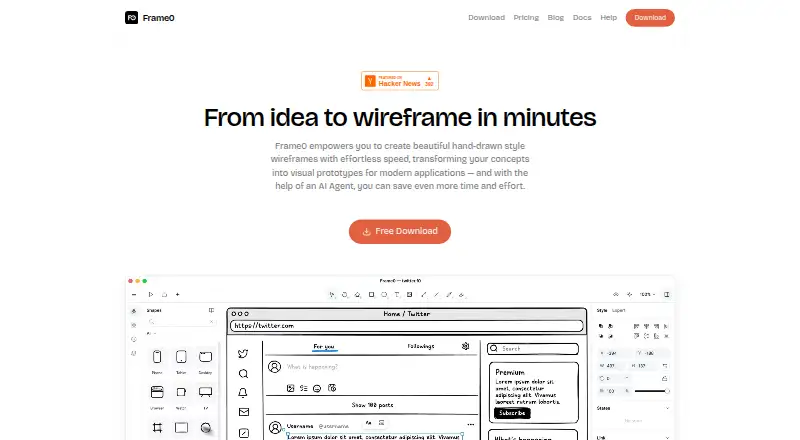
Frame0 is a desktop app for creating interactive prototypes and working with design systems.
What Frame0 is
Frame0 is a desktop app for creating interactive prototypes and working with design systems. It supports prototype sharing and is available for Windows, macOS, and Linux. The Free plan costs nothing, has no time limit, and includes 1,500 icons. Paid plans are priced by month and specify how many devices they cover: Solo is $99 a month for 1 device, Duo is $159 a month for 2 devices, and Team is $79 a month for 3 or more devices. VAT is excluded from the listed paid-plan prices. These options give prospective users a choice between a no-time-limit free plan and paid plans with stated device allowances. The listed capabilities include making interactive prototypes, using design systems, sharing prototypes, and working in a desktop application. The listed facts do not describe additional design or collaboration functions beyond those capabilities.
Good
- Free plan has no time limit
- Free plan includes 1,500 icons
- Supports interactive prototyping and prototype sharing
- Available for Windows, macOS, and Linux
Watch out
- Paid-plan prices exclude VAT
- Paid plans have specified device counts
Who it suits
Frame0 may suit people who want a desktop app for interactive prototyping, design systems, and prototype sharing. Its plans distinguish device counts, and the app is listed for Windows, macOS, and Linux.
Verdict
Frame0 covers interactive prototyping, design systems, and prototype sharing across three desktop platforms. Compare the free plan’s icon allowance with the device limits and monthly prices of the paid plans.
Plans and prices
From Frame0's own pricing page, checked 7 Oct 2026.
| Plan | Price | What it gives you |
|---|---|---|
| Free | Free | All non-premium features · all built-in shapes · all 1,500 icons · no time or size limit · No time limit |
| Team | $79, paid once | 3 or more devices · no watermarks · libraries · templates · perpetual license · Per device; VAT excluded |
| Solo | $99, paid once | 1 device · no watermarks · libraries · templates · perpetual license · One-time payment; VAT excluded |
| Duo | $159, paid once | 2 devices · no watermarks · libraries · templates · perpetual license · One-time payment; VAT excluded |
The facts
Each one read from Frame0's own pages, with the date it was checked.
What it does
- AI integrations
- Frame0 offers an MCP server for desktop AI services that support MCP, including Claude Desktop and Cursor.checked 7 Oct 2026
- AI providers
- The experimental AI Agent can use API keys from OpenAI, Anthropic, Google Gemini, or xAI Grok, with provider usage billed separately by those providers.checked 7 Oct 2026
- Cloud storage
- Frame0 is a file-based desktop application that stores each document as one file, and its docs suggest syncing files with iCloud, Dropbox, Google Drive, or Microsoft OneDrive.checked 7 Oct 2026
- Components
- Its UI component library covers desktop, mobile, smartwatch, and web interfaces, with adjustable component states.checked 7 Oct 2026
- Diagramming
- The app supports flowcharts, entity-relationship diagrams, UML use case diagrams, and UML class diagrams.checked 7 Oct 2026
- Exports
- Frame0 can export interactive prototypes as single HTML or PDF files; exported PDFs may omit characters unavailable in the selected font.checked 7 Oct 2026
- Icons
- Frame0 includes more than 1,500 sketch-style icons based on Lucide.checked 7 Oct 2026
- License limits
- A purchased license is perpetual, but major-version upgrades may require an additional payment; refunds are available within 14 days of purchase.checked 7 Oct 2026
- Privacy
- MKLabs says it does not process sensitive personal information and describes organizational and technical safeguards, while noting that it cannot guarantee 100% security.checked 7 Oct 2026
- Prototyping
- Shapes can link to pages, external URLs, or navigation actions, and prototypes can be demonstrated in presentation mode.checked 7 Oct 2026
- Purpose
- Frame0 is desktop wireframing software for quickly creating low-fidelity, sketch-style wireframes and prototypes.checked 7 Oct 2026
- Support
- The maker lists [email protected] as its support contact.checked 7 Oct 2026
- System requirements
- The download page requires macOS 15 or later, Windows 10 or later, and Ubuntu 22.04 or Fedora 40 or later for Linux.checked 7 Oct 2026
Money
- Free plan
- Yeschecked 21 Sep 2026
The full review of Frame0
Frame0 is a desktop application for low-fidelity wireframes, interactive prototypes and technical diagrams. It is most suitable for designers, product teams and developers who prefer sketch-style work saved as portable files on Linux, macOS or Windows. The free edition is unusually unrestricted for ongoing wireframing, while paid licensing is aimed at users who need more device coverage.
Overview
Frame0 brings interface sketching, clickable flows and several diagram types into one desktop tool. Its component library covers desktop, mobile, smartwatch and web interfaces, and adjustable component states help represent variations without drawing every state from scratch. The deliberately rough visual language is useful for discussing structure and behavior early; teams seeking polished visual design should look elsewhere.
Documents are stored as individual files. The maker’s workflow supports syncing those files through iCloud, Dropbox, Google Drive or Microsoft OneDrive, which suits organisations that already manage project files this way. It is not a built-in collaborative workspace, so teams must establish their own file-sharing and versioning process. MKLabs says it does not process sensitive personal information and describes organisational and technical safeguards, while acknowledging that complete security cannot be guaranteed.
Key features
Shapes can connect to other pages, external URLs and navigation actions. Presentation mode turns those links into a demonstrable flow, and export to one HTML or PDF file makes it practical to send a prototype beyond the app. PDF export can omit characters that the selected font does not contain, so font choice matters when documents include unusual glyphs.
More than 1,500 sketch-style icons based on Lucide cover common interface needs without requiring a separate icon source. Diagramming extends the app beyond screens: flowcharts, entity-relationship diagrams, UML use-case diagrams and UML class diagrams are supported. That combination is valuable when a project needs both interface concepts and a map of the underlying system.
The experimental AI Agent can use an API key from OpenAI, Anthropic, Google Gemini or xAI Grok. Those providers bill their own usage separately, so AI costs sit outside Frame0’s licence. An MCP server also connects the desktop app to MCP-capable AI services such as Claude Desktop and Cursor, giving technically inclined teams an integration route without making AI a requirement for ordinary wireframing.
Pricing
The Free plan costs 0.00 USD and has no time limit or size limit. It includes all non-premium features, built-in shapes and all 1,500 icons, making it a credible long-term option for individuals who can work within the free feature set rather than merely a trial.
Solo costs $99 a month, VAT excluded, for one device. Duo costs $159 a month, VAT excluded, for two devices. Team costs $79 a month, VAT excluded, for three or more devices. The lower monthly price of Team only makes sense when the licence covers at least three devices; Solo is the straightforward choice for a single machine, while Duo fits a two-device setup. A purchased licence is perpetual, although moving to a major new version may require another payment. Refunds are available within 14 days of purchase.
Platforms
Frame0 runs on Linux, macOS and Windows. The download requirements are macOS 15 or later, Windows 10 or later, and Ubuntu 22.04 or Fedora 40 or later on Linux. It is therefore a desktop-first choice rather than a browser tool, and older operating-system installations may not qualify.
Who it's for
Choose Frame0 for early product definition, interface architecture, clickable user-flow reviews and teams that also need UML or data diagrams. Its file-based model works well for individuals and organisations already using a synchronised drive. It is less suitable for groups that require an integrated online workspace, polished high-fidelity output or predictable cross-version licensing without upgrade charges.
Pros and cons
Pros
- Generous free edition: no expiry or document-size cap, with all built-in shapes and 1,500 icons.
- Broad sketching scope: one library covers four interface contexts, while diagram tools handle flowcharts, ER diagrams and UML.
- Portable sharing: single-file HTML and PDF exports make demonstrations easy to distribute.
- Desktop AI connectivity: provider choice and MCP support suit teams already using external AI services.
Cons
- File coordination is yours to manage: syncing depends on services such as Dropbox or OneDrive rather than a native shared workspace.
- Paid plans are device-based: Solo and Duo cover only one and two devices, and Team requires at least three.
- Major upgrades may cost extra: perpetual ownership does not guarantee free future major versions.
- Low fidelity by design: the sketch aesthetic is a poor fit for final visual-design presentation.
Alternatives
Fluid UI is a better fit when Android, iOS or browser access matters alongside desktop platforms, and it offers both a free plan and free trial.
Justinmind suits teams wanting a free editor plan with one project, unlimited screens and viewers, plus UI design and wireframing across web and desktop ecosystems.
Mockplus is preferable when a free workspace for up to 10 users and 10 active projects is more important than Frame0’s local-file model.
Quickmock is a free, open-source option distributed under an MIT licence.
MockFlow offers a browser and desktop-oriented alternative with a free Basic plan for one editor and five reviewers.
Mokkup.ai is a web-only choice with a free tier limited to one editable project and three screens per project.
Pencil Project is a completely free desktop alternative for Linux, macOS and Windows.
Visily is aimed at browser users who want AI-assisted design with monthly credit-based plans.
Verdict
Frame0 is a strong choice for individuals and teams who want an unlimited free starting point, sketch-style components, clickable prototypes and system diagrams in one cross-platform desktop app. Its main reason to choose it is the breadth of practical early-stage work available without a subscription. Look elsewhere if your priority is built-in online collaboration, high-fidelity design or licence terms that guarantee every major upgrade.
Alternatives to Frame0
- 1

Justinmind
Free planAndroidiOSWebAPI8.3From $19 a month - 2

Mockplus
Free planAndroidiOSWebExtension8.3From $2.98 a month - 3

Fluid UI
Free planAndroidiOSWebLinux7.7From $8.25 a month - 4
Moqups
Free planWebAPIExtension7.6From $11 a month - 5

Visily
Free planWebExtension7.3From $14 a month - 6

Mokkup.ai
Free planWeb7.1From $8 a month