
Fontstand
Fontstand is a font discovery and streaming service for finding and trying typefaces before using them in designs, presentations, or websites.
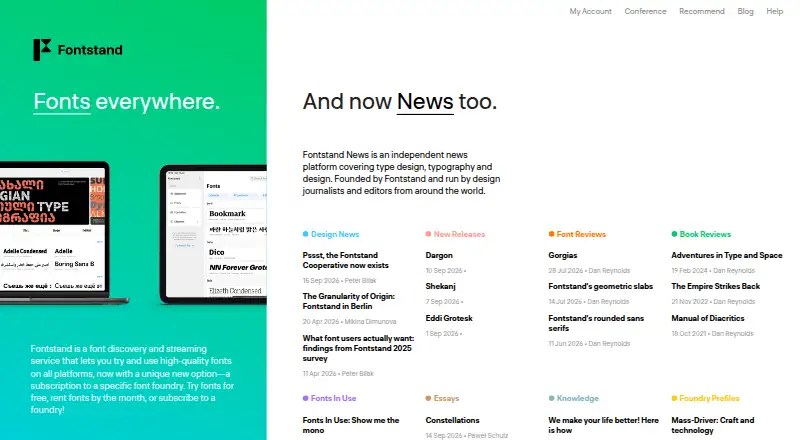
What Fontstand is
Fontstand is a font discovery and streaming service for finding and trying typefaces before using them in designs, presentations, or websites. Filters and font examples help users explore and test options. Fonts can be used on desktop and iPad, and the service offers free font testing, monthly rentals, and subscriptions to specific foundries. Monthly rental costs 10% of a font’s real price; after 12 months, users can keep and use that font on desktop, iPad, or the web. Prices vary by font family and calculator selections for options such as short trials, shared rentals, hosted webfonts, and paying in full after 12 months. An iPad option provides access to every font in the library. Fontstand supports web licensing, variable fonts, WOFF, and WOFF2. It is available on iOS, macOS, web, and Windows. The site lists desktop downloads for macOS 13 and newer and Windows 10 and newer, plus legacy versions for older systems; the iPad app supports iPadOS 13 and newer. Account creation requires a valid email address.
Good
- Free font testing is available.
- Filters and examples support font discovery.
- Rented fonts can be kept after 12 months.
- Supports web licensing and variable fonts.
- Available on iOS, macOS, web, and Windows.
Watch out
- An account requires a valid email address.
- Rental prices depend on the selected font family.
- The iPad app requires iPadOS 13 or newer.
Who it suits
Fontstand suits designers and others who want to preview fonts before choosing a rental or foundry subscription. Its iPad access and student and school offers may be useful to eligible design students and participating institutions.
Verdict
Fontstand offers several ways to explore and license fonts, including free testing, monthly rentals, and foundry subscriptions. Check the selected font and calculator options for the applicable price before renting.
Plans and prices
From Fontstand's own pricing page, checked 5 Oct 2026.
| Plan | Price | What it gives you |
|---|---|---|
| Free font testing | Free | Try fonts for free |
| 3-hour font trial | Free | Up to 50 fonts per 24 hours · Trial use is for evaluation only · Free trial; one trial per font per 30 days |
| Fontstand Font Library for iPad | $4.99 a month | Over 10,000 fonts · iPadOS 13 or newer · Available on iPad devices using the same Apple ID · Monthly Apple in-app purchase; price varies by country |
| Shared rental | — | Team members need free Fontstand accounts · Owner can add or remove users during rental · Additional users pay 20% of the standard rental fee each |
| 30-day font rental | — | Desktop and web use · Auto-renewal · After 12 rental periods, permanent use is available · 10% of the font's regular price per 30-day period; VAT may apply |
| Unlimited iPad fonts | — | Use every available font in the library on iPad · Monthly fee; amount not stated |
| Font rental | — | Rent fonts by the month · share rentals with a team · after 12 months, keep fonts forever · Monthly; rental is 10% of the font’s real price |
| Foundry subscription | — | Subscribe to a specific font foundry · Price not stated |
The facts
Each one read from Fontstand's own pages, with the date it was checked.
What it does
- API and SDK
- Official documentation describes hosted CSS generation for webfonts but does not provide a public API or SDK reference.checked 14 Oct 2026
- Cloud hosting
- Fontstand says its webfont service follows W3C standards and runs on secure Amazon Web Services hosting.checked 14 Oct 2026
- Cooperative news
- Fontstand announced on 15 September 2026 that a Netherlands cooperative had been incorporated to give participating foundries shared ownership and governance.checked 14 Oct 2026
- Data handling
- Fontstand says it does not sell personal information or share it for marketing, and limits service-provider disclosures to information needed to provide services.checked 5 Oct 2026
- Desktop versions
- The site lists Fontstand downloads for macOS 13 and newer and Windows 10 and newer, along with legacy versions for older operating systems.checked 5 Oct 2026
- Education offer
- Participating design schools and colleges can apply for a program that lets students rent fonts for half the regular rental price.checked 5 Oct 2026
- Font discovery
- The service provides advanced filtering and examples showing fonts in use.checked 14 Oct 2026
- Foundry subscriptions
- A first subscription to a foundry includes a free seven-day trial and then bills monthly; subscription fonts have no permanent ownership option.checked 14 Oct 2026
- Hosted webfonts
- Fontstand hosts webfonts, includes 10,000 monthly pageviews with a rental, and sells additional 100,000-pageview packages at 2% of retail price.checked 14 Oct 2026
- iPad integrations
- The iPad app installs fonts for apps including Adobe Illustrator and Photoshop, Affinity apps, Apple iWork and Microsoft Office.checked 14 Oct 2026
- Licence
- Fontstand software and rented fonts are proprietary, under a nonexclusive and nontransferable licence.checked 14 Oct 2026
- Limitations
- Fontstand requires a valid email address to create an account.checked 5 Oct 2026
- Limit: catalog coverage
- A G2 reviewer noted that not every font from participating foundries is available to rent.checked 14 Oct 2026
- Limit: custom fonts
- Multiple G2 reviewers complained that Fontstand cannot upload or use custom fonts.checked 14 Oct 2026
- Limit: Cyrillic coverage
- A G2 reviewer reported that the available Cyrillic selection is limited.checked 14 Oct 2026
- Limit: pausing rentals
- A G2 reviewer wanted a way to pause an activated font instead of losing access when the period ends.checked 14 Oct 2026
- Offline operation
- Internet is needed to preview, test and rent fonts, but activated fonts continue working offline until their rental expires.checked 14 Oct 2026
Where it runs
- App privacy disclosure
- Apple lists the developer as reporting that user ID and device ID may be collected and linked to identity; Apple says this information is not verified.checked 14 Oct 2026
- Cross-device use
- Fonts can be used on desktop computers and iPad for designs, presentations and websites.checked 14 Oct 2026
- iPad app
- Fontstand links to an iPad app and states that it supports iPadOS 13 and newer.checked 5 Oct 2026
The company
- Company legal name
- The maker identifies itself as Fontstand BV, with an address in The Hague, Netherlands.checked 14 Oct 2026
- Company profile
- LinkedIn describes Fontstand as a privately held software company founded in 2015, headquartered in The Hague, with 2–10 employees.checked 14 Oct 2026
- Founded
- 2015checked 28 Sep 2026
- Headquarters
- The Hague, The Netherlandschecked 28 Sep 2026
The full review of Fontstand
Fontstand is a font discovery and licensing service for designers who want to compare typefaces before choosing one. It is especially suited to people who need flexible access across desktop, iPad, and web; the main trade-off is that rental costs depend on the font and the calculator options.
Overview
Fontstand combines a searchable library with tools to try and license fonts. Filtering and font examples support exploratory work, so it is a stronger fit when a project is still finding its typography than when a buyer already knows the exact font and wants a fixed price upfront.
Its licensing path can move from testing to monthly rental and, after 12 months of renting a font, permanent use on desktop, iPad, or web. That makes a rental useful for both short-term projects and continued use, though the family-specific cost makes it harder to forecast spending across a project with several fonts.
Key features
Fontstand supports both desktop and iPad use, and the same fonts can be used in designs, presentations, or websites. Web licensing, variable fonts, and WOFF and WOFF2 formats make it relevant to web projects as well as print-oriented design.
The rental model costs 10% of a font’s real price per month and supports sharing with a team. The option to keep a font after 12 months gives continued use a clear endpoint, but the monthly percentage means the total varies by family. A foundry subscription offers a different focus: access tied to a specific foundry rather than a single rental.
The pricing calculator covers three-hour trials, 30-day rentals, shared rentals, hosted webfonts, and an after-12-month paid-in-full option. That range accommodates testing and different licensing needs, but users should check the selected family and calculator choices before budgeting.
Pricing
Fontstand offers free testing and paid access. Free testing is useful for deciding whether a typeface suits a project, but it is not a substitute for a rental or license for continued use.
- Free font testing: free. A no-cost way to try fonts before deciding whether to rent or license them.
- Font rental: custom pricing, billed monthly at 10% of the font’s real price. Rentals can be shared with a team; after 12 months, the font can be kept forever. This suits users who need access month to month or want a route to permanent use, but the cost depends on the chosen family.
- Foundry subscription: custom pricing. This is aimed at users seeking a subscription to a specific foundry; it is less suitable for anyone who needs predictable pricing across foundries.
- Unlimited iPad fonts: custom pricing, billed monthly. This plan provides every available font in the library on iPad, making it a focused option for iPad users who want broad catalog access.
The calculator also offers short trials and webfont licensing choices, with prices based on the family and inputs selected. Eligible graphic design students can receive €20 of credit per academic year for non-commercial purposes after providing a valid student ID. Participating design schools and colleges can apply to let students rent fonts for half the regular rental price.
Platforms
Fontstand supports iOS, macOS, web, and Windows. Its iPad app requires iPadOS 13 or newer; desktop downloads are available for macOS 13 and newer and Windows 10 and newer, with legacy versions for older systems. A valid email address is required to create an account.
Who it's for
Fontstand is a good match for designers who want to explore typefaces, test candidates, and choose between short-term access and eventual permanent use. Teams may benefit from shared rentals, while iPad users who want the full library have a dedicated monthly option. It is a weaker fit for buyers who prioritize a clear, fixed catalog-wide price or need fonts without an account.
Pros and cons
- Pro: Free testing helps narrow font choices before a paid commitment.
- Pro: Monthly rentals can be shared with a team and convert to permanent use after 12 months.
- Pro: Desktop, iPad, and web use cover varied design workflows, with web licensing and common WOFF formats.
- Con: Rental and subscription costs depend on the font or plan, so total spend is less predictable than a single fixed-price offer.
- Con: Account creation requires a valid email address, which may deter people seeking access without registration.
Alternatives
Font Marketplaces is a useful category overview for comparing other places to find fonts.
- Adobe Fonts is worth considering for users who want a basic library of about 5,500 fonts through eligible trial, free, team, enterprise, or education accounts, across a broader range of platforms.
- Font Bros suits buyers looking for free fonts or webfont licensing for selected fonts.
- Google Fonts is the clearer choice when open-source fonts for commercial or non-commercial use are the priority and a free service is preferred.
- Morisawa Fonts may fit users seeking a freemium option with a free plan limited to five fonts selected by Morisawa.
- YouWorkForThem Fonts is an alternative for buyers seeking a one-time standard font license, with its Mondial Plus license priced at $30, paid once.
- Fontspring is another option for people comparing font licensing offers, including perpetual ebook licensing on Worry-Free licenses.
- Font Bundles may suit users looking for a monthly subscription with access to a large product catalog and a stated download allowance.
- Fontshare is a strong alternative when free fonts with personal and commercial use across media, scale, and location are enough.
Verdict
Choose Fontstand if you want to discover and test typefaces before renting them, with the option to keep a font after 12 months and use it across desktop, iPad, or web. Its flexibility is the main draw; family-dependent pricing is the main reason to look elsewhere if you need fixed, easy-to-compare costs.
Getting started
- Visit https://fontstand.com/.
- Create an account with a valid email address.
- Use the available free font testing to explore fonts.
- Choose a foundry subscription, monthly rental, or iPad option if it suits your needs.
- Download the desktop version for macOS 13 or newer or Windows 10 or newer, or use the iPad app on iPadOS 13 or newer.
Questions
Is there a free plan?
Yes. Free font testing is listed as free.
Which platforms does Fontstand support?
It lists iOS, macOS, web, and Windows. The iPad app supports iPadOS 13 and newer, and desktop downloads are listed for macOS 13 and newer and Windows 10 and newer, with legacy versions for older systems.
Can I keep a rented font?
After 12 months of renting a font, users can keep and use it forever on desktop, iPad, or web.
Does Fontstand support webfonts?
Yes. It supports web licensing and lists hosted webfonts in its pricing calculator. Supported formats include WOFF and WOFF2.
Does account creation have a requirement?
A valid email address is required to create an account.
Alternatives to Fontstand
- 1

Google Fonts
Free planOpen sourceAndroidWebAPILinux7.9Free plan - 2

Adobe Fonts
Free planAndroidiOSWebLinux7.6Free plan - 3
YouWorkForThem Fonts
AndroidiOSWebLinux7.2$30 one-time - 4
FontSpace
Free planWebLinuxmacOSWindows7.0Free plan - 5
Font Bundles
AndroidiOSWebmacOS6.9From $11.99 a month - 6

Morisawa Fonts
Free planWebmacOSWindows6.9From ¥64,240 a year