FontSpace
FontSpace is a font directory and download site for designers, crafters, hobbyists, teachers, and students.
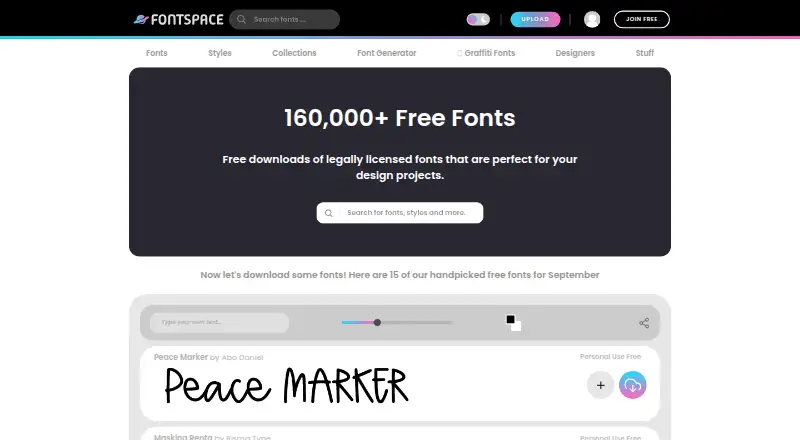
What FontSpace is
FontSpace is a font directory and download site for designers, crafters, hobbyists, teachers, and students. Its catalog includes more than 170,000 free fonts and more than 19,000 commercial-use fonts. Visitors can browse by style, collection, popularity, or designer, then customize previews by changing the text, size, and foreground color. Downloadable files include OpenType and TrueType formats; the catalog also lists WOFF and WOFF2. A free generator converts typed text into Unicode characters and symbols that can be copied to other platforms, although some sites may display unsupported characters as boxes. FontSpace says fonts are added and categorized by people, then reviewed by a moderator for quality issues and license checks. Each font’s license determines permitted use: personal-use licenses generally cover non-profit-making use, while commercial-use licenses cover uses where someone may profit. The commercial-use collection is described as usable in commercial projects with zero license fees, subject to the individual font license. FontSpace provides installation guidance for Windows, Mac, and Linux and supports modern browsers including Firefox, Chrome, Safari, Opera, and Edge. Cookies must be enabled to download fonts or register.
Good
- Offers more than 170,000 free fonts.
- Preview text, size, and foreground color are customizable.
- Provides installation guidance for Windows, Mac, and Linux.
- Font listings receive moderator quality and license review.
Watch out
- Cookies must be enabled to download or register.
- Some sites may show generated Unicode characters as boxes.
- Permitted use varies by font license.
Who it suits
FontSpace suits designers, crafters, hobbyists, teachers, and students looking for downloadable fonts or a text-to-Unicode generator. Users should check each font’s license for the intended use.
Verdict
FontSpace combines a broad font catalog, customizable previews, and a free text generator. Check the license on each font before using it, especially for commercial work.
Plans and prices
From FontSpace's own pricing page, checked 9 Oct 2026.
| Plan | Price | What it gives you |
|---|---|---|
| FontSpace | Free | Individual font licenses vary; commercial use depends on the font’s license · Free font downloads and a free online text generator; no subscription price listed. |
The facts
Each one read from FontSpace's own pages, with the date it was checked.
What it does
- Audience
- FontSpace says it is intended for professional graphic designers, crafters, hobbyists, teachers, and students.checked 8 Oct 2026
- Commercial fonts
- The commercial-use collection says its listed fonts can be used for commercial projects with zero license fees.checked 9 Oct 2026
- Commercial-use fonts
- FontSpace says its commercial-use font collection can be used for commercial projects with zero license fees.checked 8 Oct 2026
- Desktop use
- FontSpace provides installation guidance for Windows, Mac, and Linux.checked 9 Oct 2026
- Download formats
- The help page says FontSpace offers OpenType (OTF) and TrueType (TTF) font files for download.checked 9 Oct 2026
- Download requirement
- Cookies must be enabled to download fonts or register at FontSpace.checked 8 Oct 2026
- Font catalog
- FontSpace describes itself as a designer-centered site with more than 170,000 free fonts and more than 19,000 commercial-use fonts.checked 9 Oct 2026
- Font directory
- FontSpace describes itself as a designer-centered font website with 170,000+ free fonts.checked 8 Oct 2026
- Font discovery
- The site offers font browsing by styles, collections, popularity, and designer.checked 9 Oct 2026
- Font downloads
- The site offers downloadable fonts and says its collection includes OpenType (OTF) and TrueType (TTF) files.checked 8 Oct 2026
- Font generator
- Its free browser-based generator converts typed text into Unicode styles that can be copied and pasted.checked 9 Oct 2026
- Font previews
- The site offers customizable font previews, including controls for preview text, size, and foreground color.checked 8 Oct 2026
- Generator limitation
- The generator uses Unicode symbols and characters rather than creating an installable font, and some sites may not support every character.checked 9 Oct 2026
- Intended users
- FontSpace says its fonts are for professional graphic designers, crafters, hobbyists, teachers, and students.checked 9 Oct 2026
- License differences
- FontSpace explains that personal-use licenses generally cover non-profit-making use, while commercial-use licenses cover uses where someone may profit; the specific font license determines permitted use.checked 8 Oct 2026
- License variation
- FontSpace’s help page says a font’s license determines its permitted use and distinguishes personal use from commercial use.checked 9 Oct 2026
- Licensing review
- FontSpace says each font is reviewed by a moderator for quality issues and its license is verified.checked 9 Oct 2026
- Preview controls
- The home page says users can customize font previews by changing the text, preview size, and foreground color.checked 9 Oct 2026
- Privacy and advertising
- The privacy policy says FontSpace and partners use cookies for personalization and analytics, and the site uses third-party advertising companies.checked 9 Oct 2026
- Privacy policy date
- The privacy policy page says it was updated October 20, 2021.checked 8 Oct 2026
- Review and licensing
- FontSpace says each font is added and categorized by a real person, reviewed by a moderator for quality issues, and checked for licensing.checked 8 Oct 2026
- Support
- The site’s help page covers downloads, installation, font formats, and licenses, and links to a contact page.checked 9 Oct 2026
Where it runs
- Browser support
- FontSpace says it supports modern browsers including Firefox, Chrome, Safari, Opera, and Edge.checked 9 Oct 2026
The full review of FontSpace
FontSpace is a free font library and Unicode text generator for designers, makers, educators, and anyone looking for typefaces to download. Its large catalog and adjustable previews make it a useful place to explore, though choosing a font for paid work still requires checking that font’s license.
Overview
The designer-centered catalog brings together more than 170,000 free fonts, including more than 19,000 fonts in a commercial-use collection. Users can browse by style, collection, popularity, or designer, which gives them several ways to narrow a library broad enough to invite exploration. FontSpace says its commercial-use collection can be used on commercial projects with no license fee, but permission depends on the license attached to each individual font.
Downloads are offered in OTF and TTF, and FontSpace supports WOFF and WOFF2. The site also provides installation guidance for Windows, Mac, and Linux. Its free text generator turns typed text into Unicode characters and symbols for copying to other platforms; some sites may render unsupported characters as boxes.
Key features
Browse and preview
Font previews can be customized with sample text, size, and foreground color. That makes the catalog more practical to assess than a static font sample: users can see how a typeface handles their own wording and compare its appearance before downloading. Browsing by style, collections, popularity, and designer offers useful paths through the catalog, though it cannot replace checking the font’s terms before use.
Downloads and licensing
FontSpace says each font is added and categorized by a person, reviewed by a moderator for quality issues, and checked for licensing. That review is a helpful screening step, not a reason to assume all fonts carry the same permissions. Personal-use licenses generally cover non-profit-making use; commercial licenses cover uses where someone may profit, and the specific font license determines what is allowed.
The help page covers downloads, installation, file formats, and licensing. Cookies must be enabled to download fonts or register. FontSpace and its partners use cookies to personalize content and ads and analyze traffic, and third-party companies serve ads on the site.
Pricing
FontSpace: free. The free plan includes font downloads and the online text generator, with no subscription price. There is no free trial because the service is free. The important qualification is that free access does not settle usage rights: individual font licenses vary, and commercial use depends on the chosen font’s terms.
Platforms
FontSpace is available on the web and supports modern browsers including Firefox, Chrome, Safari, Opera, and Edge. Downloaded fonts can be installed on Windows, Mac, and Linux. Cookies must be enabled for downloads and registration.
Who it's for
FontSpace suits graphic designers, crafters, hobbyists, teachers, and students who want a broad range of downloadable typefaces without a subscription. It is especially useful when comparing styles against custom sample text or finding a font for a project that can work within the font’s stated license. It is less suited to anyone who wants a single blanket commercial license covering the whole catalog.
Pros and cons
- Pros: More than 170,000 free fonts and over 19,000 commercial-use fonts provide a wide field of choices without a subscription.
- Pros: Adjustable previews and multiple browsing routes help users narrow the catalog before downloading.
- Pros: Moderator review and license checks provide a useful quality and licensing screen.
- Cons: Font licenses vary, so commercial users must check permissions font by font.
- Cons: Generated Unicode characters may appear as boxes on websites that do not support them.
- Cons: Downloads and registration require cookies, and the site uses cookies and third-party advertising.
Alternatives
For a broader comparison of services, start with Font Marketplaces. Adobe Fonts is a better fit for readers who want a free basic library of about 5,500 fonts within a freemium service, including access through some trial, team, enterprise, and education accounts. Choose Fontstand if free font testing and subscriptions to specific fonts suit your workflow better.
Font Bros is another option with free fonts and webfont licenses available for most fonts. Google Fonts is a strong alternative when an open-source catalog with commercial and non-commercial use is the priority. Morisawa Fonts may suit readers seeking a subscription font service with a free plan that lets them try five selected fonts, while OH! MY FONT. offers a free plan and a paid annual plan for users considering that service.
YouWorkForThem Fonts is worth considering when buying a one-time standard font license is preferable. Fontspring is another alternative for readers comparing font licenses, including perpetual ebook licenses on its Worry-Free licenses.
Verdict
Choose FontSpace if you want a large, free catalog to browse, adjustable previews, and downloadable fonts for design, craft, classroom, or personal projects. Its breadth and zero-cost access are the main draw; the reason to look elsewhere is the need for simpler, consistent commercial rights across fonts, since FontSpace requires a license check for each choice.
Getting started
- Open https://www.fontspace.com/ in a supported modern browser.
- Enable cookies to download fonts or register.
- Browse by style, collection, popularity, or designer, and customize a font preview.
- Check the font’s license for the intended use.
- Download a font or use the free text generator; consult FontSpace’s installation guidance for Windows, Mac, or Linux.
Limits worth knowing
FontSpace is free, but permitted use depends on each font’s individual license. Some websites may not support Unicode characters from the generator and can display them as boxes.
Questions
Does FontSpace cost anything?
FontSpace offers free font downloads and a free online text generator. Its plan is listed as free.
Can I use FontSpace fonts commercially?
Some fonts are in a commercial-use collection described as usable in commercial projects with zero license fees. The specific font license determines what use is permitted.
What font formats can I download?
FontSpace offers OTF and TTF downloads; its catalog also lists WOFF and WOFF2 formats.
Can I use FontSpace on Windows, Mac, or Linux?
FontSpace provides font installation guidance for Windows, Mac, and Linux. The site supports modern browsers including Firefox, Chrome, Safari, Opera, and Edge.
What does the text generator do?
It converts typed text into Unicode characters and symbols that you can copy and paste into other platforms. Some websites may show unsupported characters as boxes.
Alternatives to FontSpace
- 1

Fontstand
Free planiOSWebmacOSWindows8.0From $4.99 a month - 2

Google Fonts
Free planOpen sourceAndroidWebAPILinux7.9Free plan - 3

Adobe Fonts
Free planAndroidiOSWebLinux7.6Free plan - 4
YouWorkForThem Fonts
AndroidiOSWebLinux7.2$30 one-time - 5
Font Bundles
AndroidiOSWebmacOS6.9From $11.99 a month - 6

Morisawa Fonts
Free planWebmacOSWindows6.9From ¥64,240 a year