
Folio Studio
Folio Studio is browser-based book layout software for independent authors creating novels, essays, memoirs, and picture books.
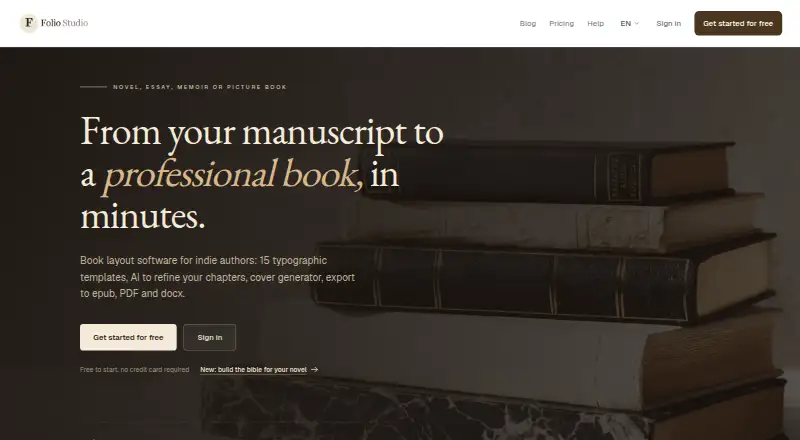
What Folio Studio is
Folio Studio is browser-based book layout software for independent authors creating novels, essays, memoirs, and picture books. It imports Markdown, DOCX, ODT, and PDF manuscripts, then detects and structures chapters. Authors can work with 15 typographic templates and preview layouts in real time. Chapter tools include summaries, style analysis, opening rewrites, and proofreading. The Pro manuscript bible organises characters and relationships and flags possible inconsistencies alongside source passages for the author to review. Export options include epub, PDF, and DOCX; the site says epub export is free, while DOCX and print-ready exports are available from Starter. The cover studio provides 2D and 3D previews and can export a 300 DPI print-ready PDF with calculated spine width, bleed, and a reserved barcode zone. Folio Studio works in modern browsers including Chrome, Firefox, Safari, and Edge, with no installation required. The Free plan allows 1 active project and includes epub and watermark-free PDF export. The listed Pro plan costs €9.00 per month; Starter costs €499.00 per month.
Good
- Imports Markdown, DOCX, ODT, and PDF manuscripts.
- Offers 15 templates with real-time preview.
- Free plan includes epub and watermark-free PDF export.
- Cover studio supports spine width and bleed calculations.
Watch out
- Free plan allows only 1 active project.
- DOCX and print-ready exports are listed from Starter.
- Starter is listed at €499.00 per month.
Who it suits
It suits independent authors who want to lay out books in a browser and export ebooks or print-ready files. Authors working with illustrated books can consider the project and page allowances listed for Starter and Pro.
Verdict
Folio Studio combines manuscript structuring, layout, and cover preparation for independent authors. Review the plan-specific project and export allowances, particularly before choosing Starter or Pro.
Plans and prices
From Folio Studio's own pricing page, checked 30 Sep 2026.
| Plan | Price | What it gives you |
|---|---|---|
| Free | Free | 1 active project · Classic and Minimal templates · epub and watermark-free PDF · 1 introductory AI action · 1 full-page illustration · import files up to 5 MB (1 MB extracted content) |
| Pro | €9 a month | Unlimited projects · 200 AI credits/month · manuscript bible · 10 AI cover credits/month · unlimited illustrated projects up to 100 pages each |
| Starter | €499 a month | 10 projects · DOCX and print-ready exports · 100 AI credits/month · 1 illustrated book project up to 30 pages |
The facts
Each one read from Folio Studio's own pages, with the date it was checked.
What it does
- AI tools
- Chapter tools include summaries, style analysis, opening rewrites, and proofreading; the plan page specifies different monthly credit allowances.checked 30 Sep 2026
- Cover design
- The cover studio offers 2D and 3D previews and can export a 300 DPI print-ready PDF with calculated spine width, bleed, and a reserved barcode zone.checked 30 Sep 2026
- Data rights
- The homepage states “Your rights, your data,” and the legal notice says user-imported content remains the user's property under the Terms of Service.checked 30 Sep 2026
- Exports
- Exports include epub, PDF, and DOCX, with DOCX and print-ready exports available from Starter; the site says epub export is free.checked 30 Sep 2026
- Hosting
- The legal notice names Vercel Inc. as the hosting provider for the websites and application.checked 30 Sep 2026
- Illustrated books
- Starter includes one illustrated book project up to 30 pages, while Pro allows unlimited illustrated projects up to 100 pages each in Fixed Layout epub or high-resolution PDF.checked 30 Sep 2026
- Manuscript bible
- The Pro manuscript bible organises characters and relationships and flags possible inconsistencies with source passages for the author to review.checked 30 Sep 2026
- Manuscript import
- It imports Markdown, DOCX, ODT, and PDF files and automatically detects and structures chapters.checked 30 Sep 2026
- Publishing compatibility
- The site says print-ready PDF exports meet specifications for Amazon KDP, IngramSpark, and local printers.checked 30 Sep 2026
- Purpose
- Folio Studio is book layout software for independent authors making novels, essays, memoirs, and picture books.checked 30 Sep 2026
- Templates
- The service offers 15 typographic templates, including layouts for novels, poetry, thrillers, and fantasy, with real-time preview.checked 30 Sep 2026
- Web access
- Folio Studio is a browser-based web application for modern browsers including Chrome, Firefox, Safari, and Edge, with no installation required.checked 30 Sep 2026
The company
- Headquarters
- Francechecked 23 Sep 2026
- Maker and location
- The legal notice identifies the publisher as Adrien Daniel Claude Maillard EI, a French individual entrepreneur trading as Folio Studio, with an address in Rouen, France.checked 30 Sep 2026
The full review of Folio Studio
Overview
Folio Studio is a browser-based book layout tool for independent authors preparing novels, essays, memoirs, or picture books. It is best suited to writers who want manuscript formatting and cover preparation in one workflow, with useful free EPUB and PDF exports; project caps and the steep Starter price make plan choice important.
Key features
From manuscript to layout
Import Markdown, DOCX, ODT, or PDF and Folio Studio detects and structures chapters, reducing the manual setup between a draft and a laid-out book. Its 15 typographic templates cover forms including novels, poetry, thrillers, and fantasy, and real-time preview helps authors judge the page design as they work. That range is useful for conventional text-led books, though the free plan includes only Classic and Minimal templates.
Chapter tools can summarize, analyze style, rewrite openings, and proofread, with monthly AI-credit allowances varying by plan. These are useful editorial aids, but the credit caps make them a supplement rather than an unlimited part of the workflow. Pro adds a manuscript bible for organizing characters and relationships; it flags possible inconsistencies with source passages for the author to assess, rather than resolving them automatically.
Exports and covers
Folio Studio exports EPUB, PDF, and DOCX. EPUB export is free; watermark-free PDF is also included on Free, while DOCX and print-ready exports start with Starter. The cover studio provides 2D and 3D previews and can produce a 300 DPI print-ready PDF with calculated spine width, bleed, and a reserved barcode zone. The service says its print-ready PDFs meet specifications for Amazon KDP, IngramSpark, and local printers, making it a practical option for authors preparing both ebook and print editions.
Illustrated-book allowances are sharply plan-dependent: Starter permits one project up to 30 pages, while Pro permits unlimited projects up to 100 pages each in Fixed Layout EPUB or high-resolution PDF. That makes Pro the more plausible tier for illustrated work, although the per-project page ceiling still matters for longer books.
Pricing
Folio Studio is freemium, with a free plan and paid plans from €4.99/mo. Free costs nothing and allows one active project, Classic and Minimal templates, EPUB and watermark-free PDF exports, one introductory AI action, one full-page illustration, and imports up to 5 MB (1 MB extracted content). It is a meaningful way to lay out a small text-led book, but the single-project limit and narrow template selection constrain ongoing or varied work.
Pro costs €9 a month and includes unlimited projects, 200 AI credits/month, the manuscript bible, 10 AI cover credits/month, and unlimited illustrated projects up to 100 pages each. It is the strongest fit for authors managing several books, using the character-consistency tools, or producing multiple illustrated titles.
Starter costs €499 a month. It includes 10 projects, DOCX and print-ready exports, 100 AI credits/month, and one illustrated book project up to 30 pages. Those export and project allowances may suit a defined production need, but its stated monthly price is far above Pro despite fewer projects and fewer AI credits; authors should compare that trade-off carefully before choosing it.
Platforms
Folio Studio supports Linux, macOS, Windows, and the web. It runs in modern browsers including Chrome, Firefox, Safari, and Edge without installation, which favors authors who want browser access across supported systems rather than a desktop-only workflow.
Who it's for
Choose Folio Studio if you are an independent author who needs chapter-aware manuscript imports, book templates, and ebook or print layout in one browser application. The free tier is a sensible starting point for a single project; Pro makes more sense for sustained multi-book work or illustrated titles. It is less compelling for anyone who needs several projects and print-ready exports on Starter at its stated monthly price, or who needs illustrated projects beyond Pro's 100-page limit.
Pros and cons
- Pro: EPUB and watermark-free PDF exports are available on Free, so authors can produce useful outputs before paying.
- Pro: The cover workflow includes spine, bleed, and barcode-zone preparation, supporting print-ready production as well as page layout.
- Pro: Pro combines unlimited projects with a manuscript bible and substantial monthly AI allowances, which suits authors juggling series or multiple manuscripts.
- Con: Free is limited to one active project and two templates, restricting users who want to compare designs or keep several books active.
- Con: Starter costs €499 a month while allowing fewer projects and AI credits than Pro, a difficult trade-off for most authors.
- Con: Pro's illustrated projects top out at 100 pages each, which may not suit longer illustrated books.
Alternatives
Book Layout Software is the category directory for comparing more options. Consider Coverfairy instead if cover creation is the priority: its free plan provides four one-time AI image credits and watermarked cover drafts, and its Week Pass costs $6, paid once, billed 7 days, for unlimited non-AI Cover and Inter…
Storyloft may fit writers focused on manuscript development and worldbuilding: its free plan includes one manuscript up to 5,000 words, 10 image credits, 20 Eddy AI conversations, and unlimited worldbuilding. For a desktop book-design application with offline editing, consider Blurb BookWright; its software plan includes templates and layout suggestions, with price not listed.
Bookmint is a web-based option if a large template and design-tool set is more important: its free beta includes 55 templates, print PDF and EPUB, and unlimited books and saved projects, but free exports carry a watermark unless activated. Folius offers a free browser editor with unlimited books and chapters, Word import, themes, trim sizes, live print preview, and EPUB, Markdown, and backup export.
Layoutly is worth considering if collaboration matters: its Pro plan costs $29 a month and includes real-time collaboration, while its free plan allows one book per month and five exports. Koberger is another freemium option for web, Windows, macOS, and Linux. Reedsy Studio is a web-based freemium alternative with writing-focused plans including advanced statistics, custom goals, daily check-ins, and dark mode.
Verdict
Folio Studio is a strong choice for independent authors who want manuscript structuring, layout, and print-cover preparation together, especially if Free covers a single book or Pro's multi-project workflow fits. The free EPUB and watermark-free PDF exports make it easy to begin, while Pro adds the most consequential ongoing tools. Look elsewhere if you need more than 100 illustrated pages per project, or think Starter's €499 a month is justified mainly by DOCX and print-ready exports.
Getting started
- Open the Folio Studio website in a modern browser such as Chrome, Firefox, Safari, or Edge.
- Choose a plan: Free, Pro, or Starter.
- Import a Markdown, DOCX, ODT, or PDF manuscript.
- Select a template and preview the layout.
- Use chapter or cover tools, then export in an available format.
Limits worth knowing
Free permits one active project, Classic and Minimal templates, one introductory AI action, one full-page illustration, and imports up to 5 MB (1 MB extracted content). Pro is listed with 200 AI credits and 10 AI cover credits per month; Starter has 10 projects, 100 AI credits per month, and one illustrated project up to 30 pages.
Questions
Is there a free plan?
Yes. The Free plan is listed as free and includes one active project, epub and watermark-free PDF export, and one introductory AI action.
What do the paid plans cost?
Pro is €9 a month. Starter is €499 a month.
Which platforms does Folio Studio support?
It is a browser-based application for modern browsers, including Chrome, Firefox, Safari, and Edge. No installation is required.
What can it export?
Exports include epub, PDF, and DOCX. The site says epub export is free, while DOCX and print-ready exports are available from Starter.
Who makes Folio Studio?
The legal notice identifies publisher Adrien Daniel Claude Maillard EI, a French individual entrepreneur trading as Folio Studio, with an address in Rouen.
Can it prepare illustrated books?
Starter includes one illustrated project up to 30 pages. Pro allows unlimited illustrated projects up to 100 pages each in Fixed Layout epub or high-resolution PDF.
Alternatives to Folio Studio
- 1

Blurb BookWright
Free planiOSWebAPImacOS8.1Free plan - 2

Storyloft
Free planWebmacOSWindows7.6From $398 a year - 3

Pressbooks
Open sourceWebAPILinuxSelf-hosted7.5From $120 a year - 4
Vivliostyle
Free planOpen sourceWebAPILinuxmacOS7.5Free plan - 5

BookSetter
Free planWeb7.3$9 one-time - 6

Koberger
Free planWebLinuxmacOSWindows7.1From $59.94 a year