Koberger
Koberger is a browser-based manuscript formatting tool for indie authors preparing EPUB ebooks and print PDFs.
What Koberger is
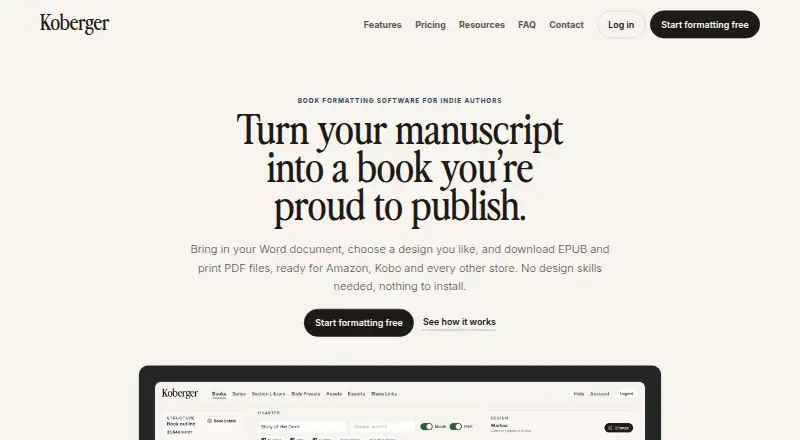
Koberger is a browser-based manuscript formatting tool for indie authors preparing EPUB ebooks and print PDFs. It imports manuscripts from Word, Pages, and Google Docs, then identifies chapters, headings, and section breaks to help structure a book. Authors can adapt ready-made designs by changing typography, spacing, chapter headings, and ornaments, then save presets for reuse. Layout elements are available for title, copyright, dedication, acknowledgements, glossary, and bibliography pages. A free account supports formatting, design, layout, and preview; exporting finished files requires Pro. Pro can export EPUB, Print PDF, and DOCX, with bulk export for multiple books. Authors can preview ebook and paperback pages and share private, read-only preview links with editors or beta readers. Saved sections and designs can carry across books, with tools to check consistency across a series. Koberger also supports watermarked advance review EPUBs. It says its EPUBs pass store checks and include accessibility information, with pre-export checks for common ebook issues. Exports are intended to work with Amazon KDP, IngramSpark, Apple Books, and Kobo. The service runs in a browser on Windows, Mac, Linux, or Chromebook without installation.
Good
- Imports from Word, Pages, and Google Docs.
- Customizable designs with reusable presets.
- Preview pages and share private review links.
- Exports EPUB, Print PDF, and DOCX with Pro.
- Watermarked advance review EPUBs are available.
Watch out
- Finished-file exports require a paid Pro plan.
- Monthly Pro covers a single book.
Who it suits
Koberger suits indie authors who want to format manuscripts for ebook and print output, with reusable designs and book sections. It also fits authors who need preview links for reviewers or want to maintain consistent styling across a series.
Verdict
Choose Koberger if you want browser-based manuscript formatting, reusable layouts, and EPUB and print PDF exports for indie publishing. Look elsewhere if you need finished-file exports without a paid plan or need the monthly plan to cover more than one book.
Plans and prices
From Koberger's own pricing page, checked 5 Oct 2026.
| Plan | Price | What it gives you |
|---|---|---|
| Free account | Free | Formatting, design, layout and preview; exporting finished files requires Pro · $0/forever |
| Koberger Pro Monthly | $9.99 a month | Unlimited exports; for a single book; pause anytime · $9.99/month |
| Koberger Pro Annual | $59.94 a year | Unlimited exports; for your whole catalogue; 30-day money-back guarantee · $59.94/year |
The facts
Each one read from Koberger's own pages, with the date it was checked.
What it does
- Book parts
- It provides layouts and blocks for pages such as title, copyright, dedication, acknowledgements, glossary, and bibliography.checked 5 Oct 2026
- Data handling
- The privacy policy says manuscripts and project files are processed to provide formatting, preview, and export, and manuscript content is not intentionally collected for analytics or monitoring.checked 5 Oct 2026
- Design
- Authors can customize ready-made designs, typography, spacing, chapter headings, and ornaments, and save reusable presets.checked 5 Oct 2026
- Integrations
- The site names Amazon KDP, IngramSpark, Apple Books, and Kobo as stores its exported files are intended to work with.checked 5 Oct 2026
- Manuscript import
- It imports manuscripts from Word, Pages, and Google Docs and detects chapters, headings, and section breaks.checked 5 Oct 2026
- Output formats
- Koberger Pro exports EPUB, Print PDF, and DOCX files, with bulk export available for multiple books.checked 5 Oct 2026
- Payments
- The pricing page says payments are processed securely by Stripe; the privacy policy says Koberger does not store full payment card numbers on its servers.checked 5 Oct 2026
- Preview and sharing
- Users can preview ebook and paperback pages and share a private read-only preview link with editors and beta readers.checked 5 Oct 2026
- Purpose
- Koberger formats manuscripts into EPUB and print PDF files for indie authors.checked 5 Oct 2026
- Review copies
- It can export watermarked advance review EPUBs for reviewers and launch teams.checked 5 Oct 2026
- Security and manuscript use
- Koberger says it does not use manuscript content to train AI models or provide manuscript content to AI training systems.checked 5 Oct 2026
- Series workflow
- Authors can reuse saved sections and designs across books and check consistency across a series.checked 5 Oct 2026
- Store compatibility
- Koberger says its EPUB passes store checks and includes accessibility information, with pre-export checks for common ebook issues.checked 5 Oct 2026
- Support
- Support for account and export questions is available by email, and the contact page suggests including account email, browser, operating system, and the task being attempted.checked 5 Oct 2026
Where it runs
- Platform
- Koberger runs in a browser on Windows, Mac, Linux, or Chromebook and requires no installation.checked 5 Oct 2026
The full review of Koberger
Koberger is a browser-based manuscript formatter for independent authors producing ebooks and print editions. It is best suited to writers who want adaptable layouts, repeatable series production, and review links without installing desktop software. The free account is useful for preparing and checking a project, while export work belongs to the paid tiers.
Overview
Koberger turns files from Word, Pages, and Google Docs into a structured book project, recognizing chapters, headings, and section breaks. That saves substantial cleanup time compared with placing manuscript text into a blank layout, while still allowing the author to revise the structure and visual treatment.
The browser workflow runs on Windows, macOS, Linux, and Chromebook without installation. It combines layout, preview, and export in one service, making it a sensible choice for authors who want a consistent production process rather than a separate editor for each output format.
Key features
Design and book structure
Ready-made designs are starting points rather than locked templates. Authors can change typography, spacing, chapter headings, and ornaments, then save those choices as reusable presets. Layout blocks cover title, copyright, dedication, acknowledgements, glossary, and bibliography pages, so front and back matter can follow the same visual system as the main text.
Preview, export, and series workflow
Page previews for ebooks and paperbacks help authors inspect both reading experiences before delivery. A private, read-only link lets editors and beta readers comment on a near-final version without receiving an editable project. Saved sections and designs can be reused across books, and series consistency checks are particularly valuable for authors publishing multiple volumes.
Pro exports EPUB, print PDF, and DOCX, with bulk export for multiple books. Koberger says its EPUB output includes accessibility information, passes store checks, and receives pre-export checks for common ebook problems. It also creates watermarked advance-review EPUBs, a practical option for launch teams and reviewers. The intended storefronts include Amazon KDP, IngramSpark, Apple Books, and Kobo.
Manuscript handling and privacy
Koberger says manuscript content is not used to train AI models or supplied to AI-training systems. Its privacy policy describes manuscript and project-file processing for formatting, preview, and export, without intentionally collecting manuscript content for analytics or monitoring. Payments go through Stripe, and full card numbers are not stored on Koberger's servers. Email support covers account and export issues; including the account email, browser, operating system, and attempted task should make troubleshooting more efficient.
Pricing
| Plan | Price | What it includes |
|---|---|---|
| Free account | free, billed $0/forever | Formatting, design, layout, and preview; finished-file export requires Pro |
| Koberger Pro Monthly | $9.99 a month | Unlimited exports for a single book; pause anytime |
| Koberger Pro Annual | $59.94 a year | Unlimited exports for your whole catalogue; 30-day money-back guarantee |
The free tier is appropriate for preparing a manuscript and sharing previews, but it cannot deliver files for publication. Monthly Pro keeps the commitment lower and suits an author working on one book; its single-book scope is a meaningful constraint for a backlist or active series. Annual Pro costs less than twelve monthly payments and covers the whole catalogue, making it the stronger fit for repeat publishers. There is no free trial, so the free account is the practical way to assess the workflow before paying.
Platforms
Koberger runs in a browser on Windows, macOS, Linux, and Chromebook and requires no installation. EPUB, print PDF, and DOCX output are available through Pro.
Who it's for
Choose it for indie fiction or nonfiction authors who need both ebook and print files, want reusable design rules across a series, and value private review links and pre-export checks. It is less suitable for a one-off project if paying to export outweighs the convenience, or for authors whose monthly subscription must cover several books at once.
Pros and cons
- Pros: Imports common manuscript sources and detects structural elements, reducing initial layout work.
- Pros: Adjustable designs, reusable presets, and saved sections support a repeatable series workflow.
- Pros: EPUB, print PDF, and DOCX exports, bulk export, review-copy watermarking, and store-oriented checks cover a broad publishing pipeline.
- Pros: Browser access avoids installation, while stated manuscript-use safeguards address a key privacy concern.
- Cons: The free plan cannot export finished files, so it is not a complete no-cost publishing solution.
- Cons: Monthly Pro is limited to one book, which can force catalogue publishers onto the annual plan.
- Cons: There is no free trial; evaluation happens through the export-limited free account.
Alternatives
For interactive ebook production across Android, iOS, Linux, macOS, web, and Windows, consider Kotobee Author. Folio Studio is a fit when a free plan with one active project, EPUB and watermark-free PDF output, and introductory creative allowances is enough. Choose Coverfairy when the priority is cover creation and short-term access options. Storyloft suits authors seeking manuscript planning and worldbuilding alongside image and AI allowances. Blurb BookWright is the alternative for desktop book design with offline editing. Pick Vivliostyle for open-source typesetting with no stated paid plan or usage limits. BookSetter offers a web-based, limited first-edition package, while Layout Department targets desktop book and zine layouts with a free community edition.
For broader category browsing, see Book Layout Software and eBook Creation Software.
Verdict
Koberger is a strong choice for indie authors who want browser-based formatting, reusable layouts, and professional ebook and print outputs in a repeatable workflow. Its main advantage is the combination of structured import, series tools, previews, and export checks. Look elsewhere if you require finished exports without a subscription or need a monthly plan that covers multiple books.
Getting started
- Open the Koberger website in a browser on Windows, Mac, Linux, or Chromebook.
- Create a free account to format, design, lay out, and preview a book.
- Import a manuscript from Word, Pages, or Google Docs.
- Customize the design and layout, then preview ebook and paperback pages.
- Choose Pro Monthly or Pro Annual to export finished files.
Limits worth knowing
The free account includes formatting, design, layout, and preview, but finished-file exports require Pro. Pro Monthly is for a single book; Pro Annual covers the whole catalogue.
Questions
Is Koberger free?
A free account is available for formatting, design, layout, and preview. Finished-file exports require Pro.
How much does Pro cost?
Pro Monthly costs $9.99 per month for a single book. Pro Annual costs $59.94 per year for a catalogue.
Which file types can it export?
Pro exports EPUB, Print PDF, and DOCX. Bulk export is available for multiple books.
Which platforms does Koberger support?
It runs in a browser on Windows, Mac, Linux, or Chromebook and requires no installation.
Which publishing stores are its exports intended for?
Koberger names Amazon KDP, IngramSpark, Apple Books, and Kobo.
Can authors share a preview with reviewers?
Yes. Users can share a private, read-only preview link with editors and beta readers.
Alternatives to Koberger
- 1

Blurb BookWright
Free planiOSWebAPImacOS8.1Free plan - 2

Storyloft
Free planWebmacOSWindows7.6From $398 a year - 3

Pressbooks
Open sourceWebAPILinuxSelf-hosted7.5From $120 a year - 4
Vivliostyle
Free planOpen sourceWebAPILinuxmacOS7.5Free plan - 5

BookSetter
Free planWeb7.3$9 one-time - 6
Kotobee Author
Free planAndroidiOSWebLinux7.1Free plan