
FlutterFlow
FlutterFlow is a visual development platform for building customized apps.
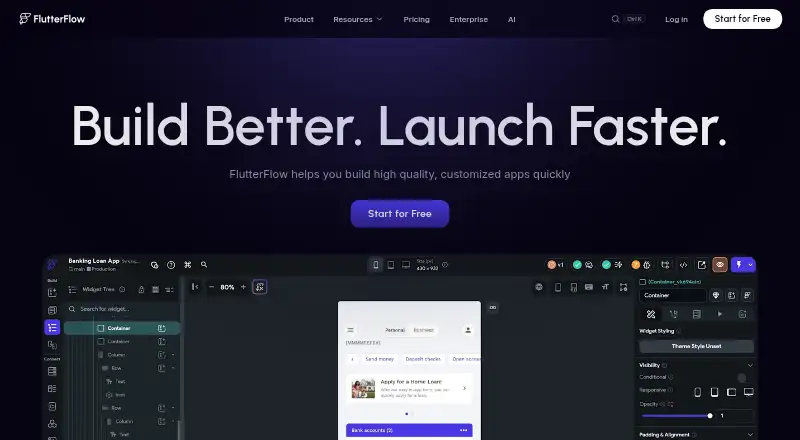
What FlutterFlow is
FlutterFlow is a visual development platform for building customized apps. Its design tools include more than 200 configurable UI elements and an Action Flow Editor for adding app logic. Apps can connect to Firebase, Supabase, or custom backends through REST APIs; users can also add Dart functions, Flutter widgets, and Google Cloud Functions. Collaboration features include team editing, feedback links for projects, branching, and sharing UI components across projects. For testing, FlutterFlow provides real-device Local Run, automated project tests, and a Debug Panel. The product supports deployment to the App Store, Play Store, and web, as well as code export. Its listed integrations span AI, payments, search, notifications, databases, maps, and deployment. Desktop apps are available for macOS and Windows, and receive automatic updates after installation. FlutterFlow supports Android, iOS, Linux, macOS, web, and Windows, and lists mobile publishing, user authentication, and API integrations. The Free plan costs nothing and is limited to two projects, 10 Lite credits, five lifetime AI requests, and two API endpoints. Basic is listed at $39 a month, with unlimited projects, code and APK downloads, custom-domain publishing, and 100 Lite credits per month. The company says it was founded by two former Google engineers, with a goal of making mobile app building easier for designers, developers, and entrepreneurs.
Good
- Includes more than 200 configurable UI elements.
- Connects apps to Firebase, Supabase, and custom backends.
- Supports team editing, branching, and shared UI components.
- Offers real-device Local Run and automated project tests.
- Apps can be deployed to app stores and the web.
Watch out
- The free plan is limited to two projects.
- Free includes only two API endpoints and 10 Lite credits.
- Code and APK downloads are included in the paid Basic plan.
Who it suits
FlutterFlow suits designers, developers, and entrepreneurs who want visual tools for building customized apps. Teams can use its editing, branching, feedback, and shared-component features, while app makers can connect data sources and deploy to mobile stores or the web.
Verdict
Choose FlutterFlow if you want visual app-building tools with data connections, collaboration, testing, and deployment options. Look elsewhere if the free plan's project, credit, or API endpoint limits do not fit your work, or if you need code and APK downloads without a paid plan.
Plans and prices
From FlutterFlow's own pricing page, checked 4 Oct 2026.
| Plan | Price | What it gives you |
|---|---|---|
| Free | Free | Up to 2 projects · 10 Lite credits · 5 AI requests lifetime · Up to 2 API endpoints |
| Basic | $39 a month | Unlimited projects · Code and APK download · Custom domain publishing · 100 Lite credits/mo · Monthly billing |
| Growth | — | 2 users · 2 open branches/project · GitHub integration · 200 Lite credits/mo per seat · Monthly billing |
| Business | — | Up to 5 users · 5 open branches/project · Up to 3 automated tests · 400 Lite credits/mo per seat · Monthly billing |
The facts
Each one read from FlutterFlow's own pages, with the date it was checked.
What it does
- API integrations
- Yeschecked 20 Sep 2026
- Collaboration
- The platform supports team editing, project links for feedback, branching, and sharing UI components across projects.checked 4 Oct 2026
- Customization
- Users can add custom Dart functions and Flutter widgets and write and deploy Google Cloud Functions.checked 4 Oct 2026
- Data connections
- Apps can connect to Firebase, Supabase, or custom backends through REST API support.checked 4 Oct 2026
- Deployment
- The product page says apps can be deployed to the App Store, Play Store, and web, and code can be exported.checked 4 Oct 2026
- Desktop availability
- FlutterFlow provides desktop apps for macOS and Windows, with automatic updates after installation.checked 4 Oct 2026
- Integrations
- The product page lists integrations covering AI, payments, search, notifications, databases, maps, and deployment.checked 4 Oct 2026
- Intended users
- The company says FlutterFlow was founded to make building mobile apps easier for designers, developers, and entrepreneurs.checked 4 Oct 2026
- Mobile publishing
- Yeschecked 20 Sep 2026
- Privacy and security
- FlutterFlow's privacy policy says it uses security cookies and commercially acceptable means to protect personal data, while noting it cannot guarantee absolute security.checked 4 Oct 2026
- Support
- The plan comparison lists account and billing support and community support; email and in-app support are also listed for paid plans.checked 4 Oct 2026
- Testing
- FlutterFlow offers real-device Local Run, automated project tests, and a Debug Panel.checked 4 Oct 2026
- User authentication
- Yeschecked 20 Sep 2026
- Visual design
- The product offers 200+ configurable UI elements and a visual Action Flow Editor for adding app logic.checked 4 Oct 2026
- What it does
- FlutterFlow describes itself as a visual development platform for building customized apps.checked 4 Oct 2026
Where it runs
- App types
- bothchecked 20 Sep 2026
The company
- Company founding
- FlutterFlow says it was founded by two former Google engineers; the page does not state a founding year or headquarters.checked 4 Oct 2026
Money
- Free plan
- Yeschecked 20 Sep 2026
- Free plan limits
- The Free plan allows up to two projects and includes 10 Lite credits and up to two API endpoints.checked 4 Oct 2026
The full review of FlutterFlow
FlutterFlow is a visual development platform for building customized apps, with tools for interface design, app logic, data connections and deployment. It suits designers, developers and entrepreneurs who want to build visually but retain options for custom code. Its breadth is compelling for committed projects, while the free plan’s tight caps and paid entry price make it less suited to casual experimentation.
Overview
FlutterFlow brings visual design and app behavior into one workflow, with connections to Firebase, Supabase and custom backends through REST APIs. Apps can target mobile, web and desktop, and the platform supports publishing to the App Store and Play Store as well as web deployment. That range makes it a practical option for teams planning across device types, though visual tools still leave users responsible for shaping their app’s data, behavior and release process.
The platform was founded by two former Google engineers with the stated aim of making mobile app building easier for designers, developers and entrepreneurs. Its mix of visual tools and code extensions serves that broad audience, but a simple, narrowly scoped app may not need its full set of capabilities.
Key features
More than 200 configurable UI elements give teams a sizeable starting point for screens, and the visual Action Flow Editor adds app logic. Those tools can speed up assembling an interface and defining behavior without making the project entirely dependent on preset screens. Users can extend projects with custom Dart functions and Flutter widgets, and write and deploy Google Cloud Functions; that flexibility is useful when visual configuration alone is insufficient, but calls for some coding knowledge.
Firebase, Supabase and custom REST API connections let apps work with external data and services. FlutterFlow also lists integrations spanning AI, payments, search, notifications, databases, maps and deployment. The range is a strength for projects that need connected services, although API endpoint caps on Free may constrain early work.
Team editing, project links for feedback, branching and reusable UI components support shared development. Real-device Local Run, automated project tests and a Debug Panel provide ways to check behavior and find issues before deployment. The platform supports code export and app-store or web deployment, making it more than a prototyping tool, but code and APK downloads require a paid plan.
Desktop apps are available for macOS and Windows and update automatically after installation. FlutterFlow supports user authentication and mobile publishing. Its privacy policy says it uses security cookies and commercially acceptable means to protect personal data, while acknowledging it cannot guarantee absolute security.
Pricing
The Free plan costs nothing and permits up to two projects, with 10 Lite credits, five AI requests over the account’s lifetime and up to two API endpoints. It is suitable for trying the workflow or a small early project, but the lifetime AI allowance and endpoint cap make it a constrained base for ongoing development.
Basic costs $39 a month, billed monthly. It adds unlimited projects, code and APK downloads, custom-domain publishing and 100 Lite credits per month. This is the relevant entry plan for individual builders who need export or custom-domain publishing; Free gives up both, along with project capacity beyond two.
Growth costs $801,552 a month, billed monthly, and includes two users, two open branches per project, GitHub integration and 200 Lite credits per seat each month. Its collaboration provisions suit a two-person team that needs branching and GitHub integration, but the listed price is a steep step from Basic.
Business costs $15,018,525 a month, billed monthly, for up to five users, five open branches per project, up to three automated tests and 400 Lite credits per seat each month. The higher seat and branch allowances and included automated tests are aimed at larger teams; the listed monthly price makes it difficult to justify unless those provisions are essential.
Paid plans include email and in-app support, while the plan comparison also lists account and billing support and community support. The pricing shown gives no trial period for paid plans.
Platforms
FlutterFlow supports Android, iOS, Linux, macOS, web and Windows. Desktop apps are provided for macOS and Windows, and apps can be published to mobile app stores or deployed to web. This broad reach is useful for projects intended for multiple platforms, rather than a single-device workflow.
Who it's for
FlutterFlow is best for designers, developers and entrepreneurs building customized apps who want visual interface and logic tools, backend connections and room to add code. Teams can benefit from shared editing, branching, feedback links and reusable components, while solo builders can start on Free and move to Basic when they need exports or a custom domain. It is a poor fit for users whose work exceeds Free’s project, credit or API endpoint limits but cannot support a paid plan, or who require code and APK downloads without paying.
Pros and cons
- Pros: Visual UI and logic tools are paired with Firebase, Supabase and REST API connections, supporting data-connected apps rather than just static screens.
- Pros: Custom Dart functions, Flutter widgets and Google Cloud Functions extend projects beyond the visual editor.
- Pros: Collaboration, real-device running, tests, debugging and deployment tools cover much of the path from development to release.
- Cons: Free is limited to two projects, two API endpoints and 10 Lite credits, with only five AI requests for the account’s lifetime.
- Cons: Code and APK downloads and custom-domain publishing start at Basic, which costs $39 a month billed monthly.
- Cons: Growth and Business carry listed monthly prices of 801552.00 USD and 15018525.00 USD respectively, making their team provisions costly at those rates.
Alternatives
Ninox is worth considering for a free, multi-platform option with up to five users, 100 MB of storage, 5,000 records and 1,000 API calls per month.
Saltcorn is a free alternative for teams that want an MIT-licensed, self-hosted platform with no per-seat fee.
Adalo offers a free plan for building and testing, with 500 records per app, one app editor and unlimited test apps; choose it when those stated limits fit your project.
Bubble has a free Web + Mobile plan with one app editor, 50K workload units per month and six hours of server logs; it may suit a project that fits those allowances.
MIT App Inventor is a free educational platform for building Android and iOS apps.
Noloco has a free plan with unlimited team seats, 50 active clients, 2,000 records and 30 AI credits per month.
Ragic offers a free plan with three custom sheets, 1,000 records per custom sheet, unlimited users and 10 GB of upload storage.
Retool is another freemium option, with a free plan and a Team plan priced at $10 a month.
For broader comparisons, see No-Code Development Platforms, No-Code AI App Builders, No-code app builders, Low-Code Development Platforms and AI App Builders.
Verdict
Choose FlutterFlow for customized apps that benefit from visual design and logic, data connections, collaboration, testing and multiple deployment targets, especially when code extensions matter. Look elsewhere if Free’s project, credit or endpoint caps are too restrictive and a paid plan is out of reach, or if you need code and APK downloads without a subscription.
Getting started
- Open https://flutterflow.io/.
- Start with the Free plan or choose a paid plan; Basic is listed at $39 a month.
- Build an app with configurable UI elements and the Action Flow Editor.
- Connect Firebase, Supabase, or a custom backend through REST API support if needed.
- Use Local Run, automated tests, or the Debug Panel to test a project.
- Deploy to the App Store, Play Store, or web, or export code.
Limits worth knowing
The Free plan allows up to two projects, includes 10 Lite credits and five lifetime AI requests, and permits up to two API endpoints. Code and APK downloads are included in the Basic plan, listed at $39 a month.
Questions
Does FlutterFlow have a free plan?
Yes. The Free plan costs nothing and allows up to two projects, 10 Lite credits, five lifetime AI requests, and two API endpoints.
How much does Basic cost?
Basic is listed at $39 a month.
Can apps connect to external data sources?
Yes. Apps can connect to Firebase, Supabase, or custom backends through REST API support.
Where can FlutterFlow apps be deployed?
The product supports deployment to the App Store, Play Store, and web. Code can also be exported.
Does it offer desktop apps?
Yes. FlutterFlow provides desktop apps for macOS and Windows, with automatic updates after installation.
Who founded FlutterFlow?
The company says it was founded by two former Google engineers.
Alternatives to FlutterFlow
- 1

Joget
Free planOpen sourceAndroidiOSWebAPI9.4Free plan - 2

ToolJet
Free planOpen sourceWebAPILinuxSelf-hosted9.0From $23 a month - 3

Bubble
Free planAndroidiOSWeb8.9From $32 a month - 4

Figma Make
Free planAndroidiOSWebAPI8.9Free plan - 5

Budibase
Free planOpen sourceWebAPILinuxSelf-hosted8.8From $19 a month - 6
Adalo
Free planAndroidiOSWeb8.8From $36 a month