
FloorAI
FloorAI turns sketches, photos, PDFs, or text descriptions into labelled floor plans that users can edit.
What FloorAI is
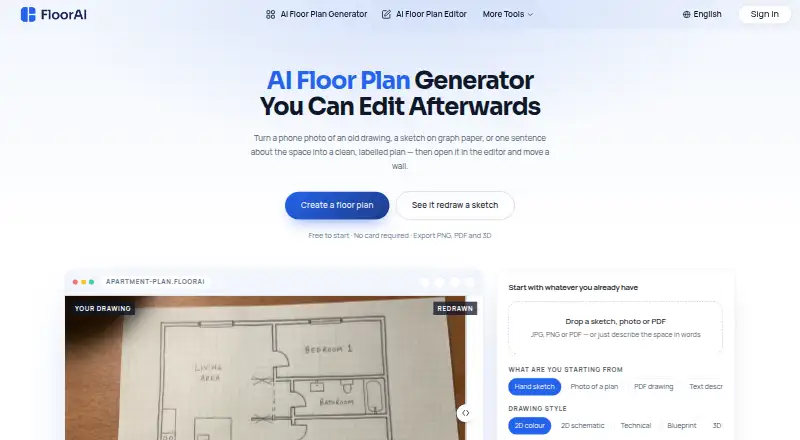
FloorAI turns sketches, photos, PDFs, or text descriptions into labelled floor plans that users can edit. It accepts JPG, PNG, and PDF uploads, including phone photos and scans. Its editor lets users move walls and openings, rename rooms, change areas, and reposition or rotate furniture. Available styles include 2D colour, 2D schematic, technical, blueprint, and 3D isometric. Users can create alternative arrangements from the same footprint, compare them at the same scale, and make a matching upper floor. Plans can be exported as PNG, PDF, and GLB; DXF export is advertised in a customer testimonial. The web service has a free plan with four AI floor plan generations and an editor for personal use. FloorAI says uploaded images are used to produce design outputs and are not used to train its AI models without explicit consent. Its stated support hours are Monday to Friday, 9:00 AM–6:00 PM UTC.
Good
- Accepts sketches, photos, PDFs, and text descriptions
- Editor supports wall, room, and furniture changes
- Offers several 2D and 3D drawing styles
- Can compare alternate layouts at the same scale
- Exports plans as PNG, PDF, and GLB
Watch out
- Free plan includes four generations
- Free plan is for personal use
- Commercial use is not included in the free tier
Who it suits
FloorAI suits listing agents, renovating homeowners, small design studios, property photographers, short-let hosts, and freelance draughtsmen who want to turn source material into editable plans. Its free tier is limited to personal use.
Verdict
FloorAI combines plan generation with editing and layout alternatives in a web app. The four-generation free plan offers a starting point, while commercial use and watermark-free output are listed with paid plans.
Plans and prices
From FloorAI's own pricing page, checked 30 Sep 2026.
| Plan | Price | What it gives you |
|---|---|---|
| Free | Free | 4 AI Floor Plan Generations · AI Floor Plan Editor · Personal Use · 24/7 Email Support |
| Starter | $9.99 a month | 100 AI Floor Plan Generations · 50 Pro AI Floor Plan Generations · AI Floor Plan Video Render · Full Resolution Downloads · Commercial Use · Watermark Free · $119.94 billed yearly. Cancel anytime. |
| Plus | $24.99 a month | 400 AI Floor Plan Generations · 200 Pro AI Floor Plan Generations · AI Floor Plan Video Render · Full Resolution Downloads · Commercial Use · Watermark Free · $299.94 billed yearly. Cancel anytime. |
| Professional | $49.99 a month | 1000 AI Floor Plan Generations · 500 Pro AI Floor Plan Generations · AI Floor Plan Video Render · Full Resolution Downloads · Commercial Use · Watermark Free · $599.94 billed yearly. Cancel anytime. |
The facts
Each one read from FloorAI's own pages, with the date it was checked.
What it does
- Alternative layouts
- The homepage says users can generate multiple arrangements of the same footprint, compare them at the same scale, and create a matching upper floor.checked 30 Sep 2026
- Drawing styles
- The homepage lists 2D colour, 2D schematic, technical, blueprint, and 3D isometric styles.checked 30 Sep 2026
- Editor
- Its built-in editor lets users move walls and openings, rename rooms, change areas, and move or rotate furniture.checked 30 Sep 2026
- Exports
- FloorAI says plans can be exported as PNG, PDF, and GLB, and advertises DXF export in a customer testimonial.checked 30 Sep 2026
- Input formats
- The homepage says it accepts phone photos, scans, and PDF drawings, and supports JPG, PNG, and PDF uploads.checked 30 Sep 2026
- Privacy
- FloorAI says uploaded images are used only to generate design outputs and are not used to train its AI models without explicit consent.checked 30 Sep 2026
- Purpose
- FloorAI turns sketches, photos, PDFs, or text descriptions into clean, labelled floor plans that can be edited afterward.checked 30 Sep 2026
- Security
- The privacy policy states FloorAI uses SSL/TLS encryption, secure cloud storage, and access controls, and limits sensitive-data access to authorized personnel.checked 30 Sep 2026
- Support
- The contact page says support is available Monday to Friday, 9:00 AM–6:00 PM UTC, and aims to respond within 24 hours on business days.checked 30 Sep 2026
- Target users
- The homepage describes the product for listing agents, renovating homeowners, small design studios, property photographers, short-let hosts, and freelance draughtsmen.checked 30 Sep 2026
- Third-party services
- The privacy policy names Stripe for payment processing and also mentions cloud storage and hosting and aggregated, non-personal analytics.checked 30 Sep 2026
- Use and refund limits
- The terms say personal plans are for non-commercial use, commercial plans permit commercial use, and refunds are generally unavailable after credits have been used except for specified errors or technical failures.checked 30 Sep 2026
Money
- Free tier limits
- The Free plan includes four AI floor plan generations and an editor, while commercial use, watermark-free output, image-to-plan, 3D, and layout optimization are not listed among its included features.checked 30 Sep 2026
The full review of FloorAI
FloorAI is a web app for turning drawings, photos, PDFs, or text into labelled floor plans, then refining them in an editor. It suits property professionals and homeowners who need editable plan concepts without switching to a wider design suite. Its free tier makes it easy to start, but commercial work and watermark-free downloads require a paid plan.
Overview
FloorAI combines generation with practical editing: users can move walls and openings, rename rooms, adjust areas, and reposition or rotate furniture. That makes it more useful for correcting a draft than a generator that only produces a finished image. The trade-off is that it is web-only, with no native mobile or desktop app.
Inputs include phone photos, scans, and PDF drawings, with JPG, PNG, and PDF uploads. Output styles range from 2D colour and schematic plans to technical, blueprint, and 3D isometric views. Plans can be exported as PNG, PDF, or GLB. FloorAI also supports multiple arrangements of the same footprint at a consistent scale and a matching upper floor, which helps when comparing alternatives rather than settling for a single layout.
Key features
Generation and editing
Prompt-to-plan, image-to-plan, and measurement input cover several ways to begin, whether the user has a rough idea or an existing drawing. The editor can then handle common revisions to rooms, openings, and furniture. This should suit early planning and presentation work; the available features do not establish it as a replacement for a broader architectural design workflow.
Privacy and support
FloorAI says uploaded images are used to generate outputs and are not used to train its models without explicit consent. Its privacy policy describes SSL/TLS encryption, secure cloud storage, and access controls, with sensitive data restricted to authorized personnel. Stripe handles payments; the policy also mentions cloud hosting and storage and aggregated, non-personal analytics. Support is available Monday to Friday, 9:00 AM–6:00 PM UTC, with a stated aim to respond within 24 hours on business days.
Pricing
The Free plan costs nothing and includes four AI floor plan generations, the editor, personal use, and 24/7 email support. Four generations are enough to try the workflow, but commercial use, watermark-free output, image-to-plan, 3D, and layout optimization are not included among its stated features.
Starter costs $9.99 a month, billed $119.94 billed yearly. Cancel anytime. It includes 100 AI Floor Plan Generations and 50 Pro AI Floor Plan Generations, plus video render, full-resolution downloads, commercial use, and watermark-free output. It is the entry paid option for occasional professional use, but the yearly billing means the stated monthly price is paid as an annual total.
Plus costs $24.99 a month, billed $299.94 billed yearly. Cancel anytime. Its 400 standard and 200 Pro generations suit heavier use without moving to the largest allowance. Professional costs $49.99 a month, billed $599.94 billed yearly. Cancel anytime. With 1,000 standard and 500 Pro generations, it is aimed at high-volume work. Both paid plans include video render, full-resolution downloads, commercial use, and watermark-free output.
Personal plans are for non-commercial use; commercial plans permit commercial use. Refunds are generally unavailable once credits have been used, except for specified errors or technical failures. The free plan is the low-risk way to assess the workflow, while paid users should choose based on generation volume and the need for commercial rights.
Platforms
FloorAI runs on the web. That keeps access device-flexible through a browser, but readers seeking a dedicated mobile or desktop app should consider a multi-platform alternative.
Who it's for
FloorAI is a sensible fit for listing agents, property photographers, short-let hosts, freelance draughtsmen, small design studios, and renovating homeowners who need labelled plans or layout variations. It is less suited to users who need native apps or a broader design environment.
Pros and cons
- Pros: Multiple input types and an editor make it possible to turn an existing drawing or idea into a plan and then adjust it.
- Pros: Multiple layouts at the same scale make alternatives easier to compare.
- Pros: Paid plans combine commercial use, watermark-free output, full-resolution downloads, and generous generation quotas.
- Cons: The free plan allows only four generations and is for personal use, limiting its usefulness for ongoing professional work.
- Cons: Paid plans are presented with annual billing totals, so the monthly figure is not the whole commitment.
- Cons: Web-only access rules it out for users who require a native app.
Alternatives
AI Floor Plan Generators is the broader category directory for comparing options. Choose Planner 5D if native Android, iOS, macOS, or Windows access matters alongside web, or if its annual Premium plan at 59.99 USD is a better fit. FloorDrafter offers a free tier with signup and daily check-in credits, 2K resolution, and watermarked PNG, while its Pro plan is $12 a month; consider it if that credit-and-resolution model fits better.
Luw.ai Studio is a multi-platform alternative with a free tier that grants two daily credits at 512×512 resolution with a watermark. RoomSketcher supports mobile and desktop platforms and its free plan includes one AI floor plan conversion plus 2D and 3D floor plans. AI Floor Plan is another freemium web option.
AIFloorPlanBuilder uses one-time plans, including a 30-export Starter for 30.00 USD and a 75-export Growth plan for 62.00 USD, which may suit buyers who prefer paying per package rather than by subscription. Maket offers a Homeowner plan at $20 a month with 300 AI credits monthly and multi-floor generation, a fit to consider for those needs. CubiCasa has a free LITE plan with 2D plans, room dimensions, and PNG and JPG output.
Verdict
Choose FloorAI if you need editable, labelled floor plans, layout alternatives, and commercial-ready exports in a browser-based workflow. The free four-generation allowance gives individuals a way to start, while paid plans provide commercial use and watermark-free output. Look elsewhere if you need native apps or a broader design suite.
Alternatives to FloorAI
- 1

Planner 5D
Free planAndroidiOSWebAPI8.4From $4.99 a month - 2

RoomSketcher
Free planAndroidiOSWebAPI8.3From $12 a month - 3
Luw.ai Studio
Free planAndroidiOSWebAPI8.1From $19 a month - 4
Ritn3D
Free planAndroidiOSWebAPI8.0From $9.99 a month - 5

Hypar
Free planWebAPIWindows7.6From $100 a month - 6
Maket
Free planWebAPI7.5From $20 a month