Ritn3D
Ritn3D turns floor plan images and PDFs into interactive 3D models that can be explored, walked through, and shared.
What Ritn3D is
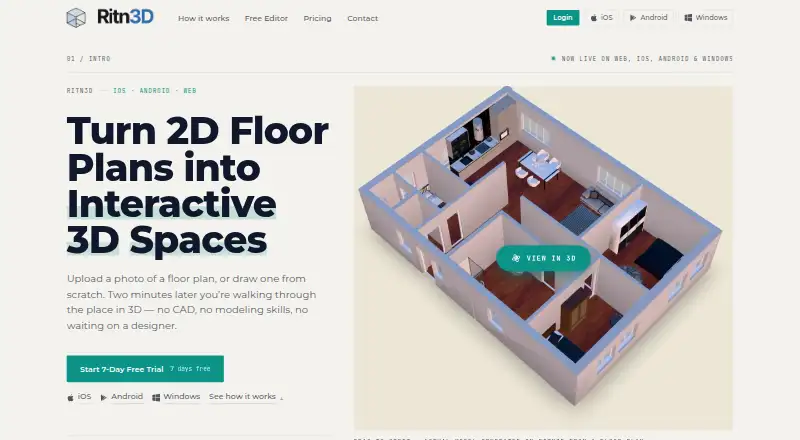
Ritn3D turns floor plan images and PDFs into interactive 3D models that can be explored, walked through, and shared. It accepts PDF, JPG, and PNG files, including CAD exports, scans, and photos of printed plans. Its neural networks identify walls, doors, windows, and rooms, after which users can check and adjust the detected layout before model generation. The site says most conversions finish in under two minutes, though plan complexity affects timing. Shared models open in a browser viewer without requiring recipients to install the app or log in. Free renders remain available for seven days; Pro includes 90-day cloud sync. Pro+ includes ten GLB or STL downloads monthly, with extra downloads costing $3.99 each. Each upload currently creates a single-floor model, and hand-drawn or heavily annotated plans may need manual corrections. The free tier includes three renders per month and sharing with up to five people. Ritn3D is available on Android, iOS, web, and Windows.
Good
- Accepts PDF, JPG, and PNG floor plans.
- Users can adjust detected layouts before generation.
- Shared models open in a browser without an app or login.
- Free plan includes three renders monthly.
- Pro includes 90-day cloud sync.
Watch out
- Each upload creates a single-floor model.
- Hand-drawn or heavily annotated plans may need corrections.
- Free renders are available for seven days.
- Extra Pro+ downloads cost $3.99 each.
Who it suits
Ritn3D is intended for real estate agents, architects, interior designers, homeowners, and builders who want to view or share a floor plan as a 3D model.
Verdict
Ritn3D provides a way to turn common floor plan files into shareable 3D models, with layout review before generation. Note its single-floor output and the free render retention period when deciding whether it fits your workflow.
Plans and prices
From Ritn3D's own pricing page, checked 15 Oct 2026.
| Plan | Price | What it gives you |
|---|---|---|
| Free | Free | 3 renders/month · bird’s-eye view · 5 shares/project · standard textures · unlimited floor-plan editor · $0 |
| Pro | $9.99 a month | 20 renders/month · walkthrough · furniture · Full HD · 50 shares/project · no watermark · 90-day cloud sync · $9.99/mo |
| Pro+ | $19.99 a month | 40 renders/month · 10 GLB/STL downloads/month · $3.99 extra download · rollover credits · $19.99/mo |
| Enterprise | Priced on request | custom render volumes · white-labelled viewer · volume pricing · partner API integration · Let's talk |
The facts
Each one read from Ritn3D's own pages, with the date it was checked.
What it does
- 3D exports
- Pro+ provides GLB and print-ready STL downloads, with ten downloads monthly and paid extras.checked 15 Oct 2026
- 3D viewing
- Generated models support orbit viewing, first-person walkthroughs and browser-based sharing.checked 15 Oct 2026
- Accuracy disclaimer
- The terms classify outputs as conceptual visualizations and warn they may be inaccurate or not to scale for construction or engineering.checked 15 Oct 2026
- API availability
- The API is offered as design-partner integrations opened one platform at a time rather than as a self-serve public API.checked 15 Oct 2026
- Automatic detection
- Its AI identifies walls, doors, windows and rooms before model generation.checked 15 Oct 2026
- Corporate registry
- ZaubaCorp lists Laghima Technologies Private Limited as an active Indian company incorporated in 2019 with Rajesh Konatala among its directors; the page does not directly establish that it owns Ritn3D.checked 15 Oct 2026
- Data retention
- Free renders remain available for seven days, while Pro cloud synchronization lasts 90 days.checked 15 Oct 2026
- Developer documentation
- The developer page describes workflow and integration concepts but publishes no public endpoint reference or SDK.checked 15 Oct 2026
- Developer identity
- The Apple and Google listings identify Rajesh Konatala as the seller or developer and give Samalkota, Andhra Pradesh, India as the Android developer address.checked 15 Oct 2026
- Export limits
- The FAQ says Pro+ includes 10 GLB or STL downloads per month and extra downloads cost $3.99 each.checked 2 Oct 2026
- Furniture
- Paid tiers provide drag-and-drop furniture with real dimensions.checked 15 Oct 2026
- Generation time
- The site says most conversions take under two minutes, depending on plan complexity.checked 2 Oct 2026
- Google Play data protection
- Google Play reports that the Android app may share activity and performance data, may collect personal information, and states that data is not encrypted.checked 15 Oct 2026
- Google Play reach
- The Android listing shows 10,000+ downloads, while AppBrain estimates about 13,000 total downloads and 2,800 in the previous 30 days.checked 15 Oct 2026
- Input formats
- The service accepts single- or multi-page PDFs, JPGs and PNGs, including scans and photos.checked 15 Oct 2026
- Input limitation
- Hand-drawn plans, heavily annotated drawings and low-quality scans may require manual correction, and DWG import is unavailable.checked 15 Oct 2026
- Integrations
- A partner program can embed Ritn3D’s editor and viewer inside another product under that product’s branding.checked 15 Oct 2026
- Intended users
- The company names real estate agents, architects, interior designers, homeowners, and builders as intended users.checked 2 Oct 2026
- Licence
- Ritn3D is described as commercial rather than open source, and its terms grant a limited proprietary EULA.checked 15 Oct 2026
- Limit: past defects
- The iOS changelog records fixes for launch crashes, checkout and trial-upgrade errors, upload detection, share-sheet crashes and render-limit resets.checked 15 Oct 2026
The company
- Company founder evidence
- A technical paper describes Ritn3D as a single-founder commercial product live since 2025 and serving users in more than 60 countries.checked 15 Oct 2026
Money
- Free editor
- The drawing and tracing editor is unlimited and can export JPG and PDF plans without a watermark.checked 15 Oct 2026
- Limit: advanced plans
- An AppBrain reviewer complained that professional or highly detailed files were rejected and requested support for basic hand-drawn plans.checked 15 Oct 2026
Where it runs
- Limit: Android stability
- The Google Play listing notes that a rare viewer stall still affects some Android users.checked 15 Oct 2026
The full review of Ritn3D
Ritn3D converts existing floor plans into interactive 3D layouts for homeowners and property professionals who want to review or share a design without building a model from scratch. It is a focused single-floor tool, not a fit for projects that need multi-storey output or generous model-export allowances.
Overview
The service uses neural networks to identify walls, doors, windows, and rooms in PDF, JPG, and PNG plans, including CAD exports, scans, and photos of printed drawings. Users can check and adjust the detected layout before generation, which is valuable when recognition misses a detail. The company says most conversions take under two minutes, though complex plans can take longer.
Generated models are interactive and can be explored or walked through. Shared models open in a browser, so recipients do not need an app or an account. The FAQ says uploads are processed securely and not shared with third parties; shared links are access-controlled and revocable. Free renders remain available for seven days, while Pro includes 90-day cloud sync.
Key features
- Plan recognition with correction: Automatic detection can reduce the work of tracing a plan, and the review step gives users a chance to fix the layout before generating a model. Hand-drawn or heavily annotated plans may still need manual corrections.
- Interactive browser sharing: Recipients can explore a model without installing software or signing in, a practical advantage for client or household review.
- Single-floor conversion: Each upload creates one floor only, so multi-level projects require a different workflow.
- Design integrations: Ritn3D can embed its editor and viewer in another product; partner API arrangements are discussed with prospective partners. This is aimed at product teams, not ordinary individual use.
Pricing
Ritn3D has a free plan and month-to-month paid plans, plus a 7-day trial. The listed starting price is $14.99/user/mo, while the plan prices below are published separately.
| Plan | Price and terms | What it includes |
|---|---|---|
| Free | free | 3 renders/month, bird’s-eye view, standard textures, sharing with up to 5 people, and an unlimited floor plan editor. |
| Pro | $9.99 a month, billed Month-to-month | 20 renders/month, walkthrough, furniture, Full HD, sharing with up to 50 people, no watermark, and 90-day cloud sync. |
| Pro+ | $19.99 a month, billed Month-to-month | 40 renders/month and 10 GLB or STL downloads/month. Extra downloads cost $3.99 each; unused downloads roll over. |
| Enterprise | Custom pricing | Custom render volumes, a white-labelled viewer, volume pricing, and partner API integration. |
Free suits occasional layout checks, but three monthly renders, bird’s-eye viewing, and seven-day render retention constrain ongoing collaboration. Pro is the step up for users who need walkthroughs, higher sharing limits, and longer cloud sync. Pro+ is for heavier render use or downloads, though its ten included GLB/STL files per month make frequent exports a metered cost. Enterprise is the relevant option for organizations seeking custom volumes or an embedded, branded experience.
Platforms
Ritn3D supports Android, iOS, web, and Windows. It accepts floor-plan images rather than creating a floor plan from a text prompt; image-to-floor-plan and measurement input are supported. Export formats include JPG, PDF, GLB, and STL.
Who it's for
Real estate agents can share an explorable view of a property layout, while architects, interior designers, builders, and homeowners can use it to review a proposed or existing single-floor plan. It is less suitable for teams whose core need is detailed multi-floor modelling, or for plans whose hand-drawn or heavily annotated content would require substantial correction.
Pros and cons
Pros
- PDF, JPG, and PNG input covers CAD exports, scans, and photographed printed plans.
- Layout review before generation allows corrections to detected architectural features.
- Browser sharing avoids requiring recipients to install an app or create an account.
- Pro provides walkthroughs and 90-day cloud sync, while Pro+ includes GLB/STL downloads.
Cons
- Uploads produce a single floor, limiting its usefulness for multi-storey projects.
- Hand-drawn and heavily annotated plans may need manual correction.
- Free includes only three renders per month and seven days of render retention.
- Pro+ limits included GLB/STL downloads to ten per month, with extra downloads priced at $3.99 each.
Alternatives
Planner 5D is worth considering if a broader design workflow matters: its Premium plan includes floor-plan upload and conversion to a 3D project, alongside a full premium furniture catalog, for $59.99 a year billed Pay annually.
RoomSketcher is another option for users who want both 2D and 3D floor plans and snapshots; its Free plan includes one AI floor-plan conversion and two starting credits.
Treform is an alternative for users seeking a different AI editing and rendering workflow, with a free plan and a Student quarterly plan at $69 a month billed billed once per term.
CubiCasa may suit users whose priority is a 2D floor plan with room dimensions and PNG or JPG output; its LITE plan is free.
Luw.ai Studio is an alternative for users looking for general AI image creation, with a free tier that provides two daily credits at 512×512 resolution and includes a watermark.
FloorLens is worth comparing for scan-based sharing and exports: its free plan includes one web scan and PDF, image, 3D model, and MP4 exports, with the link and QR code auto-deleting after 14 days.
CamPlan is an alternative for users who want a LiDAR-based room-planning workflow, with one project per month on its free plan.
Drafted is another option for users seeking free PDF, CAD, or BIM downloads, with a separate free add-in for Revit 2025 and 2026.
For more tools in the category, see AI Floor Plan Generators.
Verdict
Choose Ritn3D when you need to turn an existing single-floor plan into an interactive model that is easy to share and can be corrected before generation. Its combination of file-format flexibility and account-free browser viewing is compelling for quick review; look elsewhere for multi-storey output or frequent, high-volume model exports.
Alternatives to Ritn3D
- 1

Planner 5D
Free planAndroidiOSWebAPI8.4From $4.99 a month - 2

RoomSketcher
Free planAndroidiOSWebAPI8.3From $12 a month - 3
Luw.ai Studio
Free planAndroidiOSWebAPI8.1From $19 a month - 4

Hypar
Free planWebAPIWindows7.6From $100 a month - 5
Maket
Free planWebAPI7.5From $20 a month - 6

FloorDrafter
Free planWebAPI7.3From $12 a month