
AI Floor Plan
AI Floor Plan generates floor plan concepts from structured space requirements for users to review and develop further.
What AI Floor Plan is
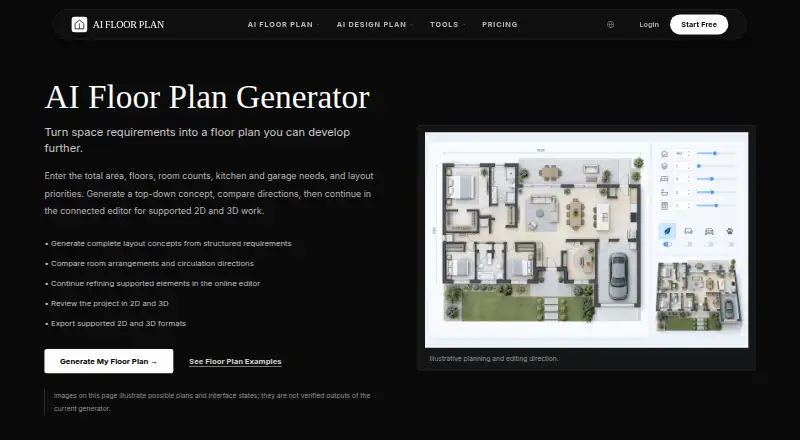
AI Floor Plan generates floor plan concepts from structured space requirements for users to review and develop further. Users can specify area, floor count, room counts, kitchen or garage needs, and layout priorities; they can also begin with text, a sketch, or a photo. It creates top-down concepts with room arrangements and circulation for residential and commercial spaces, including apartments, offices, garages, and restaurants. Concepts can be compared and continued in a connected browser editor, where supported walls, openings, dimensions, and furniture can be refined. The editor provides 2D and 3D views for projects with editable geometry. Depending on the project, exports can include DXF, PDF, PNG, GLB, OBJ, or STL. The workflow links layout generation with AI home and interior design. A free plan is available, and paid access starts at $7.99/mo. The maker says dimensions are not guaranteed accurate; plans do not replace measured drawings, engineering, code review, permits, or construction documents.
Good
- Accepts structured requirements, text, sketches, or photos
- Generates residential and commercial concepts
- Connected editor offers 2D and 3D views
- Free plan; paid access from $7.99/mo
Watch out
- Dimensions are not guaranteed accurate
- Exports vary depending on the project
- STL files are not verified as print-ready
Who it suits
It suits homeowners, renovators, spatial designers, property teams, students, and concept creators who want an initial layout to review. It is not a substitute for verified measurements or construction documentation.
Verdict
AI Floor Plan can turn requirements or reference material into concepts and continue them in a browser editor. Treat the results as starting points: measurements and construction suitability require independent verification.
The facts
Each one read from AI Floor Plan's own pages, with the date it was checked.
What it does
- Audience
- The generator is presented for homeowners and renovators, spatial designers, property teams, students, and concept creators.checked 29 Sep 2026
- Collaboration
- The maker says the platform offers real-time collaboration and cloud storage for working with clients, contractors, and team members.checked 29 Sep 2026
- Construction suitability
- The site says generated plans do not replace measured drawings, code review, engineering, permits, or construction documents.checked 30 Sep 2026
- Design inputs
- Users can describe a plan in text or upload a sketch or photo to start the workflow.checked 30 Sep 2026
- Editing
- Generated concepts can be continued in the connected editor, where supported walls, openings, dimensions, and furniture can be refined.checked 29 Sep 2026
- Editor
- The connected browser editor supports refining project elements and reviewing projects in 2D and 3D.checked 30 Sep 2026
- Export limitation
- The maker says exported formats depend on the project and STL files are not verified as watertight, correctly scaled, or print-ready.checked 29 Sep 2026
- Exports
- Depending on the project, supported export formats include DXF, PDF, PNG, GLB, OBJ, and STL.checked 30 Sep 2026
- Generation
- The generator creates top-down layout concepts for users to compare, including room arrangements and circulation.checked 29 Sep 2026
- Illustrative examples
- The generator page says its supplied plan images illustrate possible plans and interface states and are not verified outputs of the current generator.checked 30 Sep 2026
- Inputs
- Users can specify area, floors, room counts, kitchen and garage needs, and layout priorities.checked 29 Sep 2026
- Limitations
- The maker says dimensions are not guaranteed accurate and results do not replace measured drawings, code review, engineering, permits, or construction documents.checked 29 Sep 2026
- Limits and accuracy
- The generator page says dimensions are not guaranteed accurate and instructs users to verify measurements before making decisions.checked 30 Sep 2026
- Privacy policy
- The privacy policy says the service may collect prompts, uploaded media, generated outputs, account details, technical data, and payment-related data, and says it does not sell personal information.checked 30 Sep 2026
- Purpose
- AI Floor Plan turns space requirements into floor plan concepts that users can review and continue developing.checked 29 Sep 2026
- Security
- The site says enterprise-grade encryption helps protect designs; its privacy policy also lists HTTPS encryption, access controls, audit logging, user data isolation, backups, and vulnerability testing.checked 30 Sep 2026
- Space types
- The generator covers residential and commercial concepts, including apartments, offices, garages, and restaurants.checked 30 Sep 2026
- Support
- The site lists [email protected] as its contact for assistance.checked 30 Sep 2026
- Views
- The connected editor supports 2D and 3D views for projects with editable geometry.checked 29 Sep 2026
- What it does
- Generates floor plan concepts from structured requirements such as area, floors, room counts, kitchen and garage needs, and layout priorities.checked 30 Sep 2026
- Workflow integration
- The site connects floor plan layout generation with AI home and interior design in one platform.checked 30 Sep 2026
Where it runs
- Browser access
- The generation and connected editing workflow run in a browser.checked 29 Sep 2026
Money
- Free access
- The product homepage says users can start free and that no credit card is required for instant access.checked 30 Sep 2026
Alternatives to AI Floor Plan
- 1

Planner 5D
Free planAndroidiOSWebAPI8.4From $4.99 a month - 2

RoomSketcher
Free planAndroidiOSWebAPI8.3From $12 a month - 3
Luw.ai Studio
Free planAndroidiOSWebAPI8.1From $19 a month - 4
Ritn3D
Free planAndroidiOSWebAPI8.0From $9.99 a month - 5

Hypar
Free planWebAPIWindows7.6From $100 a month - 6
Maket
Free planWebAPI7.5From $20 a month