Faro
Faro is a free, MIT-licensed desktop client for file transfers, remote shells, and storage across servers and cloud services.
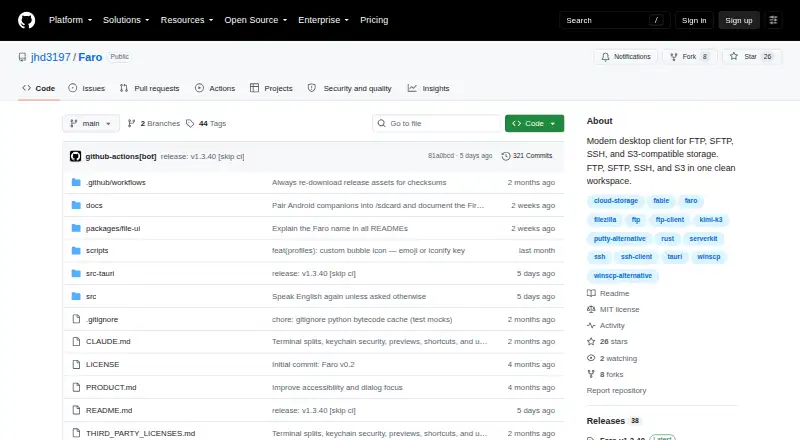
What Faro is
Faro is a free, MIT-licensed desktop client for file transfers, remote shells, and storage across servers and cloud services. It supports SFTP, FTP, FTPS, SSH, S3-compatible storage, Azure Blob, Google Cloud Storage, WebDAV, and HTTP(S), and connects to Dropbox, OneDrive, Google Drive, and Box through browser-based OAuth. Its file tools include dual-pane browsing, drag-and-drop transfers, directory sync, continuous folder sync, and editing remote files in a local editor. Users can explore disk usage, compare directories across backends, and search a fleet by name or content. The standalone faro-cli reuses saved GUI profiles for file operations, sync, diff, search, and command execution. Faro’s Agent Bridge can expose authenticated sessions to Claude Code or other MCP agents through a localhost service, with session opt-in, command approval by default, and audit logging. HTTP(S) sources are read-only: browsing and downloads are allowed, but uploads, renames, and deletes are refused. Builds are unsigned, and macOS builds are not notarized, so first launch requires operating-system-specific steps.
Good
- Supports multiple file-transfer and storage protocols
- Connects to four cloud drives through browser OAuth
- Includes directory sync and continuous folder sync
- CLI reuses saved GUI profiles
- Free and MIT-licensed
Watch out
- HTTP(S) sources are read-only
- Builds are unsigned
- macOS builds are not notarized
Who it suits
Faro suits people who manage files, remote shells, and storage across multiple servers or cloud services.
Verdict
Faro brings file transfer, synchronization, search, and remote-shell tools into a cross-platform desktop client. Note that HTTP(S) sources cannot be changed, and the maker says its builds are unsigned.
Plans and prices
From Faro's own pricing page, checked 11 Oct 2026.
| Plan | Price | What it gives you |
|---|---|---|
| Free and open source | Free | No paid plans or usage limits stated |
The facts
Each one read from Faro's own pages, with the date it was checked.
What it does
- Agent Bridge controls
- The Agent Bridge uses a per-launch bearer token, requires session opt-in, prompts for approval on each command by default, and records an audit log.checked 11 Oct 2026
- AI integration
- Its Agent Bridge exposes authenticated Faro sessions to Claude Code or other MCP agents through a localhost service.checked 11 Oct 2026
- CLI
- The standalone faro-cli reuses saved GUI profiles and supports file operations, sync, diff, search, and command execution across supported backends.checked 11 Oct 2026
- Cloud drives
- It connects to Dropbox, OneDrive, Google Drive, and Box using browser-based OAuth authorization.checked 11 Oct 2026
- Credential handling
- For cloud drives, Faro uses loopback and PKCE OAuth, stores only the refresh token in the operating system keychain, and does not see the user’s password.checked 11 Oct 2026
- Downloads
- The maker lists macOS universal DMG, Windows x64 EXE or MSI, and Linux x64 AppImage, DEB, or RPM installers.checked 11 Oct 2026
- File management
- Features include dual-pane browsing, drag-and-drop transfers, directory sync, continuous folder sync, and editing remote files in a local editor.checked 11 Oct 2026
- File synchronization
- Yeschecked 20 Sep 2026
- License and intended use
- Faro is MIT-licensed and described as a desktop companion for hands-on file transfer, shells, and ad hoc work across machines.checked 11 Oct 2026
- Notable limit
- HTTP(S) sources are read-only: Faro allows browsing or downloading, while refusing uploads, renames, and deletes.checked 11 Oct 2026
- Product
- Faro is a desktop client for file transfer, remote shells, and storage across servers and cloud services.checked 11 Oct 2026
- Protocol coverage
- multi-protocolchecked 20 Sep 2026
- Protocols
- It supports SFTP, FTP, FTPS, SSH, S3-compatible storage, Azure Blob, Google Cloud Storage, WebDAV, and HTTP(S).checked 11 Oct 2026
- Release status
- The maker says builds are unsigned and macOS builds are not notarized, so first launch requires operating system-specific steps.checked 11 Oct 2026
- Remote agent security
- Faro Agent uses a Noise handshake with X25519 and ChaCha20-Poly1305, pins peer keys after pairing, and applies the controlled machine’s execution and file access policy.checked 11 Oct 2026
- Search and comparison
- It includes disk usage exploration, directory diff across backends, and fleet search by name or content.checked 11 Oct 2026
- Support
- The maker directs users to its Discord community for setup help and feedback.checked 11 Oct 2026
- Transfer automation
- Yeschecked 20 Sep 2026
Where it runs
- Supported platforms
- cross-platformchecked 20 Sep 2026
Alternatives to Faro
- 1

WinSCP
Free planOpen sourceWindows7.9Free plan - 2
Cyberduck
Free planmacOSWindows7.9Free plan - 3
Serv-U FTP Server
AndroidiOSWebAPI7.8 - 4

FileZilla Client
Free planLinuxmacOSWindows7.7Free plan - 5
FTP Commander
Free planAndroidWindows7.6$49.95 one-time - 6

FTP Rush
Free planAndroidiOSLinuxmacOS7.5Free plan