
Extron ShareLink Pro
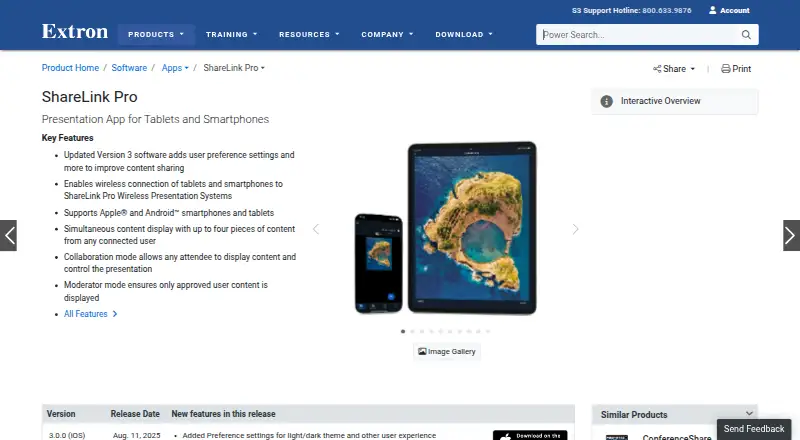
Extron ShareLink Pro is an app for wirelessly sharing content from a smartphone or tablet to a room display through an Extron ShareLink Pro presentation syst…
What Extron ShareLink Pro is
Extron ShareLink Pro is an app for wirelessly sharing content from a smartphone or tablet to a room display through an Extron ShareLink Pro presentation system. Users can share images, video, and device screen content, with up to four pieces of content displayed at once. In Collaboration mode, any user can share; Moderator mode gives a designated moderator control over who presents. The app supports Apple and Android smartphones and tablets, while the system also works with macOS and Windows computers. Android devices connect over an existing Wi-Fi network. Extron says content sent between devices and the system is encrypted, and a Welcome Screen Display ID Code helps direct content to the correct display. The app is free, but requires an Extron ShareLink Pro presentation system. It is listed for iOS, Android, macOS, web, and Windows. Extron is headquartered in Anaheim, California, and was founded in 1983.
Good
- Free app
- Displays up to four pieces of content simultaneously
- Collaboration and Moderator sharing modes
- Content sent to the system is encrypted
Watch out
- Requires an Extron ShareLink Pro presentation system
- App pricing lists iPhone and iPad
Who it suits
It may suit meeting rooms that use an Extron ShareLink Pro system and need participants to share device content on a room display. Moderator mode may be useful when one person needs to control sharing.
Verdict
ShareLink Pro provides wireless sharing with a choice between open collaboration and moderator control. It is relevant to rooms with the required Extron presentation system, rather than a standalone sharing app.
Plans and prices
From Extron ShareLink Pro's own pricing page, checked 3 Oct 2026.
| Plan | Price | What it gives you |
|---|---|---|
| ShareLink Pro app | Free | iPhone and iPad; requires an Extron ShareLink Pro presentation system |
The facts
Each one read from Extron ShareLink Pro's own pages, with the date it was checked.
What it does
- Access control
- A Welcome Screen Display ID Code is used to help ensure content is sent to the correct display.checked 3 Oct 2026
- Content sharing
- Users can share images, video, and device screen content, with multiple items displayed side by side.checked 3 Oct 2026
- Enterprise management
- Extron GVE can centrally manage and control setup, configuration, and firmware updates across multiple ShareLink Pro units.checked 3 Oct 2026
- Meeting integrations
- ConferenceShare wirelessly shares video and audio from in-room USB devices with Windows or macOS laptops running Teams, Zoom, or other UC meetings.checked 3 Oct 2026
- Modes
- Collaboration mode lets any user share content, while Moderator mode lets a designated moderator control who can share.checked 3 Oct 2026
- Network connection
- The Android app connects to a ShareLink Pro presentation system over the existing Wi-Fi network.checked 3 Oct 2026
- Pricing availability
- Extron says product pricing information is available to Extron Insider customers.checked 3 Oct 2026
- Purpose
- The app wirelessly shares content from a smartphone or tablet to a room display through an Extron ShareLink Pro presentation system.checked 3 Oct 2026
- Security
- Extron states that content sent between users’ devices and ShareLink Pro is encrypted.checked 3 Oct 2026
- Simultaneous content
- ShareLink Pro systems can display up to four pieces of content simultaneously from connected users.checked 3 Oct 2026
- Support
- Extron lists 24-hour technical support at its Anaheim worldwide headquarters.checked 3 Oct 2026
- System compatibility
- The ShareLink Pro system supports computers running macOS and Windows, as well as Apple and Android mobile devices.checked 3 Oct 2026
The company
- Founded
- 1983checked 28 Sep 2026
- Headquarters
- Anaheim, California, United Stateschecked 28 Sep 2026
Where it runs
- Supported mobile devices
- The app supports Apple and Android smartphones and tablets.checked 3 Oct 2026
The full review of Extron ShareLink Pro
Extron ShareLink Pro is a free app for sending phone and tablet content to a room display through an Extron ShareLink Pro presentation system. It is a strong fit for equipped meeting rooms that need flexible presenter access, but a poor choice if you need screen sharing without dedicated Extron hardware.
Overview
ShareLink Pro handles images, video, and device screen content, with options for open participation or moderator-led sharing. Its central trade-off is clear: the app itself costs nothing, but its usefulness depends on a compatible ShareLink Pro system in the room.
Key features
A system can show up to four content sources at once, which helps groups compare materials or keep several presenters visible. That capacity suits many collaborative discussions, though rooms that need more than four simultaneous sources will need another approach.
Collaboration mode lets any user share; Moderator mode gives a designated person control over who can present. The first favors quick, informal contributions, while the second is better for orderly meetings. A Welcome Screen Display ID Code helps direct content to the intended display, and Extron says transmissions between devices and the system are encrypted.
The Android app connects over the existing Wi-Fi network. The system supports Apple and Android mobile devices as well as macOS and Windows computers. For organizations with multiple units, Extron GVE can manage setup, configuration, and firmware updates centrally. ConferenceShare is a related option for meetings: it shares video and audio from in-room USB devices with Windows or macOS laptops running Teams, Zoom, or other UC meetings.
Pricing
The ShareLink Pro app is free: its listed plan costs nothing and covers iPhone and iPad use. The plan requires an Extron ShareLink Pro presentation system, so the free price does not make it a standalone alternative to general-purpose screen-sharing apps. Extron says product pricing information is available to Extron Insider customers; no hardware price is stated here.
Platforms
The app's platforms are Android, iOS, macOS, web, and Windows. The free plan specifically covers iPhone and iPad and requires the Extron presentation system. Android connects through the existing Wi-Fi network; the system also supports Apple and Android mobile devices and macOS and Windows computers.
Who it's for
ShareLink Pro makes sense for meeting rooms already equipped with the Extron system, especially where groups need to share several sources or choose between unrestricted participation and moderator control. Organizations managing multiple units may also value centralized configuration and firmware updates. If you want a screen-sharing app that works without that room system, this is the wrong fit.
Pros and cons
- Pros: Up to four simultaneous sources support side-by-side comparison and multiple contributors.
- Pros: Collaboration and Moderator modes accommodate both open discussion and controlled turn-taking.
- Pros: Encrypted transfers, a display ID code, and centralized management address security and multi-unit administration.
- Cons: A ShareLink Pro presentation system is required, limiting the app to rooms with compatible hardware.
- Cons: Four simultaneous sources may not be enough for meetings that need a larger number of presenters on screen.
Alternatives
Screen Sharing Software is a useful starting point if you want to compare options beyond a room-system-dependent app.
- CrankWheel is worth considering if its free allowance of 15 meetings per month, three viewers per meeting, and one-week recording retention fits your sharing needs.
- AirDroid Cast offers a free same-WLAN casting plan with one simultaneous login; choose it if that setup fits better than requiring an Extron room system.
- Screenleap has a free plan capped at 40 minutes a day and eight viewers, making it an option for time-limited sharing without ShareLink Pro hardware.
- Deskreen has a free open-source Community plan for one connected device, a fit for readers who prioritize that model and device limit.
- LetsView offers free screen mirroring at SD resolution, with one connection, a 4M maximum bitrate, and 30fps maximum framerate.
- ViewSonic AirSync is another option in this category.
- Kramer VIA is another option in this category.
- Optoma Display Share is another free option in this category.
Verdict
Choose Extron ShareLink Pro if your room already has the required system and you want a free way to share multiple sources with a choice of open or moderator-controlled participation. Look elsewhere if you need a standalone tool, or if your meetings need more than four simultaneous content sources.
Alternatives to Extron ShareLink Pro
- 1

AirDroid Cast
Free planAndroidiOSWebLinux8.0From $1.67 a month - 2

Demodesk Scheduling
AndroidiOSWebAPI7.7 - 3

CrankWheel
Free planAndroidiOSWebAPI7.5From $29 a month - 4

Screenleap
Free planAndroidiOSWebAPI7.4From $15 a month - 5

Barco ClickShare
AndroidiOSmacOSWindows7.2$3,725 one-time - 6
Deskreen
Free planWebLinuxmacOSWindows7.1From $24.99 a year