
Barco ClickShare
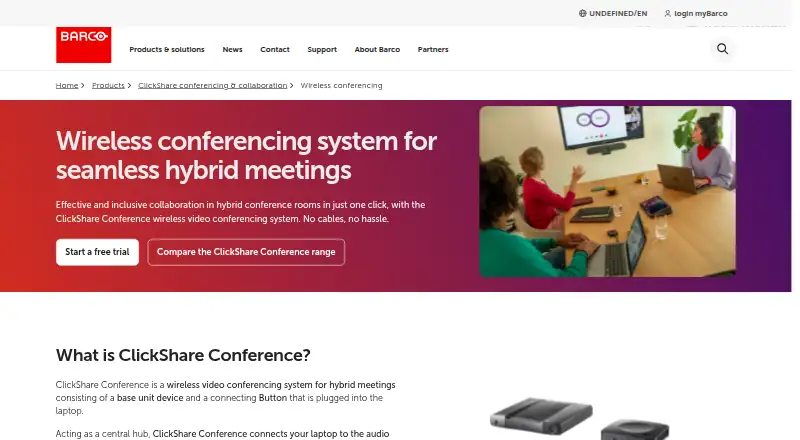
Barco ClickShare Conference connects a laptop to meeting-room audio and video equipment through a room base unit and ClickShare Button.
What Barco ClickShare is
Barco ClickShare Conference connects a laptop to meeting-room audio and video equipment through a room base unit and ClickShare Button. Users can join a video call with the room’s camera, microphone, and speakers, and Barco says a meeting can start in less than seven seconds with one click through the Button or app. Microsoft Teams, Zoom, and Cisco Webex are among its compatible conferencing platforms. Users can share from laptops, tablets, or smartphones using the mobile app, AirPlay, Miracast, or Google Cast. Compatible touchscreens support annotation and blackboarding. The CX-20 is described for small rooms and huddle spaces, the CX-30 for small to medium rooms, and the CX-50 2nd generation for high-impact rooms. Desktop apps are available for Windows and macOS; mobile sharing supports iOS and Android. XMS Cloud provides fleet installation, configuration, monitoring, management, and analytics. Firmware updates and licenses have no cost. SmartCare coverage is included with ClickShare units and provides five years of coverage upon registration, with XMS Cloud enrollment required. Pricing is available on request, and Barco offers a qualifying free try-and-buy demo unit for up to four weeks.
Good
- Connects laptops to room audio and video equipment.
- Supports sharing through AirPlay, Miracast, and Google Cast.
- Compatible touchscreens support annotation and blackboarding.
- Firmware updates and licenses have no cost.
- XMS Cloud includes fleet management and analytics.
Watch out
- Pricing is available on request.
- Mobile app does not support hybrid meetings.
- The demo is limited to eligible professional users.
- SmartCare requires registration and XMS Cloud enrollment.
Who it suits
ClickShare suits organizations that want wireless presentation and conferencing connections for meeting rooms. Room size and device model matter, and the mobile app is not intended for hybrid meetings.
Verdict
ClickShare combines room conferencing connections with wireless content sharing and fleet management. Check room fit, mobile-app limits, and demo eligibility before selecting a unit.
Plans and prices
From Barco ClickShare's own pricing page, checked 9 Oct 2026.
| Plan | Price | What it gives you |
|---|---|---|
| ClickShare Bar Pro | $3,725, paid once | Premium video bar · wireless conferencing · price shown for Bar Pro · One-time list price; excl. VAT, duties and freight. |
The facts
Each one read from Barco ClickShare's own pages, with the date it was checked.
Where it runs
- Conferencing platforms
- The product page identifies Microsoft Teams, Zoom, and Cisco Webex among compatible videoconferencing platforms.checked 9 Oct 2026
- Desktop app limits
- The mobile app is for wireless content sharing and does not support hybrid meetings; Barco directs users to use the desktop app with a ClickShare Button for those meetings.checked 9 Oct 2026
- Desktop platforms
- The ClickShare App is available for Windows and macOS, with Standard and Enterprise deployment options.checked 9 Oct 2026
- Mobile app limitation
- The mobile app does not support hybrid meetings; Barco directs users to the desktop app with a ClickShare Button for those meetings.checked 9 Oct 2026
Money
- Firmware and license costs
- The product page states that firmware updates are free and there is no license cost.checked 9 Oct 2026
The company
- Founded
- Barco states it was founded in 1934 in Poperinge, Belgium.checked 9 Oct 2026
- Headquarters
- Kortrijk, Belgiumchecked 28 Sep 2026
What it does
- Interactive collaboration
- ClickShare supports compatible touchscreens for content interaction such as annotation and blackboarding.checked 9 Oct 2026
- IoT security
- Barco says the ClickShare CX-50 2nd generation is SGS-certified to ETSI EN 303 645 for IoT cybersecurity.checked 9 Oct 2026
- Management
- XMS Cloud provides a platform to install, configure, and manage a ClickShare fleet, with monitoring, management, and analytics features.checked 9 Oct 2026
- Meeting setup
- Barco says users can start a meeting in less than 7 seconds with one click via the ClickShare Button or App.checked 9 Oct 2026
- Meeting start
- Users can connect with the ClickShare Button or Desktop App and join a video call using the room camera, microphone, and speakers.checked 9 Oct 2026
- Mobile sharing
- The ClickShare Mobile App shares a phone or tablet screen to a room display and supports iOS and Android.checked 9 Oct 2026
- Personal data
- Barco says ClickShare does not store personal data in device log files or persistent memory, or transfer personal data outside the ClickShare ecosystem.checked 9 Oct 2026
- Purpose
- ClickShare connects a laptop to meeting-room audio and video equipment for conferencing, collaboration, and presentation.checked 9 Oct 2026
- Room sizes
- The CX-20 is described for small meeting rooms and huddle spaces, the CX-30 for small to medium rooms, and the CX-50 2nd generation for high-impact rooms.checked 9 Oct 2026
- Room-system integration
- ClickShare Hub works as a Microsoft Teams Rooms component with certified video bars, cameras, and speakers; wireless BYOD can use Zoom, Webex, and Google Meet.checked 9 Oct 2026
- Security
- Barco says ClickShare offers configurable security levels, multiple layers of encryption, verification mechanisms, and frequent firmware updates.checked 9 Oct 2026
- Security certifications
- Barco states ClickShare is certified to ISO/IEC 27001, 27017, and 27018, and ISO 9001.checked 9 Oct 2026
- Security compliance
- Barco states that ClickShare development, deployment, sales, and service processes are covered by its ISO 27001 certification scope.checked 9 Oct 2026
- Security updates
- Firmware updates can be applied automatically through XMS Cloud or manually through ClickShare Configurator or a USB stick.checked 9 Oct 2026
- Sharing features
- Users can share from laptops, tablets, or smartphones using the ClickShare Mobile App or AirPlay, Miracast, or Google Cast screen mirroring.checked 9 Oct 2026
- Support and warranty
- Barco states SmartCare is included with ClickShare Conference and Present units and provides five years of coverage upon device registration, plus an XMS management-platform license.checked 9 Oct 2026
- Support coverage
- SmartCare is described as a free service package included with every ClickShare unit, providing up to 5 years of coverage and support after device registration and XMS Cloud enrollment.checked 9 Oct 2026
Alternatives to Barco ClickShare
- 1

AirDroid Cast
Free planAndroidiOSWebLinux8.0From $1.67 a month - 2

Demodesk Scheduling
AndroidiOSWebAPI7.7 - 3

CrankWheel
Free planAndroidiOSWebAPI7.5From $29 a month - 4

Screenleap
Free planAndroidiOSWebAPI7.4From $15 a month - 5
Deskreen
Free planWebLinuxmacOSWindows7.1From $24.99 a year - 6

Airtame
AndroidiOSWebLinux7.0From $120 a year