egPDF
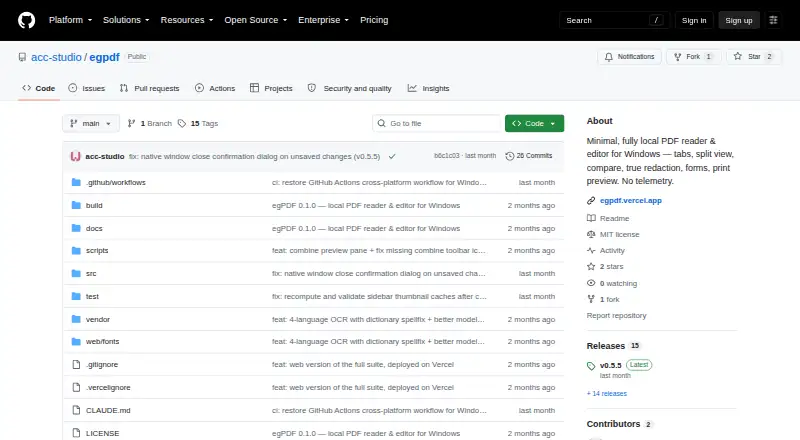
The facts below are what the maker publishes about egPDF, checked and dated. Our editors have not written about it yet.
The facts
Each one read from egPDF's own pages, with the date it was checked.
What it does
- Annotation tools
- Yeschecked 20 Sep 2026
- Downloads
- The project lists a Windows installer, macOS DMG, and Linux AppImage on its releases page.checked 11 Oct 2026
- Editing
- Editing tools include redaction, whiteout, highlighting, text and image insertion, comments, and fillable form fields.checked 12 Oct 2026
- Integrations
- The project describes release checks and updates through GitHub and browser deployment through Vercel; it lists no other integrations on the pages reviewed.checked 11 Oct 2026
- License
- The repository identifies the project as MIT-licensed.checked 12 Oct 2026
- Local processing
- The desktop app says it has no network access, accounts, or telemetry, and that files stay on the user’s machine.checked 12 Oct 2026
- Network behavior
- The desktop app checks GitHub for a newer release on launch; the README describes this as sending only a version check.checked 12 Oct 2026
- Network use
- The desktop app contacts GitHub to check for releases and download updates, and the project says the check sends only a version check.checked 11 Oct 2026
- OCR
- On-device OCR supports Turkish, English, German, and Arabic, and can add a searchable text layer to scanned pages.checked 12 Oct 2026
- PDF operations
- Users can combine documents, extract pages, reorder or rotate pages, and undo page changes.checked 12 Oct 2026
- Printing
- The desktop app provides a print screen with settings and a live preview; the browser version uses the browser's print dialog.checked 11 Oct 2026
- Privacy
- The project says documents stay on the user's machine and that the app has no accounts or telemetry.checked 11 Oct 2026
- Product
- egPDF is a minimal, fully local PDF reader and editor.checked 12 Oct 2026
- Redaction
- The README says saved redactions burn a rendered image into the page so the underlying text is removed from the file.checked 12 Oct 2026
- Text editing
- Yeschecked 20 Sep 2026
- Unsigned builds
- The README says the Windows installer is not code-signed and that macOS and Linux builds are also unsigned.checked 12 Oct 2026
- Unsigned installers
- The project says Windows, macOS, and Linux builds are unsigned and may require users to bypass operating-system warnings or settings.checked 11 Oct 2026
- Viewing
- Features include tabs, split view, word-by-word document comparison, page thumbnails, and text search.checked 12 Oct 2026
- Web printing
- In the browser version, printing uses the browser’s print dialog.checked 12 Oct 2026
Where it runs
- Browser implementation
- The browser version is described as a static site with no server component and uses browser file APIs to open documents.checked 11 Oct 2026
- Browser version
- A browser version provides the same viewer, editing tools, and OCR as the desktop app through a static site with no server component.checked 12 Oct 2026
- Desktop platforms
- The README offers downloads for Windows, macOS, and Linux.checked 12 Oct 2026
- Supported platforms
- web,windows,macos,linuxchecked 20 Sep 2026
Money
- Free plan
- Yeschecked 20 Sep 2026
Alternatives to egPDF
- 1

Smallpdf
Free planAndroidiOSWebWindows8.9From $10 a month - 2

LightPDF
Free planAndroidiOSWebAPI8.8From $15.99 a year - 3
PDF2Go
Free planAndroidiOSWebAPI8.7$6.42 usage-based - 4
Foxit PDF Editor
AndroidiOSWebmacOS8.6 - 5
WPS PDF Editor
Free planAndroidiOSWebExtension8.5From $3 a year - 6

PDF Candy
Free planAndroidiOSWebLinux8.5From $4 a year