EduEval
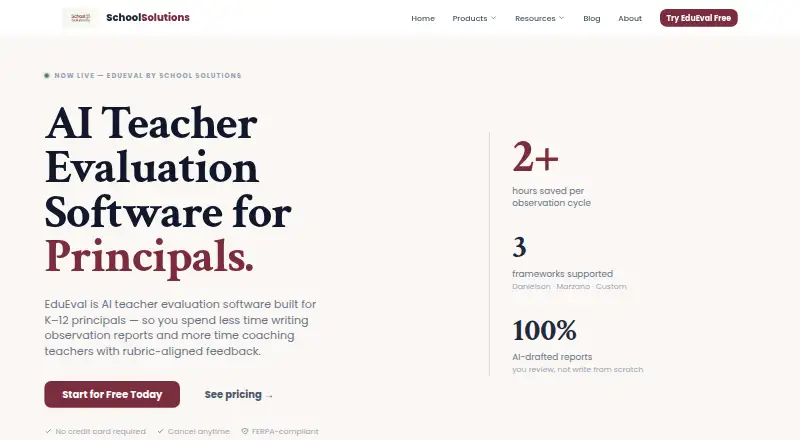
EduEval helps K–12 principals turn classroom observation notes into rubric-aligned teacher evaluation feedback.
What EduEval is
EduEval helps K–12 principals turn classroom observation notes into rubric-aligned teacher evaluation feedback. It supports Danielson, Marzano, and custom district rubrics, with configurable domains, indicators, and performance levels. Its AI workflow organizes notes, aligns them to a rubric, and drafts feedback for an evaluator to review and edit before release. Administrators can record observations on a tablet or smartphone, with automatic syncing to the desktop dashboard. Reports can be emailed with PDF attachments, and threaded comments support coaching conversations. The product is described for informal walkthroughs and formal summative evaluations. The free plan allows one administrator, one staff member, and five observations per month. Individual costs $290 a year and supports one administrator and up to 15 staff; School and Large School add school-wide analytics and audit logs. The maker says records are encrypted, access is role-limited and audit-logged, and data is not sold. Observation notes are sent to the AI provider to draft feedback, so the maker advises leaving student names out.
Good
- Supports Danielson, Marzano, and custom rubrics
- Syncs mobile observation notes to a desktop dashboard
- Shares reports by email with PDF attachments
- School and Large School include analytics and audit logs
Watch out
- Free plan allows five observations per month
- Free plan is limited to one administrator and one staff member
- Observation notes are sent to the AI provider
Who it suits
EduEval suits K–12 principals and administrators conducting informal walkthroughs or formal summative evaluations. It may also suit schools that want rubric-based feedback and coaching conversations.
Verdict
EduEval turns observation notes into editable, rubric-aligned draft feedback and supports mobile note-taking and report sharing. Its free plan is narrowly limited, and schools should keep student names out of notes sent for AI drafting.
Plans and prices
From EduEval's own pricing page, checked 15 Oct 2026.
| Plan | Price | What it gives you |
|---|---|---|
| Free | Free | 1 administrator · 1 staff member · 5 observations/month · standard rubrics · mobile access · free forever |
| Individual | $290 a year | 1 administrator · up to 15 staff · unlimited observations · 10 AI requests/day · AI insights · email sharing · $290/year; $29/month billed monthly |
| School | $790 a year | up to 10 administrators · up to 60 staff · unlimited observations · 30 AI requests/day · school-wide analytics · audit logs · $790/year; $79/month billed monthly |
| Large School | $1,990 a year | up to 25 administrators · up to 200 staff · unlimited observations · 100 AI requests/day · school-wide analytics · audit logs · $1,990/year; $199/month billed monthly |
The facts
Each one read from EduEval's own pages, with the date it was checked.
Where it runs
- AI fairness approach
- The vendor says the AI focuses on observable behavior and avoids emotional or adjective-heavy language.checked 15 Oct 2026
- GetApp feature listing
- GetApp lists multi-channel distribution, reporting/analytics and survey-builder capabilities for EduEval.checked 15 Oct 2026
- GetApp support
- GetApp lists email/help desk and FAQs/forum support, with documentation, live-online and video training.checked 15 Oct 2026
- Limit: GetApp review evidence
- GetApp shows zero reviews and a zero ease-of-use rating.checked 15 Oct 2026
What it does
- AI synthesis
- AI organizes raw notes, aligns them to the selected rubric and drafts feedback for evaluator review.checked 15 Oct 2026
- AI workflow
- EduEval organizes observation notes, aligns them to a rubric, and drafts feedback for the evaluator to review and edit before release.checked 7 Oct 2026
- Analytics
- Automated dashboards surface instructional trends across a school.checked 15 Oct 2026
- Annual discount
- Annual billing is presented as ten times the monthly rate, making two months free.checked 15 Oct 2026
- Capterra deployment
- Capterra lists web, Android and iPhone/iPad deployment options.checked 15 Oct 2026
- Capterra support
- Capterra lists email/help desk, FAQs/forum, knowledge base, phone, live chat and documentation-oriented training options.checked 15 Oct 2026
- Custom rubric builder
- Administrators can create rubrics with domains, indicators and performance levels.checked 15 Oct 2026
- Data handling
- The maker says observation notes are sent to its AI provider to draft feedback and advises users to leave student names out of notes.checked 7 Oct 2026
- Data use
- School Solutions says it does not sell evaluation data or train public models on evaluations.checked 15 Oct 2026
- Developer documentation
- The official product and pricing pages describe browser and mobile use but state no public API, SDK, self-hosting option or open-source licence.checked 15 Oct 2026
- Email sharing
- Reports can be emailed with PDF attachments and discussed through threaded comments.checked 15 Oct 2026
- Evidence tracking
- Observed instructional behaviors can be mapped directly to rubric indicators.checked 15 Oct 2026
- FERPA controls
- The FERPA statement describes role-based access, SSL/TLS transmission encryption, AES-256 storage encryption, audits, multifactor options and backups.checked 15 Oct 2026
- Founder
- Mike Giroux is identified as School Solutions’ founder and a practicing K–12 administrator.checked 15 Oct 2026
- Independent founder profile
- LinkedIn identifies Michael Giroux in Warwick, Rhode Island and links schoolsolutions.app as his company website.checked 15 Oct 2026
- Integrations
- The opened maker pages describe email sharing and PDF attachments but do not name external software integrations.checked 7 Oct 2026
- Limit: Capterra review evidence
- Capterra reports no user reviews and shows no review sentiment data for EduEval.checked 15 Oct 2026
The company
- Data ownership
- The FERPA statement says schools and districts retain ownership and control of records entered into the platform.checked 15 Oct 2026
- G2 company listing
- G2 lists School Solutions as the seller, with headquarters shown as N/A and one LinkedIn employee.checked 15 Oct 2026
- Headquarters
- Rhode Islandchecked 28 Sep 2026
The full review of EduEval
EduEval is a K–12 teacher-evaluation tool for principals and school administrators. It is best suited to teams that want rubric-based feedback, mobile note-taking, and a path from walkthroughs to formal evaluations. Its strengths are a flexible rubric workflow and evaluator-reviewed AI drafts; its free plan is too limited for regular school-wide use.
Overview
EduEval connects classroom observation notes to feedback organized around Danielson, Marzano, or a district’s own rubric. Evaluators can adjust rubric domains, indicators, and performance levels, then review and edit AI-drafted feedback before release. That makes it a focused choice for schools seeking consistency across evaluations while keeping the final judgment with the evaluator.
The workflow covers informal walkthroughs and formal summative evaluations. Notes can be taken on a tablet or smartphone and sync automatically to the desktop dashboard. Reports can be emailed as PDF attachments, while threaded comments support coaching conversations after an observation. Those pieces make EduEval useful across the observation and follow-up cycle, though the described sharing options center on email and PDFs.
Key features
Rubrics and feedback
Support for Danielson and Marzano provides established frameworks, while configurable district rubrics let schools use their own domains, indicators, and performance levels. The AI workflow organizes notes, maps them to the selected rubric, and proposes feedback for review. This can make drafting more structured, but it does not remove the evaluator’s responsibility to check and edit the result.
Mobile observations and follow-up
Administrators can capture notes on a smartphone or tablet and continue on the desktop dashboard after automatic syncing. Email reports with PDF attachments and threaded comments give evaluators a way to share findings and continue coaching discussions. Paid School and Large School plans add school-wide analytics and audit logs, which are more relevant to teams coordinating evaluations across a building than to an individual evaluator.
Privacy and security
The maker says records are encrypted in transit and at rest, access is role-limited and audit-logged, and data is not sold. Its stated safeguards include SSL/TLS transmission encryption, AES-256 encryption at rest, security audits and penetration testing, optional multi-factor authentication, and backup and disaster recovery procedures. The maker also says schools retain ownership and control of records and that evaluations are not used to train public models.
Observation notes are sent to the AI provider to draft feedback, so schools should leave student names out of those notes. That is a meaningful workflow consideration for administrators handling sensitive classroom information, even with the stated privacy controls.
Pricing
EduEval has a free plan and paid plans starting at $290/year. There is no free trial. Annual and monthly billing are offered on paid plans, with the monthly rate costing more over a full year.
| Plan | Price and limits | Best fit |
|---|---|---|
| Free | $0.00 USD, free forever; 1 administrator, 1 staff member, 5 observations per month, standard rubrics, and mobile access. | A single administrator evaluating one staff member occasionally. The five-observation monthly cap makes it a poor fit for routine school-wide use. |
| Individual | $290/year or $29/month billed monthly; 1 administrator, up to 15 staff, unlimited observations, 10 AI requests per day, AI-powered insights, and email sharing. | A principal or evaluator responsible for a small team who needs regular observations. It lifts the observation cap but limits AI analysis to 10 requests daily. |
| School | $790/year or $79/month billed monthly; up to 10 administrators, 60 staff, unlimited observations, 30 AI requests per day, school-wide analytics, and audit logs. | A school sharing evaluation work across administrators and needing school-wide reporting and audit logs. |
| Large School | $1,990/year or $199/month billed monthly; up to 25 administrators, 200 staff, unlimited observations, 100 AI requests per day, school-wide analytics, and audit logs. | A larger school that needs the higher staff and administrator capacity and larger daily AI allowance. |
Individual gives up the multi-administrator capacity, school-wide analytics, and audit logs included with School and Large School. The higher tiers raise seat and daily AI limits while keeping observations unlimited; the right choice depends on how many people will evaluate and how often they need AI drafting.
Platforms
EduEval is available on Android, iOS, and the web. Mobile note-taking syncs to the desktop dashboard, supporting administrators who observe in classrooms and complete their work later at a desk.
Who it's for
EduEval suits K–12 principals and school administrators who already use a defined teacher-evaluation rubric and want one workflow for walkthrough notes, formal evaluations, draft feedback, and coaching follow-up. Individual is aimed at one evaluator serving up to 15 staff; School and Large School suit teams that need multiple administrator accounts, broader staff capacity, analytics, and audit logs.
It is less suitable for schools that cannot send observation notes to an AI provider, even with student names removed, or for buyers who need a larger free allowance. The maker offers onboarding support and a 15-minute walkthrough by contacting [email protected].
Pros and cons
Pros
- Danielson, Marzano, and configurable district rubrics support schools that need feedback tied to their evaluation framework.
- AI drafts remain editable before release, preserving an evaluator review step in the feedback process.
- Mobile note-taking syncs to the desktop dashboard, and email PDFs plus threaded comments support reporting and coaching follow-up.
- School and Large School include analytics and audit logs for teams coordinating evaluations.
Cons
- The free plan allows only one administrator, one staff member, and five observations per month, limiting its usefulness for sustained evaluation work.
- Notes go to an AI provider for drafting, so schools need to keep student names out and assess whether that workflow fits their privacy requirements.
- AI requests are capped daily on paid plans, from 10 on Individual to 100 on Large School.
- The described sharing workflow uses email and PDF attachments; schools seeking named external software integrations may find the workflow restrictive.
Alternatives
Education Walkthrough is worth considering for a smaller walkthrough program: its free Basic plan allows one school, five teachers, and 10 walkthroughs per month, with no analytics or collaboration, and it also offers a free trial.
Observation Partner is a web-based alternative with a free plan that provides 1,250 lifetime starter AI credits, a personal observation workspace, evidence capture, drafts, export, and progress tracking; choose it if that individual workspace and credit-based starting allowance suit your workflow.
Observation Copilot is another web-based option with a free Individuals plan for unlimited teachers, formal observations, and walkthroughs.
Zyqual may fit an individual teacher seeking a free web account with observation forms, lesson-plan creation, student IEP management, progress tracking, and a teaching strategy library.
eCOVE Observation Software is an alternative for organizations that need Android, iOS, macOS, web, and Windows support; its Advanced Editions are $99.00 per year per user/observer.
Teach Primary is a free tool and complementary resource toolkit for readers considering that option.
Classroom Mosaic is a paid alternative with a free trial and apps for Android, iOS, macOS, web, and Windows.
PowerSchool Behavior Support has custom pricing; contact PowerSchool for a demo.
Compare more options in Teacher Evaluation Software.
Verdict
EduEval is a strong fit for K–12 administrators who want configurable rubric-based evaluations, mobile observation notes, and AI-assisted drafts that remain subject to human review. Its paid plans make the most sense when the school needs more than the free plan’s five monthly observations or needs multiple evaluators and school-wide oversight. Look elsewhere if the AI note-sharing workflow does not meet your privacy requirements or if you need a more generous free tier.
Getting started
- Open the EduEval website.
- Choose the Free plan or a paid plan.
- Use EduEval on Android, iOS, or the web.
- Record observation notes on a tablet or smartphone, or use the desktop dashboard.
- Select a supported rubric and review and edit drafted feedback before release.
Limits worth knowing
The free plan is limited to one administrator, one staff member, and five observations per month. Individual allows 10 AI analysis requests per day; School allows 30, and Large School allows 100.
Questions
How much does EduEval cost?
The Free plan costs nothing. Individual is $290 a year, or $29/month billed monthly; School is $790 a year, or $79/month billed monthly; Large School is $1,990 a year, or $199/month billed monthly.
What does the free plan include?
It includes one administrator, one staff member, five observations per month, standard rubrics, and mobile access.
Which platforms does EduEval support?
EduEval is available on Android, iOS, and the web.
Can schools use custom rubrics?
Yes. EduEval supports Danielson, Marzano, and custom district rubrics, with customizable domains, indicators, and performance levels.
What happens to observation notes used for AI feedback?
The maker says notes are sent to its AI provider to draft feedback and advises leaving student names out. It says it does not train public models on evaluations, schools retain ownership and control of their records, and data is not sold.
Does EduEval connect to other software?
The maker describes email sharing and PDF attachments; no external software integrations are named.
Alternatives to EduEval
- 1

Classroom Mosaic
AndroidiOSWebmacOS7.6From $40 a month - 2
Education Walkthrough
Free planAndroidiOSWeb7.3From $200 a year - 3

EvalScribe
iOSmacOS7.1From $80 a year - 4
eCOVE Observation Software
AndroidiOSWebmacOS6.9From $99 a year - 5
Frontline Employee Evaluation Management
AndroidiOSWebAPI6.7 - 6
Observation Partner
Free planWeb6.7From $89.99 a year