Easy Data Transform
Easy Data Transform is desktop software for cleaning, merging, filtering, deduplicating, analyzing, and reshaping data without coding.
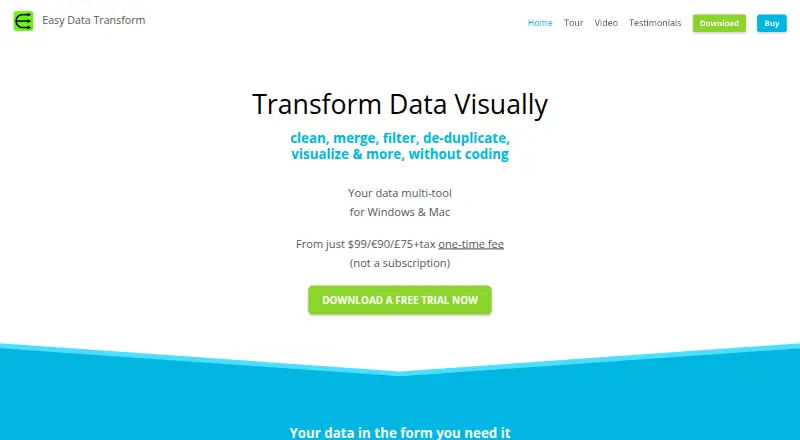
What Easy Data Transform is
Easy Data Transform is desktop software for cleaning, merging, filtering, deduplicating, analyzing, and reshaping data without coding. Its drag-and-drop workflow builds transformations step by step and shows results as you work. It runs on Windows and macOS. Inputs include Excel, CSV and TSV, fixed-width text, JSON, plain text, XML, and vCard; outputs also include HTML, Markdown, and YAML. There are 74 built-in transforms, with JavaScript scripting and regular expressions available. Batch processing and command-line arguments can apply a transform to multiple files or folders in one operation. The Core Edition costs $999,075, paid once for one named user on up to three computers, with unlimited transform files, inputs, transforms, and outputs; it does not include charts. Visualizations are available in the Advanced Edition. The fully functional trial lasts seven days of use, which need not be consecutive, but saving and exporting require a license once it ends. Transform data is stored locally, and the maker says it does not leave the computer unless you choose otherwise.
Good
- Drag-and-drop workflow shows results as you build transforms.
- Supports a range of spreadsheet and text formats.
- Includes 74 built-in transforms.
- Batch processing can handle multiple files or folders.
- Transform data is stored locally.
Watch out
- No free plan.
- Core Edition has no charts.
- Saving and exporting require a license after the trial.
- One named user license covers up to three computers.
Who it suits
Easy Data Transform suits Windows or Mac users who need to clean or reshape data through a visual workflow rather than coding. It may fit people handling multiple files or folders, though the Core Edition has no charts.
Verdict
Easy Data Transform provides a visual, local workflow for common data-cleaning and reshaping tasks, with batch and command-line options. Check the Core Edition’s chart limitation, named-user license, and trial terms before buying.
Plans and prices
From Easy Data Transform's own pricing page, checked 5 Oct 2026.
| Plan | Price | What it gives you |
|---|---|---|
| Core Edition | — | 1 named user · up to 3 PC or Mac computers · unlimited transform files, inputs, transforms and outputs · no charts · One-time fee; not a subscription. |
The facts
Each one read from Easy Data Transform's own pages, with the date it was checked.
What it does
- Audience
- The maker describes the software as intended to make it easy, quick and affordable to wrangle business data, and says it grew from the founders’ own data-cleaning needs.checked 5 Oct 2026
- Batch and command line
- Batch processing and command-line arguments can apply a transform to multiple files or folders in one operation.checked 5 Oct 2026
- Charts
- Data visualizations are available in the Advanced Edition; the Core Edition has no charts.checked 5 Oct 2026
- Inputs
- Supported inputs include Excel, delimited text such as CSV and TSV, fixed-width text, JSON, plain text, XML and vCard.checked 5 Oct 2026
- Integrations and sharing
- The maker describes exporting data to formats such as CSV, Markdown and HTML for use or sharing with other tools; it also mentions storing transform files in Dropbox or a similar folder.checked 5 Oct 2026
- Local data and privacy
- Transform data is stored locally and is not sent to the maker; the maker says the software data never leaves the computer unless the user chooses otherwise.checked 5 Oct 2026
- Notable limits
- A standard license is for one named, non-transferable user and can be used on up to three PC or Mac computers; additional users need separate licenses.checked 5 Oct 2026
- Outputs
- Supported outputs include Excel, delimited text such as CSV and TSV, JSON, XML, vCard, HTML, plain text, Markdown and YAML.checked 5 Oct 2026
- Purpose
- Easy Data Transform is desktop software for visually cleaning, merging, filtering, deduplicating, analyzing and reshaping data without coding.checked 5 Oct 2026
- Security
- The maker says it does not sell customer information, and its payment processor is PCI DSS Level 1 certified and does not share financial details with the maker.checked 5 Oct 2026
- Support
- The maker offers email and forum technical support, documentation, and a 60-day money-back guarantee.checked 5 Oct 2026
- Transforms
- The product provides 74 built-in transforms, with JavaScript scripting and regular expressions also available.checked 5 Oct 2026
- Workflow
- Users build transformations step by step with drag and drop and can see results immediately.checked 5 Oct 2026
The company
- Founded
- 2019checked 28 Sep 2026
- Headquarters
- United Kingdomchecked 28 Sep 2026
Money
- Trial
- The fully functional trial lasts 7 days of use, which need not be consecutive; after it ends, saving and exporting require a license.checked 5 Oct 2026
Alternatives to Easy Data Transform
- 1
Microsoft Planner
Free planAndroidiOSWebAPI7.9Free plan - 2
EasyMorph
Free planWebAPISelf-hostedWindows7.7From $600 a year - 3
DataCleaner
Free planOpen sourceAPILinuxmacOSSelf-hosted7.4Free plan - 4

AWS Glue DataBrew
WebAPI7.2 - 5
Microsoft Project
Free planWebAPIWindows7.2Free plan - 6
qsv
Free planWebLinuxmacOSWindows6.9From $99.99 a month