
Duplicati
Duplicati is backup software for Windows, macOS, and Linux, covering computers and servers.
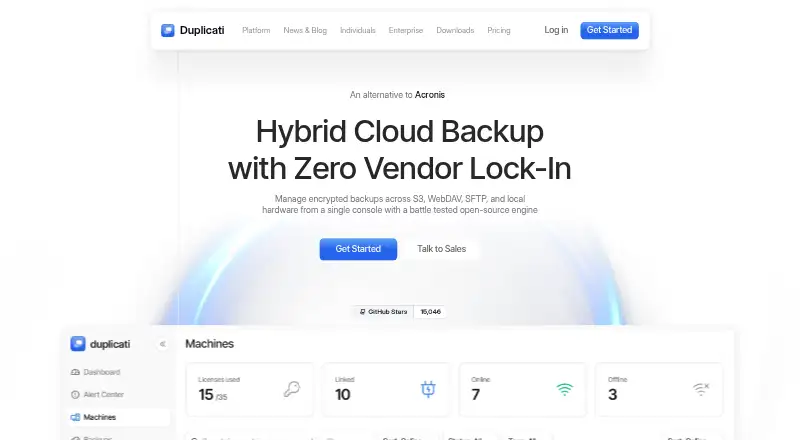
What Duplicati is
Duplicati is backup software for Windows, macOS, and Linux, covering computers and servers. It can protect desktops, laptops, local servers, NAS devices, Microsoft 365, Google Workspace, and S3 buckets. Destinations include S3, WebDAV, SFTP, and local hardware, and cloud data can be copied to an on-prem SAN or private S3 cluster. Data is encrypted locally with AES-256 before transfer, and only changed blocks are sent. Retention rules can remove older backups or keep a chosen number. Administrators can create configurations for multiple clients, delegate management to regional staff, and separate clients into sub-organizations. A subscription supports unlimited clients and endpoints. The free plan includes an insights dashboard and monitoring for up to two machines, with access to the last 200 backups. Pro adds alerts, AI analysis, remote management, retention, storage, and priority support. Enterprise adds organization management, SSO with MFA, agent deployment, and credential management.
Good
- Encrypts backups locally with AES-256.
- Sends only changed blocks.
- Supports S3, WebDAV, SFTP, and local hardware.
- Unlimited clients and endpoints per subscription.
- Free plan monitors up to 2 machines.
Watch out
- Free plan covers only 2 machines and 200 backups.
- Enterprise requires at least 10 machines.
- Enterprise requires a yearly contract.
Who it suits
Duplicati suits individuals and organizations that need computer or server backups across varied storage destinations. Teams managing multiple clients may value its shared configurations and delegated administration.
Verdict
Duplicati combines broad backup coverage with encryption, retention controls, and multi-client administration. Check the free-plan limits and Enterprise minimum before choosing a plan.
Plans and prices
From Duplicati's own pricing page, checked 27 Sep 2026.
| Plan | Price | What it gives you |
|---|---|---|
| Free | Free | Always free; monitor up to 2 machines and view the last 200 backups · 2 machines · 200 backups · Always free |
| Pro | $2 a month | Fits companies and individuals; up to 100 machines · Up to 100 machines · 3 year monitoring retention · 100 GB storage per machine · Annual billing |
| Enterprise | $3 a month | Minimum 10 machines; yearly contract; contact sales · Minimum 10 machines · contract billed yearly |
| Additional storage | $0.60 a month | Per additional 100 GB using Duplicati integrated storage · 100 GB · Billed yearly |
| Microsoft 365 backup | $0.50 a month | Per Office 365 user; enables backup of a Microsoft 365 tenant · Mailbox backup · OneDrive backup · SharePoint backup · Teams chat and files backup · Restore locally or to tenant · Billed yearly |
| Google Workspace backup | $0.50 a month | Per workspace user; enables backup of a Google Workspace account · Gmail backup · Google Drive backup · Contacts backup · Calendar backup · Restore locally or to tenant · Billed yearly |
The facts
Each one read from Duplicati's own pages, with the date it was checked.
What it does
- Backup destinations
- Back up to S3, WebDAV, SFTP, and local hardware from one console.checked 27 Sep 2026
- Backup retention
- Retention can delete older backups or keep a specific number of backups.checked 27 Sep 2026
- Backup scope
- mixedchecked 20 Sep 2026
- Centralized policies
- Create backup configurations once and push them to multiple clients instantly.checked 27 Sep 2026
- Changed blocks
- Transmits only changed blocks to reduce network congestion and cloud egress costs.checked 27 Sep 2026
- Client capacity
- Unlimited clients and endpoints are supported under one subscription.checked 27 Sep 2026
- Community size
- The pricing page says more than 50,000 users trust Duplicati with their backups.checked 27 Sep 2026
- Computer backup
- Yeschecked 20 Sep 2026
- Encryption
- Encrypts data locally with AES-256 before it reaches the network or cloud.checked 27 Sep 2026
- Enterprise features
- Enterprise adds organization management, configuration assistance, SSO with MFA, agent deployment, and credential management.checked 27 Sep 2026
- Local archives
- Cloud data can be backed up to an on-prem SAN or private S3 cluster.checked 27 Sep 2026
- Local network backup
- Backs up local machines to network-attached storage via SFTP or SMB.checked 27 Sep 2026
- Multi-site administration
- Global admins can delegate local backup management to regional IT staff.checked 27 Sep 2026
- Paid from
- 2checked 20 Sep 2026
- Pro features
- Pro adds alerts, AI analysis, remote management, retention, storage, and priority support.checked 27 Sep 2026
- Ransomware protection
- Yeschecked 20 Sep 2026
- Restore modes
- mixedchecked 20 Sep 2026
- Server backup
- Yeschecked 20 Sep 2026
- Source systems
- Supports local servers, NAS devices, desktops, laptops, Microsoft 365, Google Workspace, and S3 buckets.checked 27 Sep 2026
- Storage model
- Bring your own storage with no added storage fees or bandwidth limits.checked 27 Sep 2026
- Sub-organizations
- Clients can be isolated in dedicated sub-organizations under one subscription.checked 27 Sep 2026
The company
- Company identity
- The page identifies the company as Duplicati Inc.checked 27 Sep 2026
Money
- Free plan
- Yeschecked 20 Sep 2026
- Free plan limits
- The free plan includes an insights dashboard, monitoring for up to 2 machines, and the last 200 backups.checked 27 Sep 2026
The full review of Duplicati
Duplicati is a backup platform for computers, servers, cloud services, and storage you provide. It is best suited to teams managing varied systems from one console. Its breadth and unlimited endpoint capacity are compelling, but the free tier is tightly capped and paid plans carry annual terms and storage limits.
Overview
Duplicati brings backup configuration and administration together for local machines, servers, NAS devices, Microsoft 365, Google Workspace, and S3 buckets. Destinations include S3, WebDAV, SFTP, and local hardware, so it can serve mixed environments without requiring a single storage provider. The trade-off is that customers generally bring their own storage; the service adds no storage fees or bandwidth limits for that model, but storage itself remains your responsibility.
Data is encrypted locally with AES-256 before it reaches a network or cloud destination. Changed-block transfers reduce the amount sent after the initial backup, helping limit network congestion and cloud egress costs. Retention rules can remove older backups or keep a chosen number, useful for controlling backup history rather than allowing it to grow unchecked.
Key features
- Broad coverage: Back up desktops, laptops, local servers, NAS devices, Microsoft 365, Google Workspace, and S3 buckets. Cloud data can also be copied to an on-premises SAN or private S3 cluster, a useful option for organizations that want a local archive.
- Local network backups: Machines can back up to network-attached storage over SFTP or SMB, giving offices another destination beyond cloud storage.
- Central administration: Create configurations once and push them to multiple clients. Global administrators can delegate local backup management to regional IT staff, while sub-organizations keep clients separated under one subscription. That combination is well suited to distributed teams and service providers managing multiple groups.
- Security and retention: Local AES-256 encryption protects data before transmission, while configurable retention governs how many older backups remain. Duplicati also identifies ransomware protection as a capability.
- Changed-block transfers: Sending only modified blocks after a backup can reduce repeated traffic and cloud egress, particularly across larger or frequently updated datasets.
Pricing
Duplicati has a free plan and paid plans billed annually. The free plan costs nothing and is always free, but its dashboard monitors only 2 machines and shows the last 200 backups. It is a reasonable way to oversee a very small setup, not a substitute for broader fleet monitoring.
Pro costs $2 a month with annual billing and supports up to 100 machines. It includes 3-year monitoring retention and 100 GB of storage per machine, as well as alerts, AI analysis, remote management, retention, storage, and priority support. This is the practical fit for individuals or companies that need more than the free monitoring caps; teams should still account for the included storage allowance per machine.
Enterprise costs $3 a month, is billed yearly, requires a minimum of 10 machines, and uses a yearly contract. It adds organization management, configuration assistance, SSO with MFA, agent deployment, and credential management. Those administrative and identity controls suit larger or more structured deployments, but the minimum and contract make it a poor fit for a small team; contact sales is required.
Additional storage costs $0.60 a month, billed yearly, per additional 100 GB using Duplicati integrated storage. Microsoft 365 backup costs $0.50 a month, billed yearly, per Office 365 user, and covers mailbox, OneDrive, SharePoint, and Teams chat and files, with restore locally or to the tenant. Google Workspace backup also costs $0.50 a month, billed yearly, per workspace user, covering Gmail, Drive, contacts, and calendar, with restore locally or to the tenant. These per-user add-ons matter for organizations protecting hosted productivity accounts rather than just machines.
Platforms
Duplicati supports Windows, macOS, and Linux. That desktop and server coverage is broad, though readers looking specifically for a mobile client should consider another option.
Who it's for
Duplicati is strongest for organizations that need to coordinate backups across different operating systems, cloud services, NAS devices, and storage destinations. Centralized policies, delegated administration, sub-organizations, and unlimited clients and endpoints under one subscription make it especially relevant to distributed IT teams. Individuals can use Pro, but the annual billing and emphasis on machine administration may be more than a simple personal backup need requires.
Pros and cons
- Pros: Broad source and destination support lets one console cover local systems, cloud services, and storage you control.
- Pros: Local AES-256 encryption and changed-block transfers address data protection and transfer efficiency before data reaches its destination.
- Pros: Centralized configuration, delegation, and sub-organizations support multi-site management, while endpoint capacity is unlimited under one subscription.
- Cons: The free plan monitors just 2 machines and retains visibility of only the last 200 backups, limiting its usefulness for larger setups.
- Cons: Pro's included storage is 100 GB per machine, and extra integrated storage is a separate annual-billed charge.
- Cons: Enterprise requires at least 10 machines and a yearly contract, making it a substantial commitment for smaller organizations.
Alternatives
IDrive is worth considering if mobile coverage matters: it supports Android and iOS as well as desktop and web platforms, and its IDrive Mini plan costs $0.25 a month for 100 GB and one user.
MSP360 Backup is a relevant alternative for a personal workstation backup: its free plan includes file- and image-based backup with forum-based support.
VM Backup may be the better match for a small virtual-machine setup, with a free edition covering 2 VMs per host and a 30-day fully featured trial.
Vinchin Backup & Recovery offers a permanent free edition for protecting up to 3 virtual machines, a focused option for that scale of VM use.
Bareos is an alternative for readers seeking an open-source community edition with public repository access and complete source code.
AOMEI Backupper has a perpetually free Windows PC backup plan, so it may suit a Windows-only user seeking a basic desktop alternative.
SEP sesam may suit a small environment that fits its Community Edition limits: up to 5 backup clients, a 3 TB storage pool, and 1 TB of Si3 deduplication.
Veeam Agent for Microsoft Windows is a Windows-focused alternative whose free plan supports one backup job targeting a local drive, network shared folder, or Veeam backup.
Browse more options in Backup software, NAS Backup Software, and Cloud Backup Services.
Verdict
Choose Duplicati if you need one system to coordinate encrypted backups across varied sources and destinations, especially across multiple teams or sites. Its unlimited endpoint support, retention controls, and administrative tools give it meaningful reach. Look elsewhere if two-machine free monitoring is insufficient but an annual subscription, storage allowances, or Enterprise's 10-machine minimum do not fit your needs.
Getting started
- Visit https://duplicati.com/.
- Choose the free plan or review Pro and Enterprise plans.
- Use the free plan to monitor up to two machines, or choose Pro for up to 100 machines.
- Select backup sources and destinations such as S3, WebDAV, SFTP, or local hardware.
- For Enterprise, contact sales; the plan has a 10-machine minimum and yearly contract.
Limits worth knowing
The always-free plan monitors up to two machines and provides the last 200 backups. Pro supports up to 100 machines, with three-year monitoring retention and 100 GB storage per machine. Enterprise requires a minimum of 10 machines and a yearly contract.
Questions
Is Duplicati free?
Yes. Its free plan is always free and includes an insights dashboard, monitoring for up to two machines, and the last 200 backups.
How much do the paid plans cost?
Pro is $2 per month with annual billing. Enterprise is $3 per month, billed yearly, and requires at least 10 machines and a yearly contract.
Which platforms does Duplicati support?
Duplicati supports Windows, macOS, and Linux.
Where can backups be stored?
Destinations include S3, WebDAV, SFTP, and local hardware. Cloud data can also be backed up to an on-premises SAN or private S3 cluster.
What does Pro add?
Pro adds alerts, AI analysis, remote management, retention, storage, and priority support.
What does Enterprise add?
Enterprise adds organization management, configuration assistance, SSO with MFA, agent deployment, and credential management.
Alternatives to Duplicati
- 1
UrBackup
Free planOpen sourceAndroidWebAPILinux9.4Free plan - 2

IDrive
Free planAndroidiOSWebLinux9.2From $0.25 a month - 3

Bareos
Free planOpen sourceWebAPILinuxmacOS9.1From €480 a year - 4

MSP360 Backup
Free planAndroidiOSWebAPI9.0Free plan - 5

iCloud Backup
Free planAndroidiOSWebAPI8.6From $0.99 a month - 6

Backblaze Computer Backup
AndroidiOSWebmacOS8.5From $7.88 a month