Dual Camera Stop Motion Studio
Dual Camera Stop Motion Studio is a free, open-source browser application for stop-motion and multi-camera capture.
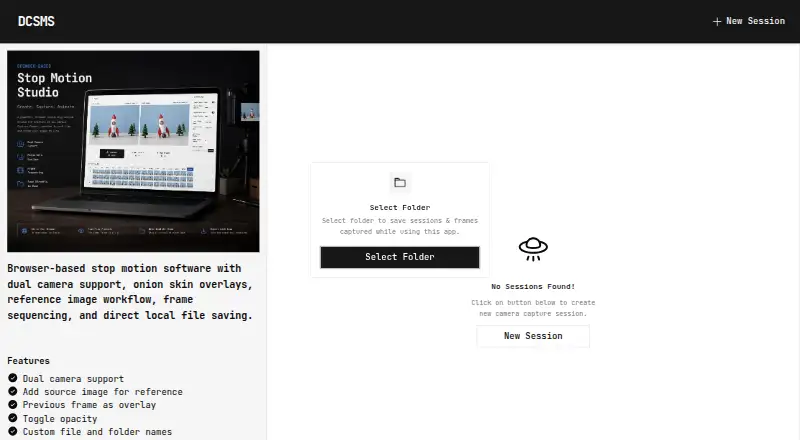
What Dual Camera Stop Motion Studio is
Dual Camera Stop Motion Studio is a free, open-source browser application for stop-motion and multi-camera capture. It connects two USB cameras and captures synchronized frames from both. Onion skinning places the previously captured frame over the live feed to help align the next shot, and imported reference images can appear beside the cameras while you compose. The capture screen includes thumbnail previews, frame history, capture verification, and a progress overview. Pressing Space captures a frame for hands-free shooting. Images are saved to folders you choose through the browser’s File System Access API, and the maker says they remain local rather than being uploaded. The app depends on webcam permissions, the MediaDevices API, and File System Access API support. Google Chrome and Microsoft Edge are recommended; Safari and Firefox have limited direct-folder support. Mobile and tablet screens are not supported. The maker describes uses including stop-motion, product and miniature photography, toy photography, stereoscopic imaging, and other frame-by-frame workflows. The project uses the MIT License.
Good
- Synchronized capture from two USB cameras
- Onion skinning for frame alignment
- Local folder saving
- Reference-image display beside live feeds
- Free and MIT-licensed
Watch out
- Mobile and tablet screens are unsupported
- Safari and Firefox have limited folder access
- Requires webcam permissions and browser APIs
Who it suits
It suits creators working with two USB cameras on desktop browsers for stop-motion or other frame-by-frame projects. It is useful when local saving, reference images, and onion-skin alignment matter.
Verdict
Dual Camera Stop Motion Studio provides focused two-camera capture with alignment aids and local file handling. Use a recommended desktop browser for the fullest folder-access support.
The facts
Each one read from Dual Camera Stop Motion Studio's own pages, with the date it was checked.
Where it runs
- Browser limits
- Google Chrome and Microsoft Edge are recommended; Safari and Firefox have limited support for direct folder access.checked 4 Oct 2026
- Browser requirements
- The app relies on the File System Access API, MediaDevices API, and webcam permissions; Chrome and Edge are recommended, while Safari and Firefox have limited direct folder access support.checked 11 Oct 2026
What it does
- Camera capture
- It captures synchronized frames from two USB cameras.checked 4 Oct 2026
- Dual-camera capture
- It supports connecting two USB cameras and capturing synchronized frames from both.checked 11 Oct 2026
- Intended users
- The maker lists stop motion, product and miniature photography, toy photography, stereoscopic imaging, and frame-by-frame production as use cases.checked 11 Oct 2026
- License
- The project is licensed under the MIT License.checked 11 Oct 2026
- Local saving
- Images are saved to user-selected folders using the browser File System Access API; the maker says there are no uploads or cloud storage.checked 11 Oct 2026
- Mobile support
- The app page states that mobile and tablet screens are not supported.checked 11 Oct 2026
- Onion skin
- It overlays the previously captured frame on the live camera feed to help align frames.checked 11 Oct 2026
- Privacy
- The maker says images are not uploaded and everything remains local.checked 4 Oct 2026
- Product
- Dual Camera Stop Motion Studio is a browser-based stop-motion and multi-camera capture application.checked 4 Oct 2026
- Reference images
- Users can import reference images and display them alongside live camera feeds.checked 11 Oct 2026
- Shortcut
- Pressing Space captures a frame for hands-free operation.checked 11 Oct 2026
- Support
- The maker invites bug reports and feature requests through GitHub issues and asks reporters to include browser version, operating system, camera hardware, and reproduction steps.checked 11 Oct 2026
- Timeline
- The capture screen includes thumbnail previews, frame history, capture verification, and a progress overview.checked 4 Oct 2026
- Timeline preview
- The capture screen can show thumbnail previews, frame history, capture verification, and a progress overview.checked 11 Oct 2026
- What it does
- It is a browser-based stop motion and multi-camera capture app for capturing synchronized frames from two cameras.checked 11 Oct 2026
Alternatives to Dual Camera Stop Motion Studio
- 1

Stop Motion Studio
Free planAndroidiOSmacOSWindows8.0$5.99 one-time - 2
Cloud Stop Motion
Free planAndroidiOSWebLinux7.9From $4 a year - 3

Dragonframe
AndroidiOSAPILinux7.7$195 one-time - 4
AnyMotion
Free planiOSmacOS7.5Free plan - 5
Koma Koma
Free planiOSmacOSWindows6.9Free plan - 6
I Can Animate
AndroidiOSmacOSWindows6.7£29.95 one-time