drt
drt is a free reverse ETL tool that moves modeled warehouse data into team tools, with syncs defined in YAML and versioned in Git.
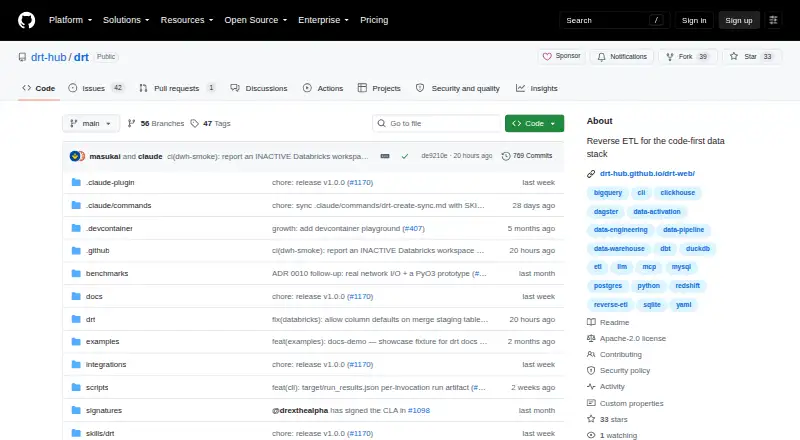
What drt is
drt is a free reverse ETL tool that moves modeled warehouse data into team tools, with syncs defined in YAML and versioned in Git. Users install drt-core with pip and run syncs from a terminal using `drt run`. A dry run with a diff previews rows that would be added, updated, or deleted before writing. The project lists 13 sources and 34 destinations, including BigQuery, Snowflake, Postgres, Slack, and Salesforce. It can read dbt projects and follow model lineage through `ref()` models. Listed orchestration integrations include Dagster, Prefect, Airflow, and a dbt manifest reader; a GitHub Action supports scheduled or event-triggered syncs. An optional MCP server lets compatible clients list and run syncs, validate configuration, and inspect status. Data travels directly from the user's warehouse to the destination rather than through a drt-hosted intermediary. The core is self-hosted, batch-based, and licensed under Apache 2.0. RBAC, audit logging, a plugin system, and managed cloud hosting are outside drt-core.
Good
- YAML syncs can be versioned in Git.
- Dry runs preview row changes before writing.
- Follows dbt model lineage through `ref()` models.
- Data goes directly from warehouse to destination.
- Includes orchestration integrations and a GitHub Action.
Watch out
- Syncs run in batches.
- Reverse sync is not supported.
- RBAC and audit logging are outside drt-core.
- Managed cloud hosting is outside drt-core.
Who it suits
drt suits teams that use dbt and Git and want to manage reverse ETL pipelines in their repository. It is designed for teams comfortable installing and running self-hosted software from the terminal.
Verdict
drt provides a repository-centered way to run batch reverse ETL, with preview and orchestration options. Teams needing RBAC, audit logging, plugins, or managed hosting should note that these are not part of drt-core.
Plans and prices
From drt's own pricing page, checked 8 Oct 2026.
| Plan | Price | What it gives you |
|---|---|---|
| drt-core | Free | All connectors · sync engine · CLI · MCP server · self-hosted |
The facts
Each one read from drt's own pages, with the date it was checked.
What it does
- AI integration
- An optional MCP server lets compatible clients list syncs, run syncs, validate configuration, and inspect status.checked 8 Oct 2026
- CI/CD
- The project provides a GitHub Action for scheduled or event-triggered syncs and documents structured status outputs.checked 8 Oct 2026
- Connectors
- The project lists 13 sources and 34 destinations, including BigQuery, Snowflake, Postgres, Slack, and Salesforce.checked 8 Oct 2026
- Data handling
- The README says data goes directly from the user's warehouse to the destination and never through a drt-hosted intermediary.checked 8 Oct 2026
- dbt lineage
- drt can read dbt projects and use `ref()` models so activation follows the model lineage.checked 8 Oct 2026
- Enterprise boundary
- The open-core document places RBAC, audit logging, plugin system, and managed cloud hosting outside drt-core.checked 8 Oct 2026
- Intended users
- The site describes drt as suited to teams that ship with dbt and Git and want reverse ETL pipelines managed in their repository.checked 8 Oct 2026
- License
- The project is licensed under Apache 2.0.checked 8 Oct 2026
- Orchestration
- The README lists integrations for Dagster, Prefect, Airflow, and a dbt manifest reader.checked 8 Oct 2026
- Preview
- `drt run --dry-run --diff` previews which rows will be added, updated, or deleted before writing.checked 8 Oct 2026
- Purpose
- drt moves modeled warehouse data into team tools as reverse ETL, with syncs defined in YAML and versioned in Git.checked 8 Oct 2026
- Security
- The security policy describes Dependabot, CodeQL, pip-audit, and CycloneDX SBOM generation for releases.checked 8 Oct 2026
- Support
- The security policy asks vulnerability reports to be emailed and says receipt is acknowledged within 48 hours, with critical fixes or mitigations within 7 days.checked 8 Oct 2026
- Telemetry
- Telemetry is off by default; when enabled, the project says it collects sync metadata and does not transmit sync names, SQL, destination URLs, credentials, or project paths.checked 8 Oct 2026
- Workflow
- Users install `drt-core` with pip and run syncs from the terminal using `drt run`.checked 8 Oct 2026
The full review of drt
Overview
drt moves modeled warehouse data into team tools through batch reverse ETL syncs defined in YAML and versioned in Git. It is best suited to teams that already build with dbt and manage data work in repositories. Its strongest case is a free, self-hosted workflow with a preview before writes; teams must provide the runtime and operations.
Install drt-core with pip, then run syncs from the terminal with drt run. The --dry-run --diff option previews rows that would be added, updated, or deleted, giving teams a chance to inspect changes before they reach a destination. Syncs are batch-based, and drt does not support reverse sync.
Key features
The project lists 13 sources and 34 destinations across warehouses, SaaS APIs, cloud storage, files, and webhooks. BigQuery, Snowflake, Postgres, Slack, and Salesforce are among the named connectors. This range suits common warehouse-to-tool activation pipelines, though a team should confirm its specific endpoints are covered before committing a workflow to drt.
drt can read dbt projects and use ref() models, so activation can follow model lineage. Its documented orchestration integrations include Dagster, Prefect, Airflow, and a dbt manifest reader. A GitHub Action supports scheduled or event-triggered syncs and provides structured status outputs, which gives repository-based teams ways to fit syncs into existing automation.
An optional MCP server allows compatible clients to list syncs, run them, validate configuration, and inspect status. That adds a route for AI-enabled tooling to work with sync operations, while remaining optional to the core terminal workflow.
Data moves directly from the user's warehouse to the destination rather than through a drt-hosted intermediary. Telemetry is off by default; if enabled, it collects sync metadata and excludes sync names, SQL, destination URLs, credentials, and project paths. The security policy describes Dependabot, CodeQL, pip-audit, and CycloneDX SBOM generation for releases. Vulnerability reports are accepted by email, with receipt acknowledged within 48 hours and critical fixes or mitigations targeted within 7 days.
Pricing
drt-core costs nothing. The plan includes all connectors, the sync engine, CLI, MCP server, and self-hosting, with the project licensed under Apache 2.0. There is no paid tier in drt-core to trade against quotas or seat limits; teams instead take on hosting and operational responsibility themselves.
The open-core boundary matters for organizations with governance or managed-service requirements: RBAC, audit logging, a plugin system, and managed cloud hosting sit outside drt-core. Teams that need those capabilities should budget for a different arrangement rather than assume the free core provides them.
Platforms
drt supports Linux, macOS, and Windows, and is self-hosted. That suits teams able to run their own batch jobs on those systems; it is not a managed service that removes deployment and upkeep from the team's workload.
Who it's for
drt fits data teams that ship with dbt and Git, want sync definitions reviewed and versioned alongside other project work, and can operate their own jobs. Its preview, lineage support, and orchestration integrations make it particularly practical when a team values repository control and already has a batch pipeline around its warehouse models.
It is a weaker fit for teams that need reverse synchronization, a hosted service, or enterprise controls such as RBAC and audit logging as part of the core product. Its batch cadence also rules it out when a workflow depends on a different sync pattern.
Pros and cons
- Pros: The free core includes all connectors and self-hosting, so teams can build without a connector-based plan restriction.
- Pros: A dry-run diff previews additions, updates, and deletions before writes, making changes easier to review.
- Pros: dbt lineage, orchestration integrations, and a GitHub Action support teams already managing pipelines in code.
- Cons: Batch-only syncs and no reverse sync limit the workflows it can serve.
- Cons: Self-hosting leaves deployment and operations with the team, and managed cloud hosting is outside drt-core.
- Cons: RBAC, audit logging, and plugins are outside the free core, which may make it unsuitable for teams that require those controls.
Alternatives
For a broader customer data platform with a free plan billed forever, 250K events per month, 16 SDK sources, and 200+ cloud destinations, consider RudderStack Customer Data Platform. It is a better direction when event collection and a wide destination network matter more than drt's Git-defined batch sync workflow.
Clay offers a free tier with 500 actions per month, 100 data credits per month, unlimited seats and tables, and up to 200 rows per table. It is worth considering when those enrichment and table limits better match the work than warehouse-to-tool batch activation.
Singular has a free plan billed per conversion, covering 15,000 paid conversions with no credit card required. Choose it when conversion-based pricing is a better fit for the workload.
DataChannel offers a free plan with 1 million rows per month, 2 data sources, 5 user accounts, 20 transformations, 20 data models, and 7-day ingestion log retention. Its stated row quota and account limits may suit teams comparing usage-capped plans.
Bitscale provides a lifetime free tier with 200 credits, 2,000 monthly company or people searches, 50,000 rows per grid, and 20 action columns per grid. Consider it when those search and grid allowances are more relevant to the job.
Fivetran Database Replication has a free plan with monthly active row allowances for connections, activations, and transformations; it is an alternative for readers comparing replication tools.
Hightouch offers a free plan with 2 active syncs per month, hourly sync frequency, and 100,000,000 operations per month. Its stated hourly cadence may suit teams that need a more frequent schedule than drt's batch syncs.
Omnata Sync is another alternative for readers evaluating sync software.
See the broader Reverse ETL Tools category for more options.
Verdict
Choose drt if your team works in dbt and Git, wants to keep reverse ETL definitions in its repository, and is prepared to run batch jobs itself. The free core, preview diff, lineage support, and automation integrations make that combination compelling. Look elsewhere if you need a hosted service, reverse sync, or built-in enterprise controls.
Getting started
- Open the drt GitHub project.
- Install `drt-core` with pip.
- Define syncs in YAML and version them in Git.
- Run syncs from the terminal with `drt run`.
- Use `drt run --dry-run --diff` to preview changes before writing.
Limits worth knowing
The free drt-core plan includes connectors, the sync engine, CLI, MCP server, and self-hosting. Managed cloud hosting, RBAC, audit logging, and the plugin system are outside drt-core.
Questions
How much does drt cost?
The drt-core plan is free.
What platforms does drt support?
Listed platforms are Linux, macOS, Windows, and self-hosted.
Is drt open source?
It is licensed under Apache 2.0.
How does drt run syncs?
Teams install `drt-core` with pip and run syncs from the terminal using `drt run`.
What destinations and sources are available?
The project lists 13 sources and 34 destinations, including BigQuery, Snowflake, Postgres, Slack, and Salesforce.
What capabilities are outside drt-core?
RBAC, audit logging, a plugin system, and managed cloud hosting are outside the core.
Alternatives to drt
- 1

RudderStack Customer Data Platform
Free planOpen sourceAndroidiOSWebAPI8.5From $265 a month - 2

Hightouch
Free planAndroidiOSWebAPI8.2From $350 a month - 3
Singular
Free planAndroidiOSWebAPI8.1$0.05 one-time - 4

Bitscale
Free planWebAPI7.4From $349 a month - 5

DataChannel
Free planWebAPI7.3From $99 a month - 6

Dataflowz
Free planWebAPISelf-hosted7.3From $49 a month